1. Introduzione
This manual provides detailed instructions for the installation, operation, maintenance, and troubleshooting of your Stiflix Single Din 10.1-inch CarPlay Touchscreen Car Stereo. Please read this manual thoroughly before using the product to ensure proper function and safety.
2. Contenuto della confezione
Verificare che tutti gli articoli siano presenti nel pacco:
- Single Din Android Radio Unit
- Cablaggio e cavi
- Cavo USB
- Antenna GPS
- Kit di montaggio
- Manuale dell'utente (questo documento)
3. Configurazione e installazione
The Stiflix 10.1-inch car stereo is designed for single DIN and most double DIN dash openings. Professional installation is recommended.
3.1 Controlli pre-installazione
- Ensure your vehicle's electrical system is compatible with the stereo's power requirements.
- Scollegare la batteria del veicolo prima di iniziare l'installazione.
- Identify the correct wiring for power, ground, speakers, and accessories in your vehicle.
3.2 Schema elettrico
Refer to the included wiring diagram for specific connections. Match the color-coded wires from the stereo's harness to your vehicle's wiring harness. Secure all connections properly.
3.3 Montaggio dell'unità
- Install the single DIN chassis into your vehicle's dash opening using the provided mounting kits.
- Attach the 10.1-inch display to the chassis. The display is detachable and can be adjusted for optimal viewing.
- Collegare l'antenna GPS e indirizzarla verso una posizione con una chiara view del cielo.
- Connect any optional accessories such as a backup camera or external amppiù vivace.

Image: The Stiflix 10.1-inch Single Din Car Stereo, showcasing its rotatable and adjustable screen. This image provides an overview of the product's design and key features.

Image: An illustration of the 10.1-inch Single Din Android Car Stereo with icons representing its features like CarPlay, Android Auto, Bluetooth, Mirrorlink, Voice Control, Offline Maps, WiFi Hotspot, Touchscreen, Backup Camera Input, and 2GB RAM + 64GB ROM.
4. Istruzioni per l'uso
4.1 Accensione/spegnimento e controlli di base
- Premere il pulsante di alimentazione per accendere o spegnere l'unità.
- Adjust volume using the dedicated controls or touchscreen interface.
- Navigate through menus and applications using the 10.1-inch capacitive IPS touchscreen.
CarPlay wireless 4.2 e Android Auto
Connect your smartphone wirelessly via Bluetooth and Wi-Fi to access CarPlay or Android Auto features. This allows for safe access to navigation, calls, messages, music, and voice commands while driving.

Image: The car stereo display showing the Wireless CarPlay and Android Auto interface with various app icons like Maps, Spotify, YouTube Music, and Phone, demonstrating voice command integration.

Image: A woman driving, interacting with the car stereo using Wireless Apple CarPlay and Siri voice commands for navigation and communication.

Image: A woman driving, interacting with the car stereo using Wireless Android Auto and Google Assistant voice commands for navigation and music playback.
4.3 High Definition IPS Display
The unit features a 1280*720 HD capacitive IPS touchscreen with a 178° full-viewing angle. This provides a clear display and responsive touch controls.

Image: A graphic highlighting the features of the 10.1-inch IPS display, including HD 1280x720 resolution, capacitive screen, touchable hot buttons, and 178-degree viewangolo di ing.
4.4 Adjustable and Rotatable Floating Screen
The 10.1-inch display is detachable and can be adjusted in three directions and rotated 360° to achieve comfortable viewing angles, whether horizontal or vertical.

Image: Demonstrates the 360-degree rotation and 30-degree tilt adjustments of the floating screen, allowing for flexible positioning in the vehicle.

Image: A visual representation of the rotatable floating touchscreen, illustrating its 360-degree rotation and 30-degree adjustment capabilities for optimal viewing.
4.5 Connettività Bluetooth
Built-in Bluetooth technology enables hands-free calling, phonebook access, and music streaming for safe and convenient driving.

Image: A graphic emphasizing seamless Bluetooth connectivity, featuring a Bluetooth 5.3 chip and icons for calls, music, and Wi-Fi.
Radio AM/FM 4.6
Tune into AM/FM radio with 30 station presets for news, music, and weather forecasts.

Image: A visual representation of FM AM Radio functionality, displaying frequency ranges (AM: 530-1710KHz, FM: 87.5-107.9MHz) with sound wave graphics.
4.7 Navigazione GPS e mappe offline
The unit includes built-in GPS engines and an antenna for stable satellite signals, providing real-time navigation. Offline maps can be downloaded for use in areas without internet access.
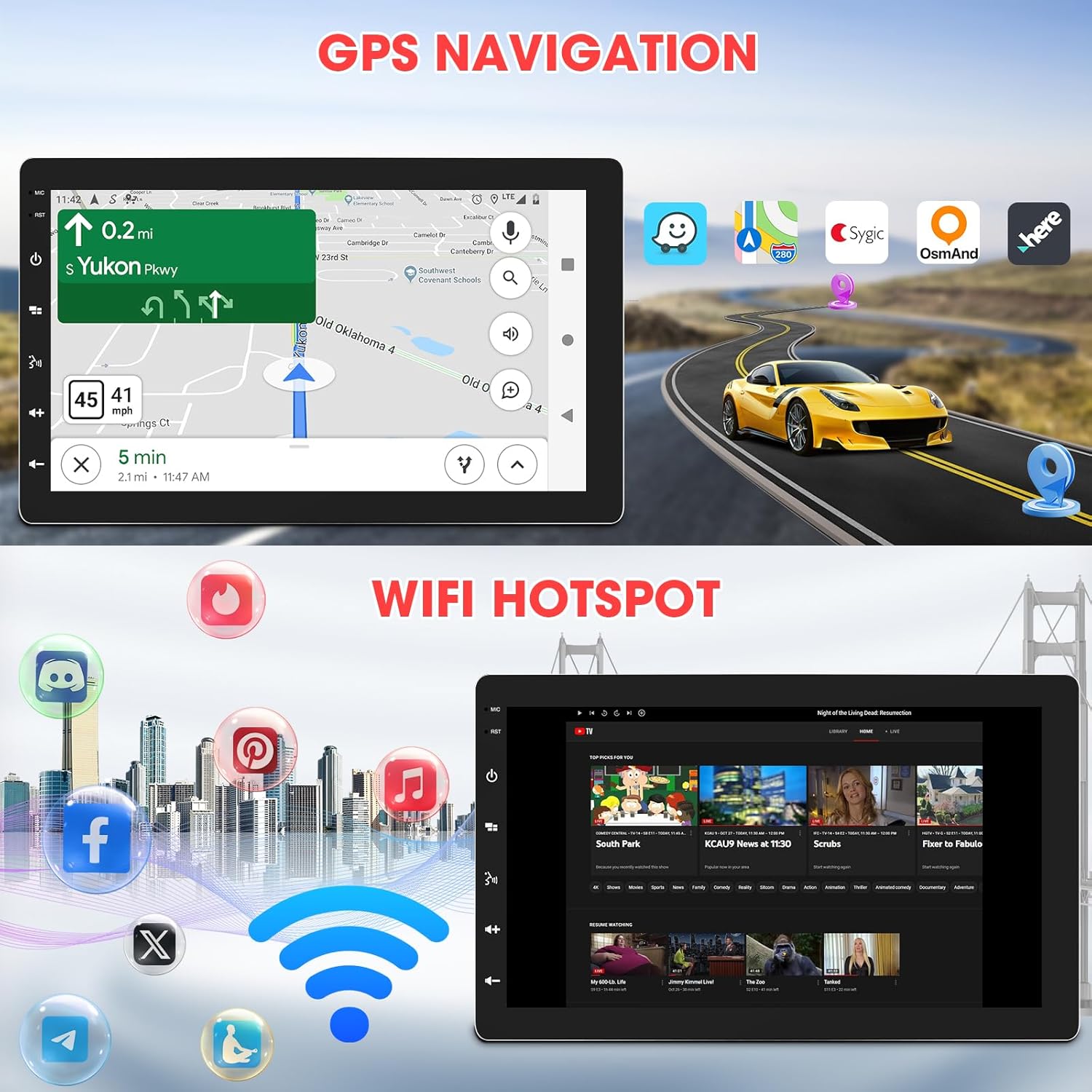
Image: The car stereo displaying GPS navigation, alongside an illustration of WiFi hotspot connectivity with various social media and streaming app icons.

Image: A split image showing the WiFi Hotspot feature on the left, with various app icons, and GPS Navigation on the right, displaying a map with a car icon.
4.8 Hotspot Wi-Fi
The stereo supports 2.4 GHz & 5 GHz Wi-Fi for a smooth internet connection, enabling streaming and map downloads.
4.9 Mirrorlink & Fast Charge
Mirrorlink allows casting unsupported apps and content from your phone to the stereo. USB inputs provide 2.1A charging for devices.

Image: Illustrates the Mirrorlink function, showing a smartphone screen mirrored onto the car stereo, and a phone charging via USB, highlighting the fast charge capability.
4.10 Caratteristiche audio
- Impostazioni dell'equalizzatore: Enhance your music with dynamic customized equalizer settings.
- Pre-amp and Subwoofer Output: Features 2-volt 4-channel pre-amp and subwoofer audio output with peak power 50W*4.
- Mechless Audio: Riproduci audio filetramite USB.

Image: A graphic detailing the Mechless HIFI Sound Quality, highlighting 2V Preamp Output, Preset EQ, Subwoofer Output, and Built-in DSP for enhanced audio.
4.11 uscita video
Video output is available to connect to headrest monitors for additional video playback.

Image: Illustrates the car stereo's ability to deliver high-quality sound and output video to rear headrest monitors, enhancing entertainment for passengers.
4.12 Posteriore View Ingresso telecamera
The unit is capable of connecting to a rear view camera for easier reversing and parking.
5. Manutenzione
Una manutenzione regolare garantisce la longevità e le prestazioni ottimali dell'autoradio.
- Pulizia dello schermo: Utilizzare un panno morbido e privo di lanugine per pulire delicatamente il touchscreen. Non utilizzare detergenti abrasivi o solventi.
- Aggiornamenti software: Controllare periodicamente le istruzioni del produttore website for available software updates to ensure the best performance and access to new features.
- Verifiche della connessione: Assicurarsi che tutti i collegamenti elettrici siano sicuri e privi di corrosione.
6. Risoluzione Dei Problemi
In caso di problemi, fare riferimento ai seguenti problemi comuni e alle relative soluzioni:
| Problema | Possibile causa | Soluzione |
|---|---|---|
| Nessun potere | Cablaggio errato; Fusibile bruciato; Batteria del veicolo scollegata. | Check power and ground connections; Inspect vehicle fuses; Reconnect battery. |
| Nessun suono | Cavi degli altoparlanti scollegati; Volume troppo basso; Funzione mute attiva. | Verificare i collegamenti degli altoparlanti; aumentare il volume; disattivare l'audio. |
| Problemi di connessione Bluetooth | Device not paired; Bluetooth off on phone/stereo; Interference. | Ensure Bluetooth is enabled on both devices; Re-pair the device; Move closer to the stereo; Restart both devices. |
| CarPlay/Android Auto non si connette | Incorrect Wi-Fi/Bluetooth settings; Software glitch; Phone compatibility. | Verify Wi-Fi and Bluetooth are active and connected; Restart phone and stereo; Check for software updates; Ensure phone is compatible. |
| Segnale GPS perso | Antenna GPS ostruita o scollegata; scarsa copertura satellitare. | Assicurarsi che l'antenna GPS abbia una visuale libera view of the sky; Check antenna connection; Move to an open area. |
| Lo schermo non risponde | Problema software temporaneo; è necessaria la calibrazione dello schermo. | Restart the unit; Perform a factory reset (refer to advanced settings); Contact support if issue persists. |
If the problem persists after attempting these solutions, please contact Stiflix customer support.
7. Specifiche
| Caratteristica | Specificazione |
|---|---|
| Dimensioni del prodotto | 6.8 x 10 x 5.9 pollici |
| Peso dell'articolo | 2.8 libbre |
| Numero modello articolo | SF20250929B0D5QMLXYL |
| Marca | Stiflix |
| Tecnologia di connettività | Bluetooth, USB, Wi-Fi |
| Tipo di controllore | Android |
| Display | 10.1-inch IPS Touchscreen, 1280*720 HD, 178° Viewangolo di ing |
| Caratteristiche speciali | 360° Rotatable Adjustable Detachable Touchscreen, Wireless Apple CarPlay, Wireless Android Auto, Voice Control, Mirrorlink, Online GPS Navigation, Offline Map, WIFI Hotspot, 2GB RAM, 64GB ROM, Bluetooth Calling, Wireless Audio Streaming, AV Input, Backup Camera Input, USB Charging, FM AM Tuner, Preset EQ, Video Output, Amplifier Subwoofer Output |
| Dispositivi compatibili | Amplifier, Smartphone, Speaker, Subwoofer |
| Porte HDMI totali | 2 |
| Tipo di connettore | RCA |
| Modalità di uscita audio | Stereo |
| Configurazione del canale audio surround | 5.1 |
| Codifica video | H.264, H.265/HEVC, MPEG-4, ecc. |
8. Informazioni sulla garanzia
For warranty details, please refer to the warranty card included with your product or visit the official Stiflix websito. Conservare la ricevuta d'acquisto come prova d'acquisto per eventuali reclami in garanzia.
9. Assistenza clienti
If you require further assistance, technical support, or have questions not covered in this manual, please contact Stiflix customer service through their official websito o le informazioni di contatto fornite con l'acquisto.

Image: A customer service representative smiling, symbolizing available support for product inquiries.