1. Importanti istruzioni di sicurezza
Please read this manual carefully before operating the appliance and retain it for future reference. Failure to follow these instructions may result in electric shock, fire, or serious injury.
- Collegare sempre il deumidificatore a una presa di corrente dotata di messa a terra.
- Non utilizzare l'unità con un cavo di alimentazione o una spina danneggiati.
- Tenere l'apparecchio lontano dall'acqua e da altri liquidi. Non immergerlo.
- Assicurare una ventilazione adeguata attorno all'unità. Non ostruire le prese d'aria o le uscite.
- Scollegare il deumidificatore prima di pulirlo o di effettuare qualsiasi intervento di manutenzione.
- Questo apparecchio non è destinato all'uso da parte di persone (bambini compresi) con ridotte capacità fisiche, sensoriali o mentali, o prive di esperienza e conoscenza, a meno che non siano supervisionate o abbiano ricevuto istruzioni riguardanti l'uso dell'apparecchio da una persona responsabile della loro sicurezza.
- Non utilizzare l'apparecchio in aree in cui sono presenti gas o vapori infiammabili.
- Operate the unit within the specified temperature range of 5-32 °C.
2. Prodotto finitoview
The SENCOR SDH 3028WH is a portable smart dehumidifier designed to efficiently remove excess moisture from your indoor environment. It features Wi-Fi connectivity for app control, multiple operating modes, and a large water tank capacity.
Caratteristiche principali:
- Dehumidification Capacity: 30 liters per day (at 30 °C, 80% Relative Humidity).
- Water Tank Capacity: 6 liters.
- Control: Wi-Fi enabled with Sencor HOME app (iOS and Android).
- Dehumidification Settings: Adjustable from 35% to 85% Relative Humidity, or Continuous operation.
- Operating Modes: Dehumidification, Fan, Laundry Drying.
- Fan Speeds: High and Low.
- Display: Precise humidity indication.
- Timer: 0-24 hours.
- Safety Features: Full tank indicator, Child safety lock, Automatic defrost function, Automatic restart function.
- Convenience: Removable and washable filter, Integrated handles and wheels for easy portability, 1-meter drain hose for continuous drainage.
- Quiet Operation: Noise level 43/41 dB.
- Suitable Room Size: 30 to 89 m².
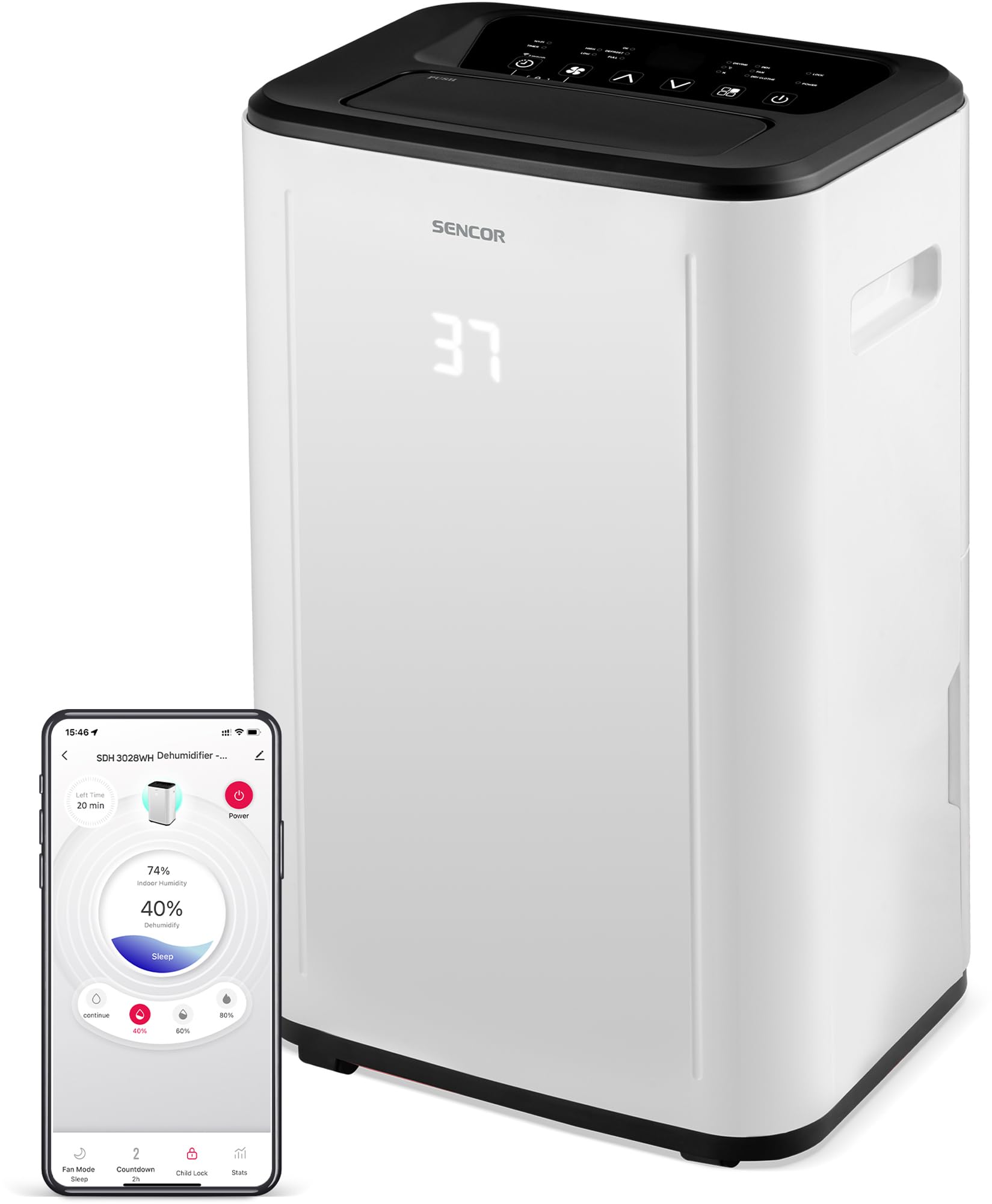
Figura 1: Fronte view of the SENCOR SDH 3028WH Portable Dehumidifier.
3. Contenuto della confezione
Dopo aver disimballato, assicurarsi che tutti gli articoli siano presenti e in buone condizioni:
- SENCOR SDH 3028WH Portable Dehumidifier
- Manuale di istruzioni
- Drain Hose (1 meter)

Figure 2: Packaging of the SENCOR SDH 3028WH, illustrating key features.
4. Impostazione
4.1 Posizionamento
Place the dehumidifier on a firm, level surface in the area where dehumidification is desired. Ensure there is at least 20 cm (8 inches) of clear space around the air inlets and outlets for optimal airflow.
4.2 Collegamento di alimentazione
Plug the power cord into a suitable grounded electrical outlet (220-240V, 50Hz). The unit will enter standby mode.
4.3 Wi-Fi Setup (Sencor HOME App)
- Download the Sencor HOME app from the App Store (iOS) or Google Play Store (Android).
- Crea un account o accedi.
- Follow the in-app instructions to add your SDH 3028WH dehumidifier. This typically involves putting the dehumidifier into pairing mode (refer to the app or device display for specific instructions) and connecting it to your home Wi-Fi network.
- Once connected, you can control the dehumidifier remotely and monitor its status via the app.
5. Istruzioni per l'uso
5.1 Pannello di controllo
The control panel on top of the unit allows you to manage all functions. The digital display shows the current humidity level or timer settings.
5.2 Accensione/spegnimento
Premere il tasto Energia pulsante per accendere o spegnere l'unità.
5.3 Impostazione dell'umidità desiderata
- Premere il tasto Umidità pulsante.
- Utilizzare il Su/Giù arrows to adjust the desired humidity level between 35% and 85% RH in 5% increments.
- L'unità funzionerà finché non verrà raggiunto il livello di umidità impostato, quindi si accenderà e spegnerà ciclicamente per mantenerlo.
- To enable continuous dehumidification, select the 'Continuous' setting (usually indicated by 'CO' or similar on the display).
Modalità operative 5.4
Premere il tasto Modalità pulsante per scorrere le modalità disponibili:
- Modalità di deumidificazione: Standard operation to remove moisture.
- Modalità ventola: Circulates air without dehumidifying.
- Modalità di asciugatura della biancheria: Optimized for drying clothes faster by continuously running the fan and dehumidifier.
5.5 Velocità della ventola
Premere il tasto Velocità della ventola pulsante per passare dalla velocità alta a quella bassa della ventola.
5.6 Funzione timer
- Premere il tasto Timer pulsante.
- Utilizzare il Su/Giù arrows to set the desired operating duration from 0 to 24 hours.
- L'unità si spegnerà o accenderà automaticamente dopo l'orario impostato.
5.7 Blocco bambini
Per attivare il blocco bambini, tenere premuto il tasto Blocco bambini button (or a combination of buttons as indicated on the control panel) for a few seconds. This prevents accidental changes to settings. Repeat the action to deactivate.
6. Manutenzione
Una manutenzione regolare garantisce prestazioni ottimali e prolunga la durata del deumidificatore.
6.1 Svuotamento del serbatoio dell'acqua
- When the water tank is full, the unit will stop operating, and the 'Full Tank' indicator will illuminate.
- Carefully pull out the water tank from the back or side of the unit.
- Svuotare l'acqua raccolta.
- Reinserire saldamente il serbatoio vuoto nella sua posizione. L'unità riprenderà a funzionare.
6.2 Drenaggio continuo
For continuous operation without needing to empty the tank, you can use the included drain hose.
- Locate the continuous drain outlet on the back of the dehumidifier.
- Rimuovere il tappo di gomma (se presente).
- Connect one end of the 1-meter drain hose to the outlet.
- Direct the other end of the hose to a suitable drain or larger container, ensuring it is lower than the dehumidifier's drain outlet for gravity flow.
6.3 Pulizia del filtro dell'aria
- It is recommended to clean the air filter every two weeks or more frequently depending on usage.
- Spegni e scollega il deumidificatore.
- Individuare e rimuovere il filtro dell'aria (solitamente nella parte posteriore o laterale).
- Lavare il filtro con acqua tiepida e un detergente delicato. Risciacquare abbondantemente.
- Lasciare asciugare completamente il filtro all'aria prima di reinserirlo nell'unità. Non utilizzare un'asciugatrice o esporre il filtro a fonti di calore dirette.
6.4 Pulizia dell'esterno
Pulire l'esterno dell'unità con un panno morbido, damp panno. Non utilizzare prodotti chimici aggressivi, detergenti abrasivi o solventi.
7. Risoluzione Dei Problemi
Prima di contattare l'assistenza clienti, fai riferimento ai seguenti problemi comuni e alle relative soluzioni:
| Problema | Possibile causa | Soluzione |
|---|---|---|
| L'unità non si accende. | Nessuna alimentazione elettrica. Cavo di alimentazione non collegato correttamente. | Controllare che l'unità sia collegata a una presa funzionante. Assicurarsi che il cavo di alimentazione sia collegato saldamente. |
| Il deumidificatore non raccoglie acqua. | Il filtro dell'aria è intasato. La temperatura ambiente è troppo bassa (inferiore a 5°C). L'impostazione dell'umidità è troppo alta. Il serbatoio dell'acqua non è inserito correttamente. | Pulire il filtro dell'aria. Assicurarsi che la temperatura ambiente sia compresa tra 5 e 32 °C. Abbassare l'impostazione di umidità desiderata. Reinserire correttamente il serbatoio dell'acqua. |
| Unit is noisy or vibrating excessively. | L'unità si trova su una superficie irregolare. Il filtro dell'aria è intasato. | Posizionare l'unità su una superficie piana e stabile. Pulire il filtro dell'aria. |
| L'indicatore "Serbatoio pieno" è acceso, ma il serbatoio non è pieno. | Il serbatoio dell'acqua non è posizionato correttamente. Float switch is stuck. | Rimuovere e reinserire saldamente il serbatoio dell'acqua. Check the float switch inside the tank for obstructions. |
| Problemi di connessione Wi-Fi. | Password Wi-Fi errata. Deumidificatore troppo lontano dal router. Problemi con il router. | Verifica la password Wi-Fi. Move dehumidifier closer to the router. Restart your Wi-Fi router. Re-attempt pairing process. |
8. Specifiche
| Caratteristica | Dettaglio |
|---|---|
| Marca | SENCOR |
| Numero di modello | SDH3028WH |
| Capacità di deumidificazione | 30 Liters/day (at 30 °C, 80% RH) |
| Capacità del serbatoio dell'acqua | 6 litri |
| Consumo energetico | 420 Watt |
| Intervallo di temperatura di esercizio | Temperatura: 5-32 °C |
| Dimensioni consigliate della stanza | 30-89 mq |
| Livello di rumore | 43/41 dB |
| Dimensioni (L x P x A) | Dimensioni: 26 x 33.5 x 53 cm |
| Peso | 15.3 kg |
| Materiale | Plastica |
| Caratteristiche speciali | Digital display, Automatic defrost, Timer, Portable, Wi-Fi control, Child lock, Auto restart |
| Lunghezza del tubo di scarico | 1 metro |
9. Garanzia e supporto
SENCOR products are manufactured to the highest quality standards. For warranty information, please refer to the warranty card included with your product or visit the official SENCOR website. For technical support or service inquiries, please contact SENCOR customer service through their official channels.
Disponibilità dei pezzi di ricambio: 5 anni.


