Brookstone BK1778

Brookstone Tablet Lap Cushion BK1778 User Manual

Modello: BK1778

1. Finitaview

The Brookstone Tablet Lap Cushion, model BK1778, is a versatile memory foam lap desk designed for comfortable, hands-free use of tablets, phones, and books. Its ergonomic design aims to reduce wrist strain and improve posture by maintaining an optimal viewing angle for your device. The cushion is suitable for various environments, from relaxing at home to traveling.

Caratteristiche principali:

  • Two Display Angles: Offre versatilità viewing options for different activities.
  • Soft & Scratch-Free Plush: Ensures device protection and user comfort.
  • Leggero e compatto: Easy to transport for use anywhere.
  • Supporto ergonomico: Designed to reduce neck and wrist strain.
  • Integrated Storage Pockets: Contiene comodamente piccoli accessori.
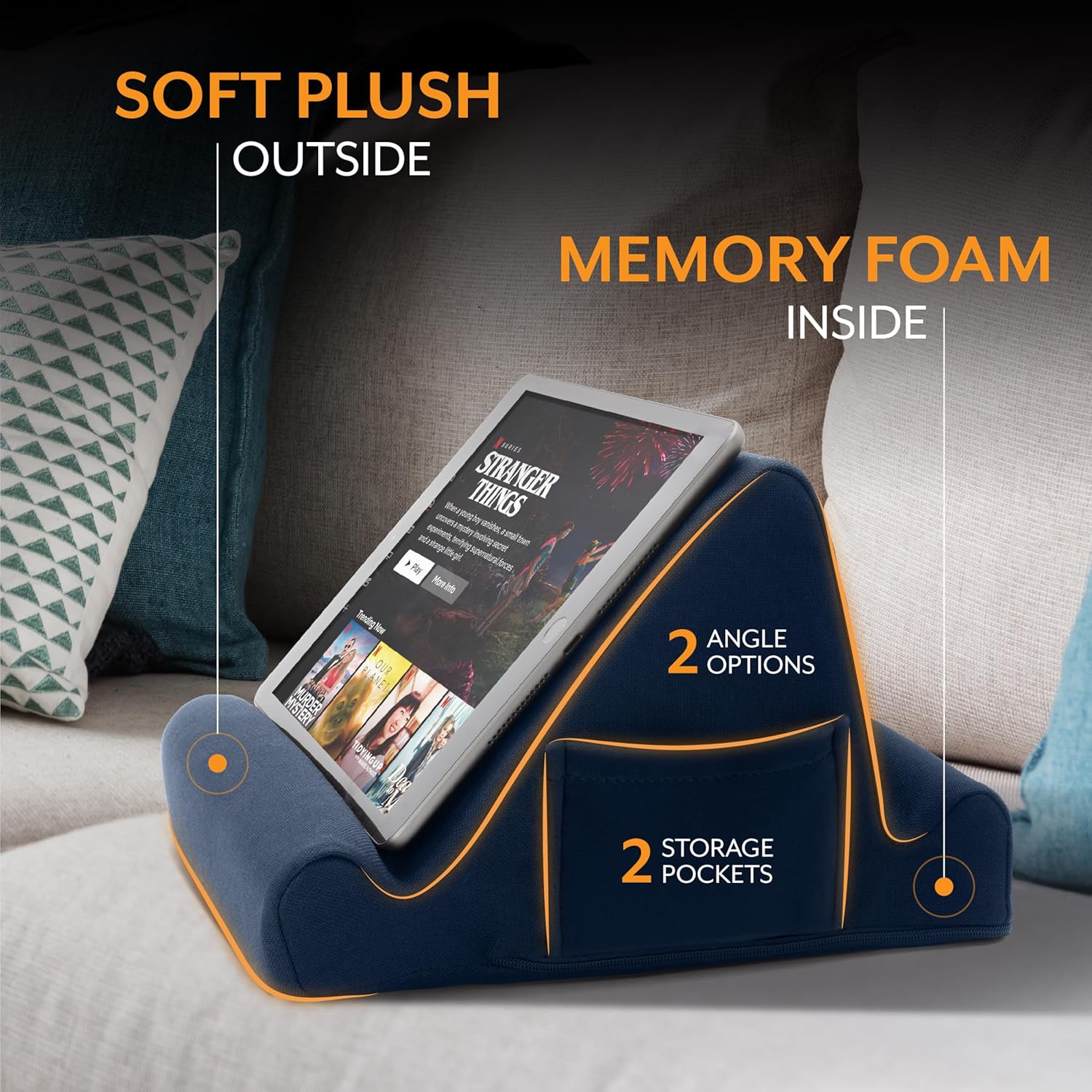
Diagram of the Brookstone Tablet Lap Cushion highlighting its soft plush exterior, memory foam interior, two angle options, and two storage pockets.
Constructed with soft plush material and memory foam, the cushion features two distinct viewing angles and two convenient side pockets for accessories.

2. Impostazione

The Brookstone Tablet Lap Cushion is designed for immediate use and requires no assembly. Simply remove it from its packaging.

Brookstone Tablet Lap Cushion with dimensions (10 inches wide, 10 inches deep, 6 inches high) and text indicating it is ready to use out of the box.
The cushion is designed for immediate use upon unboxing, with dimensions of approximately 10 inches (width) x 10 inches (depth) x 6 inches (height).

3. Istruzioni per l'uso

Selezione di un Viewangolo di ing:

The cushion offers two distinct viewing angles. Place your device in the deeper groove for a more reclined view, or use the shallower groove for a more upright position. Experiment with both angles to find the most comfortable setup for your activity and device.

Woman relaxing on a sofa using the Brookstone Tablet Lap Cushion to hold her tablet.
The Tablet Lap Cushion provides a comfortable and stable platform for hands-free viewing of your tablet while relaxing at home.

Using Side Pockets:

Utilize the two mesh side pockets for convenient storage of small items such as charging cables, earbuds, or a stylus.

Man in a car using the Brookstone Tablet Lap Cushion to hold his tablet for work.
The portable design allows for productive work or entertainment from various locations, including the back seat of a car.
Woman using the Brookstone Tablet Lap Cushion on an airplane tray table to hold her phone while writing.
Ideal for travel, the cushion can be placed on a tray table or lap, offering stability for devices during flights, train rides, or car trips.
Woman comfortably reading a book in bed with the Brookstone Tablet Lap Cushion supporting her book.
Whether reading a book or using a tablet, the cushion supports your device at an optimal angle for comfort in bed.

4. Manutenzione

Pulizia della copertura:

The outer cover of the Tablet Lap Cushion is removable for cleaning. Locate the zipper on the side of the cushion to remove the cover.

  • Lavare la fodera in lavatrice con un ciclo delicato e acqua fredda.
  • Asciugare in asciugatrice a fuoco basso o asciugare all'aria.
  • Non candeggiare né stirare.
  • Ensure the cover is completely dry before reattaching it to the foam insert.

5. Risoluzione Dei Problemi

If you encounter any issues with your Brookstone Tablet Lap Cushion, please refer to the following general advice:

  • Device Stability: Ensure your device is properly seated in one of the two grooves. If using a device with a thick case, adjust its position to ensure a secure fit.
  • Pulizia: For minor spills or dirt, spot clean the cover with a damp cloth. For thorough cleaning, remove the cover as described in the Maintenance section.
  • Perdita di forma: The memory foam is designed to retain its shape. If it appears compressed, gently fluff the cushion to restore its form.

Per ulteriore assistenza, contattare l'assistenza clienti.

6. Specifiche

CaratteristicaDettaglio
MarcaPietra di ruscello
Numero di modelloBK1778
ColoreBlu Reale
Fattore di formaCuscino
Dispositivi compatibiliAll Tablets, Phones, and Books
Peso dell'articolo1.06 libbre
Dimensioni del pacco11.61 x 10 x 6.42 pollici

7. Garanzia e supporto

For product support or inquiries regarding your Brookstone Tablet Lap Cushion, please contact Brookstone customer service:

Information regarding specific warranty terms can be obtained by contacting customer service directly.

8. Video del prodotto

This video demonstrates the Brookstone Tablet Lap Cushion, showcasing its use as a versatile holder for tablets, phones, and books, highlighting its design and functionality.

Documenti correlati - BK1778

Preview Brookstone Nature Sounds Sleep Pillow: User Manual and Features
Detailed guide for the Brookstone Nature Sounds Sleep Pillow, covering setup, usage, care, specifications, and warranty information. Features memory foam neck support and multiple nature sounds.
Preview Manuale utente e specifiche della stazione tablet Bluetooth Brookstone
Manuale utente completo per la Brookstone Bluetooth Tablet Station, che comprende istruzioni di sicurezza, configurazione, utilizzo, ricarica, sincronizzazione, cura, risoluzione dei problemi, specifiche e informazioni sulla garanzia.
Preview Convertitore da viaggio Brookstone per elettrodomestici fino a 85 Watt - Guida utente e garanzia
Scopri come utilizzare il convertitore da viaggio Brookstone (modello 599431) per collegare i tuoi elettrodomestici da 110/120 volt a prese da 220/240 volt in tutto il mondo. Include avvertenze di sicurezza e una garanzia limitata di un anno.
Preview Manuale utente del ventilatore da scrivania personale Brookstone Slim
Manuale utente per il ventilatore da scrivania personale Brookstone Slim, contenente istruzioni di sicurezza, funzionamento, manutenzione, specifiche e informazioni sulla garanzia.
Preview Guida utente e garanzia della postazione di lavoro multifunzione Brookstone eComfort Home Office
Manuale d'uso e informazioni sulla garanzia limitata di un anno per la workstation Brookstone eComfort Home Office All-in-One, che illustrano in dettaglio configurazione, caratteristiche, precauzioni e termini di garanzia.
Preview Manuale utente dell'orologio da viaggio Brookstone con torcia
Scopri come utilizzare e manutenere il tuo orologio da viaggio Brookstone con torcia, inclusa l'impostazione dell'ora, della sveglia, del calendario e l'utilizzo dei LED Microbeam. Questa guida include informazioni sull'installazione della batteria, sulla cura e sulla garanzia.