1. Introduzione
Thank you for choosing the Alvar 4K Smart Projector. This manual provides essential information for setting up, operating, and maintaining your projector to ensure optimal performance and longevity. Please read this manual thoroughly before using the product and retain it for future reference.
The Alvar V800P is designed to deliver a premium home entertainment experience with its 1000 ANSI lumens brightness, native 1080P resolution with 4K support, integrated Netflix, Prime Video, and YouTube apps, and advanced audio features including Dolby Audio and DBX-TV Total Sonics. It also boasts AI-powered auto-focus, auto-keystone correction, auto-obstacle avoidance, and auto-screen alignment for effortless setup.
2. Informazioni sulla sicurezza
To prevent fire, electric shock, or injury, always follow these basic safety precautions:
- Non esporre il proiettore alla pioggia o all'umidità.
- Non aprire il proiettore casing. Affidare tutti gli interventi di manutenzione a personale qualificato.
- Assicurare una ventilazione adeguata. Non ostruire le aperture di ventilazione.
- Utilizzare solo l'adattatore di alimentazione fornito con il proiettore.
- Evitare l'esposizione diretta degli occhi alla lente del proiettore quando lamp è acceso.
- Tenere il proiettore lontano da fonti di calore e dalla luce solare diretta.
- Scollegare il proiettore durante i temporali o quando non viene utilizzato per lunghi periodi.
3. Contenuto della confezione
Verifica che tutti gli articoli siano inclusi nel tuo pacco:
- 1 × Alvar Smart Projector
- 1 × cavo di alimentazione
- 1 × Cavo HDMI
- 1 × Remote Control (Requires 2 AAA batteries, not included)
- 1 × Manuale utente (questo documento)
4. Prodotto finitoview
Familiarize yourself with the components of your Alvar V800P projector.

Figura 4.1: Fronte view of the Alvar 4K Smart Projector, showcasing the main lens and sleek design.

Figura 4.2: Posteriore view of the projector, highlighting the various connectivity ports including USB, HDMI (x2), and AV port.
4.1. Componenti del proiettore
- Lente di proiezione: Emette l'immagine.
- Pulsante di accensione: Accende/spegne il proiettore.
- Pannello di controllo: Touch-sensitive buttons for basic navigation.
- Griglie di ventilazione: Essenziale per la dissipazione del calore. Non ostruire.
- Porte di ingresso:
- HDMI (x2): Connects to external devices like laptops, gaming consoles, streaming sticks.
- USB: Per collegare unità USB per riprodurre contenuti multimediali.
- Jack per cuffie da 3.5 mm: Per uscita audio esterna.
- Porta AV: Per dispositivi analogici più vecchi.
- Altoparlanti incorporati: 30W HiFi speakers with Dolby Audio and DBX-TV Total Sonics.
5. Impostazione
5.1. Posizionamento
Choose a suitable location for your projector. The Alvar V800P supports various installation methods:
- Montaggio da tavolo: Posizionare su una superficie piana e stabile.
- Montaggio a soffitto: Use the four holes on the bottom of the projector (covered by rubber fillers) for ceiling installation.
- Wall Mount: Securely mount to a wall.
Per un funzionamento ottimale viewing, ensure the projector is positioned perpendicular to the projection surface. The recommended projection distance for a 300-inch screen is approximately 19.6 feet (6 meters), and for a 50-inch screen, it's about 4.9 feet (1.5 meters).

Figure 5.1: The projector automatically adjusts the image for optimal display, even when placed at an angle.
5.2. Collegamento elettrico
- Collegare il cavo di alimentazione alla porta di ingresso alimentazione del proiettore.
- Collegare l'altra estremità del cavo di alimentazione a una presa a muro.
5.3. Initial Setup and Automatic Adjustments
Upon powering on, the Alvar V800P utilizes advanced AI features for quick and precise image adjustment:
- Messa a fuoco automatica AI: Automatically sharpens the image within 3 seconds.
- Correzione trapezoidale automatica: Corregge le immagini distorte trasformandole in un rettangolo perfetto.
- Evitamento automatico degli ostacoli: Adjusts the projection to avoid objects on the wall.
- Allineamento automatico dello schermo: Automatically fits the image within your projection screen boundaries.

Figure 5.2: The projector's intelligent features ensure a perfect display with minimal effort.
6. Istruzioni per l'uso
6.1. Accensione/Spegnimento
- Per accendere: Premere il pulsante di alimentazione sul proiettore o sul telecomando.
- Per spegnere: Press the power button again. A confirmation prompt may appear; select "Power Off".
6.2. Controllo remoto e navigazione
The projector comes with a Bluetooth/Infrared remote control and a touch pad for easy navigation.
- Use the directional buttons on the remote or touch pad to navigate menus.
- Press the "OK" or "Enter" button to confirm selections.
- The remote also features dedicated buttons for Netflix, Prime Video, and YouTube for quick access.
6.3. Collegamento di dispositivi esterni
The Alvar V800P offers extensive connectivity options:
- HDMI: Connect laptops, gaming consoles (PS5, Switch), Roku, Fire TV Stick, etc., using an HDMI cable. Select the corresponding HDMI input from the projector's source menu.
- USB: Insert a USB flash drive into the USB port to play local media files (video, foto, musica).
- Bluetooth 5.2 (bidirezionale):
- Modalità trasmettitore: Connect the projector to external Bluetooth speakers or headphones for enhanced audio.
- Modalità ricevitore: Connect your smartphone or tablet to the projector to use its powerful 30W speakers as a standalone Bluetooth speaker.
- Wi-Fi 6: Connect to your home network for streaming content from built-in apps or mirroring your device screen.

Figure 6.1: The projector supports a wide range of external devices for versatile entertainment.

Figure 6.2: Bi-directional Bluetooth allows flexible audio configurations.
6.4. Using Built-in Smart Apps
The Alvar V800P comes preloaded with officially licensed streaming applications:
- Netflix
- Video principale
- YouTube
Access these apps directly from the home screen. Ensure the projector is connected to a stable internet connection via WiFi 6 for optimal streaming performance.

Figure 6.3: Enjoy popular streaming services directly from your projector.
6.5. Regolazione delle impostazioni
Accedi al menu delle impostazioni per personalizzare il tuo viewesperienza audio e video:
- Impostazioni immagine: Adjust brightness, contrast, color temperature, and aspect ratio. The projector supports HDR10 for vibrant colors.
- Impostazioni audio: Control volume, activate DBX-TV Total Sonics for enhanced audio, and manage Dolby Audio settings.
- Funzione zoom: Adjust the screen size from 100% down to 50% without moving the projector. This feature is accessible via the setup menu and remote control.
- Impostazioni di rete: Configure WiFi and Bluetooth connections.
- Impostazioni di sistema: Language, date/time, software updates, and factory reset options.

Figure 6.4: Experience ultra-bright and vibrant colors, even in well-lit environments.
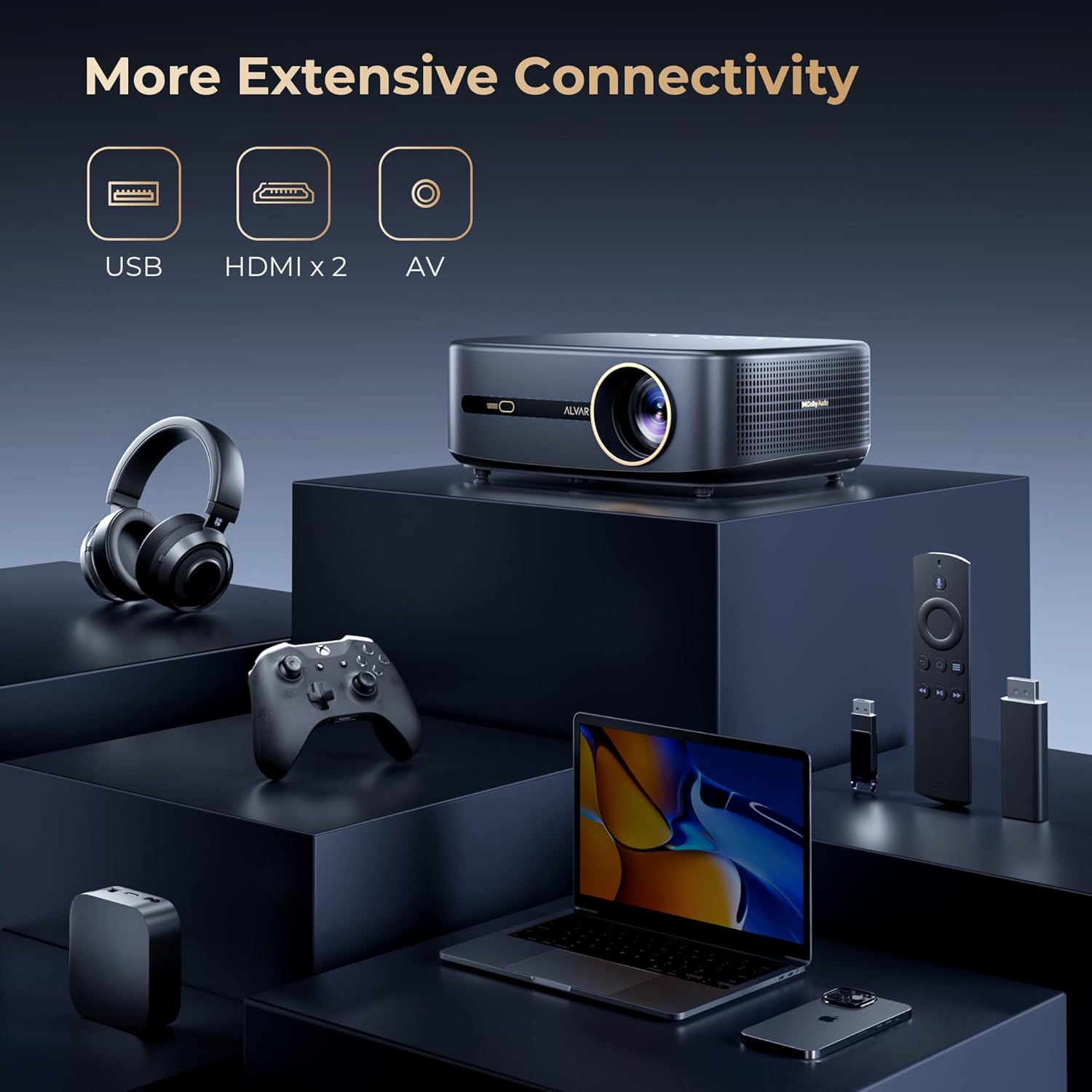
Figure 6.5: Adjust the projection size to fit any space, from 50 to 300 inches.
7. Manutenzione
7.1. Pulizia
- Lente: Utilizzare un panno morbido e privo di lanugine, specificamente progettato per lenti ottiche. Non utilizzare detergenti abrasivi o solventi.
- Casing: Pulire l'esterno del proiettore con un panno morbido e asciutto. Per macchie ostinate, strofinare leggermenteampimmergi il panno nell'acqua.
- Ventilazione: Periodically check and gently clean the ventilation grilles to prevent dust buildup, which can affect performance and lifespan.
7.2. Conservazione
Quando non viene utilizzato per lunghi periodi, conservare il proiettore in un luogo fresco e asciutto, lontano dalla luce solare diretta e da temperature estreme. Si consiglia di utilizzare l'imballaggio originale o una custodia protettiva per evitare polvere e danni.
8. Risoluzione Dei Problemi
If you encounter issues with your Alvar V800P projector, refer to the following common problems and solutions:
| Problema | Possibile causa | Soluzione |
|---|---|---|
| Nessuna immagine o immagine sfocata | Power issue, incorrect input source, focus/keystone not adjusted. | Ensure power is connected. Select correct input source. Allow auto-focus/keystone to complete or manually adjust. |
| Nessun suono | Volume too low, incorrect audio output, external device audio settings. | Increase volume. Check audio output settings on projector and connected device. Ensure Bluetooth audio is correctly paired. |
| Il telecomando non funziona | Batteries low/dead, remote not paired, obstruction. | Replace AAA batteries. Ensure remote is paired via Bluetooth. Remove any obstructions between remote and projector. |
| Impossibile connettersi al WiFi/Bluetooth | Password errata, fuori portata, problema di rete. | Verify password. Move projector closer to router/device. Restart projector and router. |
| Apps not loading/crashing | Poor internet connection, app cache, outdated app version. | Check internet connection. Clear app cache in settings. Update apps if available. Restart projector. |
If the problem persists, please contact Alvar customer support.
9. Specifiche
| Caratteristica | Dettaglio |
|---|---|
| Marca | Alvar |
| Numero di modello | V800P |
| Luminosità | 1000 ANSI Lumen |
| Risoluzione nativa | 1920x1080 (1080P) |
| Risoluzione supportata | Fino a 4K (60Hz) |
| Gamma di colori | 100% NTSC |
| Supporto HDR | L'HDR10 |
| Tecnologia audio | Dolby Audio, DBX-TV Total Sonics |
| Altoparlanti | 30W HiFi Speakers |
| Connettività | WiFi 6, Bluetooth 5.2 (Bi-directional), 2x HDMI, 1x USB, 1x 3.5mm Headphone Jack, AV Port |
| Funzionalità intelligenti | Netflix, Prime Video, YouTube (Officially Licensed), AI Auto Focus, Auto Keystone, Auto Obstacle Avoidance, Auto Screen Alignment |
| Dimensioni della proiezione | 50-300 inches (100%-50% Zoom) |
| Dimensioni | 11.8 x 9 x 3.93 pollici |
| Peso | 5.24 libbre |
10. Garanzia e supporto
Alvar offers comprehensive support for your projector:
- Garanzia: 1-year replacement warranty and 3-year repair service.
- Assistenza clienti: For any questions or issues, please contact Alvar customer service. Provide your order ID and a description (or image/video) of the issue for quicker assistance. Support typically replies within 12 business hours.
- Informazioni sui contatti: Refer to the contact details provided on the product packaging or the official Alvar websito.
Per maggiori informazioni, visita il Alvar Store on Amazon.


