1. Introduzione
The Flashpoint R2 Nano Remote is a compact and advanced wireless flash trigger designed for Panasonic and Olympus camera systems. It offers precise control over your flash settings through an intuitive touchscreen interface and OLED display, enhancing your photography experience with seamless integration and reliable performance.
Le caratteristiche principali includono:
- Integrazione perfetta: Full TTL compatibility with Olympus/Panasonic cameras for optimal exposure.
- Ultimate Reliability: Stable 2.4 GHz radio frequency with 32 channels, ensuring consistent triggering up to 328 feet (100 meters).
- Sincronizzazione ad alta velocità (HSS): Achieve sync speeds up to 1/8000s for creative effects and motion freezing.
- Controllo touchscreen intuitivo: Responsive interface for quick and easy adjustments.
- Versatile Group Control: Manage up to 16 groups (A-F, 0-9) independently for complex lighting setups.
2. Cosa c'è nella scatola
Upon unboxing your Flashpoint R2 Nano, please verify that all components are present:
- Flashpoint R2 Nano Remote
- Cavo di ricarica USB-C
- Borsa portaoggetti
- Manuale dell'utente (questo documento)
3. Prodotto finitoview
Familiarize yourself with the components and controls of your R2 Nano remote.
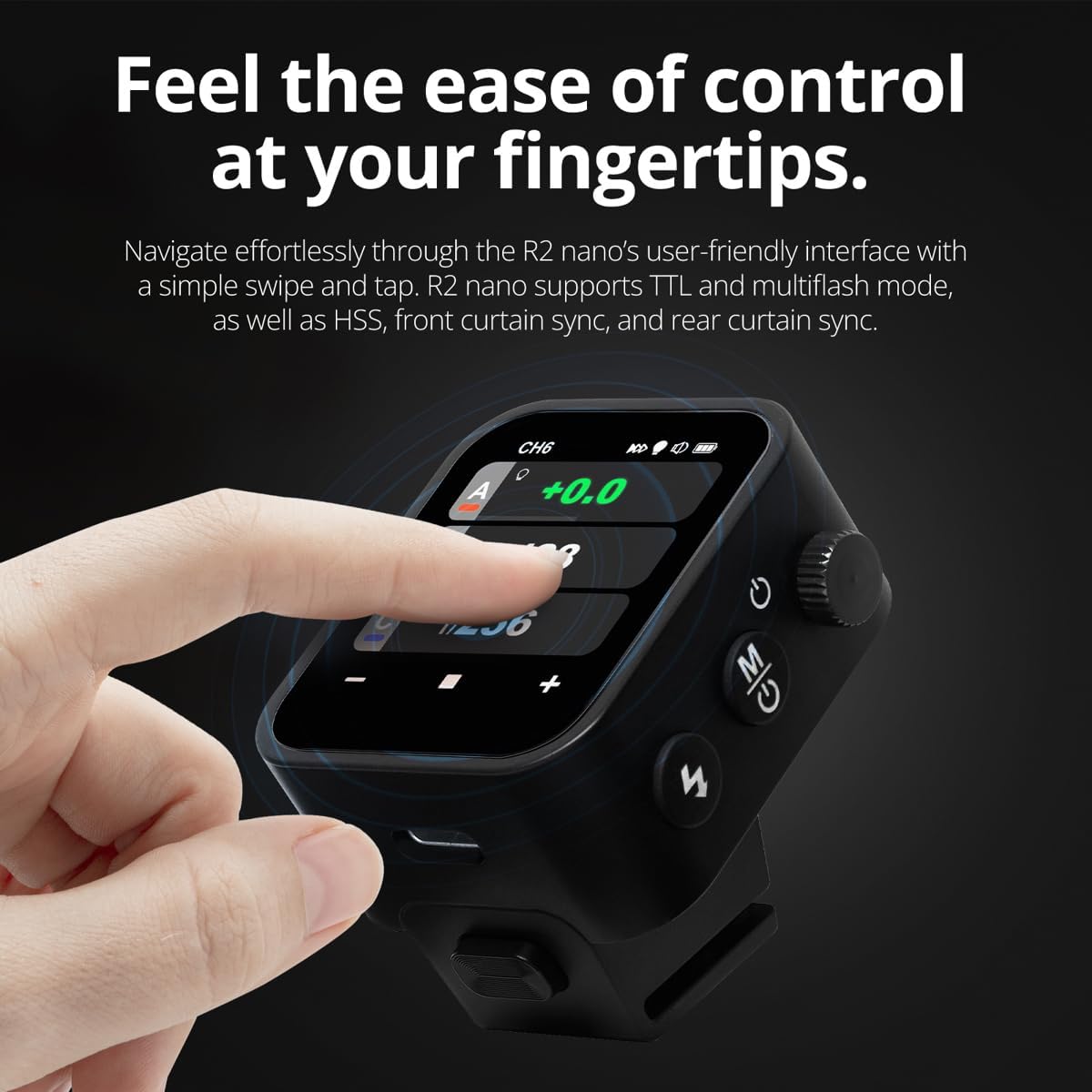
Figura 3.1: Fronte e lato View of the R2 Nano with Key Components Labeled.
- Schermo tattile: Main interface for settings and control.
- Seleziona quadrante: Per navigare nei menu e regolare i valori.
- Interruttore di alimentazione: Accende/spegne il dispositivo.
- Pulsante di prova: Attiva un flash di prova.
- Installing/Detaching Button: Releases the remote from the hotshoe.
- Slot di montaggio: Connects to the camera's hotshoe.
- Porta di ricarica USB-C: Per la ricarica della batteria.

Figure 3.2: R2 Nano Touchscreen Interface Details.
- Canale (CH): Displays the current wireless channel (e.g., CH6).
- Group (A, B, C, etc.): Indicates the active flash groups.
- Livello di potenza in uscita: Shows the flash power setting (e.g., +0.0, 1/128).
- Parameters - / +: Touch controls for decreasing/increasinvalori g.
- Modalità di sincronizzazione: Icons indicating sync modes (e.g., HSS, front curtain, rear curtain).
- Modellazione Lamp: Icon for modeling lamp stato.
- Indicatore della batteria: Visualizza il livello attuale della batteria.
4. Impostazione
4.1 Caricamento della batteria
The R2 Nano is equipped with a built-in rechargeable lithium battery. Before first use, fully charge the device.
- Locate the USB-C charging port on the side of the R2 Nano.
- Collegare il cavo di ricarica USB-C in dotazione alla porta.
- Collegare l'altra estremità del cavo a un adattatore di alimentazione USB (non incluso) o alla porta USB di un computer.
- The battery indicator on the screen will show charging status. A full charge from 0% to 100% typically takes approximately 2 hours.

Figure 4.1: Charging the R2 Nano via USB-C.
4.2 Montaggio sulla telecamera
The R2 Nano features an easy-mounting, durable hotshoe design for secure attachment to your camera.
- Assicurati che la fotocamera sia spenta.
- Slide the R2 Nano's mounting slot onto your camera's hotshoe.
- Spingere delicatamente finché non scatta in posizione, garantendo una connessione sicura.
- To detach, press the Installing/Detaching Button and slide the remote off.

Figure 4.2: Mounting the R2 Nano on a Camera Hotshoe.
5. Istruzioni per l'uso
5.1 Accensione/Spegnimento
- To power on, press and hold the Power Switch until the screen illuminates.
- To power off, press and hold the Power Switch until the screen turns off.
5.2 Navigazione nell'interfaccia touchscreen
The R2 Nano features a responsive touchscreen and a select dial for intuitive control.

Figure 5.1: High Definition OLED Screen Interface.
- Interazione touch: Tap on a group (A, B, C, etc.) to select it for adjustment. Tap on parameters like power level to modify them.
- Seleziona quadrante: Rotate the dial to scroll through options or adjust values. Press the dial to confirm selections.
- Regolazione dei parametri: Use the on-screen '-' and '+' buttons or the Select Dial to change flash power, exposure compensation, or other settings.

Figure 5.2: Touchscreen Interaction for Settings Adjustment.
5.3 Setting Channels and Groups
To avoid interference and control multiple flashes, set appropriate channels and groups.
- Access the channel settings through the touchscreen menu. Select a channel from 1 to 32. Ensure your flash units are set to the same channel.
- Assign flash units to different groups (A-F, 0-9) to control them independently. The R2 Nano allows control of up to 16 groups.
5.4 Flash Modes (TTL, Manual, Multi-flash)
The R2 Nano supports various flash modes to suit different shooting scenarios.
- TTL (attraverso l'obiettivo): Automatically adjusts flash output for correct exposure. Ideal for fast-paced shooting where lighting conditions change frequently.
- Manuale (M): Allows precise control over flash power output (e.g., 1/1 to 1/256). Suitable for consistent lighting setups and creative control.
- Multi-flash (Stroboscopic): Emette una serie di rapidi lampi durante una singola esposizione per catturare più movimenti di un soggetto.
5.5 Sync Modes (HSS, Front Curtain, Rear Curtain)
Select the appropriate sync mode based on your shutter speed and desired effect.
- HSS (sincronizzazione ad alta velocità): Enables flash synchronization at shutter speeds faster than the camera's native sync speed (up to 1/8000s). Useful for overpowering ambient light or using wide apertures in bright conditions.
- Sincronizzazione sulla tendina anteriore: The flash fires at the beginning of the exposure. This is the standard sync mode.
- Sincronizzazione della tendina posteriore: The flash fires just before the second curtain closes. This creates a streaking effect behind moving subjects, giving a sense of motion.
6. Manutenzione
Proper maintenance ensures the longevity and optimal performance of your R2 Nano remote.
- Pulizia: Use a soft, dry cloth to clean the exterior of the device. For the touchscreen, use a microfiber cloth specifically designed for electronics. Avoid using harsh chemicals or abrasive materials.
- Magazzinaggio: When not in use, store the R2 Nano in its provided storage bag to protect it from dust and scratches. Store in a cool, dry place away from direct sunlight and extreme temperatures.
- Cura della batteria: To maintain battery health, avoid fully discharging the battery frequently. If storing for extended periods, charge the battery to approximately 50% every few months.
- Contatti Hotshoe: Keep the hotshoe contacts clean and free of debris to ensure reliable communication with your camera.
7. Risoluzione Dei Problemi
If you encounter issues with your Flashpoint R2 Nano, refer to the following common problems and solutions.
| Problema | Possibile causa | Soluzione |
|---|---|---|
| Il dispositivo non si accende. | La batteria è scarica. | Caricare il dispositivo tramite il cavo USB-C. |
| Le unità flash non si attivano. | Impostazioni canale o gruppo errate. | Ensure the R2 Nano and flash units are set to the same channel and correct groups. |
| Le unità flash non si attivano. | Remote not securely mounted. | Ensure the R2 Nano is fully seated in the camera's hotshoe. |
| Inconsistent flash triggering. | Interferenza ambientale. | Change the wireless channel to one with less interference. Ensure no obstructions between remote and flash. |
| Il touchscreen non risponde. | Problema temporaneo del software. | Spegnere il dispositivo, attendere qualche secondo, quindi riaccenderlo. |
| HSS not working. | Camera or flash not set to HSS mode. | Verify HSS is enabled on both the R2 Nano and your compatible flash unit. Ensure camera shutter speed is above sync speed. |
8. Specifiche
| Caratteristica | Dettaglio |
|---|---|
| Modello | Flashpoint R2 Nano |
| Compatibilità | Panasonic and Olympus Cameras |
| Frequenza senza fili | 2.4 GHz |
| Canali | 32 |
| Gruppi | 16 (AF, 0-9) |
| wireless Range | Fino a 100 metri (328 piedi) |
| Velocità di sincronizzazione | Fino a 1/8000s (HSS) |
| Display | Touchscreen OLED |
| Batteria | Batteria al litio ricaricabile integrata |
| Porta di ricarica | USB-C |
| Dimensioni del prodotto | 5.25 x 4.25 x 2.5 pollici |
| Peso dell'articolo | 6.4 once |
| Produttore | Punto d'infiammabilità |
| Data prima disponibilità | 19 giugno 2024 |
9. Garanzia e supporto
Flashpoint products are designed for reliability and performance. For warranty information, technical support, or service inquiries, please refer to the official Flashpoint websito o contattare il rivenditore autorizzato.
Si prega di conservare la prova d'acquisto per eventuali reclami in garanzia.


