1. Introduzione
The Parsonver Smartwatch Z139 is designed to enhance your daily life with a variety of intelligent functions. This manual provides detailed instructions for setting up, operating, and maintaining your smartwatch to ensure optimal performance and user experience.
Key features include Bluetooth calling, comprehensive health monitoring (heart rate, blood oxygen, sleep), over 100 sports modes, and smart notifications.
2. Per iniziare: configurazione
2.1 Contenuto della confezione
- Parsonver Smartwatch Z139
- Cavo di ricarica
- Manuale d'uso
2.2 Ricarica dello smartwatch
Prima del primo utilizzo, carica completamente lo smartwatch. Collega il cavo di ricarica magnetico ai contatti di ricarica sul retro dell'orologio e collega l'estremità USB a un adattatore di alimentazione (non incluso) o alla porta USB di un computer.
2.3 Installazione e associazione dell'app
To unlock the full potential of your Parsonver Smartwatch, download the companion app on your smartphone. The app is compatible with iOS 9.0/Android 6.0 or above.
- Scan the QR code in the manual or search for "Parsonver" in your phone's app store (Google Play Store for Android, Apple App Store for iOS).
- Installa e apri l'app.
- Follow the on-screen instructions in the app to create an account and pair your smartwatch via Bluetooth. Ensure Bluetooth is enabled on your smartphone.
- During pairing, grant necessary permissions for notifications, location, and health data synchronization.

Image: The Parsonver Smartwatch Z139, showcasing its main display with time, date, and step count.
3. Istruzioni per l'uso
3.1 Chiamate Bluetooth e notifiche intelligenti
Once connected via Bluetooth, you can manage calls directly from your smartwatch.
- Rispondere/effettuare chiamate: Use the watch's interface to answer incoming calls or dial numbers. The watch features high-quality speakers and a high-definition microphone for clear communication.
- Notifiche: Receive alerts for SMS, WhatsApp, Facebook, emails, and other app notifications directly on your watch. The watch will vibrate to inform you of new messages.
- Assistente vocale: Utilize the integrated voice assistant for hands-free control and information access.
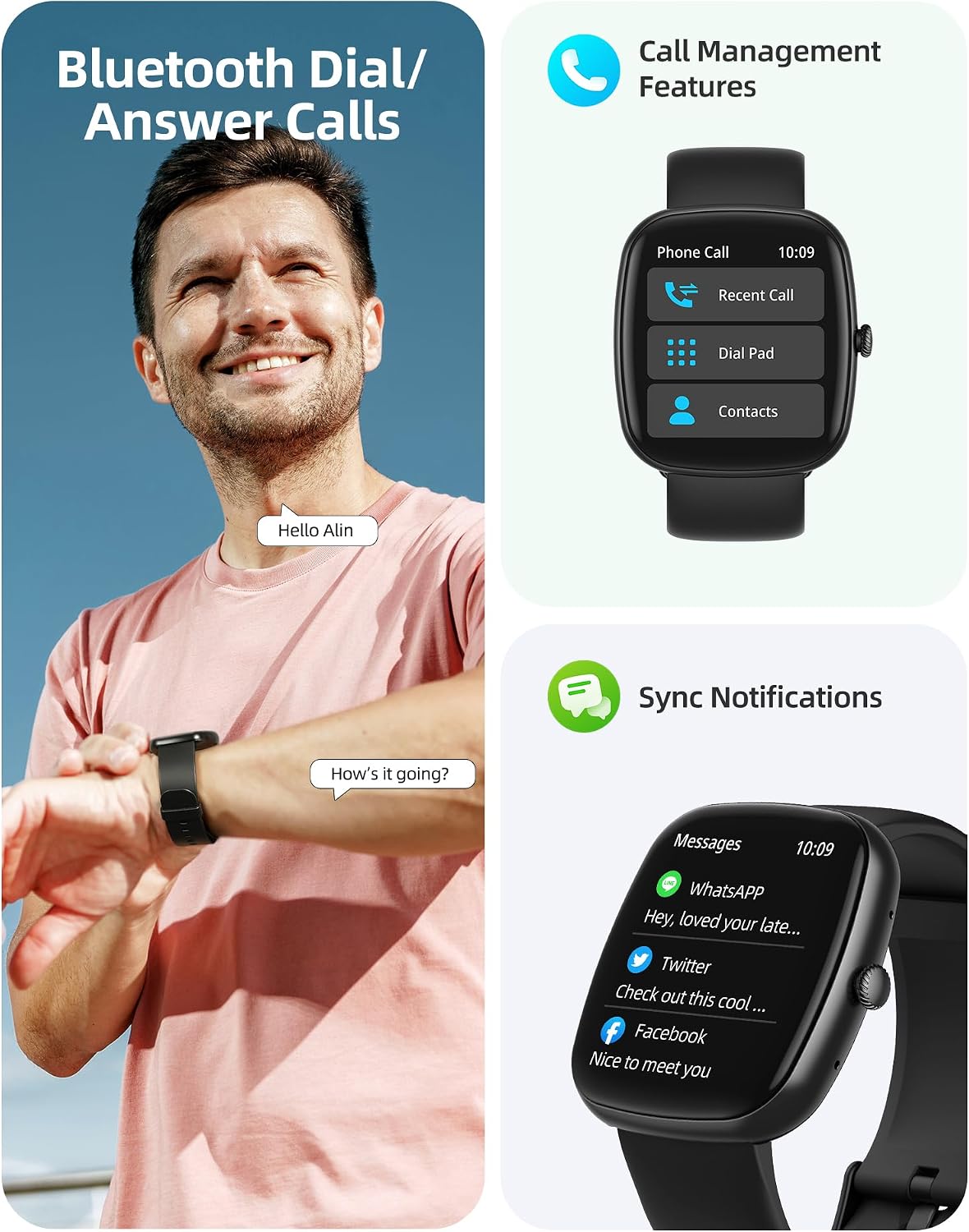
Image: A user interacting with the smartwatch for Bluetooth calls, demonstrating the call management interface.
3.2 Monitoraggio sanitario
The smartwatch features advanced sensors for continuous health tracking.
- Monitoraggio della frequenza cardiaca: Measures and records your heart rate throughout the day. The app displays trends and alerts for abnormal readings.
- Monitoraggio dell'ossigeno nel sangue (SpO2): Tiene traccia dei livelli di saturazione dell'ossigeno nel sangue.
- Monitoraggio del sonno: Analyzes your sleep patterns, including deep sleep, light sleep, and awake times, to help optimize your sleep habits.
- Monitoraggio dello stress: Fornisce informazioni sui tuoi livelli di stress.
- Monitoraggio della salute delle donne: Records menstrual cycles and ovulation periods.

Image: Visual representation of the smartwatch's health monitoring capabilities, including heart rate, blood oxygen, and pressure readings.
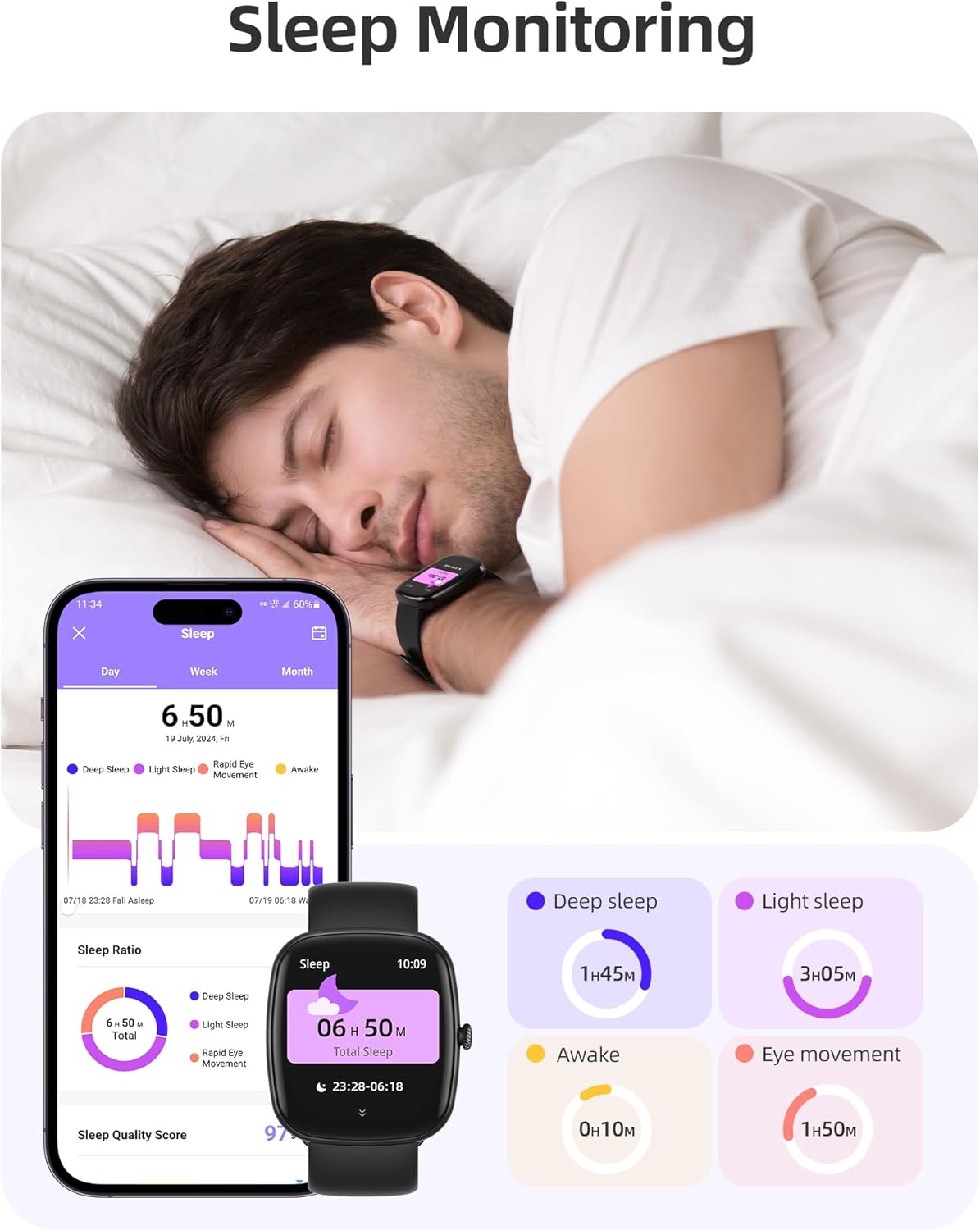
Image: The smartwatch monitoring sleep, with a detailed breakdown of sleep stages displayed on the companion app.
3.3 Modalità sportive e monitoraggio delle attività
The activity tracker supports over 100 sports modes to monitor your workouts effectively.
- Modalità disponibili: Includes yoga, running, jumping, cycling, badminton, football, rowing, and many more.
- Monitoraggio dei dati: Records steps, distance, calories burned, and real-time heart rate during exercise.
- Punteggio di prontezza giornaliera: Provides a summary of your daily activity and recovery.

Image: The smartwatch tracking a user's activity during a run, displaying key metrics like calories, steps, heart rate, and distance.
3.4 App Experience and BMI Tracking
The companion app offers additional features for health management.
- Weight and BMI Tracking: Manually input your weight in the app to track changes and automatically calculate your Body Mass Index (BMI). View daily, weekly, monthly, and yearly weight trends.
- Corsi di formazione: Access integrated training courses from beginner to advanced levels.
- Relaxation Features: Includes white noise, meditation exercises, and relaxation training.

Image: The companion app displaying weight and BMI tracking features, helping users monitor their body composition.
3.5 quadranti personalizzabili
Personalize your smartwatch with over 200 different watch face designs available through the app.

Image: A selection of customizable watch faces, demonstrating the variety of styles and information layouts available.
3.6 Altre funzioni pratiche
Lo smartwatch include molte altre utili funzionalità:
- Previsioni del tempo: View 7-day weather forecasts.
- Controllo della musica: Controlla la riproduzione musicale direttamente dal tuo polso.
- Controllo della telecamera: Controlla a distanza la fotocamera del tuo smartphone.
- Sveglia: Imposta più sveglie.
- Cronometro e timer: Tempistica precisa per varie attività.
- Promemoria sedentario: Ti invita a muoverti dopo periodi di inattività.
- Esercizi di respirazione: Guided exercises to reduce stress.
- Trova telefono: Locate your paired smartphone with a tap on your watch.
- Regolazione della luminosità: Continuously adjustable screen brightness for optimal visibility in any lighting condition.

Immagine: Un overview of the various practical functions available on the Parsonver Smartwatch Z139.
4. Manutenzione
Proper care ensures the longevity and performance of your smartwatch.
- Pulizia: Pulisci regolarmente l'orologio e il cinturino con un panno morbido e asciutto. Evita prodotti chimici aggressivi.
- Resistenza all'acqua: The smartwatch has an IP68 water resistance rating, meaning it can withstand hand washing, rain, and splashes. Do not use it for swimming, diving, or in saunas.
- Ricarica: Use only the provided charging cable. Avoid exposing charging contacts to moisture.
- Magazzinaggio: Quando non lo si utilizza, conservare l'orologio in un luogo fresco e asciutto.
5. Risoluzione Dei Problemi
Se riscontri problemi con il tuo smartwatch, prova a seguire questi passaggi:
- L'orologio non si accende: Assicurarsi che l'orologio sia completamente carico.
- Impossibile associare il telefono:
- Assicurati che il Bluetooth sia abilitato sul telefono e sull'orologio.
- Assicurati che l'orologio si trovi nel raggio d'azione del tuo telefono.
- Riavvia sia l'orologio che il telefono.
- Prova a disaccoppiare e riassociare tramite l'app.
- Notifiche non ricevute:
- Check app permissions on your phone to ensure notifications are allowed for the Parsonver app.
- Verify that notifications are enabled within the Parsonver app settings.
- Assicurarsi che l'orologio sia correttamente connesso tramite Bluetooth.
- Dati sanitari inesatti:
- Assicurati che l'orologio sia indossato comodamente al polso, né troppo stretto né troppo largo.
- Pulisci il sensore sul retro dell'orologio.
- Evitare movimenti eccessivi durante le misurazioni.
- Schermo non reattivo: Prova a riavviare l'orologio. Se il problema persiste, contatta l'assistenza clienti.
6. Specifiche
| Caratteristica | Specificazione |
|---|---|
| Marca | Parsonver |
| Numero di modello | Z139 |
| Dimensioni dello schermo | 1.83 pollici |
| Compatibilità del sistema operativo | Smartphone iOS 9.0/Android 6.0 o versioni successive |
| Tecnologia di connettività | Bluetooth |
| Caratteristiche speciali | Bluetooth Calls, 100+ Sports Modes, Heart Rate Monitoring, SpO2 Monitoring, Sleep Monitoring, IP68 Water Resistance, Music Control, Camera Control, Weather, Alarm, Timer, Stopwatch, Sedentary Reminder, Breathing Exercises, Find Phone, Brightness Adjustment, Women's Health Tracking |
| Composizione della batteria | Litio-polimero |
| Capacità della batteria | 230 mAh |
| Valutazione della resistenza all'acqua | IP68 (Not for swimming/diving/sauna) |
| Capacità di archiviazione della memoria | 512 MB |
| GPS | Tramite smartphone |
7. Garanzia e supporto
For warranty information and customer support, please refer to the documentation included with your purchase or visit the official Parsonver website. Typically, products are covered by a manufacturer's warranty against defects in materials and workmanship for a specified period from the date of purchase. Please retain your proof of purchase.
If you experience any issues not covered in this manual, or require further assistance, please contact Parsonver customer service.


