1. Introduzione
The Drexma WiStat is a programmable WiFi touchscreen thermostat designed for radiant floor heating systems. It offers advanced control and monitoring capabilities through its intuitive interface and mobile application for iOS and Android devices. This thermostat is compatible with both 2.4G and 5G Wi-Fi networks and integrates with popular smart home ecosystems such as Amazon Alexa and Google Assistant. It supports dual-voltage (120V and 240V) floor heating cables and includes built-in Class A GFCI protection for enhanced safety. This manual provides detailed instructions for the proper installation, operation, and maintenance of your WiStat thermostat.
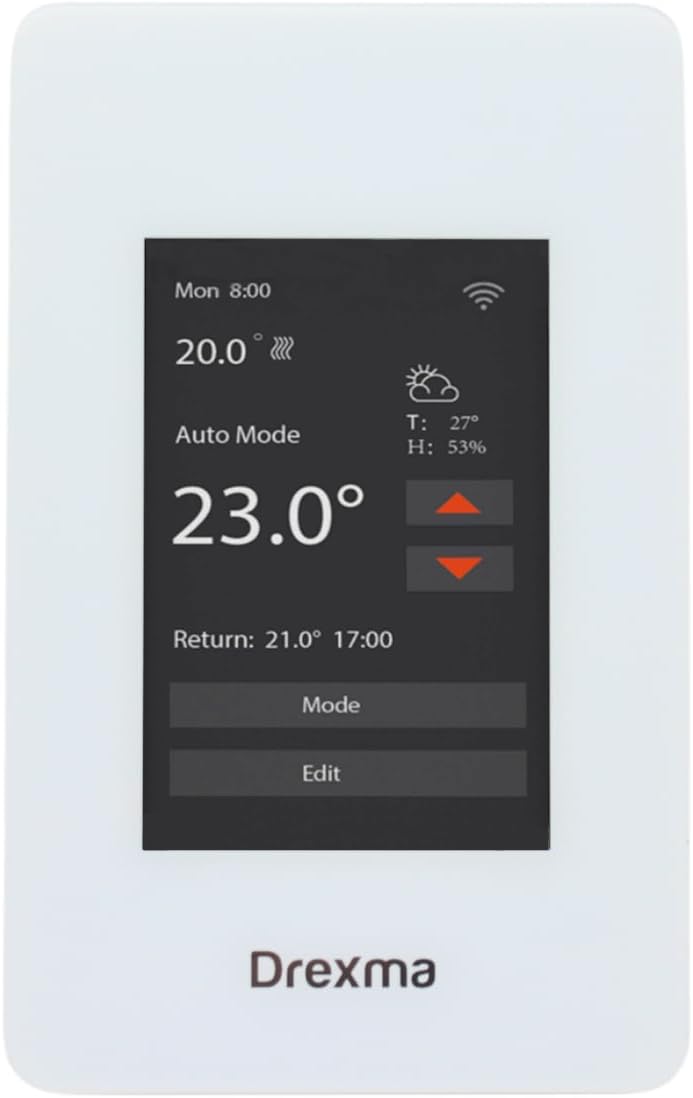
Figure 1: Drexma WiStat Thermostat and Packaging
2. Informazioni sulla sicurezza
AVVERTENZA: Rischio di scossa elettrica. Installation must be performed by a qualified electrician in accordance with local electrical codes. Disconnect power at the circuit breaker before installing or servicing the thermostat.
- Prima di effettuare qualsiasi cablaggio, assicurarsi che l'alimentazione sia scollegata.
- The thermostat is designed for 120V or 240V radiant floor heating systems. Verify your system's voltage prima dell'installazione.
- The built-in Class A GFCI (Ground Fault Circuit Interrupter) provides protection against electrical shock. Test the GFCI regularly as per local regulations.
- Non esporre il termostato all'acqua o a umidità eccessiva.
- Do not attempt to repair or modify the thermostat. Refer all servicing to qualified personnel.

Figura 2: Posteriore view with wiring caution
3. Contenuto della confezione
Verificare che tutti gli articoli siano presenti nel pacco:
- Drexma WiStat Thermostat Unit
- Sensore di temperatura del pavimento
- Viti di montaggio (solitamente incluse)
- Manuale dell'utente (questo documento)
4. Impostazione
4.1. Installazione
- Scollegare l'alimentazione: Turn off power to the heating circuit at the main electrical panel.
- Montaggio: Install the thermostat into a standard electrical box. Ensure proper clearance for wiring.
- Cablaggio: Connect the thermostat according to the wiring diagram provided in the installation guide (refer to Figure 2 for terminal layout). Ensure correct connections for LINE (power supply), LOAD (heating cables), and the floor sensor. The thermostat supports both 120V and 240V systems.
- Installazione del sensore: Route the floor temperature sensor cable to the desired location in the floor, ensuring it is properly embedded in the heating area.
- Termostato sicuro: Fasten the thermostat to the electrical box using the provided screws.
- Ripristina alimentazione: Accendere l'interruttore automatico. Il display del termostato dovrebbe illuminarsi.

Figura 3: lato view del termostato
4.2. Configurazione iniziale
- Upon first power-on, the thermostat will guide you through initial settings such as language (English/French) and temperature units (Celsius/Fahrenheit).
- Seguire le istruzioni sullo schermo per impostare la data e l'ora.
4.3. Connessione wifi
- Scarica l'app: Download the Drexma WiStat mobile application from the iOS App Store or Google Play Store.
- Creare un account: Apri l'app e crea un account utente.
- Aggiungi dispositivo: Follow the in-app instructions to add your WiStat thermostat. This typically involves putting the thermostat into pairing mode and connecting it to your home's 2.4G or 5G Wi-Fi network.
- Integrazione della casa intelligente: Once connected to Wi-Fi, you can link your thermostat to smart home platforms like Amazon Alexa or Google Assistant through their respective apps.

Figura 4: Fronte view of the thermostat display
5. Istruzioni per l'uso
5.1. Interfaccia touchscreen
The WiStat thermostat features a color touchscreen for easy navigation. Tap icons and menus to access various settings and functions.
5.2. Modalità di riscaldamento
Select from available heating modes (e.g., Auto, Manual, Away) to suit your comfort and energy-saving preferences. Refer to the on-screen menu for specific mode descriptions.
5.3. Pianificazione
Utilize the 7-day programmability feature to create custom heating schedules. This allows you to set different temperatures for various times of the day and days of the week, optimizing comfort and energy consumption.
5.4. Regolazione della temperatura
Adjust the desired temperature directly on the touchscreen or through the mobile app. The thermostat can display temperatures in either Fahrenheit or Celsius.
5.5. Funzionalità di blocco bambini
Activate the child lock feature through the settings menu to prevent unauthorized changes to the thermostat settings.
5.6. Real-time Weather Reports
The thermostat can display real-time local weather reports, allowing you to anticipate heating needs and adjust settings proactively.

Figura 5: in alto view del termostato
6. Manutenzione
- Pulizia: Gently wipe the touchscreen and thermostat body with a soft, damp panno. Non usare detergenti abrasivi o solventi.
- Prova GFCI: Regularly test the GFCI function as recommended by local electrical codes, typically monthly. Press the TEST button on the thermostat; the heating should turn off. Press the RESET button to restore normal operation.
- Aggiornamenti del firmware: Ensure your thermostat's firmware is up to date through the mobile application for optimal performance and new features.
7. Risoluzione Dei Problemi
| Problema | Possibile causa | Soluzione |
|---|---|---|
| Il display del termostato è vuoto | No power supply; tripped circuit breaker; incorrect wiring. | Check circuit breaker. Verify wiring connections. Consult a qualified electrician if necessary. |
| Nessun calore dal pavimento | Thermostat in OFF mode; GFCI tripped; heating cables faulty; temperature set too low. | Ensure thermostat is in an active heating mode. Reset GFCI. Increase set temperature. Consult a professional for heating cable inspection. |
| Problemi di connessione Wi-Fi | Incorrect Wi-Fi password; router too far; network interference; 2.4G/5G band conflict. | Re-enter Wi-Fi password. Move router closer or use a Wi-Fi extender. Ensure your router supports 2.4G or 5G and the thermostat is connecting to the correct band. Restart router and thermostat. |
| Letture della temperatura imprecise | Floor sensor not properly installed or damaged. | Verify floor sensor placement. If damaged, replace the sensor. |
| Thermostat unresponsive | Problema temporaneo del software. | Perform a soft reset by turning off power at the circuit breaker for 30 seconds, then restoring power. |
8. Specifiche
| Caratteristica | Dettaglio |
|---|---|
| Marca | Drexma |
| Nome del modello | DREXMA-WiStat |
| Tipo di controllore | Programmabile tramite WiFi |
| Caratteristica speciale | Schermo tattile |
| Colore | Bianco |
| Usi specifici per il prodotto | Riscaldamento a pavimento |
| Voltage | 120 Volt, 240 Volt |
| Forma | Rettangolare |
| Tipo di controllo | Tocco |
| Metodo di controllo | Applicazione |
| Caratteristiche del prodotto | Schermo tattile |
| Protocollo di connettività | Wi-Fi (2.4G and 5G compatible) |
| Retroilluminazione | SÌ |
| Stile del prodotto | Moderno |
| Numero di modello | DREXMA-WiStat |
| Codice UPC | 659460138640 |
| Produttore | Drexma |
| Paese di origine | U.S.A. |
| ASIN | B0D9KPCW36 |
| Codice GTIN | 659460138640 |
9. Garanzia
As per the product information, this Drexma WiStat Thermostat is sold without a manufacturer's warranty. Please refer to your retailer's return policy for any issues.
10. Supporto
For technical assistance or further inquiries regarding your Drexma WiStat Thermostat, please refer to the support section within the Drexma WiStat mobile application or visit the manufacturer's official websito per le informazioni di contatto.