1. Introduzione
This manual provides detailed instructions for the operation and maintenance of your Docooler Digital Voice Recorder. Please read this manual thoroughly before using the device to ensure proper function and to maximize its capabilities. This device is designed for recording audio in various settings, including lectures, meetings, and interviews, featuring noise reduction and voice-activated recording.
2. Prodotto finitoview
The Docooler Digital Voice Recorder is a compact and portable audio recording device. It features a clear digital display, intuitive controls, and a robust design for reliable performance. Key features include intelligent noise cancellation, voice-activated recording, and a choice of 8GB or 32GB storage capacity.

Figura 2.1: Fronte view of the Docooler Digital Voice Recorder, showing the display and control buttons.

Figure 2.2: The compact size of the Docooler Digital Voice Recorder, shown held in a hand.

Figure 2.3: Illustration of the voice-activated recording feature, automatically starting when sound reaches a detectable level.
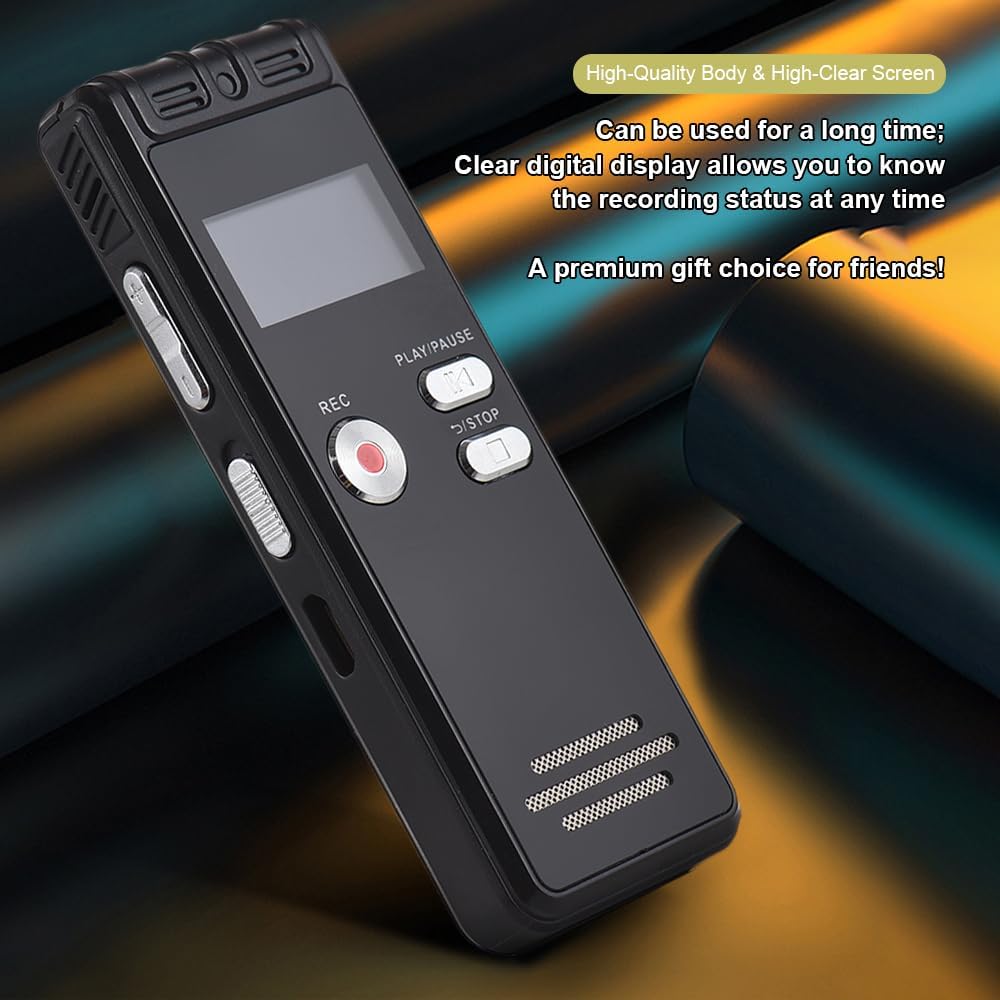
Figure 2.4: The durable construction and clear digital display of the recorder, providing real-time recording status.

Figure 2.5: The device features a built-in high-quality omnidirectional microphone for 360-degree panoramic sound capture.

Figure 2.6: The recorder's compact dimensions allow it to be easily carried in a pocket or bag.

Figure 2.7: The device supports one-click recording and saving, simplifying the recording process.

Figura 2.8: Esamples of various environments where the recorder can be effectively used, such as meetings, lectures, training sessions, and teaching.
3. Contenuto della confezione
Si prega di verificare che tutti gli articoli elencati di seguito siano inclusi nel pacchetto:
- 1x Voice Recorder
- 1x cavo USB
- Cuffie 1x
- 1x Adapters (likely phone line adapter)
- 1x Connect Cable (likely for phone recording)
- 1x Manuale (questo documento)

Figure 3.1: The Docooler Digital Voice Recorder shown with its complete set of accessories, including USB cable, headphones, and connection cables.
4. Impostazione
4.1 Ricarica del dispositivo
- Connect the included USB cable to the recorder's USB port.
- Plug the other end of the USB cable into a computer's USB port or a compatible USB wall adapter (not included).
- The device's screen will indicate charging status. A full charge typically takes approximately 2-3 hours.
4.2 Accensione/Spegnimento
- Per accendere: tenere premuto il pulsante di accensione finché lo schermo non si illumina.
- To power off: Press and hold the Power button until the screen turns off.
4.3 Collegamento delle cuffie
Insert the included headphones into the 3.5mm headphone jack on the device for private playback of recordings.
5. Istruzioni per l'uso
5.1 Registrazione di base
- Assicurati che il dispositivo sia acceso.
- Premere il tasto RICORDA per avviare la registrazione. L'indicatore di registrazione si illuminerà.
- Per mettere in pausa la registrazione, premere il RIPRODUCI/PAUSA pulsante. Premere di nuovo per riprendere.
- Per interrompere la registrazione e salvare il file, premere il tasto FERMARE pulsante. La registrazione verrà salvata automaticamente.
5.2 Registrazione attivata dalla voce (VOR)
This feature allows the recorder to automatically start recording when sound is detected and pause when silence occurs, conserving memory and battery life.
- Navigate to the VOR settings in the device menu.
- Enable the VOR function and adjust the sensitivity level as needed.
- Premere il tasto RICORDA pulsante. Il dispositivo ora registrerà solo quando è presente l'audio.
- Premere il tasto FERMARE button to end the voice-activated recording session.
5.3 Riproduzione
- From the main menu, select the 'Recordings' or 'Files' option.
- Utilizzare i pulsanti di navigazione per selezionare l'audio desiderato file.
- Premere il tasto RIPRODUCI/PAUSA pulsante per avviare la riproduzione.
- Use the volume controls on the side of the device to adjust the playback volume.
- Premere il tasto FERMARE pulsante per terminare la riproduzione.
5.4 Riduzione del rumore
The device is equipped with an intelligent noise reduction feature. This function is typically active by default to enhance audio clarity. Refer to the device's settings menu for options to adjust or disable noise reduction if available.
6. Manutenzione
- Mantenere il dispositivo asciutto. Evitare l'esposizione a umidità o liquidi.
- Pulire il dispositivo con un panno morbido e asciutto. Non utilizzare detergenti abrasivi o solventi.
- Evitare di far cadere il dispositivo o di sottoporlo a forti impatti.
- Conservare il dispositivo in un luogo fresco e asciutto, lontano dalla luce solare diretta e da temperature estreme.
- Eseguire regolarmente il backup delle registrazioni importanti su un computer per evitare la perdita di dati.
7. Risoluzione Dei Problemi
7.1 Il dispositivo non si accende
- Ensure the battery is charged. Connect the device to a power source using the USB cable and allow it to charge for at least 30 minutes.
- Tenere premuto il pulsante di accensione per alcuni secondi.
7.2 Scarsa qualità di registrazione
- Assicurarsi che il microfono non sia ostruito.
- Record in a quieter environment to minimize background noise.
- Check the microphone sensitivity settings in the device menu.
- Ensure the device is placed close enough to the sound source.
7.3 Cannot Play Back Recordings
- Verify that recordings exist in the device's memory.
- Check the volume level during playback.
- Se si utilizzano le cuffie, assicurarsi che siano collegate correttamente.
7.4 Dispositivo non riconosciuto dal computer
- Assicurarsi che il cavo USB sia collegato saldamente sia al dispositivo che al computer.
- Prova a connetterti a un'altra porta USB del tuo computer.
- Riavvia il computer e riprova.
8. Specifiche
| Marca | Docooler |
| Modello | Registratore vocale digitale |
| Opzioni di capacità | 8 GB, 32 GB |
| Colore | Nero |
| Materiale | addominali |
| Batteria | 300mAh |
| Peso dell'articolo | 2.38 once (circa 67.5 g) |
| Dimensioni del pacco | 4.65 x 3.23 x 0.59 pollici (11.8 x 8.2 x 1.5 cm) |
| Produttore | docooler |
| ASIN | B0D9WB349S (for 8GB variant) |
9. Garanzia e supporto
For warranty information and customer support, please refer to the documentation provided at the time of purchase or contact your retailer. Keep your purchase receipt as proof of purchase for any warranty claims.


