1. Introduzione
The BUSICOM PC-SeaV15c is a 15-inch Windows IoT touch panel PC designed for commercial and industrial applications. This manual provides essential information for the safe and efficient setup, operation, and maintenance of your device. Please read this manual thoroughly before using the product and retain it for future reference.
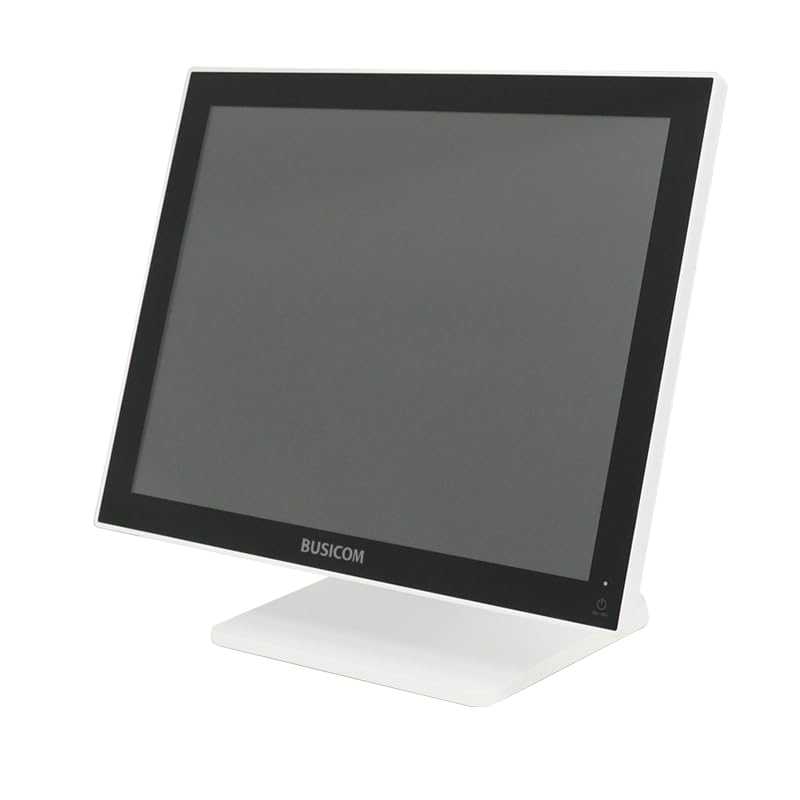
Figura 1: Fronte view of the BUSICOM PC-SeaV15c Touch Panel PC.
2. Prodotto finitoview
2.1 Caratteristiche principali
- Progettazione avanzata: Features an ultra-thin bezel and a highly durable 7H reinforced display for enhanced aesthetics and protection.
- Prestazioni superiori: Equipped with Microsoft Windows 10 IoT Enterprise, ensuring long-term support and reliable operation.
- Pannello touch intuitivo: Utilizes a capacitive touch method, offering a familiar and responsive touch experience similar to smartphones and tablets.
- Facile manutenzione: Designed for simple RAM and SSD replacement, facilitating upgrades and servicing.
- Versatile Interfaces: Provides a wide range of connectivity options to integrate with various peripherals.
- Archiviazione efficiente: SSD storage ensures fast processing speeds, quiet operation, and excellent shock resistance.
2.2 Componenti
The package typically includes the BUSICOM PC-SeaV15c unit and a power adapter. Additional accessories may vary.

Figure 2: Front and side profile of the PC-SeaV15c unit.

Figura 3: Posteriore view showing access panels for RAM and SSD components.
3. Istruzioni per l'installazione
3.1 Disimballaggio
- Carefully remove the PC-SeaV15c from its packaging.
- Controllare eventuali danni visibili. In caso di danni, contattare immediatamente il fornitore.
- Assicurarsi che tutti i componenti elencati siano presenti.
3.2 Collegamento delle periferiche
Refer to the interface diagram below for port locations and types.

Figure 4: Detailed diagram of the PC-SeaV15c's rear and bottom interfaces.
- Collegamento elettrico: Connect the provided power adapter to the DC In port and then to a power outlet.
- Dispositivi USB: Use the USB 2.0 (4 ports) and USB 3.0 (2 ports) for connecting keyboards, mice, printers, and other USB peripherals.
- Connessione di rete: Connect an Ethernet cable to the LAN port for wired network access.
- Uscita audio: Connect external speakers or headphones to the Audio Out port.
- Serial Ports (RJ45): Utilize COM1, COM2, COM3, and COM6 for connecting specialized POS peripherals such as barcode scanners or receipt printers.
- Cash Drawer (RJ11): Connect a compatible cash drawer to the RJ11 port.
- Display esterno: If an external monitor is required, connect it to the Mini DisplayPort.
- USB Tipo-C: Per dispositivi compatibili.
3.3 Accensione/Spegnimento
- Accensione: Press the power button located on the upper right side of the display bezel or the power mark on the rear panel.
- Spegni: To safely shut down the system, use the standard Windows shutdown procedure. Avoid direct power disconnection during operation to prevent data loss.
4. Istruzioni per l'uso
4.1 Windows 10 IoT Enterprise
The PC-SeaV15c operates on Windows 10 IoT Enterprise 2021. Familiarize yourself with the Windows operating system for basic navigation, application management, and system settings.
4.2 Touch Panel Usage
The capacitive touch screen supports multi-touch gestures.
- Rubinetto: Equivale a un clic del mouse.
- Doppio tocco: Equivale a un doppio clic.
- Premere e tenere premuto: Equivale a un clic con il tasto destro.
- Scorri: Per scorrere o navigare.
- Pizzica per ingrandire: Per ingrandire o ridurre la visualizzazione, usa due dita.
5. Manutenzione
5.1 Pulizia del dispositivo
- Prima di pulire il dispositivo, spegnerlo e scollegarlo sempre.
- Utilizzare un panno morbido e privo di lanugine leggermente dampcon acqua o con un detergente per schermi non abrasivo.
- Do not spray liquids directly onto the screen or device.
- Evitare l'uso di prodotti chimici aggressivi, solventi o materiali abrasivi.
5.2 RAM and SSD Replacement
The PC-SeaV15c is designed for easy replacement of RAM and SSD components. Refer to Figure 3 for the access panel location. For detailed instructions on component replacement, consult a qualified technician or the BUSICOM support websito.
6. Risoluzione Dei Problemi
Questa sezione fornisce soluzioni ai problemi più comuni che potresti riscontrare.
- Il dispositivo non si accende:
- Assicurarsi che l'adattatore di alimentazione sia collegato saldamente sia al dispositivo sia a una presa di corrente funzionante.
- Verificare che la presa di corrente funzioni collegandovi un altro dispositivo.
- Il touch screen non risponde:
- Riavviare il dispositivo.
- Assicurarsi che lo schermo sia pulito e libero da ostruzioni.
- Nessuna visualizzazione:
- Controlla se il dispositivo è acceso.
- If an external display is connected, ensure the correct input source is selected on the external display.
- Peripheral not detected:
- Ensure the peripheral is correctly connected to the appropriate port (USB, LAN, COM).
- Prova a collegare la periferica a una porta diversa.
- Check the peripheral's own power supply, if applicable.
For further assistance, please contact BUSICOM customer support.
7. Specifiche
| Caratteristica | Dettaglio |
|---|---|
| Marca | BUSICOM |
| Nome del modello | PC-SeaV15c |
| Colore | Bianco |
| Dimensioni dello schermo | 15 pollici |
| Risoluzione | 1024x768 |
| Sistema operativo | Windows 10 IoT Enterprise 2021 |
| Marca della CPU | Intel |
| Presa per processore | Intel® N97 |
| Velocità della CPU | 3.6 GHz |
| Tipo di memoria | DDR4 |
| RAM installata | 4 GB |
| Tipo di disco rigido | Unità SSD |
| Capacità SSD | 128 GB (come da titolo del prodotto) |
| Tipo di scheda grafica | Integrato |
| Tipo di VRAM | Memoria DDR4 |
| Capacità VRAM | 4 GB |
| Porte USB 2.0 | 4 |
| Porte USB 3.0 | 2 |
| Unità ottica | Nessuno |
| Peso del prodotto | 6 chilogrammi |
| Altezza (circa) | 307.5 mm (as per dimension diagram) |

Figura 5: Posteriore view of the PC-SeaV15c with approximate height dimension.
8. Garanzia e supporto
For warranty information and technical support, please refer to the warranty card included with your product or visit the official BUSICOM websito. Conservare la ricevuta d'acquisto come prova d'acquisto per eventuali reclami in garanzia.
BUSICOM Official Websito: BUSICOM Store on Amazon.co.jp