Introduzione
This manual provides detailed instructions for the safe and effective use of your Docooler Wireless Headphones Model BQ70. These earbuds feature advanced Bluetooth 5.3 technology, Active Noise Cancellation (ANC), Environmental Noise Cancellation (ENC), and a convenient slide-open charging case with a digital display. Please read this manual thoroughly before using the product and retain it for future reference.
Informazioni importanti sulla sicurezza

Avvertimento: If you find the product damaged, deformed, or exhibiting abnormal performance, please stop using it immediately and contact customer support. This image displays a universal warning symbol, emphasizing the importance of discontinuing use if any product anomalies are observed.
- Non smontare, riparare o modificare il prodotto.
- Tenere il prodotto lontano da temperature estreme, luce solare diretta e umidità.
- Evitare di far cadere o sottoporre il prodotto a forti impatti.
- Utilizzare solo il cavo di ricarica fornito o un equivalente certificato.
- Smaltire il prodotto in modo responsabile secondo le normative locali.
Contenuto della confezione
Si prega di verificare che tutti gli articoli siano presenti nel pacco:
- 1 Pair of Docooler Wireless Earbuds
- 1 Custodia di ricarica
- Cavo di ricarica 1
- 1 Manuale utente (questo documento)
Prodotto finitoview
Familiarize yourself with the components of your Docooler Wireless Headphones.

Immagine 1.1: The sleek black charging case features a digital display indicating battery percentage, along with charging ports. This image highlights the compact design and the integrated battery level indicator.
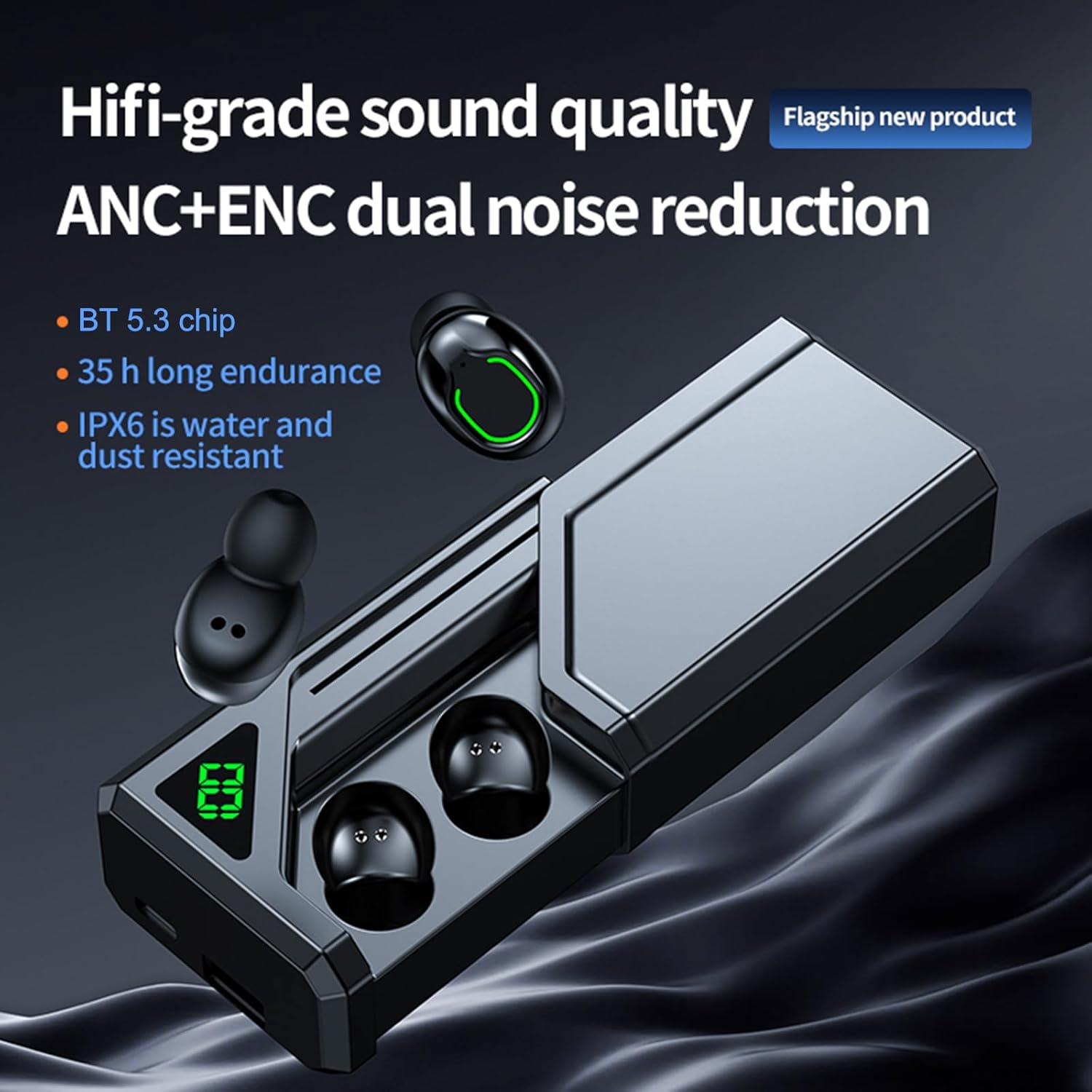
Immagine 1.2: Questo view shows the earbuds alongside the charging case, emphasizing key features such as Hi-fi grade sound quality, ANC+ENC dual noise reduction, BT 5.3 chip, 35-hour endurance, and IPX6 water and dust resistance. The slide-open design of the case is also visible.
Guida all'installazione
1. Ricarica degli auricolari e della custodia
Prima del primo utilizzo, caricare completamente la custodia di ricarica e gli auricolari.
- Connect the charging cable to the charging port on the case and to a USB power source (DC5V 1A recommended).
- The digital display on the case will show the battery percentage durante la carica.
- Place the earbuds into the charging case. Ensure they are correctly seated; indicators on the earbuds will show charging status.
- A full charge for the case and earbuds typically takes 1-2 hours.

Immagine 2.1: This image illustrates the charging process and battery life, showing 6-7 hours of play time, 1-2 hours of charging time, and up to 100 days of standby time for the charging case. The digital display on the case indicates its charge level.
2. Associazione con un dispositivo Bluetooth
The earbuds utilize Bluetooth 5.3 for a stable and low-latency connection.
- Aprire la custodia di ricarica. Gli auricolari si accenderanno automaticamente ed entreranno in modalità di associazione.
- Sul tuo dispositivo (smartphone, tablet, ecc.), attiva il Bluetooth e cerca i dispositivi disponibili.
- Select "Docooler BQ70" (or similar name) from the list of found devices.
- Una volta effettuata la connessione, sentirai un segnale acustico di conferma e le spie luminose degli auricolari cambieranno.
- Per gli utilizzi successivi, gli auricolari si connetteranno automaticamente all'ultimo dispositivo associato quando verranno estratti dalla custodia.

Immagine 2.2: This graphic highlights the advanced Bluetooth 5.3 chip, emphasizing its role in providing faster, more stable, and lower latency wireless connectivity for an enhanced user experience.
3. Indossare gli auricolari
Per una qualità audio e un comfort ottimali, assicurati che gli auricolari siano posizionati correttamente nelle orecchie.
- Identifica gli auricolari sinistro (L) e destro (R).
- Inserire delicatamente ciascun auricolare nel canale uditivo corrispondente.
- Ruotare leggermente l'auricolare finché non risulta stabile e confortevole. Una buona tenuta è fondamentale per un'efficace cancellazione del rumore e una buona risposta dei bassi.
Istruzioni per l'uso
The Docooler Wireless Headphones feature intuitive touch controls. Specific touch functions may vary slightly, but common operations are listed below.
1. Accensione/spegnimento
- Accensione: Open the charging case, and the earbuds will automatically power on. Alternatively, press and hold the touch area on both earbuds for approximately 3 seconds.
- Spegni: Place the earbuds back into the charging case and close the lid. They will automatically power off and begin charging. Alternatively, press and hold the touch area on both earbuds for approximately 5 seconds.
2. Controlli di riproduzione musicale
- Riproduci/Pausa: Un solo tocco su uno degli auricolari.
- Traccia successiva: Tocca due volte l'auricolare destro.
- Traccia precedente: Tocca due volte l'auricolare sinistro.
- Aumenta volume: Tocca tre volte l'auricolare destro.
- Volume basso: Tocca tre volte l'auricolare sinistro.
3. Gestione delle chiamate
- Rispondi/Termina chiamata: Un solo tocco su uno degli auricolari.
- Rifiuta chiamata: Tieni premuta l'area touch su uno degli auricolari per 2 secondi.
4. Noise Cancellation Modes (ANC/ENC)
The earbuds feature both Active Noise Cancellation (ANC) for immersive listening and Environmental Noise Cancellation (ENC) for clear calls.
- Attiva/disattiva la modalità ANC/Trasparenza: Press and hold the touch area on the Left earbud for 2 seconds to cycle between ANC On, Transparency Mode, and ANC Off.
- ENC is automatically active during phone calls to reduce background noise for the person you are speaking with.

Immagine 3.1: This image visually represents the noise reduction capability of the earbuds, indicating a depth of up to -36dB, allowing users to enjoy a quiet listening experience.

Immagine 3.2: This graphic illustrates the dual noise reduction technology, ANC (Active Noise Cancellation) and ENC (Environmental Noise Cancellation), highlighting how the earbuds suppress ambient sound for both listening and calls.
5. Modalità di gioco a bassa latenza
Experience synchronized audio and visuals with ultra-low latency, ideal for gaming.
- Attiva la modalità di gioco: Triple tap on the Right earbud (or refer to specific product instructions if different).
- This mode reduces audio latency to as low as 38ms, enhancing your gaming experience.

Immagine 3.3: This image depicts a user gaming with the earbuds, emphasizing the ultra-low latency of 38ms, which provides a competitive advantage by ensuring audio and video are perfectly synchronized.
6. Single/Dual Earbud Use
The earbuds support both single and dual earbud modes, allowing flexible usage.
- You can use either the left or right earbud independently. Simply take one earbud out of the case, and it will connect to your device.
- To switch back to dual mode, take the other earbud out of the case. They will automatically pair with each other.

Immagine 3.4: This image demonstrates the "uncoupling ready-to-use" feature, allowing for easy switching between single and binaural modes. It shows the earbuds in the case and a phone displaying a music player interface, indicating seamless connectivity.
7. Charging Case as Portable Power Source
The 800mAh charging case can also serve as a portable power bank for other small electronic devices.
- Connect your device to the USB output port on the charging case using an appropriate cable.
- La custodia di ricarica inizierà a fornire energia al dispositivo connesso.
Cura e manutenzione
1. Pulizia
- Pulisci regolarmente gli auricolari e la custodia di ricarica con un panno morbido, asciutto e privo di lanugine.
- Non utilizzare prodotti chimici aggressivi, solventi per la pulizia o detergenti aggressivi.
- Rimuovere delicatamente eventuali residui di cerume o detriti dai puntali degli auricolari e dalla rete dell'altoparlante utilizzando una piccola spazzola morbida o un cotton fioc.
2. Resistenza all'acqua (IPX6)
The earbuds are rated IPX6 waterproof, meaning they are protected against powerful water jets. This makes them suitable for workouts and light rain.
- Non immergere gli auricolari in acqua.
- La custodia di ricarica NON è impermeabile. Mantenerla asciutta.
- Se gli auricolari si bagnano, asciugarli completamente prima di riporli nella custodia di ricarica.
3. Conservazione
- Quando non li usi, riponi gli auricolari nella custodia di ricarica per proteggerli e mantenerli carichi.
- Conservare il prodotto in un luogo fresco e asciutto, lontano da temperature estreme e dalla luce solare diretta.
Risoluzione dei problemi
Se riscontri problemi con gli auricolari, fai riferimento alle seguenti soluzioni comuni:
| Problema | Possibile soluzione |
|---|---|
| Gli auricolari non si associano al dispositivo. |
|
| Nessun suono da uno o entrambi gli auricolari. |
|
| La custodia di ricarica non si carica. |
|
| Gli auricolari non si caricano nella custodia. |
|
| Scarsa qualità del suono o connessione intermittente. |
|
Specifiche
| Modello | BQ70 |
| Versione BT | 5.3 |
| Distanza di trasmissione | 10 metri (nessun ostacolo) |
| Drive Unit | Bobina mobile da 8 mm |
| Risposta in frequenza | Da 15 Hz a 20 kHz |
| Impedenza | 32Ω |
| Potenza nominale | 3 mW |
| Capacità della batteria della scatola di ricarica | 800mAh |
| Capacità della batteria degli auricolari | 45 mAh (ciascuno) |
| Tempo di ricarica | 1-2 ore |
| Tempo di musica | 6-7 ore (dipende dal volume) |
| Volume di caricatage/corrente | CC5V 1A |
| Colore | Nero |
| Valutazione della resistenza all'acqua | IPX6 (solo auricolari) |
| Fattore di forma | Nell'orecchio |
| Peso dell'articolo | Approx. 4.4 ounces (119g package weight) |
| Produttore | Docooler |
Garanzia e supporto
Docooler products are designed and manufactured to the highest quality standards. For information regarding warranty coverage, please refer to the warranty card included in your product packaging or visit the official Docooler websito.
If you require technical assistance or have questions about your product, please contact Docooler customer support through the retailer where you purchased the product or via the contact information provided on the official Docooler websito.
Risorse online: For the latest product information, FAQs, and support, please visit the Negozio Docooler su Amazon.


