Introduzione
This user manual provides comprehensive instructions for the Phomemo LT12 Label Maker Machine. It covers setup, operation, maintenance, and troubleshooting to ensure optimal performance and longevity of your device. Please read this manual thoroughly before using the label maker.
Video 1: Oltreview of the Phomemo LT12 Portable Label Maker.
Cosa c'è nella scatola
Upon unboxing your Phomemo LT12 Label Maker, please verify that all the following items are included:
- 1 x Phomemo LT12 Label Maker
- 1 x Black on white label tape (12mm*4m)
- 1 x Cavo di ricarica di tipo C
- 1 x Guida rapida

Figura 1: Elenco di imballaggio del prodotto
Impostare
1. Dispositivo suview
Familiarize yourself with the key components of your Phomemo LT12 Label Maker:
- Schermo LCD: Displays text, settings, and status.
- Tastiera QWERTY: For direct text input.
- Etichetta Uscita: Dove emergono le etichette stampate.
- Taglierina: Manual cutter for labels.
- Porta USB: Per caricare il dispositivo.
- Pulsante di accensione: Per accendere/spegnere il dispositivo.

Figure 2: Phomemo LT12 Label Maker Front View
Figure 3: Phomemo LT12 Label Maker Key Components
2. Carica del dispositivo
The Phomemo LT12 Label Maker is equipped with a 1200mAh high-capacity lithium battery. To charge the device, connect the provided Type-C charging cable to the USB port on the side of the label maker and plug the other end into a compatible USB power adapter (not included). The device can be used while charging.
3. Inserting the Tape Cassette
Follow these steps to properly install a label tape cassette:
- Open the tape cassette compartment cover located at the top of the device.
- Pull out a section of the label tape (approximately 1 inch or 3 cm) through the paper outlet of the cassette.
- Insert the tape cassette into the compartment, ensuring it clicks firmly into place.
- Chiudere il coperchio del vano portacassetta.

Figure 4: Inserting the Label Tape Cassette
Video 2: How to install the label tape in the Phomemo LT12 Label Maker.
Operazione
1. Printing from the Device (QWERTY Keyboard)
The LT12 features a full QWERTY keyboard for direct label creation:
- Premere il tasto Energia pulsante finché il display non si illumina.
- Type your desired text using the QWERTY keyboard. You can adjust font size, style, and add symbols using the function keys.
- Premere il tasto Stampa pulsante per avviare la stampa.
- Once the label is printed, press the Taglierina button on the side to cut the label.
- Tear off the backing paper from the back of the label along the easy-tear line and attach it to a dry, flat object.
Video 3: How to print directly from the Phomemo LT12 Label Maker using its keyboard.
2. Printing from Your Mobile Device (Bluetooth)
For advanced customization and ease of use, connect your LT12 to your smartphone or tablet via Bluetooth using the "Print Master" application:
- Download the "Print Master" app from your phone's app store (available for Android and iOS).
- Turn on the Bluetooth function on your LT12 Label Maker (Settings -> Bluetooth -> ON).
- Open the "Print Master" app and follow the auto-connect guidelines to search for and connect to your LT12 device.
- Once connected, you can design your labels within the app, utilizing various fonts, symbols, borders, and even images.
- Press the print icon in the app to send the label design to your LT12 for printing.
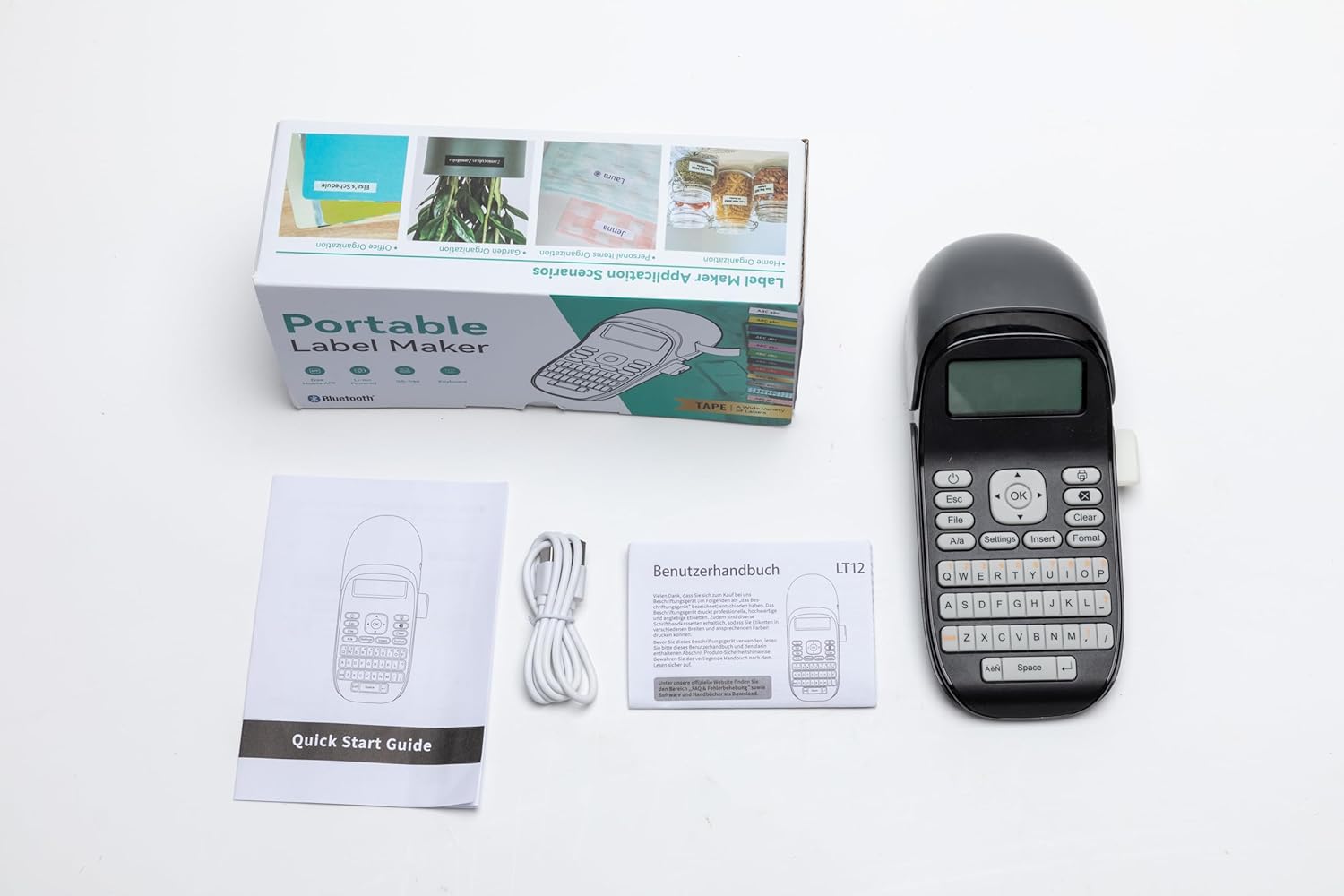
Figura 5: Passaggi per la connessione Bluetooth
Video 4: How to print from your mobile device using the Phomemo LT12 Label Maker.
3. Personalizzazione delle etichette
The Phomemo LT12 offers extensive customization options:
- Opzioni carattere: Choose from 3 font sizes, 4 font decorations, and over 160 fonts via the app.
- Simboli e bordi: Access 791+ symbols and 287+ border/underline styles.
- Supporto multilingua: Supports 14 national languages.
- Tape Versatility: Compatible with 12mm thermal paper and thermal transfer supplies, including solid color, pattern, silk, and fabric iron-on labels. Labels are waterproof, oil-proof, scratch-proof, sun-proof, and resistant to high and low temperatures.

Figure 6: Multi-functional Editing Options

Figure 7: Label Application Examples
Figure 8: Multi-functional Label Properties

Figure 9: Indoor and Outdoor Label Usage

Figure 10: LCD Backlight for Eye Care

Figura 11: Design portatile
Manutenzione
1. Pulizia e cura
To ensure the longevity and optimal performance of your label maker, follow these cleaning and care guidelines:
- Pulire regolarmente la parte esterna del dispositivo con un panno morbido e asciutto.
- Non utilizzare detergenti abrasivi o solventi.
- Keep the label maker away from excessive dust, moisture, and extreme temperatures.
- Ensure the print head and cutter area are free from adhesive residue or paper dust. Use a cotton swab lightly dampened with rubbing alcohol if necessary, but ensure the device is off and completely dry before use.
2. Durata della batteria
The 1200mAh lithium battery provides long-lasting use. For best battery health, avoid completely draining the battery frequently. If the device will not be used for an extended period, it is recommended to charge it periodically to maintain battery capacity.
Risoluzione dei problemi
If you encounter issues with your Phomemo LT12 Label Maker, refer to the following common problems and solutions:
| Problema | Possibile causa | Soluzione |
|---|---|---|
| Il dispositivo non si accende. | Batteria scarica; il pulsante di accensione non è premuto correttamente. | Charge the device; Press and hold the Power button firmly. |
| Label not printing or print is faint. | Tape cassette incorrectly installed; Tape run out; Print head dirty. | Reinstall tape cassette; Replace tape; Clean the print head. |
| La connessione Bluetooth non riesce. | Bluetooth off on device/phone; App permissions; Device too far. | Ensure Bluetooth is on for both devices; Grant app permissions; Move devices closer. |
| Le etichette sono inceppate. | Incorrect tape installation; Debris in cutter. | Open compartment, remove tape, clear jam, reinstall tape; Clean cutter. |
Specifiche
| Caratteristica | Dettaglio |
|---|---|
| Nome del modello | LT12 |
| Marca | Fomeo |
| Tecnologia di connettività | Bluetooth |
| Tecnologia di stampa | Thermal and Thermal Transfer |
| Dispositivi compatibili | Smartphone, tablet (iOS, Android) |
| Velocità di stampa massima in bianco e nero | 60 ppm |
| Risoluzione massima di stampa in bianco e nero | 203 DPI |
| Dimensioni massime del supporto di stampa | 12mm label width |
| Dimensioni del prodotto | 6.7P x 10L x 22.2A cm |
| Peso dell'articolo | 298 grammi |
| Batteria | Polimeri di litio da 1200 mAh (inclusi) |
| Porta di ricarica | Tipo C |
Garanzia e supporto
Informazioni sulla garanzia
Please refer to the warranty card included with your product for specific warranty terms and conditions. Keep your purchase receipt as proof of purchase for warranty claims.
Assistenza clienti
For further assistance, technical support, or inquiries about replacement parts and accessories, please visit the official Phomemo store or contact their customer service directly. You can find contact information on the Phomemo website or within the "Print Master" application.
Official Phomemo Store: Phomemo Amazon Store


