Introduzione
This manual provides comprehensive instructions for the NEWYES 991ES MAX Rechargeable Scientific Calculator. Designed for students and professionals, this calculator features 417 functions, an integrated writing pad, and a dual power supply system. Please read this manual thoroughly to ensure proper use and maintenance of your device.
Prodotto finitoview
The NEWYES 991ES MAX combines a powerful scientific calculator with a convenient LCD writing pad, allowing for simultaneous calculation and note-taking. Its foldable design enhances portability, and the dual power system ensures reliable operation.
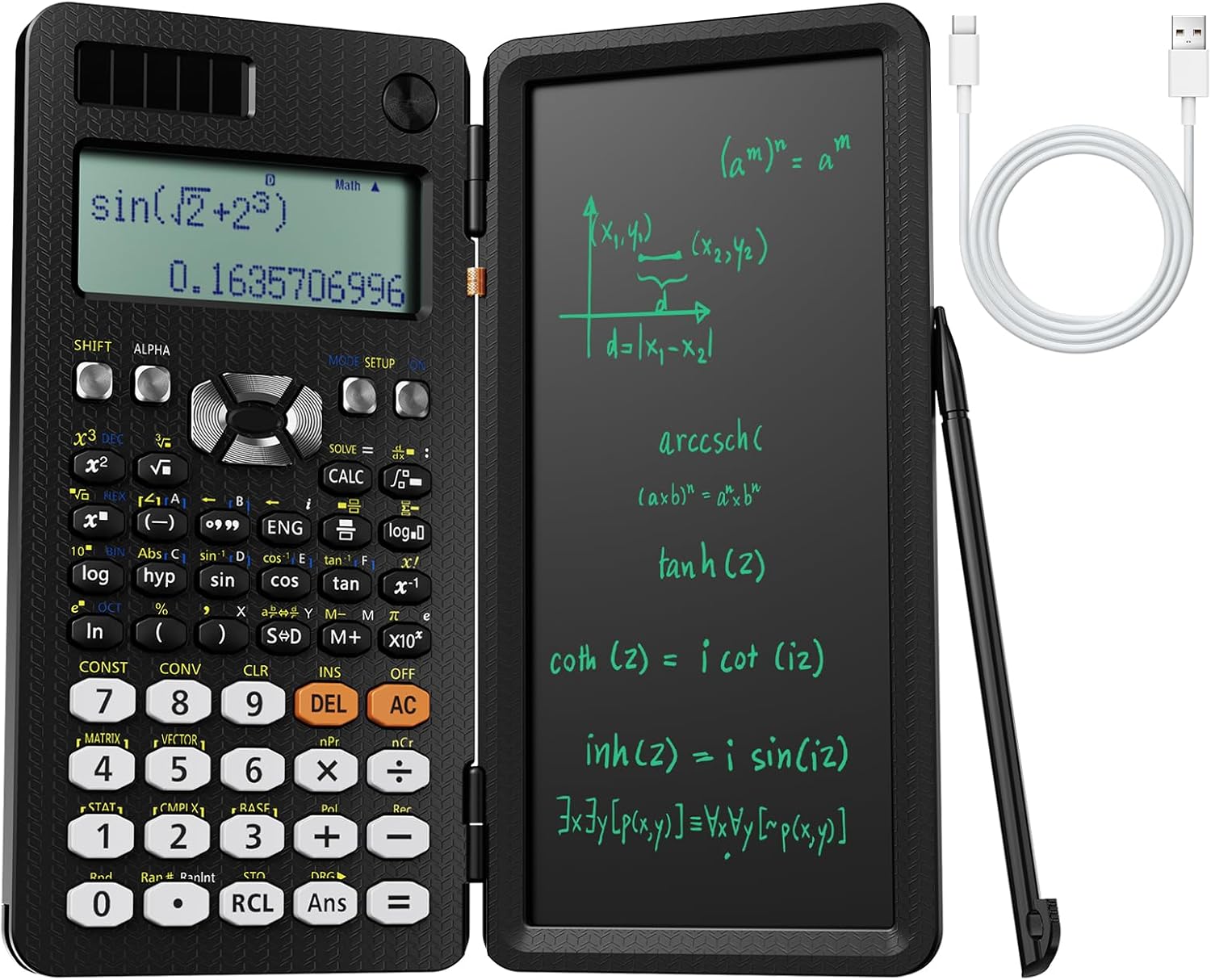
Figure 1: NEWYES 991ES MAX Scientific Calculator, showing the calculator on the left and the writing pad on the right, with a stylus and charging cable.

Figura 2: dettagliata view of key features including the 4-line display, writing board, pen storage, and Type-C charging port.
Impostare
Accensione e ricarica
The calculator operates on a dual power supply system: Type-C rechargeable battery and solar power.
- Carica iniziale: Before first use, connect the calculator to a power source using the provided Type-C charging cable. The charging port is located on the side of the device.
- Energia solare: For continuous power in well-lit environments, ensure the solar panel located above the display is exposed to light.
Video: Demonstrates the Type-C charging port and the calculator's rechargeable feature. This video highlights the convenience of not needing frequent battery replacements.
Utilizzo del blocco note
- Retrieve Stylus: The stylus is stored in the lower left corner of the calculator. Slide it out gently. It may be slightly tight initially.
- Scrivere: Use the stylus to write notes, formulas, or diagrams on the LCD writing pad.
- Chiaro: To clear the writing pad, turn the button located near the hinge to the unlocked position, then press the clear button on the writing pad.

Figure 3: The integrated writing pad in use, demonstrating its functionality for note-taking.
Istruzioni per l'uso
Operazioni di base
The calculator features a standard scientific calculator layout.
- Accensione/spegnimento: Premere il tasto ON button to turn on. Press SPOSTARE Poi AC (OFF) per spegnere.
- Ingresso: Enter numbers and operations using the keypad. The 4-line display shows the input and results.
- Clear Entry (CE) / All Clear (AC): Utilizzo DEL to delete the last entered character. Use AC to clear all current calculations.
Advanced Functions (417 Functions)
The 991ES MAX supports a wide range of mathematical and scientific functions.
- Accesso alle funzioni: Molte funzioni sono accessibili premendo il tasto SPOSTARE or ALFA tasto seguito dal tasto funzione desiderato.
- Modalità: Premere IMPOSTAZIONE MODALITÀ to select different calculation modes (e.g., COMP, CMPLX, STAT, BASE-N, EQN, MATRIX, TABLE, VECTOR).
- Conversione di frazioni/decimali: To change results between fractions and decimals, use the S↔D key. Alternatively, configure calculator settings:
- Premere SPOSTARE.
- Premere MODALITÀ.
- Choose 1 or 2 to set the mode for fraction (MthIO) or decimal (LineIO).

Figura 4: Oltreview of the 8 calculation modes and the extensive list of 417 functions supported by the calculator.
Funzioni chiave finiteview
| Categoria | Funzioni |
|---|---|
| Basic Calculation | Basic Calculation, Fraction Calculation, Degree/Minute/Second (Sexagesimal) Calculations, Reciprocal Calculation, Percent Calculation, Factorial Function, π, Calculation with A and π, Rounding Function |
| Advanced Calculation | Transcendental number e, Base-n calculation, Logical Operators, Complex number calculation, Matrix calculations, Vector calculations, Differential calculation, Integration calculation |
| Funzioni applicate | Multi-statement Command (:), Continuous Calculation, Replay Function, Multi-replay Function, CALC Function, SOLVE Function |
| Funzioni statistiche | List-based STAT data editor, Standard deviation, Paired-variable statistics regression analysis |
| Constants & Conversions | 40 scientific constants, 40 metric conversions (20 conversion pairs) |
| Memoria | 9 variable memories |
Manutenzione
- Pulizia: Use a soft, dry cloth to clean the calculator and writing pad surfaces. Do not use abrasive cleaners or solvents.
- Magazzinaggio: When not in use, fold the calculator to protect the screen and keypad. Store in a cool, dry place away from direct sunlight and extreme temperatures.
- Cura della batteria: Recharge the calculator regularly to maintain battery health. Avoid fully discharging the battery for extended periods.
- Cura dello stilo: Ensure the stylus is securely stored in its designated slot when not in use to prevent loss.
Risoluzione dei problemi
| Problema | Possibile causa/soluzione |
|---|---|
| La calcolatrice non si accende. | Battery may be depleted. Connect to Type-C charger. Ensure solar panel is exposed to light. |
| Writing pad does not clear. | Ensure the lock button for the writing pad is in the unlocked position before pressing the clear button. |
| Il display è scuro o illeggibile. | Adjust ambient lighting for the writing pad. For the calculator display, ensure sufficient battery charge. |
| Stylus is difficult to remove. | The stylus may be tight when new. Apply gentle, firm pressure to slide it out. |
| Risultati di calcolo errati. | Check the selected calculation mode (IMPOSTAZIONE MODALITÀ). Verify input values and function usage. Refer to the detailed function guide for specific operations. |
Specifiche
- Modello: 991ES MAX
- Funzioni: 417
- Display: 4-Line Written Display
- Fonte di energia: Solar & Rechargeable Battery (Type-C)
- Dimensioni: 12 x 2 x 0.1 pollici (piegato)
- Peso dell'articolo: 9.5 once
- Screen Size (Writing Pad): 6.5 pollici
- Batterie incluse: 1 CR5 battery (for calculator memory, included)
Garanzia e supporto
For warranty information and customer support, please refer to the official NEWYES websito o contattare il rivenditore.


