Prodotto finitoview
The EMOS GoSmart Outdoor Surveillance Camera with WiFi and App provides an advanced solution for monitoring your outdoor area. This device combines high-resolution video surveillance with integrated lighting, offering comprehensive security features for your property.

Image: The EMOS GoSmart Outdoor Surveillance Camera H4064, shown alongside a smartphone displaying its live feed and control interface.
Key features include a 3 MP high-resolution camera, an integrated LED light adjustable between 200 and 1200 lumens, and a rotating camera function for extended coverage. It supports night vision, motion detection, two-way audio communication, and can be controlled via the EMOS GoSmart app, compatible with Google Assistant and Alexa.
Configurazione e installazione
Contenuto della confezione
Prima di iniziare l'installazione, verificare che tutti i componenti siano presenti nella confezione:
- EMOS GoSmart Outdoor Camera with LED Light
- Installation material for wall mounting
- Manuale dell'utente (questo documento)
Installazione fisica
The camera is designed for wall mounting. Choose a suitable outdoor location that provides the desired surveillance coverage and has access to a wired power source. Ensure the mounting surface is stable and can support the camera's weight.
- Segnare i punti di foratura sulla parete utilizzando la staffa di montaggio come modello.
- Praticare dei fori nei punti contrassegnati.
- Inserire i tasselli in dotazione nei fori praticati.
- Fissare la staffa di montaggio alla parete utilizzando le viti.
- Attach the camera unit to the mounted bracket.
Collegamento di potenza
Connect the camera to a 12-volt wired power supply. Ensure the connection is secure and protected from outdoor elements, as the camera is waterproof (IP65 rated).
App Installation and Wi-Fi Setup
To control and monitor your camera, download the EMOS GoSmart App on your smartphone or tablet. The app is available for both Android and iOS devices.
- Cercare "EMOS GoSmart" in the Google Play Store (for Android) or Apple App Store (for iOS).
- Scarica e installa l'app.
- Apri l'app e segui le istruzioni sullo schermo per creare un account o accedere.
- Add your new camera device by selecting the appropriate model and following the pairing process. The camera connects via 2.4 GHz Wi-Fi.

Image: A user interacting with the EMOS GoSmart application on a mobile phone, demonstrating remote monitoring capabilities.
Utilizzo della fotocamera
Funzioni della fotocamera
The EMOS GoSmart camera offers a range of functions accessible through the mobile application:
- Video ad alta risoluzione: Captures video at 3 Megapixel resolution with a 130° wide-angle view.
- Lente girevole: The camera lens can be rotated 120° horizontally via the app to adjust the viewzona di ingaggio.
- Visione notturna: Provides clear surveillance up to 10 meters in low-light conditions.
- Luce LED integrata: The powerful LED light can be adjusted between 200 and 1200 lumens directly from the app, providing illumination for your monitored area.
- Motion Detection & Person Recognition: The camera detects movement and can specifically identify human figures, reducing false alarms.
- Comunicazione bidirezionale: Use the built-in microphone and speaker for real-time two-way audio communication.
- Sirena: Activate a 120 dB siren remotely via the app to deter intruders.
- Adjustable Surveillance Areas: Definisci zone specifiche all'interno della telecamera view for motion detection, ensuring you only receive alerts for relevant activities.

Image: An illustration highlighting the key features of the EMOS GoSmart camera, including motion detection, two-way audio, night vision, and adjustable LED light.

Image: This graphic details advanced functionalities such as defining adjustable surveillance zones, the integrated 120 dB siren, person detection, 2.4 GHz Wi-Fi operation, and smart scenario integration.

Image: Visual representation of the EMOS GoSmart camera's adjustable light intensity, demonstrating illumination levels at 200, 600, 1000, and 1200 lumens.
Registrazione e archiviazione
The camera supports video recording to a local SD card (not included) or to cloud storage. Your data is stored securely on AWS-Cloud servers located in Germany.
Integrazione della casa intelligente
The EMOS GoSmart camera is compatible with popular smart home platforms, including Amazon Alexa and Google Assistant. It also supports Tuya and Smart Life ecosystems, allowing for seamless integration into your existing smart home setup.
Manutenzione
To ensure optimal performance and longevity of your EMOS GoSmart camera, regular maintenance is recommended:
- Pulizia: Pulire periodicamente l'obiettivo e l'alloggiamento della fotocamera con un panno morbido e asciutto.amp panno per rimuovere polvere e sporco. Evitare l'uso di prodotti chimici aggressivi o materiali abrasivi.
- Aggiornamenti del firmware: Keep the camera's firmware updated through the EMOS GoSmart App to benefit from the latest features and security enhancements.
- Alimentazione elettrica: Ensure the power connection remains secure and free from damage.
Risoluzione dei problemi
If you encounter issues with your EMOS GoSmart camera, refer to the following common troubleshooting steps:
| Problema | Possibile causa | Soluzione |
|---|---|---|
| La fotocamera non si connette al Wi-Fi | Incorrect Wi-Fi password, 5 GHz network, weak signal. | Ensure correct 2.4 GHz Wi-Fi password. Move camera closer to router or use a Wi-Fi extender. |
| Nessuna immagine o schermata nera nell'app | Power issue, app glitch, network problem. | Check power connection. Restart the app. Verify internet connectivity. |
| Motion detection too sensitive/not sensitive enough | Sensitivity settings, detection zone configuration. | Adjust motion detection sensitivity and define specific surveillance zones within the app. |
| L'audio bidirezionale non funziona | Microfono/altoparlante bloccati, autorizzazioni app. | Ensure nothing is obstructing the microphone or speaker. Check app permissions for audio access. |
For further assistance, please refer to the support section of the EMOS GoSmart App or visit the EMOS official websito.
Specifiche
| Caratteristica | Dettaglio |
|---|---|
| Numero di modello | H4064 |
| Ambiente di utilizzo | All'aperto |
| Dispositivi compatibili | iPhone, Smartphone |
| Fonte di alimentazione | Cablato (12 Volt) |
| Protocollo di connettività | Wi-Fi (2.4 GHz) |
| Tipo di controllore | Google Assistant, SmartThings, Tuya, Android, Amazon Alexa |
| Tipo di montaggio | Montaggio a parete |
| Risoluzione video | 1296p (3 MP Effective Still Resolution) |
| Colore | Bianco |
| Componenti inclusi | Camera, Installation Accessories |
| Viewangolo di ing | 130 gradi |
| Gamma di visione notturna | 10 metri |
| Materiale | Metallo |
| Resistenza all'acqua | Impermeabile (IP65) |
| Dimensioni articolo (L x P x A) | Dimensioni: 7.4 x 13.1 x 26 cm |
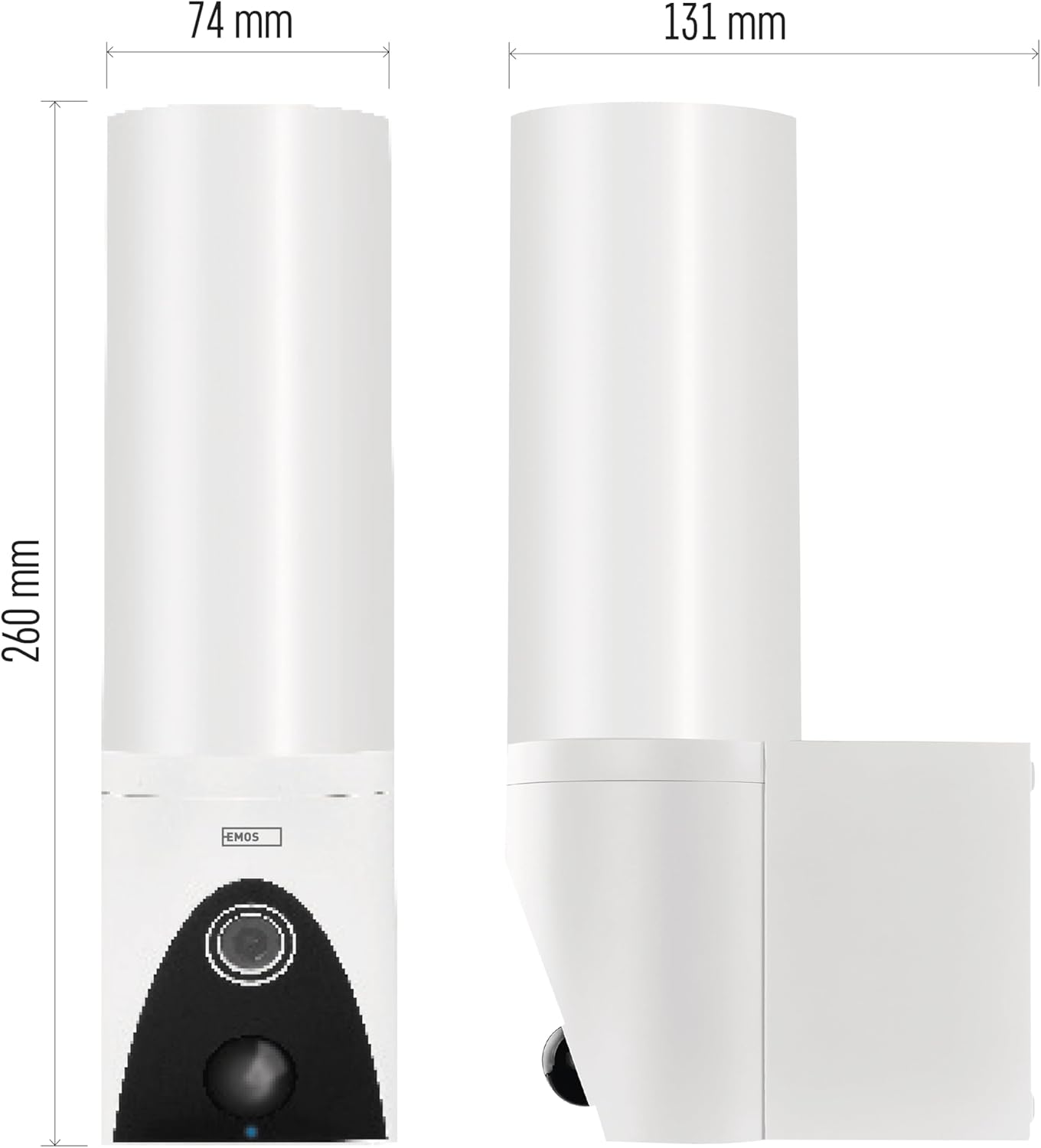
Image: Technical drawing illustrating the dimensions of the EMOS GoSmart Outdoor Surveillance Camera, with measurements for height, width, and depth.
Garanzia e supporto
EMOS products are designed for reliability and performance. For any questions, technical support, or warranty claims, please contact EMOS customer service or visit the official EMOS websito per informazioni di supporto dettagliate.
Software updates are guaranteed, though the specific end date is not specified. It is recommended to regularly check the EMOS GoSmart App for available updates to ensure your device operates with the latest features and security patches.
For information regarding recycling of lamps o smaltimento di l rotti/danneggiatiamps, fare riferimento alle normative e alle linee guida locali.


