Introduzione
The Logitech Zone Wireless 2 is a premium noise-canceling headset designed for professional use, offering advanced audio clarity and comfort. This manual provides instructions for setting up, operating, maintaining, and troubleshooting your headset to ensure optimal performance.
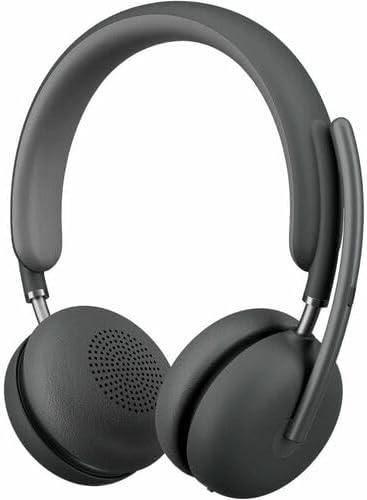
Image: The Logitech Zone Wireless 2 headset, shown in graphite color.
Caratteristiche principali:
- Certificazione Microsoft Teams: Optimized for Microsoft Teams over native Bluetooth, freeing up a USB port.
- Chiarezza avanzata delle chiamate: Logi Tune app feature suppresses far-end ambient noise for clearer communication.
- Four Noise-Canceling Microphones: Elevate your voice and suppress background sounds.
- Cancellazione attiva del rumore ibrida (ANC): Offers ANC high, ANC low, transparency on, and ANC/transparency off modes for focused work.
- Audio personalizzato: Custom listening experience via Personal EQ in the Logi Tune mobile app with 40mm drivers.
- Progettazione sostenibile: Features interchangeable earpads, a replaceable battery, 20% post-consumer recycled plastic, and low-carbon aluminum.
- Libertà senza fili: Connects simultaneously to laptop and mobile phone via Bluetooth with a range of up to 170 ft (50 meters).
- Durata prolungata della batteria: Up to 15 hours talk time and 22 hours listening time (with ANC on).
Impostare
1. Cosa c'è nella scatola
- Logitech Zone Wireless 2 Headset
- Custodia protettiva
- Cavo di ricarica USB-C
- Adattatore da USB-C a USB-A
- Manuale dell'utente (questo documento)
- Ear Cushions (pre-installed, with additional set for replacement)

Image: The Logitech Zone Wireless 2 headset, protective case, USB-C cable, and USB-C to USB-A adapter.
2. Caricare l'auricolare
- Connect the USB-C charging cable to the USB-C port on the headset.
- Collegare l'altra estremità del cavo a una fonte di alimentazione USB (ad esempio, una porta USB del computer, un adattatore da parete).
- L'indicatore LED sull'auricolare mostrerà lo stato di carica. Una carica completa richiede circa 2 ore.
3. Connessione ai dispositivi
The Zone Wireless 2 headset supports Bluetooth 5.2 for wireless connectivity.
Accoppiamento Bluetooth:
- Power on the headset by sliding the power switch.
- Press and hold the Bluetooth pairing button on the headset until the LED indicator flashes blue rapidly.
- On your device (laptop, smartphone), go to Bluetooth settings and select "Logitech Zone Wireless 2" from the list of available devices.
- Una volta connesso, l'indicatore LED diventerà blu fisso.

Image: Diagram illustrating the headset's ability to connect simultaneously to a smartphone and a laptop via Bluetooth.
Microsoft Teams Certification:
The headset is certified for Microsoft Teams over native Bluetooth. This allows for a full Teams meeting experience without requiring a separate USB dongle, preserving your device's USB ports.
4. Logi Tune App Installation
For full functionality, including Personal EQ, Advanced Call Clarity, and firmware updates, download and install the Logi Tune application on your computer or mobile device. The app provides a personalized experience and device management.

Image: A laptop screen displaying the Logi Tune application interface, showing device management and settings.
Utilizzo dell'auricolare
1. Controlli delle cuffie
The headset features intuitive controls for managing calls, media, and noise cancellation.

Image: A close-up of the right earcup, showing the power switch, ANC button, and other controls.
- Interruttore di alimentazione: Scorrere per accendere o spegnere l'auricolare.
- Pulsanti del volume: Regola il volume dell'audio.
- Pulsante multifunzione: Play/pause media, answer/end calls.
- Pulsante ANC: Scorrere le modalità di cancellazione attiva del rumore.
- Microfono disattivato: Flip the microphone boom up to mute, down to unmute.
2. Cancellazione attiva del rumore (ANC)
The Hybrid ANC feature allows you to control your listening environment. Press the ANC button to switch between modes:
- ANC Alto: Maximum noise cancellation for noisy environments.
- ANC Basso: Reduced noise cancellation for less intrusive background sounds.
- Trasparenza attiva: Lascia passare i suoni ambientali, mantenendoti consapevole di ciò che ti circonda.
- ANC e Trasparenza disattivati: No active noise cancellation or transparency mode.
3. Utilizzo del microfono
The headset features four noise-canceling microphones designed to isolate your voice and suppress background noise during calls. Simply lower the microphone boom to activate the microphone for calls. Raise it to mute.

Image: A man wearing the headset, illustrating the clear audio experience with sound wave graphics around his head.
4. Audio Customization with Logi Tune
Use the Logi Tune app to personalize your audio experience:
- Personal EQ: Adjust audio frequencies to optimize sound for your hearing range.
- Chiarezza avanzata delle chiamate: Further refine noise suppression for incoming audio.
- Aggiornamenti del firmware: Ensure your headset has the latest features and performance improvements.
Manutenzione
1. Pulizia
- Pulisci l'auricolare con un panno morbido eamp stoffa.
- Evitare l'uso di detergenti o solventi abrasivi.
- Assicurarsi che tutte le porte siano asciutte prima di caricare o collegare.
2. Earpad and Battery Replacement
The Zone Wireless 2 is designed for longevity with user-replaceable components:
- Cuscinetti auricolari: Interchangeable earpads can be replaced to maintain hygiene and comfort. Refer to the Logi Tune app or Logitech support websito per istruzioni su come sostituirli.
- Batteria: The battery is designed to be replaceable, extending the product's lifespan. Contact Logitech support for information on obtaining and replacing the battery.

Image: The headset disassembled, showing the removable earpads, internal components, and a replaceable battery, highlighting its modular design.
3. Conservazione
Quando non vengono utilizzate, conservare le cuffie nella loro custodia protettiva per evitare danni e mantenerle pulite.
Risoluzione dei problemi
- Nessun potere: Assicurati che le cuffie siano cariche. Collegale a una fonte di alimentazione tramite il cavo USB-C.
- Impossibile connettersi tramite Bluetooth:
- Ensure the headset is in pairing mode (LED flashing blue).
- Controlla le impostazioni Bluetooth del tuo dispositivo e assicurati che il Bluetooth sia abilitato.
- Prova a riavviare sia l'auricolare che il dispositivo.
- If previously paired, remove the headset from your device's Bluetooth list and re-pair.
- Scarsa qualità audio:
- Ensure the headset is within the Bluetooth range (up to 170 ft / 50 meters).
- Verificare la presenza di interferenze da altri dispositivi wireless.
- Adjust Personal EQ settings in the Logi Tune app.
- Ensure the microphone boom is properly positioned for clear voice pickup.
- L'ANC non funziona in modo efficace:
- Ensure ANC mode is activated (not in Transparency or Off mode).
- Check that the earpads are properly seated and forming a good seal around your ears.
- Logi Tune App Issues: Ensure the app is updated to the latest version. Restart the app and your headset.
Per ulteriore assistenza, fare riferimento al supporto Logitech website or the Logi Tune application.
Specifiche
| Caratteristica | Dettaglio |
|---|---|
| Nome del modello | Zone Wireless 2 |
| Numero modello articolo | 981-001435 |
| Tecnologia di connettività | Senza fili (Bluetooth 5.2) |
| Portata Bluetooth | Fino a 50 metri (170 piedi) |
| Presa per cuffie | USB di tipo C (per la ricarica) |
| Tipo di driver audio | Driver dinamico (40 mm) |
| Gamma di frequenza | 20 - 20000 Hz |
| Controllo del rumore | Cancellazione attiva del rumore ibrida |
| Microfono | Four noise-canceling mics |
| Durata della batteria (ascolto) | Fino a 22 ore (con ANC attivo) |
| Durata della batteria (tempo di conversazione) | Fino a 15 ore (con ANC attivo) |
| Tempo di ricarica | Circa 2 ore |
| Peso dell'articolo | 230 grammi (8.1 once) |
| Dimensioni del prodotto | 9 x 8.75 x 2.5 pollici |
| Materiale | Plastic (20% post-consumer recycled) |
| Dispositivi compatibili | Desktops, Laptops (PC, Mac), Smartphones |
| Metodo di controllo | App (Logi Tune), Media Control Buttons |
| Codice UPC | 097855196316 |
Garanzia e supporto
Informazioni sulla garanzia
Logitech products are typically covered by a limited hardware warranty. Please refer to the warranty card included with your product or visit the official Logitech website for specific warranty terms and conditions applicable to your region and product model.
Assistenza clienti
For technical assistance, troubleshooting guides, FAQs, and driver downloads, please visit the official Logitech support websito:
You can also utilize the Logi Tune application for device management, personalized settings, and access to support resources directly from the app.


