Introduzione
This manual provides comprehensive instructions for the Lumote Replacement Remote Control, designed to function as a direct replacement for various ONKYO audio systems. This remote control replicates all functions of the original ONKYO RC660S, RC662S, CR-315, CR-515, CR-325, CR-535, and CR-715 remote controls. No programming or setup codes are required; simply insert batteries, and the remote is ready for immediate use.
Impostare
1. Installazione delle batterie
Il telecomando richiede due (2) batterie AAA (non incluse). Per installarle, seguire questi passaggi:
- Individuare il coperchio del vano batterie sul retro del telecomando.
- Premere la linguetta e far scorrere il coperchio verso il basso per aprire il vano.
- Inserire due batterie AAA, assicurandosi che i terminali positivo (+) e negativo (-) siano allineati correttamente con le marcature all'interno del vano.
- Riposizionare il coperchio del vano batteria finché non scatta in posizione.
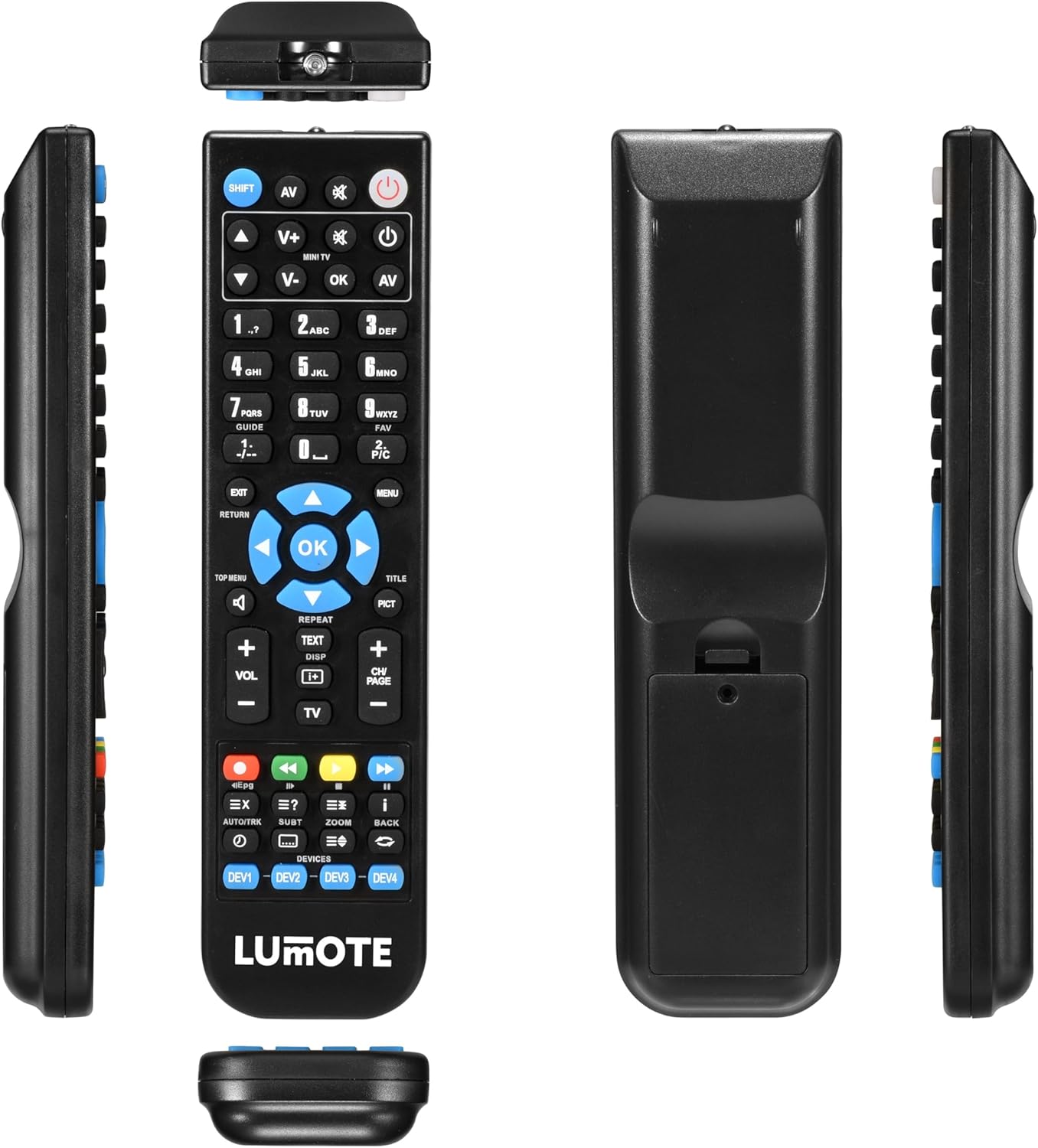
Immagine: Multiplo views of the Lumote replacement remote control. The back view clearly shows the battery compartment, which can be opened by sliding the cover down to insert two AAA batteries.
2. Utilizzo iniziale
Once batteries are installed, the Lumote Replacement Remote Control is ready for immediate use. No additional setup codes or programming are required. Point the remote towards your ONKYO audio system and begin operation.
Istruzioni per l'uso
This remote control provides full functionality for your compatible ONKYO audio system. Below is a guide to the primary buttons and their functions.

Immagine: Davanti view of the Lumote replacement remote control, displaying all buttons and their labels. This image serves as a visual reference for the button descriptions below.
Funzioni dei pulsanti chiave:
- Energia (⏻): Turns the ONKYO system on or off.
- AV: Seleziona la sorgente di ingresso audio/video.
- SPOSTARE: Activates secondary functions for certain buttons (if applicable).
- V+ / V-: Regola il volume verso l'alto o verso il basso.
- OK: Conferma le selezioni nei menu.
- Frecce di navigazione (◀ ▶ ▲ ▼): Naviga attraverso i menu e le opzioni.
- MENU: Accesses the main menu of the ONKYO system.
- USCITA / RITORNO: Exits current menu or returns to the previous screen.
- Tasti numerici (0-9): Direct input for channel selection or numerical settings.
- GUIDA: Accesses program guide (if supported by the connected device).
- PREFERITO: Accede ai canali preferiti o alle impostazioni.
- PIC: Regola le impostazioni dell'immagine.
- MEN SUPERIORE: Accesses the top level menu of a disc.
- TITOLO: Accesses the title menu of a disc.
- VOL+ / VOL-: Dedicated volume control.
- CH+ / CH-: Changes channels or navigates through tracks.
- RIPETERE: Ripete la riproduzione (ad esempio, traccia, capitolo).
- TESTO: Displays teletext (if supported).
- VISUALIZZA: Visualizza le informazioni sullo schermo.
- TV: Switches control to the television (if programmed or universal function).
- Pulsanti colorati (rosso, verde, giallo, blu): Often used for specific functions within menus or interactive services.
- Controlli di riproduzione (Riproduci, Pausa, Interrompi, Avanzamento rapido, Riavvolgimento, Salta): Controlla la riproduzione multimediale.
- Epg: Guida elettronica ai programmi.
- AUTO/TRK: Auto track search or similar function.
- SOTTO: Controllo dei sottotitoli.
- ZOOM: Zooms in/out on the display.
- INDIETRO: Returns to the previous screen or step.
- DEV1 - DEV4: Device selection buttons for universal remote functionality (if applicable, may require programming not covered here as this is a direct replacement).
Note: The specific functionality of some buttons may vary depending on the ONKYO model and the connected devices.
Manutenzione
Pulizia del telecomando
- Pulire il telecomando con un panno morbido e asciutto.
- Per sporco ostinato, leggermente dampInumidire il panno con acqua o con una soluzione detergente delicata, quindi asciugarlo immediatamente.
- Do not use abrasive cleaners, alcohol, or solvents, as these can damage the surface and markings.
Sostituzione della batteria
- Sostituire le batterie quando la risposta del telecomando diventa lenta o smette di funzionare.
- Always replace both AAA batteries at the same time with new ones.
- Non mischiare batterie vecchie e nuove o diversi tipi di batterie.
- Rimuovere le batterie se il telecomando non viene utilizzato per un periodo prolungato per evitare perdite.
Risoluzione dei problemi
- Il telecomando non risponde:
Ensure the batteries are correctly inserted with the proper polarity (+/-). Replace old or depleted batteries with new AAA batteries. Make sure there are no obstructions between the remote control and the ONKYO system's infrared receiver. Ensure you are within the effective range of the remote control.
- Pulsanti specifici non funzionanti:
Check if the button is stuck or dirty. Clean the remote as described in the Maintenance section. If only specific buttons are unresponsive, and others work, it might indicate a fault with the remote itself.
- Il sistema non si accende/spegne:
Verify that the ONKYO system is plugged into a power source and is not in a standby mode that prevents remote activation. Test other functions to confirm the remote is generally working.
Se le procedure di risoluzione dei problemi non risolvono il problema, consultare la sezione Garanzia e supporto.
Specifiche
| Marca | Lumote |
| Dispositivi compatibili | ONKYO RC660S, RC662S, CR-315, CR-515, CR-325, CR-535, CR-715 |
| Tipo di batteria | 2 batterie AAA (non incluse) |
| Peso dell'articolo | 6 once (circa 170 grammi) |
| Dimensioni del pacco | 9 x 3 x 2 pollici (circa 22.86 x 7.62 x 5.08 cm) |
| Numero massimo di dispositivi supportati | 1 (Direct replacement for specified ONKYO models) |
Informazioni sulla garanzia
This Lumote Replacement Remote Control comes with a 12 mesi di garanzia from the date of purchase. This warranty covers manufacturing defects and ensures the remote functions as described. Please retain your proof of purchase for warranty claims. The warranty does not cover damage caused by misuse, accidents, unauthorized repairs, or normal wear and tear.
Supporto
For further assistance, technical support, or warranty inquiries, please contact the retailer or manufacturer directly. Refer to your purchase documentation for specific contact details. When contacting support, please have your product model information and purchase date available.