1. Prodotto finitoview
The GEARELEC S3 is an advanced motorcycle helmet Bluetooth headset integrated with a 1080P HD camera. Designed for enhanced communication and recording during rides, it features full-duplex intercom for up to 8 riders, G-Sensor lock for collision footage, and a 128GB TF card for extensive recording. It also includes HiFi stereo sound, music sharing, FM radio, and triple noise reduction technology for clear audio even at high speeds. The device is built with an IP65 waterproof rating and a long-lasting 2000mAh battery.
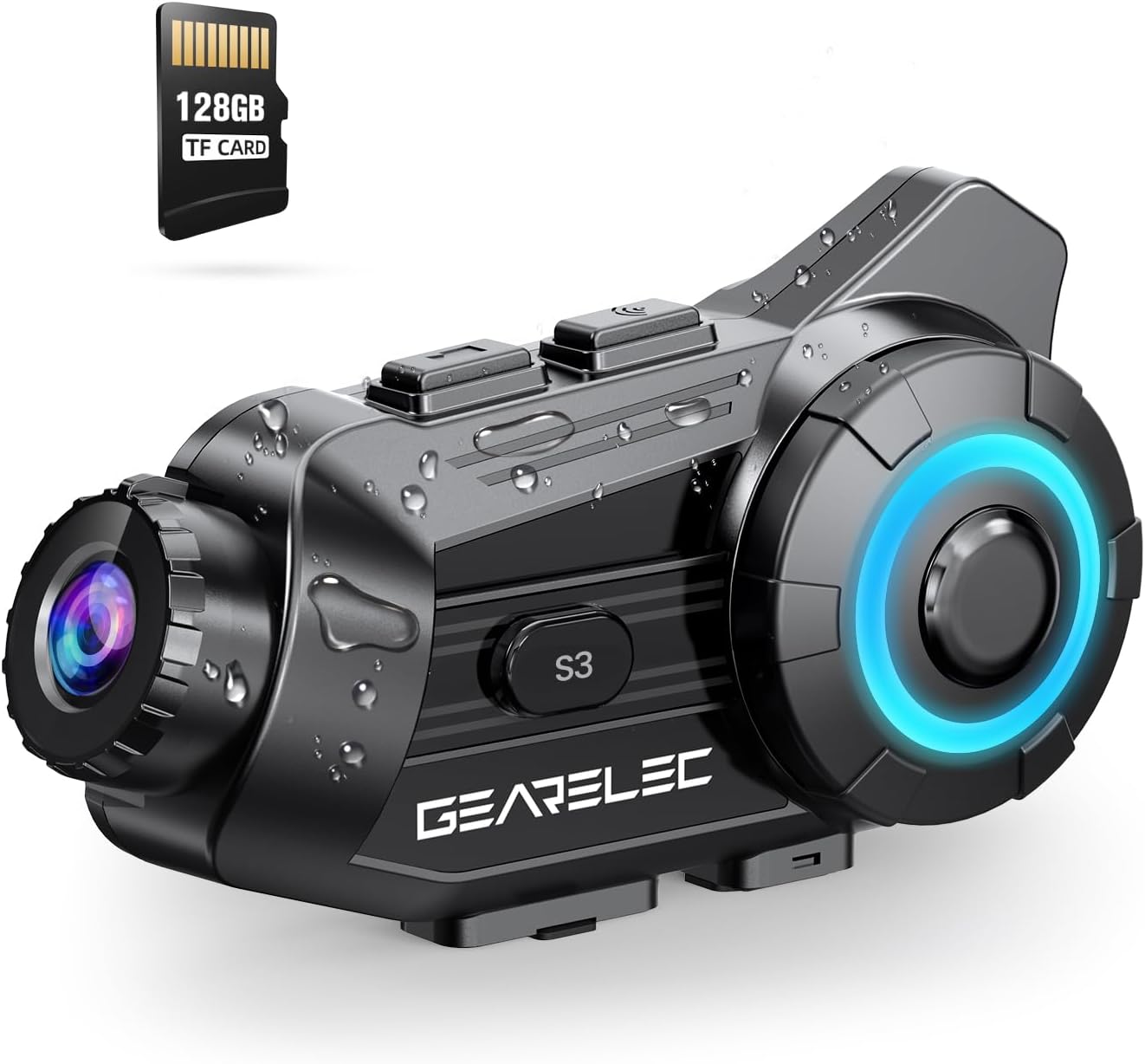
Figure 1: GEARELEC S3 Main Unit with 128GB TF Card.
2. Contenuto della confezione
Si prega di verificare che tutti gli articoli siano presenti nel pacco:
- Unità principale GEARELEC S3
- Headset Speakers and Microphone Kit
- Staffa di montaggio (clip e adesivo)
- Cavo di ricarica USB
- Scheda TF da 128 GB (preinstallata o separata)
- Manuale dell'utente (questo documento)
3. Configurazione e installazione
3.1 Ricarica del dispositivo
Before first use, fully charge the S3 unit. Connect the provided USB charging cable to the charging port on the S3 unit and to a standard USB power adapter (not included). The charging indicator light will show the charging status. A full charge takes approximately 3 hours.

Figure 2: Battery capacity and charging details. The 2000mAh battery provides up to 100 hours of music time and 7 hours of video recording.
3.2 Installazione della scheda TF
The S3 comes with a 128GB TF card. Locate the TF card slot on the unit. Gently insert the TF card into the slot until it clicks into place. Ensure the card is inserted correctly to enable video recording and storage.
3.3 Montaggio sul casco
Choose between the clip-on bracket or the adhesive bracket for mounting the S3 unit to your helmet. Ensure the mounting location allows for optimal camera view and easy access to controls. Securely attach the speakers inside the helmet's ear pockets and position the microphone near your mouth for clear audio.
4. Istruzioni per l'uso
4.1 Accensione/spegnimento
- Accensione: Tenere premuto il pulsante di accensione per circa 3 secondi finché la spia non si accende.
- Spegni: Tenere premuto il pulsante di accensione per circa 3 secondi finché la spia non si spegne.
4.2 Accoppiamento Bluetooth con dispositivo mobile
- Ensure the S3 unit is powered off.
- Tenere premuto il pulsante di accensione per circa 5-7 secondi finché la spia luminosa non lampeggia rapidamente, indicando la modalità di associazione.
- Sul tuo cellulare, attiva il Bluetooth e cerca i dispositivi disponibili.
- Select "GEARELEC S3" from the list.
- Una volta effettuato l'abbinamento, la spia luminosa cambierà colore e verrà emesso un tono di conferma.
4.3 Comunicazione interfonica
The S3 supports full-duplex intercom for 2 to 8 riders within a 2000-meter range.
- Ensure all S3 units are powered on and within range.
- Initiate intercom pairing according to the specific instructions for multi-unit connection (refer to the quick start guide for detailed steps on group pairing).
- Once connected, riders can communicate freely.

Figure 3: Intercom communication for multiple riders.
4.4 Camera Operation and Recording
The integrated 1080P HD camera captures video at 30 frames per second and 2MP still images. It features a 135° wide-angle lens and 20° lens rotation for flexible shooting angles.
- Avvia/Interrompi registrazione: Press the Camera button once to start recording. Press again to stop.
- Scatta una foto: Press and hold the Camera button briefly to capture a still image.
- Blocco sensore G: The built-in gravity sensor automatically detects collisions and locks the current recording segment to prevent it from being overwritten, serving as protected evidence.
- Registrazione in loop: Quando la scheda TF è piena, il sistema sovrascrive automaticamente la scheda non protetta più vecchia files, garantendo una registrazione continua.

Figure 4: 1080P HD lens with 20° rotation for clear shooting.

Figure 5: Loop Recording and Gravity Sensor functionality.
4.5 Using the "RoadCam" App
The S3 has a built-in Wi-Fi module, allowing you to connect to the "RoadCam" application on your smartphone (available on Google Play and the App Store). This app enables you to view recorded videos and photos directly on your phone, and download them for sharing or backup.

Figure 6: "RoadCam" App for viewing and downloading media.
4.6 Audio Features (Music, FM, Noise Reduction)
- Riproduzione musicale: Once paired with your phone, play music through your phone's media player. The S3's 40MM HiFi stereo speakers provide strong bass and clear sound.
- Condivisione di musica: The S3 supports music sharing between two riders within 30-50 meters. Activate this feature through the device controls or app.
- FM Radio: Tune into FM radio stations directly from the S3 unit.
- Riduzione del rumore: Equipped with DSP & CVC noise reduction and a windproof microphone, the S3 minimizes wind and engine noise, ensuring clear calls and music even at speeds up to 80mph.

Figure 7: HiFi Stereo Sound with 40mm speakers.

Figure 8: Triple Noise-Reduction Technology for clear audio.
5. Manutenzione e cura
- Pulizia: Wipe the S3 unit with a soft, damp stoffa. Non utilizzare prodotti chimici aggressivi o detergenti abrasivi.
- Resistenza all'acqua: The S3 has an IP65 waterproof rating, making it suitable for use in rain and snow. However, avoid submerging the device in water.
- Magazzinaggio: Conservare il dispositivo in un luogo fresco e asciutto quando non in uso. Evitare temperature estreme.
- Cura della batteria: For optimal battery life, avoid fully discharging the battery frequently. Charge the device regularly, even if not in active use for extended periods.
6. Risoluzione Dei Problemi
| Problema | Possibile causa | Soluzione |
|---|---|---|
| Il dispositivo non si accende. | Batteria scarica. | Caricare il dispositivo per almeno 3 ore. |
| Impossibile effettuare l'associazione con il telefono. | Dispositivo non in modalità di associazione; Bluetooth disattivato sul telefono; troppi dispositivi associati. | Ensure S3 is in pairing mode. Turn phone Bluetooth off/on. Clear old Bluetooth connections on phone. |
| Scarsa qualità audio/rumore. | Microfono non posizionato correttamente; forte rumore del vento; posizionamento degli altoparlanti. | Adjust microphone closer to mouth. Ensure speakers are aligned with ears. Noise reduction works best at certain speeds. |
| La telecamera non registra. | TF card full or not inserted correctly; card error. | Check TF card insertion. Format TF card (backup data first). Ensure sufficient space. |
| Connessione interfono instabile. | Fuori portata; interferenza; batteria scarica. | Ensure riders are within 2000m. Avoid obstacles. Charge devices. |
7. Specifiche
| Caratteristica | Dettaglio |
|---|---|
| Nome del modello | S3 |
| Tipo di videocamera | Action Camera |
| Risoluzione di acquisizione video | Formato: 1080p |
| Formato di acquisizione video | MP4 |
| Tecnologia del sensore fotografico | CMOS |
| Apertura massima | 1.8 millimetri |
| Angolo dell'obiettivo | Grandangolo 135° |
| Rotazione dell'obiettivo | 20° |
| Tecnologia di connettività | Senza fili (Bluetooth, Wi-Fi) |
| Caratteristiche speciali | Noise Cancellation (DSP & CVC), G-Sensor Lock, Loop Recording, Music Sharing, FM Radio |
| Interfono | Up to 2000 meters (full-duplex) |
| Max Riders (Intercom) | 8 Cavalieri |
| Capacità della batteria | 2000mAh |
| Tempo di ricarica | Circa 3 ore |
| Tempo di musica | Fino a 100 ore |
| Tempo di registrazione video | Fino a 7 ore |
| Grado di impermeabilità | Grado di protezione IP65 |
| Peso dell'articolo | 15.2 once |
| Colore | Nero |
8. Garanzia e supporto
For any questions, technical assistance, or warranty inquiries regarding your GEARELEC S3, please contact the seller directly. The seller, RuiSi Elctric, typically responds to inquiries within 6 hours.
To contact support, please visit the product page on Amazon and click on the seller's name "RuiSi Elctric" followed by "ASK A QUESTION".


