1. Introduzione
This manual provides essential information for the safe and efficient installation, operation, and maintenance of your TCP Economy LED UFO High Bay Luminaire. Please read this manual thoroughly before installation and retain it for future reference.
The TCP Economy LED UFO High Bay Luminaire is designed for commercial and industrial applications, offering high efficacy and a long operational lifespan. It features a robust design suitable for various environments, including warehouses, retail spaces, and gymnasiums.

Figura 1: Fronte view of the TCP Economy LED UFO High Bay Luminaire, showing the LED array and clear lens.
2. Informazioni sulla sicurezza
- Sicurezza elettrica: Installation must be performed by a qualified electrician in accordance with all national and local electrical codes. Always disconnect power at the circuit breaker before installing, servicing, or cleaning the fixture.
- Messa a terra: Assicurarsi che l'apparecchio sia correttamente collegato a terra per evitare scosse elettriche.
- Gestione: Do not handle the fixture with wet hands. Avoid touching the LED array directly.
- Ambiente operativo: This luminaire is rated IP65 for outdoor use and protection against dust and water jets. Do not submerge the fixture in water. Ensure the operating temperature is within the specified range.
- Montaggio: The mounting structure must be capable of supporting the weight of the fixture.
- Modifiche: Do not attempt to modify or disassemble the fixture. This will void the warranty and may create safety hazards.
3. Contenuto della confezione
Dopo aver disimballato il prodotto, verificare che tutti i componenti siano presenti e integri. La confezione deve contenere:
- 1 x TCP Economy LED UFO High Bay Luminaire
- 1 x Eyebolt for suspended mounting
Note: Additional mounting hardware (e.g., chains, hooks) may be required and is sold separately.
4. Specifiche
| Caratteristica | Specificazione |
|---|---|
| Numero di modello | 762148336747 |
| Marca | TCP |
| Cosatage Opzioni | 115W / 160W / 200W |
| Efficacia | Fino a 145 LPW |
| Temperatura del colore (CCT) | Colore: 4000K / 5000K |
| Oscuramento | Oscuramento 0-10V |
| Grado di protezione IP | IP65 (a tenuta di polvere, protetto contro i getti d'acqua) |
| Durata | 50,000 ore |
| Ingresso volumetage | 120-277V AC (Typical, verify product label) |
| Tipo di sorgente luminosa | GUIDATO |
| Tipo di installazione | Suspended (Eyebolt included) |
| Forma di fissaggio | Soffitto |
| Uso interno/esterno | All'aperto |
| Materiale dell'ombra | Acrilico |
| Peso dell'articolo | 6.44 libbre |
| Dimensioni del pacco | 12.48 x 12.44 x 5.87 pollici |
| Fixture Dimensions (approx.) | 11" Diameter x 5.9" Height (with eyebolt) |
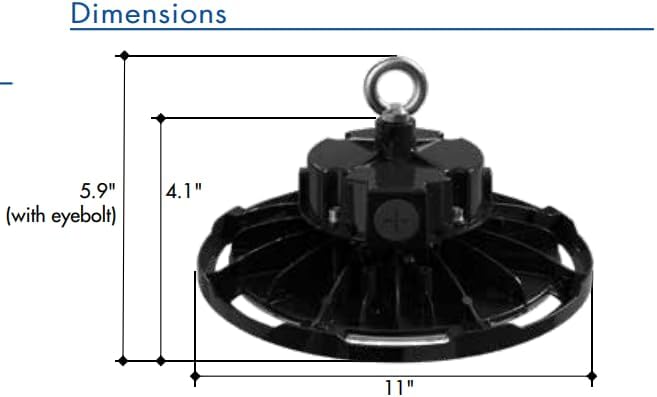
Figure 2: Approximate dimensions of the luminaire, including height with eyebolt and diameter.
5. Istruzioni per l'installazione (configurazione)
This luminaire is designed for suspended mounting. Follow these steps for proper installation:
- La sicurezza prima di tutto: Ensure power to the installation area is turned OFF at the circuit breaker before beginning any work.
- Ispezionare l'apparecchio: Carefully remove the luminaire from its packaging and inspect for any damage. Do not install if damaged.
- Prepare Mounting Point: Identify a suitable structural mounting point capable of safely supporting the luminaire's weight (6.44 lbs). Install appropriate mounting hardware (e.g., chain, hook) if not already present.
- Attach Eyebolt: Securely thread the provided eyebolt into the top of the luminaire housing.
- Suspend Fixture: Carefully lift the luminaire and attach the eyebolt to your chosen mounting hardware. Ensure the fixture is stable and level.
- Cablaggio:
- Open the wiring compartment on the top of the fixture.
- Connect the AC input wires (Line, Neutral, Ground) from your power supply to the corresponding wires on the luminaire. Refer to local electrical codes for proper wiring practices.
- For 0-10V dimming functionality, connect the purple (DIM+) and gray (DIM-) wires from your 0-10V dimmer to the corresponding dimming wires on the luminaire. If dimming is not desired, cap these wires individually.
- Assicurarsi che tutti i collegamenti siano sicuri e isolati.
- Chiudi scomparto: Securely close the wiring compartment cover.
- Ripristina alimentazione: Una volta completata l'installazione e verificati tutti i collegamenti, ripristinare l'alimentazione all'interruttore automatico.
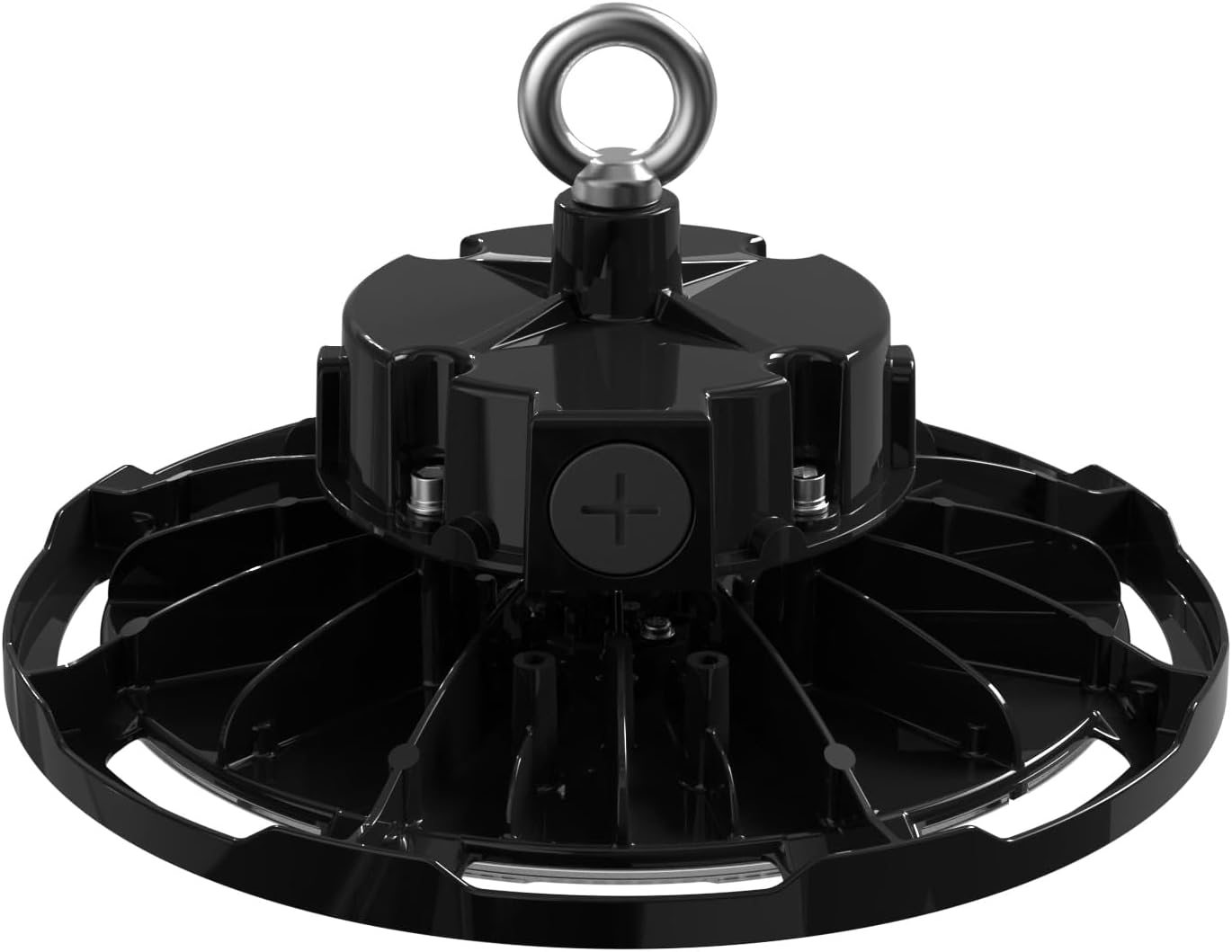
Figura 3: in alto view of the luminaire, illustrating the eyebolt for suspension and the location of the wiring compartment.
6. Funzionamento
The TCP Economy LED UFO High Bay Luminaire operates immediately upon receiving power.
- Accensione/spegnimento: Control the luminaire's power supply via the connected wall switch or circuit breaker.
- dimming: If connected to a compatible 0-10V dimmer, adjust the light output by manipulating the dimmer control. The luminaire will respond to the 0-10V signal to vary its brightness.
7. Manutenzione
The TCP Economy LED UFO High Bay Luminaire requires minimal maintenance.
- Pulizia: Ensure power is disconnected before cleaning. Use a soft, damp cloth to wipe the exterior of the fixture. Do not use abrasive cleaners or solvents, as these may damage the finish or optical components.
- Ispezione: Periodically inspect the fixture and its mounting hardware for any signs of damage, loose connections, or wear. Address any issues promptly.
- Nessuna parte riparabile dall'utente: There are no user-serviceable parts inside the luminaire. Do not attempt to open or repair the unit.
8. Risoluzione Dei Problemi
If the luminaire is not functioning as expected, perform the following basic checks:
- Nessuna luce:
- Verify that the power supply to the fixture is active at the circuit breaker and wall switch.
- Controllare tutti i collegamenti elettrici per verificare il corretto contatto e isolamento.
- Oscuramento non funzionante:
- Ensure the 0-10V dimmer is compatible and correctly wired to the luminaire's dimming leads (purple and gray).
- Verify the dimmer is functioning correctly.
- Sfarfallio:
- Controllare che i collegamenti dei cavi non siano allentati.
- Assicurare il volume di inputtage è stabile e rientra nell'intervallo specificato.
If these steps do not resolve the issue, contact customer support for assistance. Do not attempt further repairs yourself.
9. Garanzia e supporto
This TCP Economy LED UFO High Bay Luminaire is covered by a Garanzia limitata di cinque anni against defects in manufacturing. Please retain your proof of purchase for warranty claims.

Figure 4: Warranty statement and product listings (UL and cUL listed, IP65 Rated).
For technical support, warranty inquiries, or replacement parts, please contact TCP customer service:
- Websito: www.tcpi.com
- Telefono: Refer to TCP's official websito per i numeri di contatto attuali.


