1. Introduzione
Welcome to the ATTOP X-PACK 2 Mini Foldable Drone user manual. This guide provides essential information for setting up, operating, and maintaining your new drone. Designed for kids and beginners, the X-PACK 2 offers an intuitive flying experience with features like FPV video, voice control, altitude hold, and headless mode. Please read this manual thoroughly before first use to ensure safe and optimal performance.
Importante avviso di sicurezza:
- Always use the original USB charging cable for charging.
- Do not use an adapter or power supply with a voltage exceeding 5V. A 5V2A adapter or power supply is most suitable. Exceeding 5V can damage the charging cable due to excessive voltage e sovraccarico.
- Ensure correct polarity when connecting the charging cable; incorrect insertion can cause the cable to emit smoke.
- Confirm the drone is fully charged before flight. An undercharged battery may cause propellers to rotate but prevent the drone from flying.
- Verify propellers are installed in the correct direction as per the installation manual. Incorrect installation will prevent propeller rotation and drone flight.
- It is recommended to use this drone indoors.
2. Contenuto della confezione
The ATTOP X-PACK 2 Mini Foldable Drone package includes the following items:
- ATTOP X-PACK 2 Mini Foldable Drone with Camera
- Controllo remoto
- Cavo di ricarica USB
- Eliche di ricambio
- Cacciavite
- Supporto per telefono
- Manuale dell'utente (questo documento)

Image: Contents of the ATTOP X-PACK 2 Mini Foldable Drone package, including the drone, remote controller with phone holder, spare propellers, USB charging cable, and screwdriver.
3. Prodotto finitoview
The ATTOP X-PACK 2 is a compact and portable drone designed for ease of use. Its foldable arm design allows it to be stored conveniently within the remote controller itself.

Immagine: Oltreview of the ATTOP X-PACK 2 drone highlighting key features such as camera, app control, one-key functions, headless mode, altitude hold, and foldable design.
3.1 Caratteristiche del drone
- Telecamera HD: Capture photos and videos directly to your connected smartphone.
- FPV (prima persona) View): Stream live video from the drone's camera to your phone for an immersive flying experience.
- Design pieghevole: Compact and portable, the drone arms fold for easy storage within the controller.
- Mantenimento dell'altitudine: Automatically maintains a set altitude for stable hovering, making it easier to control and capture media.
- Modalità senza testa: Eliminates the need to adjust the drone's position before flight; the drone's direction is relative to the pilot.
- Modalità a 3 velocità: Adjustable speed settings suitable for beginners and more experienced pilots.
- Rotazione a 360°: Perform impressive aerial stunts with a single button.
- Traiettoria di volo: Draw a path on your smartphone screen, and the drone will follow it automatically.
- Controllo vocale: Control the drone with simple voice commands via the app.
- AR Game Mode: Experience augmented reality games through the "XT GO" app.
4. Impostazione
4.1 Ricarica della batteria del drone
Before first use, fully charge the drone's battery using the provided USB charging cable. Connect the cable to a 5V2A power source (e.g., a computer USB port or a compatible wall adapter). The charging indicator will show the charging status and turn off when fully charged.
4.2 Installazione delle batterie del controller
The remote controller requires batteries (not included). Open the battery compartment on the back of the controller and insert the required batteries, ensuring correct polarity.
4.3 Apertura del drone
Gently unfold the drone's arms until they click into place. Ensure all four arms are fully extended before flight.
Video: Demonstrates the unfolding of the drone, installation of the phone holder on the remote, and the initial power-on and pairing process.
4.4 Installazione del supporto per telefono
Attach the phone holder to the top of the remote controller. This allows you to mount your smartphone for FPV viewcontrollo e app.
4.5 Abbinamento del drone e del controller
- Posiziona il drone su una superficie piana e livellata.
- Switch on the drone by pressing the power button. The drone's indicator lights will flash.
- Switch on the remote controller.
- Push the left joystick (throttle) all the way up, then pull it all the way down. The drone's lights will stop flashing and remain solid, indicating successful pairing.
4.6 Calibrating the Drone
After pairing, perform a calibration to ensure stable flight. Push both joysticks on the remote controller to the bottom-right corner simultaneously. The drone's lights will flash rapidly and then turn solid, indicating successful calibration.
5. Istruzioni per l'uso
5.1 Take-Off and Landing
- One Key Take-Off: After pairing and calibration, press the One Key Take-Off button (usually indicated by an arrow pointing up) on the remote. The drone will automatically ascend and hover at a stable altitude.
- Decollo manuale: After pairing and calibration, push both joysticks to the bottom-left corner simultaneously to unlock the motors. Then, slowly push the left joystick (throttle) upwards to take off.
- Un atterraggio chiave: Press the One Key Landing button (usually indicated by an arrow pointing down) on the remote. The drone will automatically descend and land gently.
- Atterraggio manuale: Slowly pull the left joystick (throttle) downwards until the drone lands. Once landed, push both joysticks to the bottom-left corner simultaneously to lock the motors.

Image: Illustration of the drone performing a one-key take-off and landing, demonstrating its ease of use for beginners.
5.2 Controlli di volo
| Controllare | Azione | Descrizione |
|---|---|---|
| Joystick sinistro (su/giù) | Acceleratore | Controls the drone's altitude (ascend/descend). |
| Joystick sinistro (sinistra/destra) | Imbardata | Controls the drone's rotation (turn left/right). |
| Joystick destro (su/giù) | Pece | Controls the drone's forward/backward movement. |
| Joystick destro (sinistra/destra) | Rotolo | Controls the drone's left/right side flight. |
Video: Demonstrates basic flight controls including forward/backward, left/right side flight, and turning left/right.
5.3 Modalità senza testa
In Headless Mode, the drone's orientation is locked to the pilot's perspective, regardless of which way the drone is facing. This simplifies control for beginners. To activate/deactivate Headless Mode, press the dedicated Headless Mode button on the remote controller.
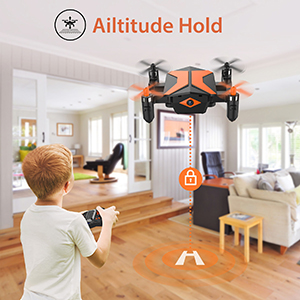
Image: A child operating the drone in headless mode, where the drone's direction follows the pilot's input regardless of its front orientation.
5.4 Capovolgimento a 360°
To perform a 360° flip, press the 360° Flip button on the remote, then quickly push the right joystick in the desired direction (forward, backward, left, or right). The drone will perform a flip in that direction.

Image: The drone performing a 3D flip, showcasinle sue capacità acrobatiche.
5.5 App Control and FPV
Download the "XT GO" app from your smartphone's app store. Connect your phone to the drone's Wi-Fi network (usually named "ATTOP-XXXX"). Once connected, you can view live FPV video, control the drone, and access advanced features.
- FPV Experience: The app displays a live video feed from the drone's camera, allowing you to see what the drone sees in real-time.
- Traiettoria di volo: Within the app, draw a flight path on your screen. The drone will automatically follow the drawn path.
- Controllo vocale: Use voice commands through the app to control basic flight functions.
- AR Game Mode: Engage in augmented reality games that integrate the drone's camera feed.
- Modalità di rilevamento della gravità: Controlla il movimento del drone inclinando il tuo smartphone.
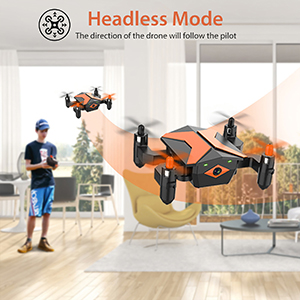
Immagine: un utente viewing the drone's live FPV feed on a tablet, showing the drone flying over a rooftop with a cat.
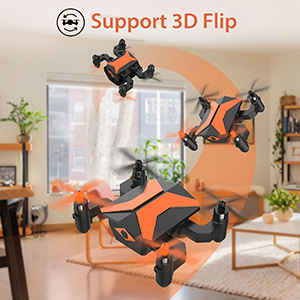
Image: A smartphone screen displaying the "XT GO" app interface with a drawn trajectory path for the drone to follow.

Image: A smartphone screen showing the AR Game mode, where virtual fighter planes are integrated into the live drone camera feed.
5.6 Registrazione di foto e video
With your smartphone connected to the drone via the "XT GO" app, you can capture photos and record videos directly to your phone's storage. Use the dedicated buttons within the app interface for these functions.


