1. Introduzione
This manual provides detailed instructions for the installation, operation, and maintenance of your Biorunn 9-inch Android Car Stereo Radio. This head unit is designed specifically for Kia Ceed models from 2018 to 2021, offering advanced features such as GPS navigation, wireless and wired Car-Play, Android Auto, IPS display, WiFi connectivity, and FM RDS radio.
Please read this manual thoroughly before installation and use to ensure proper functionality and to maximize your user experience. Keep this manual for future reference.
2. Contenuto della confezione
Verifica che tutti gli articoli elencati di seguito siano inclusi nel pacco. Se alcuni articoli risultano mancanti o danneggiati, contatta il fornitore.

Figura 2.1: Contenuto della confezioneview
- Unità principale (macchina)
- Canbus Box (se applicabile al modello del tuo veicolo)
- Set di cavi RCA
- Reversing Camera Cable (Camera not included)
- Cavi USB (multipli)
- Microfono (MIC)
- Antenna GPS
- Antenna 4G (se applicabile)
- Cablaggio di alimentazione
3. Configurazione e installazione
Installation of the Biorunn car stereo requires technical knowledge and experience with car electronics. It is highly recommended to have the unit installed by a qualified professional to avoid damage to the product or your vehicle.
3.1 Controlli pre-installazione
- Prima di iniziare qualsiasi installazione, assicurarsi che l'accensione del veicolo sia spenta e che la batteria sia scollegata.
- Confirm compatibility with your Kia Ceed (2018-2021) model.
- Review the wiring diagram carefully.
3.2 Schema elettrico
Refer to the following diagram for proper connection of the head unit to your vehicle's electrical system. Pay close attention to power, ground, speaker, and accessory connections.

Figura 3.1: Schema elettrico del pannello posteriore
3.3 Fasi di installazione (generali)
- Rimuovere con cautela l'autoradio originale e i pannelli di rivestimento.
- Connect the main power harness, speaker wires, and other necessary cables (GPS antenna, USB cables, microphone, reversing camera cable) to the new head unit according to the wiring diagram.
- If your car requires a Canbus box, connect it as instructed.
- Montare saldamente la nuova unità principale nell'apertura del cruscotto.
- Reconnect the vehicle battery and test the unit's functionality before reassembling the trim panels.
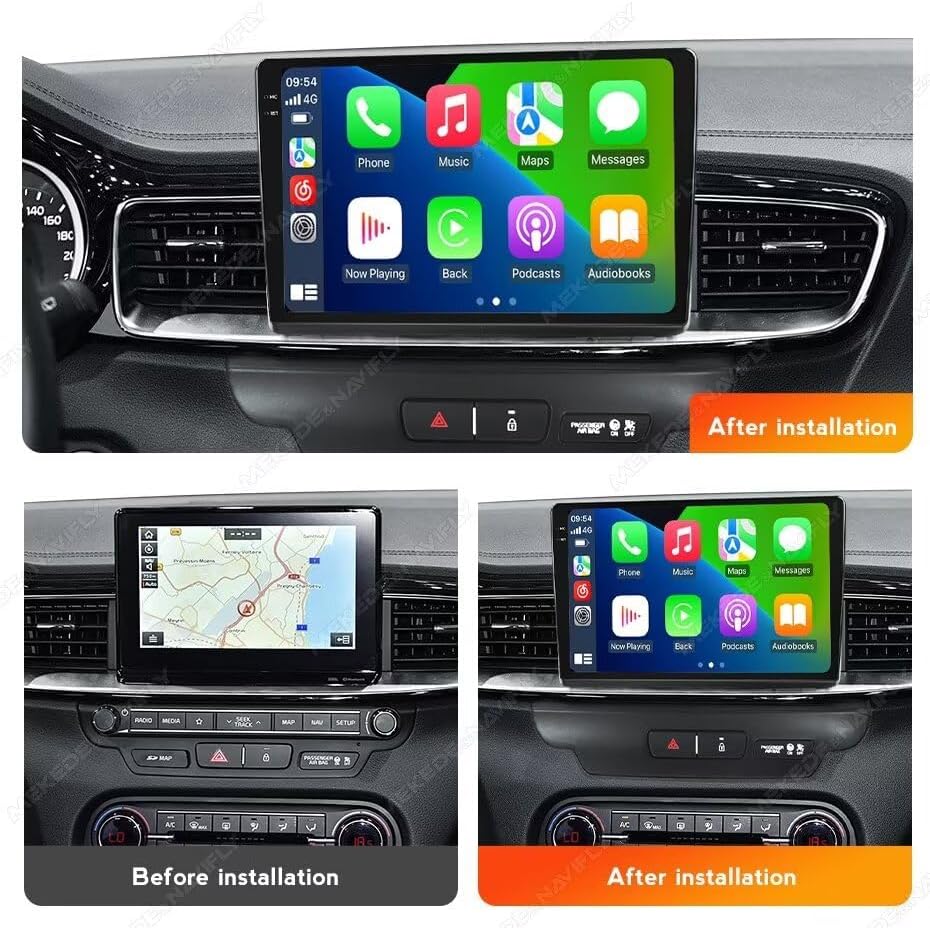
Figura 3.2: Prima e dopo l'installazione Example
4. Istruzioni per l'uso
4.1 Car-Play e Android Auto
The head unit supports both wireless and wired Car-Play and Android Auto. This allows seamless integration of your smartphone for navigation, music, calls, and messages directly on the stereo display.
- Per connettersi: Ensure your phone's Bluetooth and Wi-Fi are enabled. Follow the on-screen prompts on the head unit to pair your device. For wired connection, use a compatible USB cable.
- Once connected, your phone's compatible apps will appear on the stereo screen, allowing for safe and convenient use while driving.

Figura 4.1: Interfaccia Car-Play e Android Auto
4.2 Funzione Bluetooth (BT)
The integrated Bluetooth 5.0 module enables hands-free calling and audio streaming.
- Abbinamento: Go to the Bluetooth settings on the head unit and search for available devices. Select your phone from the list and confirm the pairing code.
- Chiamate in vivavoce: Once paired, you can make and receive calls directly through the stereo. The unit supports phone book download and caller ID display.
- Streaming musicale BT: Play audio from your paired smartphone wirelessly through the car's speakers.

Figure 4.2: Bluetooth Calling and Music
Radio FM RDS 4.3
Ascolta le tue stazioni radio preferite con il sintonizzatore FM RDS integrato.
- Ricerca automatica: Utilizzare la funzione di scansione automatica per trovare e salvare le stazioni disponibili.
- Ricerca manuale: Sintonizzarsi manualmente su frequenze specifiche.
- Stazioni preimpostate: Salva fino a 18 delle tue stazioni preferite per un accesso rapido.
- Funzione RDS: Displays station information such as song title or program name where available.

Figura 4.3: Interfaccia radio FM RDS
4.4 Ingresso video inverso
The unit supports video input from an aftermarket reversing camera (camera not included). When the vehicle is shifted into reverse, the display will automatically switch to the camera view, agevolando il parcheggio e le manovre in sicurezza.
- Connessione: Connect your reversing camera to the dedicated 'Camera Input' RCA port on the rear of the head unit (refer to Figure 3.1).
- Attivazione: Ensure the reverse trigger wire is correctly connected to your vehicle's reverse light circuit.

Figura 4.4: Display della telecamera di retromarcia
4.5 Funzione schermo diviso
The split-screen feature allows you to run two applications simultaneously on the display, enhancing multitasking and convenience.
- Attivazione: Mentre un'app è aperta, tieni premuto a lungo il pulsante delle app recenti o trascina un'app su un lato dello schermo (il metodo può variare leggermente in base alla versione di Android).
- Utilizzo: Per esempioample, puoi avere la navigazione da un lato e la riproduzione musicale dall'altro.

Figura 4.5: Funzionalità Schermo diviso
4.6 Controllo del volante
The unit supports original steering wheel controls, allowing you to manage audio playback, volume, and calls without taking your hands off the wheel. This feature requires correct wiring during installation (refer to Figure 3.1).
5. Manutenzione
To ensure the longevity and optimal performance of your Biorunn car stereo, follow these maintenance guidelines:
- Pulizia: Utilizzare un panno morbido e asciutto per pulire lo schermo e l'esterno. Per le macchie ostinate, strofinare leggermenteampPulisci il panno con acqua o un detergente per schermi. Evita prodotti chimici aggressivi o materiali abrasivi.
- Aggiornamenti software: Periodically check for available software updates from the manufacturer to ensure you have the latest features and bug fixes. Updates can typically be performed via Wi-Fi.
- Temperatura: Evitare di esporre l'unità a temperature estreme. Sebbene sia progettata per l'uso automobilistico, l'esposizione prolungata alla luce solare diretta o al freddo estremo può comprometterne le prestazioni.
- Connessioni: Assicurarsi che tutti i cavi e i collegamenti siano ben saldi. Collegamenti allentati possono causare problemi intermittenti.
6. Risoluzione Dei Problemi
If you encounter issues with your Biorunn car stereo, refer to the following common problems and solutions:
| Problema | Possibile causa | Soluzione |
|---|---|---|
| Nessun potere | Collegamento elettrico allentato, fusibile bruciato, cablaggio errato. | Check power harness connections. Inspect vehicle fuses. Verify wiring against diagram. |
| Nessun suono | Cavi degli altoparlanti scollegati, volume troppo basso, impostazioni di uscita audio errate. | Check speaker wire connections. Increase volume. Verify audio settings in the system menu. |
| GPS non funzionante/impreciso | GPS antenna not connected, antenna placed in a poor reception area, outdated maps. | Assicurarsi che l'antenna GPS sia collegata saldamente e posizionata in modo trasparente view del cielo. Aggiorna le mappe di navigazione se necessario. |
| Touch screen non reattivo | Software glitch, system freeze. | Restart the unit (turn off vehicle ignition and restart). If issue persists, perform a factory reset (note: this will erase user data). |
| Problemi di connessione Bluetooth | Telefono non rilevabile, associazione errata, interferenza. | Assicurati che il Bluetooth del telefono sia attivo e rilevabile. Elimina gli abbinamenti precedenti e ripeti l'abbinamento. Avvicina il telefono all'unità. |
Se queste soluzioni non risolvono il problema, contattare l'assistenza clienti.
7. Specifiche
Key technical specifications for the Biorunn 9-inch Android Car Stereo Radio:
- Sistema operativo: Android
- Nucleo: 4-Nucleo
- Memoria RAM: 2 GB
- ROM: 32 GB
- Dimensioni dello schermo: 9 pollici
- Risoluzione dello schermo: 1280 x 720 (IPS Touch Screen)
- Tipo di schermo a sfioramento: Capacitivo
- Connettività: Wireless (Wi-Fi), Bluetooth 5.0
- Caratteristiche speciali: Built-in Wireless/Wired Car-Play, Android Auto, GPS Navigation, FM RDS Radio, Split Screen, Steering Wheel Control Support
- Supporto per i formati audio: MP3, WMA, AAC, RM, FALC, ecc.
- Supporto per il formato video: MPEG-1/2/4, H264, H263, VC1, RV, RMVB, DivX, Sorenson SparK, Spark, VP184, AVS Stream, 1080P full format
- Photo Format Support: JPG/BMP/JEPG/GIF/PNG
- Porte USB: USB 1, USB 2
- Lingue: Supports multiple languages including English, German, French, Spanish, Italian, Portuguese, Russian, Dutch, Polish, Japanese, Chinese, Arabic, etc.
8. Garanzia e supporto
Your Biorunn car stereo is covered by a manufacturer's warranty. Please refer to the warranty card included with your product or contact your point of purchase for specific warranty terms and conditions.
For technical support, troubleshooting assistance beyond this manual, or warranty claims, please contact Biorunn customer service through the vendor's platform or the official Biorunn websito. Quando contatti l'assistenza, tieni a portata di mano il numero di modello del tuo prodotto e i dettagli dell'acquisto.
Risorse online: For additional information, FAQs, and software updates, visit the official Biorunn store or support page.