1. Introduzione
This manual provides essential instructions for the safe operation, assembly, and maintenance of your Genesis Designs Smart Full Body Massage Chair, model GM1-W. Please read this manual thoroughly before using the product to ensure proper function and to prevent injury or damage.
The Genesis Designs GM1-W massage chair features 2D SL-track rollers, voice activation, a tablet remote control, 12 auto pre-programmed modes, and 6 massage techniques. It includes a zero-gravity function, built-in Bluetooth speakers, and a USB charging port. Airbag massage is provided for the shoulders, arms, waist, legs, and feet, along with a heated lumbar function and foot rollers.
2. Informazioni importanti sulla sicurezza
WARNING: To reduce the risk of electric shock, burns, fire, or injury, always follow these basic precautions:
- Leggere tutte le istruzioni prima di utilizzare la poltrona massaggiante.
- Non utilizzare accessori non consigliati dal produttore.
- Scollegare dalla presa quando non in uso, prima di montare o smontare componenti e prima di pulirlo.
- È necessaria un'attenta supervisione quando questo prodotto viene utilizzato da, sopra o vicino a bambini, invalidi o persone disabili.
- Non utilizzare sotto una coperta o un cuscino. Potrebbe verificarsi un surriscaldamento eccessivo e causare incendi, scosse elettriche o lesioni alle persone.
- Non utilizzare mai questo prodotto se ha un cavo o una spina danneggiati, se non funziona correttamente, se è caduto o è stato danneggiato o è caduto in acqua.
- Tenere il cavo lontano da superfici calde.
- Non utilizzare all'aperto.
- Non operare in luoghi in cui vengono utilizzati prodotti aerosol (spray) o in cui viene somministrato ossigeno.
- Per scollegare, portare tutti i controlli in posizione OFF, quindi rimuovere la spina dalla presa.
- Questo apparecchio è destinato esclusivamente all'uso domestico.
- Consult a physician before using if you have any medical conditions, are pregnant, or have a pacemaker.
3. Contenuto della confezione
Verificare che tutti i componenti siano presenti nella confezione:
- Genesis Designs GM1-W Massage Chair (Main Unit)
- Controllo remoto del tablet
- Cavo di alimentazione
- Manuale dell'utente (questo documento)

Figura 3.1: "In The Box" diagram illustrating the main chair unit, the tablet remote control, and the power cord.
4. Installazione e assemblaggio
The Genesis Designs GM1-W massage chair typically arrives partially assembled. Follow these steps for final assembly and placement.
4.1 Disimballaggio e posizionamento
- Carefully remove all packaging materials. It is recommended to retain packaging for future transport or service.
- Position the chair in a suitable location. Ensure there is enough space around the chair for full recline, especially for the zero-gravity function. The chair requires approximately 66.33 inches in length when fully reclined.
- Assicurarsi che la sedia sia posizionata su una superficie piana.

Figura 4.1: Fronte view of the Genesis Designs GM1-W massage chair.

Figura 4.2: Lato view of the Genesis Designs GM1-W massage chair, illustrating its profile.
4.2 Collegamento dell'alimentazione
- Locate the power input port on the back or bottom of the chair.
- Connect the power cord securely to the chair.
- Collegare l'altra estremità del cavo di alimentazione a una presa elettrica con messa a terra.
5. Istruzioni per l'uso
Your Genesis Designs GM1-W massage chair offers various functions for a personalized massage experience.
5.1 controlli oltreview
The chair can be controlled via the handheld tablet remote or the quick-start buttons on the right armrest.

Figura 5.1: Handheld tablet remote control interface.

Figura 5.2: Quick-start control panel on the right armrest.
5.2 Starting a Massage
- Sedetevi comodamente sulla sedia.
- Press the Power button on the tablet remote or the quick-start panel.
- Seleziona uno dei file 12 auto pre-programmed modes or choose from 6 massage techniques using the tablet remote.
5.3 Caratteristiche e funzioni principali
- Rulli 2D SL-Track: The massage rollers follow the natural curve of your spine, extending from your neck to your thighs, providing a comprehensive massage.
- Funzione di gravità zero: Activate zero gravity mode to recline the chair to a position that elevates your legs above your heart, reducing pressure on your spine and enhancing relaxation. The chair offers multiple recline levels.

Figura 5.3: Illustration of the chair's zero gravity recline positions.
- Attivazione vocale: Use voice commands to control various functions of the massage chair. Refer to the tablet remote interface for specific voice commands.
- Massaggio tramite airbag: Airbags located in the shoulders, arms, waist, legs, and feet inflate and deflate to provide compression massage. Adjust intensity via the tablet remote.
- Heated Lumbar Function: Activate the heating function for the lower back to soothe muscles and enhance relaxation.
- Foot Massage: The legrest can extend up to 6.25 inches to accommodate different user heights. Foot rollers provide a targeted massage to the soles of your feet.
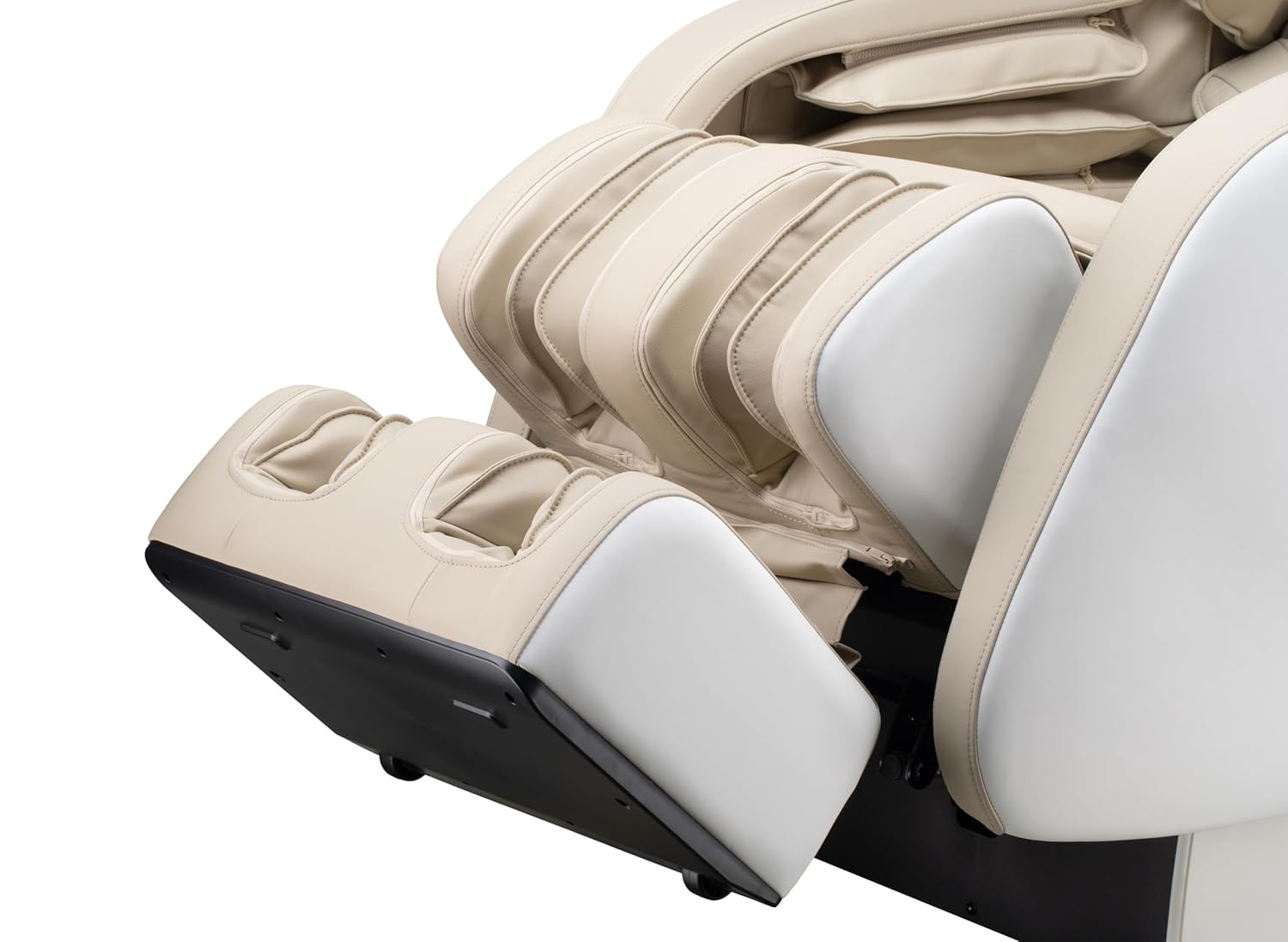
Figura 5.4: Detail of the footrest with integrated foot rollers.
- Altoparlanti Bluetooth: Connect your personal device via Bluetooth to enjoy audio during your massage.
- Abilita il Bluetooth sul tuo dispositivo.
- Cercare "Genesis Massage Chair" or similar on your device's Bluetooth settings.
- Associa e connetti.
- Porta di ricarica USB: A convenient USB port is available for charging your mobile devices.

Figura 5.5: Sopraview of main features and their locations on the chair.
6. Manutenzione e cura
Una corretta manutenzione garantisce la longevità e le prestazioni ottimali della poltrona massaggiante.
6.1 Pulizia
- Esterno: Pulisci con un panno morbido, damp panno. Non utilizzare detergenti abrasivi, solventi o prodotti chimici aggressivi, poiché potrebbero danneggiare il rivestimento.
- Interno: Aspirare periodicamente la polvere e i detriti dalle fessure.
- Prima di pulire la sedia, assicurarsi che sia scollegata dalla presa di corrente.
6.2 Conservazione
If storing the chair for an extended period, unplug it and cover it to protect from dust and moisture. Store in a cool, dry place.
7. Risoluzione Dei Problemi
Se riscontri problemi con la tua poltrona massaggiante, fai riferimento ai seguenti problemi comuni e alle relative soluzioni:
| Problema | Possibile causa | Soluzione |
|---|---|---|
| La sedia non si accende. | Cavo di alimentazione non collegato correttamente. Nessuna corrente dalla presa. | Check power cord connection to chair and outlet. Test outlet with another device. |
| I rulli massaggianti non si muovono. | Chair is in standby mode. Program not selected. | Ensure chair is powered on. Select an auto program or manual massage technique. |
| Il Bluetooth non si connette. | Bluetooth on device is off. Chair's Bluetooth is off or not discoverable. | Ensure Bluetooth is enabled on your device. Check tablet remote for Bluetooth activation. Try restarting both devices. |
| L'attivazione vocale non risponde. | Microphone obstructed. Incorrect commands. | Ensure no obstructions near the microphone. Speak clearly and use the specified voice commands. |
| Rumori insoliti durante il funzionamento. | Normal operational sounds. Loose component. | Some motor and airbag sounds are normal. If noise is excessive or new, discontinue use and contact customer support. |
If the problem persists after attempting these solutions, please contact Genesis Designs customer support for assistance.
8. Specifiche
| Caratteristica | Dettaglio |
|---|---|
| Numero di modello | GM1-W |
| Marca | Disegni di genesi |
| Percorso di massaggio | 2D SL-Track |
| Dimensioni verticali (L x P x A) | 57.67 x 29.72 x 44.33 pollici |
| Zero Gravity Dimensions (L x W x H) | 66.33 x 29.72 x 38.77 pollici |
| Peso del prodotto | 165 libbre |
| Larghezza del sedile | 21 pollici |
| Legrest Extension | Fino a 6.25 pollici |
| Programmi di massaggio | 12 Auto Modes, 6 Manual Techniques |
| Caratteristiche speciali | Voice Activation, Bluetooth Speakers, USB Charging, Heated Lumbar, Foot Rollers |
| Certificazione | Certificato ETL |
| UPC / GTIN | 811691028064 |

Figura 8.1: Dimensional diagram of the massage chair.
9. Garanzia e assistenza clienti
For warranty information, please refer to the documentation included with your purchase or contact Genesis Designs customer support directly. Keep your proof of purchase for warranty claims.
If you require technical assistance, have questions about operation, or need to report a problem, please contact Genesis Designs customer support through their official websito o le informazioni di contatto fornite con il prodotto.


