1. Introduzione
This manual provides essential instructions for the safe and effective use of your Dekala PlaySmart Kids Phone. Please read it thoroughly before operating the device and retain it for future reference.
2. Informazioni sulla sicurezza
Avvertimento:
- Questo prodotto è destinato ai bambini dai 36 mesi in su.
- Si consiglia la supervisione di un adulto durante l'uso.
- Non esporre il dispositivo all'acqua o a temperature estreme.
- Tenere le parti di piccole dimensioni lontano dalla portata dei bambini per evitare rischi di soffocamento.
- Utilizzare solo il cavo di ricarica e l'adattatore forniti.
3. Contenuto della confezione
Si prega di controllare la confezione per verificare la presenza dei seguenti elementi:
- Dekala PlaySmart Kids Phone
- Cavo di ricarica USB
- Manuale dell'utente (questo documento)
- (Gli accessori aggiuntivi possono variare in base alla confezione)
4. Prodotto finitoview
The Dekala PlaySmart Kids Phone is designed to provide an engaging and educational experience for children. It features a 2.8-inch HD touchscreen and a durable build.

Figura 1: Dekala PlaySmart Kids Phone, showing the front screen and the back panel with camera lenses.
Caratteristiche principali:
- 180° Rotatable Camera: For photos and video recording.
- Music Player: Enjoy pre-loaded or user-added music.
- Video Recorder: Capture moments.
- Educational Games: 26 puzzle games to stimulate learning.
- Habit Tracker: Helps children manage daily routines.
- Calendar: Basic time management.
- Learning Cards & Audiobooks: 100 learning cards and 10 audio storybooks for educational content.
- Parental Controls: Manage screen time and access to features.
5. Impostazione
5.1. Carica del dispositivo
- Connect the USB charging cable to the charging port on the phone.
- Collegare l'altra estremità del cavo USB a un adattatore di alimentazione USB compatibile (non incluso) o alla porta USB di un computer.
- The screen will indicate charging status. Allow approximately 2-3 hours for a full charge.
- Scollegare il caricabatterie una volta completamente carico.
5.2. Accensione/Spegnimento
- To power on: Press and hold the power button (usually located on the side) until the screen lights up.
- To power off: Press and hold the power button, then follow the on-screen prompts to shut down.
5.3. Configurazione iniziale
Alla prima accensione, potrebbe essere richiesto di impostare data, ora e lingua. Seguire le istruzioni visualizzate sullo schermo.
6. Istruzioni per l'uso

Figura 2: Main interface displaying various applications and customizable wallpapers.
6.1. Navigazione
- Schermo tattile: Tocca le icone per aprire le applicazioni, scorri per navigare tra le schermate.
- Pulsante Home: A physical or on-screen button (usually at the bottom center) to return to the main screen.
6.2. Telecamera e videoregistratore
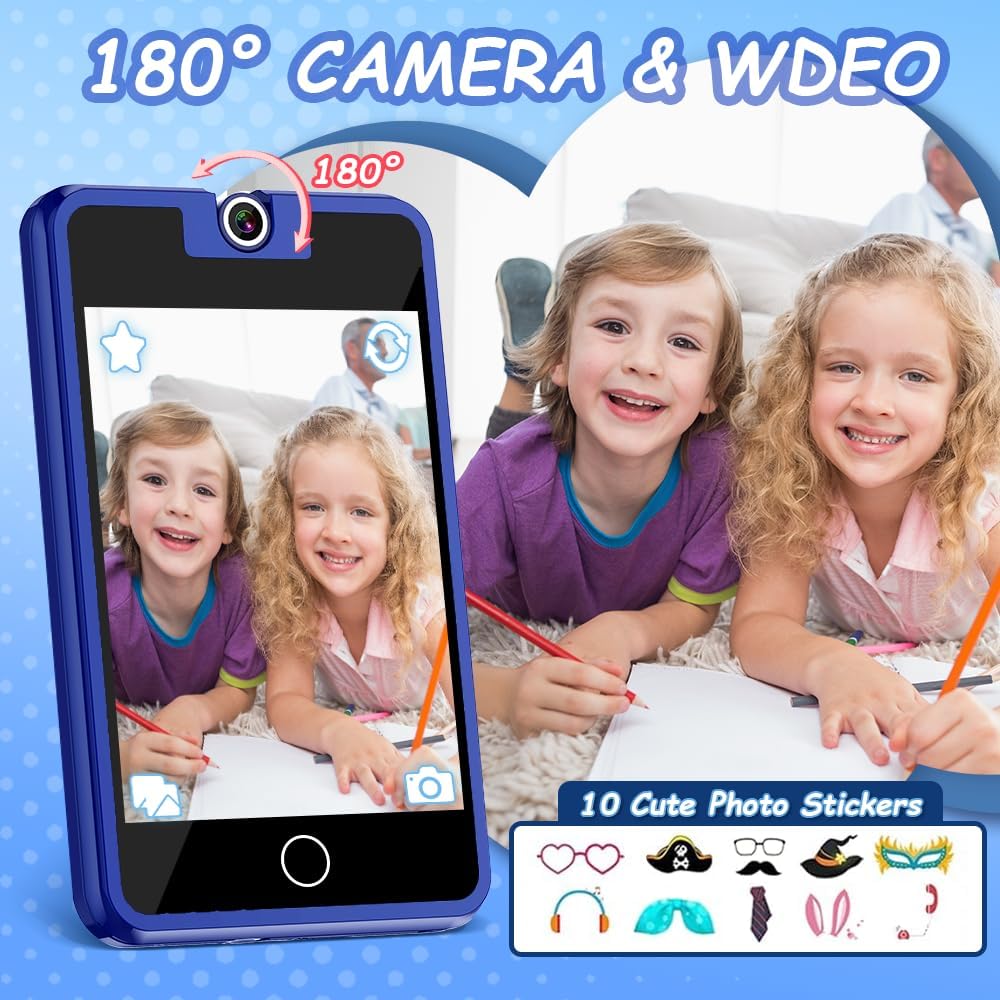
Figura 3: The 180° rotatable camera in action, allowing for both front and rear-facing shots. Includes options for fun photo stickers.
- Tocca l'icona "Fotocamera" per aprire l'applicazione della fotocamera.
- Rotate the camera lens 180° to switch between front and rear views.
- Tocca il pulsante di scatto per scattare una foto o avviare/interrompere la registrazione video.
- Explore fun photo stickers and filters within the camera app.
6.3. Lettore musicale

Figura 4: Music player interface, showing track information and playback controls.
- Tap the "Music" icon to access the music player.
- Browse pre-loaded songs or any music files transferred to the device.
- Use the on-screen controls for play, pause, skip, and volume adjustment.
6.4. Giochi educativi

Figura 5: Example of an educational puzzle game and the variety of games available.
- Tap the "Games" icon to view the selection of 26 puzzle games.
- Seleziona un gioco per iniziare a giocare.
- Parental controls can be used to manage access to games (see section 6.7).
6.5. Habit Tracker

Figura 6: The habit tracker interface, designed to help children manage and track daily routines.
- Tap the "Habit Tracker" icon.
- Set up and track daily activities such as "Get Up," "Brush Your Teeth," "Homework," etc.
- Use the alarm and timer functions to assist with habit formation.
6.6. Learning Cards and Audiobooks

Figura 7: Learning content including 100 learning cards covering various themes and 10 audio storybooks.
- Access "Knowledge Card" for 100 learning cards on various topics.
- Open "Story" to listen to 10 pre-loaded audiobooks.
6.7. Controllo genitori
The device includes parental control features to manage screen time and access to specific applications or content.
- Vai al menu "Impostazioni".
- Locate and select "Parental Control" or a similar option.
- Set a password (if prompted) to secure the settings.
- Adjust settings for screen time limits, game access, and other features as desired.
7. Manutenzione
- Pulizia: Use a soft, dry cloth to clean the screen and body of the device. Do not use liquid cleaners or abrasive materials.
- Magazzinaggio: Conservare il dispositivo in un luogo fresco e asciutto, lontano dalla luce solare diretta quando non viene utilizzato.
- Cura della batteria: Per prolungare la durata della batteria, evitare di scaricarla completamente frequentemente. Caricare il dispositivo regolarmente.
8. Risoluzione Dei Problemi
| Problema | Possibile causa | Soluzione |
|---|---|---|
| Il dispositivo non si accende. | Batteria scarica. | Caricare il dispositivo per almeno 30 minuti. |
| Lo schermo non risponde. | Problema temporaneo del software. | Eseguire un soft reset tenendo premuto il pulsante di accensione per 10-15 secondi. |
| Impossibile sentire l'audio. | Il volume è troppo basso o disattivato. | Check volume settings in the "Settings" menu or use volume buttons. |
| Games are not accessible. | Parental controls enabled. | Adjust parental control settings in the "Settings" menu. |
9. Specifiche
- Modello: PlaySmart
- Schermo: Touchscreen HD da 2.8 pollici
- Telecamera: 180° girevole
- Dimensioni: 2 x 0.3 x 3 pollici
- Peso: 5 once
- Batteria: 1 batteria non standard (inclusa)
- Età consigliata: 36 mesi +
- Marca: Dekala
10. Informazioni sulla garanzia
I dettagli specifici della garanzia non sono forniti nelle informazioni sul prodotto. Per i termini e le condizioni della garanzia, fare riferimento alla confezione del prodotto o contattare direttamente il produttore.
11. Assistenza clienti
For further assistance, technical support, or inquiries, please contact Dekala customer service through their official websito o le informazioni di contatto fornite sulla confezione del prodotto.
Websito: Dekala Store on Amazon


