1. Introduzione
This manual provides detailed instructions for the setup, operation, maintenance, and troubleshooting of your Deli ET521 Digital Safe Box. Please read this manual thoroughly before using the safe to ensure proper function and security. Keep this manual for future reference.
2. Informazioni sulla sicurezza
- Non conservare le chiavi di emergenza all'interno della cassaforte. Conservarle in un luogo sicuro all'esterno della cassaforte.
- Keep your personal access code confidential and do not share it with unauthorized individuals.
- Ensure the safe is securely mounted or placed to prevent unauthorized removal.
- Replace batteries promptly when the 'LO-BAT' indicator appears to avoid being locked out.
- This safe is designed for security and fire resistance. However, it is not completely fireproof or waterproof.
3. Contenuto della confezione
Verificare che tutti gli articoli siano presenti nel pacco:
- 1 x Deli ET521 Digital Safe Box
- 2 chiavi di emergenza
- 1 x Manuale utente
- Hardware di montaggio (bulloni)
4. Prodotto finitoview
The Deli ET521 Digital Safe Box offers secure storage with a digital keypad and emergency key access. It features a reinforced solid steel body, felt interior, and LED lighting for convenience.

Figura 4.1: Fronte view of the Deli ET521 Digital Safe Box, showcasing the keypad and overall design.
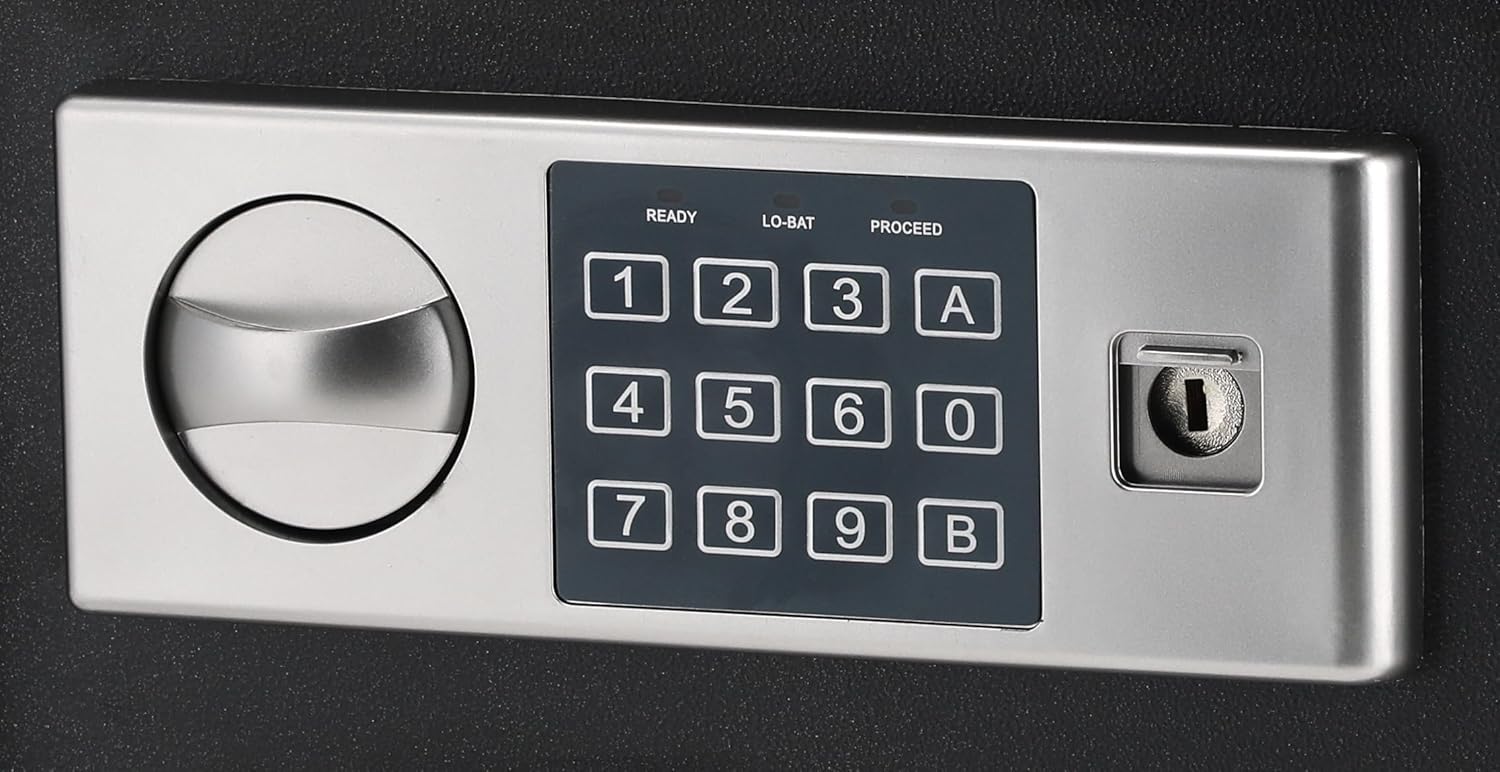
Figure 4.2: Close-up of the digital keypad with number buttons, 'A' and 'B' buttons, and the emergency keyhole.

Figura 4.3: Interno view of the safe, showing the felt lining and internal space.
5. Impostazione
5.1 Installazione della batteria
The digital keypad requires 4 AA batteries (not included) for operation. The battery compartment is typically located on the inside of the safe door.
- Open the safe using the emergency override key (refer to Section 6.3 if needed).
- Individuare il coperchio del vano batteria sul lato interno dello sportello.
- Rimuovere il coperchio e inserire 4 nuove batterie AA, assicurandosi della corretta polarità (+/-).
- Riposizionare il coperchio del vano batterie.
5.2 Impostazione del codice iniziale
Al primo utilizzo sarà necessario impostare il codice di accesso personale.
- With the safe door open, press the red reset button located on the inside of the door (usually near the hinge). You will hear a beep.
- Within 5 seconds, enter a new 3-8 digit code on the keypad.
- Press the 'A' or 'B' button to confirm. The safe will beep twice, indicating the code is set.
- Prova il nuovo codice con la porta aperta prima di chiuderla.
5.3 Montaggio della cassaforte
The Deli ET521 is designed for floor-standing mounting. Securely mounting the safe is recommended to prevent theft.
- Scegliere una posizione adatta, preferibilmente su una superficie solida.
- Mark the drilling points through the pre-drilled holes at the bottom or back of the safe.
- Praticare dei fori pilota nel pavimento o nella parete utilizzando una punta da trapano adatta.
- Position the safe and secure it using the provided mounting bolts.
6. Istruzioni per l'uso
6.1 Apertura della cassaforte con il tuo codice
- Enter your 3-8 digit personal access code on the keypad.
- Press the 'A' or 'B' button.
- If the code is correct, the 'PROCEED' light will illuminate, and you will hear a beep.
- Entro 5 secondi, ruotare la manopola in senso orario per aprire la porta.
6.2 Chiusura della cassaforte
To lock the safe, simply close the door and turn the knob counter-clockwise. The safe will automatically lock.
6.3 Using the Emergency Override Key
In case of forgotten code or dead batteries, the emergency override key can be used.
- Individuare il copriserratura sul pannello della tastiera.
- Togliere il coperchio.
- Insert the emergency override key and turn it clockwise while simultaneously turning the knob clockwise to open the door.
- Once open, you can replace batteries or reset the code.
6.4 Changing Your Access Code
You can change your access code at any time with the door open.
- Apri la porta della cassaforte.
- Press the red reset button on the inside of the door. You will hear a beep.
- Within 5 seconds, enter your new 3-8 digit code.
- Press the 'A' or 'B' button to confirm. The safe will beep twice.
- Prova il nuovo codice con la porta aperta prima di chiuderla.
7. Manutenzione
7.1 Pulizia
Pulisci l'esterno della cassaforte con un panno morbido eamp cloth. Avoid using abrasive cleaners or solvents that could damage the finish or keypad.
7.2 Sostituzione della batteria
When the 'LO-BAT' indicator light illuminates on the keypad, it is time to replace the batteries. Follow the steps in Section 5.1 to replace the 4 AA batteries.
8. Risoluzione Dei Problemi
- La cassaforte non si apre con il codice:
- Ensure batteries are not low (check 'LO-BAT' indicator). Replace if necessary.
- Re-enter the code carefully.
- Use the emergency override key to open the safe and reset the code.
- La tastiera non risponde:
- Controllare l'installazione delle batterie e sostituirle.
- Door does not lock:
- Ensure the door is fully closed before turning the knob.
- Check for any obstructions preventing the door from closing completely.
9. Specifiche

Figure 9.1: Diagram illustrating the approximate dimensions of the Deli ET521 Digital Safe Box.
| Caratteristica | Dettaglio |
|---|---|
| Numero di modello | ET521 |
| Dimensioni esterne (P x L x A) | Dimensioni: 25 cm x 35 cm x 25 cm |
| Peso dell'articolo | 5.7 chilogrammi |
| Tipo di blocco | Electronic Combination Lock, Key Lock |
| Materiale | Acciaio legato |
| Colore | Nero |
| Caratteristiche speciali | Fire Resistant, Digital Lock, LED Lighting |
| Tipo di montaggio | A pavimento |
| Batterie richieste | 4 x AA (for keypad, not included) |
10. Garanzia e supporto
For warranty information or technical support, please contact Deli customer service through their official websito o il rivenditore presso cui è stato acquistato il prodotto. Conservare la ricevuta d'acquisto come prova d'acquisto.


