1. Introduzione
Grazie per aver scelto Blackview Smart Glasses. These innovative sunglasses combine stylish design with advanced audio technology, allowing you to enjoy music, make calls, and interact with your voice assistant while staying aware of your surroundings. This manual provides detailed instructions for setup, operation, and maintenance to ensure optimal performance and longevity of your device.

Figura 1: Fronte view di Neroview Smart Glasses.
2. Caratteristiche del prodotto
- Tecnologia Bluetooth 5.3: Ensures faster and more stable signal transmission with low latency, offering a connection range of up to 12 meters.
- Grado di impermeabilità IP65: Protects against sweat and small raindrops, suitable for outdoor activities and gym use.
- Abbinamento in un unico passaggio: After initial pairing, the glasses automatically reconnect to the last paired device upon opening.
- Ampia compatibilità: Compatible with various devices including smartphones and computers.
- Immersive Open Ear Sound: Features an open headphone speaker design, dynamic drivers, and ultra-sensitive polymer diaphragms for rich, balanced audio without isolating you from your environment.
- Unparalleled Call Clarity: Advanced microphone design with noise reduction technology suppresses up to 90% of background noise for clear communication.
- Controlli touch intuitivi: Manage playback, volume, calls, and voice assistant activation directly from the glasses.
- Orario di lavoro esteso: Equipped with 80mAh+80mAh rechargeable batteries, providing approximately 7 hours of communication, 6 hours of music playback, and 160 hours of standby time.
3. Prodotto finitoview
Familiarize yourself with the components of your Blackview Occhiali intelligenti:

Figure 2: Key components of the Smart Glasses.
- Lente: TAC+UV400 (UV resistant)
- Nose Bridge: Provides comfortable fit.
- Pulsante a sfioramento: For various control functions.
- Stereo-speaker: Delivers open-ear audio.
- Mic incorporato: Per una qualità di chiamata nitida.
- Charging Indicator Port: For magnetic charging.
- Cornice dello specchio: PC+light steel construction.
4. Specifiche
Refer to the following specifications for your Blackview Occhiali intelligenti:
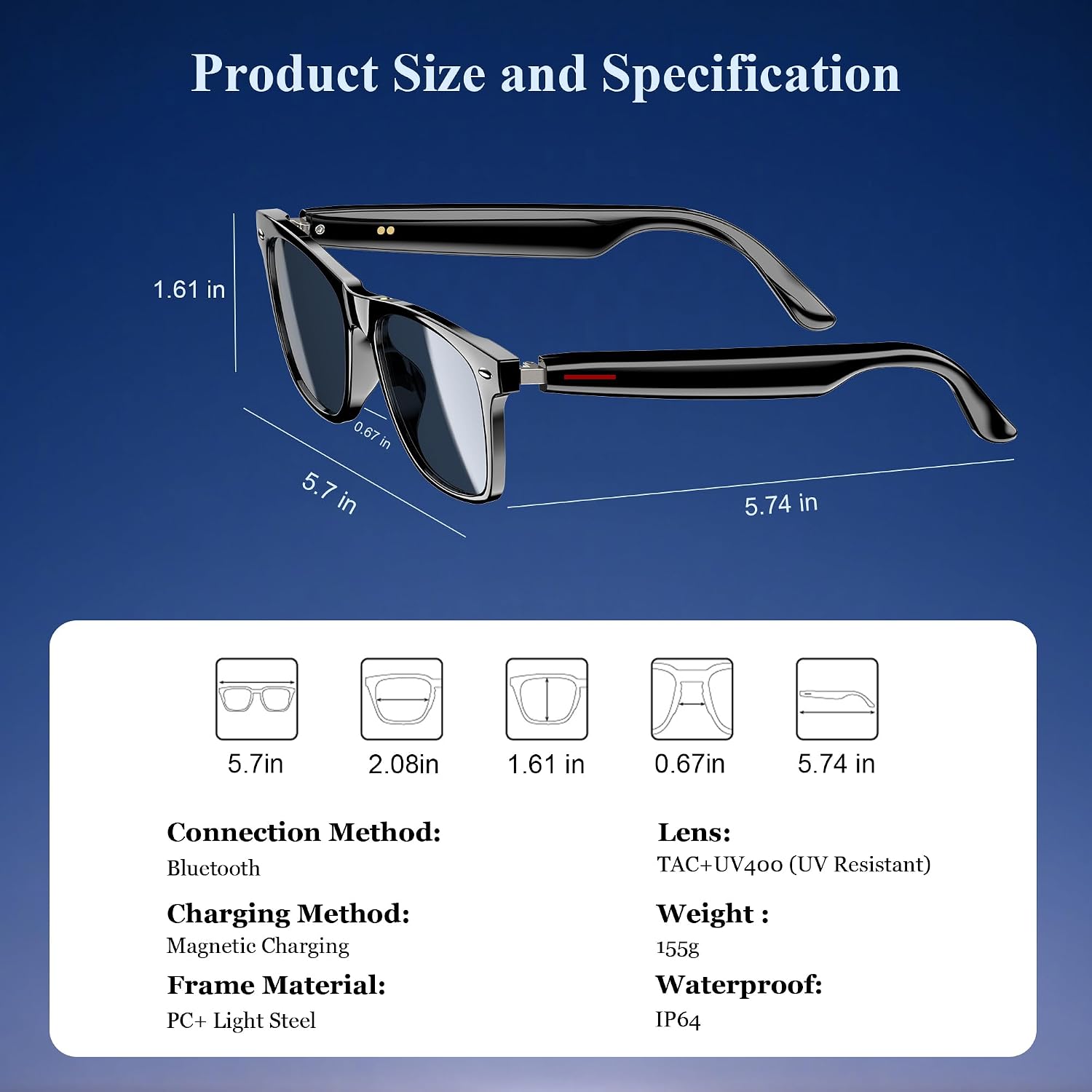
Figura 3: Dimensioni del prodotto e specifiche principali.
| Specificazione | Valore |
|---|---|
| Versione Bluetooth | 5.3 |
| Grado di impermeabilità | Grado di protezione IP65 |
| Capacità della batteria | 80mAh+80mAh |
| Tempo di comunicazione | Circa 7 ore |
| Tempo di riproduzione della musica | Circa 6 ore |
| Tempo di standby | Circa 160 ore |
| Tempo di ricarica | Approx. 1.2 hours (magnetic charge) |
| Tipo di lente | TAC+UV400 (UV Resistant) |
| Materiale del telaio | PC + Light Steel |
| Peso dell'articolo | 4.6 once |
| Dimensioni del pacco | 6.65 x 2.36 x 1.93 pollici |
5. Cosa c'è nella scatola
Il tuo neroview Smart Glasses package includes:
- Occhiali da sole intelligenti
- Cavo di ricarica magnetico
- Panno per la pulizia
- Manuale d'uso
6. Impostazione
6.1. Ricarica degli occhiali
Prima del primo utilizzo, caricare completamente il tuo Blackview Smart Glasses. Use the provided magnetic charging cable.
- Connect the magnetic charging cable to the charging port on the temple of the glasses.
- Collega l'altra estremità del cavo a una fonte di alimentazione USB (ad esempio, computer, adattatore a muro).
- The charging indicator light will illuminate (usually red) during charging and turn off or change color (usually blue/green) when fully charged.
- Una carica completa richiede circa 1.2 ore.

Figura 4: Connessione di ricarica magnetica.
6.2. Accensione/spegnimento
- Accensione: Long touch the touch button on the temple for 5 seconds until you hear a power-on prompt.
- Spegni: Long touch the touch button for 5 seconds until you hear a power-off prompt.
6.3. Accoppiamento Bluetooth
- Assicurarsi che gli occhiali siano carichi e accesi.
- Sul tuo smartphone o dispositivo, abilita il Bluetooth e cerca i dispositivi disponibili.
- Seleziona "Neroview Smart Glasses" (or similar name) from the list to pair.
- Once paired, the glasses will automatically reconnect to your device when powered on and within range.
7. Istruzioni per l'uso
Il tuo neroview Smart Glasses feature intuitive touch controls located on the temples:

Figura 5: Funzioni di controllo touch.
- Riproduci/Pausa musica: One-tap the touch button on either temple.
- Traccia successiva: Twice-tap the touch button on the right temple.
- Traccia precedente: Twice-tap the touch button on the left temple.
- Volume su/giù: (Specific gesture not detailed in image, typically long press or swipe, refer to quick start guide if included).
- Rispondi/Riaggancia alla chiamata: One-tap the touch button on either temple.
- Attiva l'assistente vocale: Long touch the touch button for 2 seconds.
- Fotografia a distanza: Double click the touch button to trigger your phone's camera shutter.

Figure 6: Voice assistant activation examplui.
8. Cura e manutenzione
Per garantire la longevità e le prestazioni ottimali dei tuoi occhiali intelligenti, segui queste linee guida per la cura:
- Pulizia: Use the provided cleaning cloth to gently wipe the lenses and frame. Avoid using abrasive materials or harsh chemicals.
- Resistenza all'acqua: The glasses have an IP65 rating, meaning they are resistant to sweat and light splashes of water. Do not submerge them in water or expose them to heavy rain.
- Magazzinaggio: Store the glasses in a protective case when not in use to prevent scratches and damage. Avoid exposing them to extreme temperatures.
- Evitare l'impatto: While the lenses are strong, avoid dropping the glasses or subjecting them to strong impacts.

Figure 7: Smart Glasses demonstrating water resistance.
9. Risoluzione Dei Problemi
Se riscontri problemi con il tuo Blackview Smart Glasses, refer to the following common solutions:
- Nessun potere: Ensure the glasses are fully charged. Connect them to the magnetic charger and check the indicator light.
- Impossibile associare:
- Ensure Bluetooth is enabled on your device and the glasses are in pairing mode (usually indicated by a flashing light).
- Make sure the glasses are not already connected to another device. Turn off Bluetooth on other nearby devices.
- Restart both the glasses and your device, then attempt pairing again.
- Nessun suono/Volume basso:
- Controlla i livelli del volume sia sugli occhiali che sul dispositivo collegato.
- Ensure the glasses are properly positioned on your ears for optimal open-ear audio.
- Verifica che gli occhiali siano correttamente associati e selezionati come dispositivo di uscita audio sul tuo telefono.
- Problemi di qualità della chiamata:
- Assicurarsi che il microfono non sia ostruito.
- Spostatevi in una zona con meno rumore di fondo.
- Check your phone's signal strength.
- Controlli touch che non rispondono:
- Assicurati che le tue dita siano pulite e asciutte.
- Riavvia gli occhiali.
If these steps do not resolve the issue, please contact Blackview assistenza clienti per ulteriore assistenza.
10. Video ufficiale del prodotto
Guarda il video ufficiale del prodotto per un'analisi più approfonditaview del Neroview Smart Glasses features and usage:
Video 1: Neroview Polarized Sport Smart Sunglasses for Men and Women. This video highlights the design and features of the smart sunglasses, including their polarized lenses and smart capabilities.