1. Introduzione
This manual provides comprehensive instructions for the Newmen BK66 Foldable Bluetooth Keyboard with Touchpad. The BK66 is a portable, compact, and rechargeable wireless keyboard designed for multi-device compatibility across various operating systems. It features a three-fold design, an integrated touchpad with multi-touch gestures, and a numeric keypad.
Le caratteristiche principali includono:
- Accoppiamento multidispositivo: Connects to up to three devices simultaneously via Bluetooth.
- Touchpad integrato: Supports multi-touch gestures for enhanced navigation.
- Tastiera numerica: Full-size layout for efficient data entry.
- Compatto e portatile: Three-fold design for easy transport.
- Batteria ricaricabile: Batteria al litio integrata con ricarica USB-C.
- Silent Scissor Switches: Offre un'esperienza di digitazione comoda e silenziosa.
- Ampia compatibilità: Supports Windows, Mac, Android, and iOS operating systems.
2. Contenuto della confezione
Si prega di verificare che tutti gli articoli siano presenti nel pacco:
- 1 x Newmen BK66 Foldable Bluetooth Keyboard
- 2 x Keyboard Cover (one pre-installed, one spare)
- Cavo di ricarica 1 x USB-C
- 1 x Borsa portaoggetti
- 1 x supporto per telefono cellulare
- 1 x Manuale utente
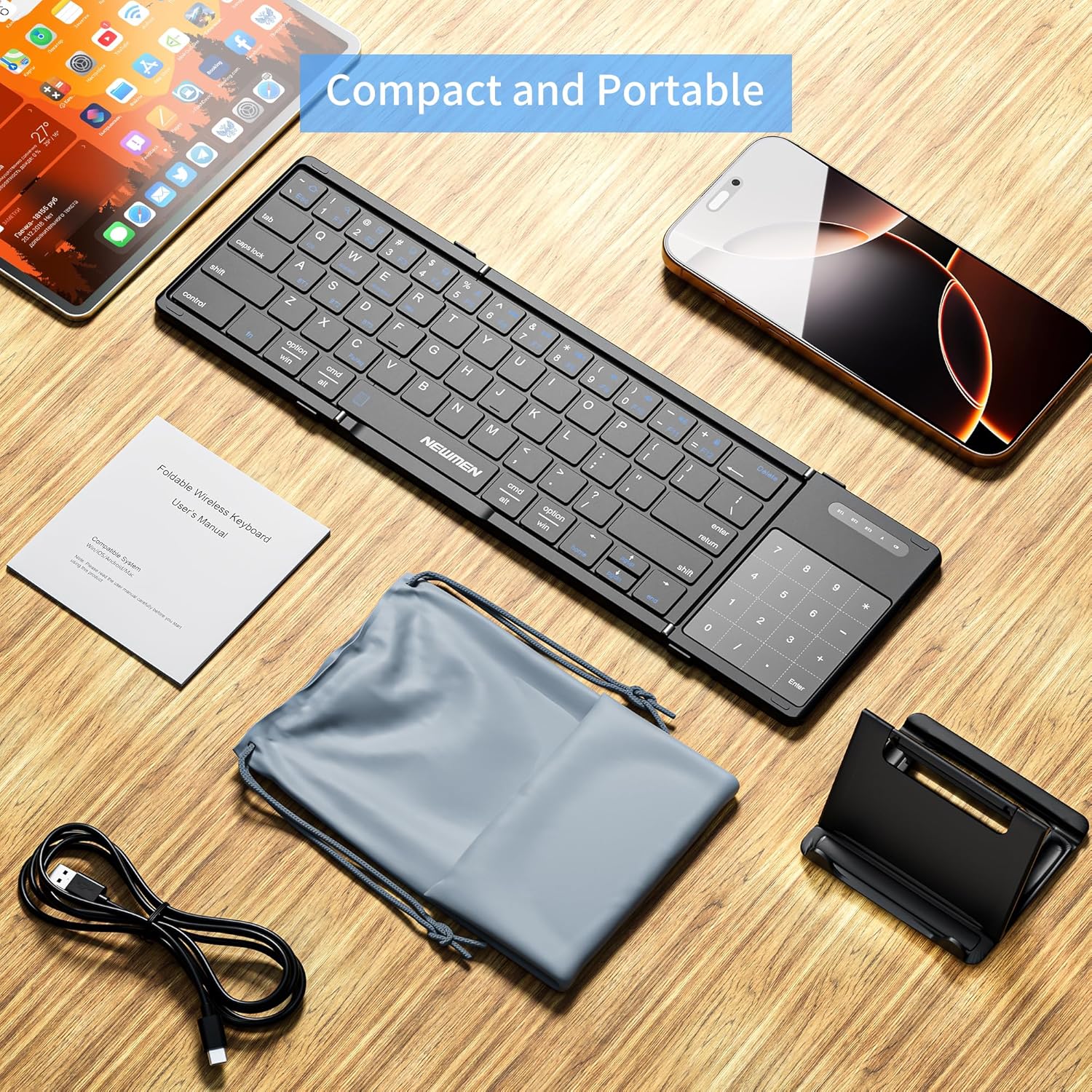
Image: The Newmen BK66 Foldable Bluetooth Keyboard shown with its included accessories: a USB-C charging cable, a storage bag, a mobile phone holder, and the user manual.

Image: The Newmen BK66 Foldable Bluetooth Keyboard in both its compact, folded state and its fully unfolded, operational state, showcasing il suo design.
3. Impostazione
3.1 Ricarica della tastiera
Before initial use, fully charge the keyboard. Connect the provided USB-C charging cable to the keyboard's charging port and the other end to a USB power source (e.g., computer, wall adapter). The charging indicator light will illuminate during charging and turn off when fully charged.

Immagine: un primo piano view of the Newmen BK66 keyboard showing the USB-C charging cable connected to its port, indicating the charging process.
3.2 Accensione/Spegnimento
Locate the power switch on the side of the keyboard. Slide it to the 'ON' position to power on the device. Slide it to the 'OFF' position to power off.

Image: A composite image highlighting the charging port, the power switch, and the scissor switch key mechanism of the Newmen BK66 keyboard.
3.3 Associazione Bluetooth
The Newmen BK66 keyboard supports pairing with up to three devices simultaneously. Follow these steps to pair your device:
- Assicurarsi che la tastiera sia carica e accesa.
- Premere e tenere premuto il tasto Fn chiave e uno dei tasti del canale Bluetooth (A per BT1, S per BT2, o D for BT3) for 3-5 seconds until the corresponding indicator light flashes, indicating pairing mode.
- On your device (smartphone, tablet, laptop), navigate to its Bluetooth settings.
- Cercare available devices and select "Newmen BK66" from the list.
- Se richiesto, inserisci il codice di associazione visualizzato sullo schermo utilizzando la tastiera e premi Entrare.
- Una volta effettuata l'associazione, la spia luminosa smetterà di lampeggiare e rimarrà fissa per alcuni secondi prima di spegnersi.
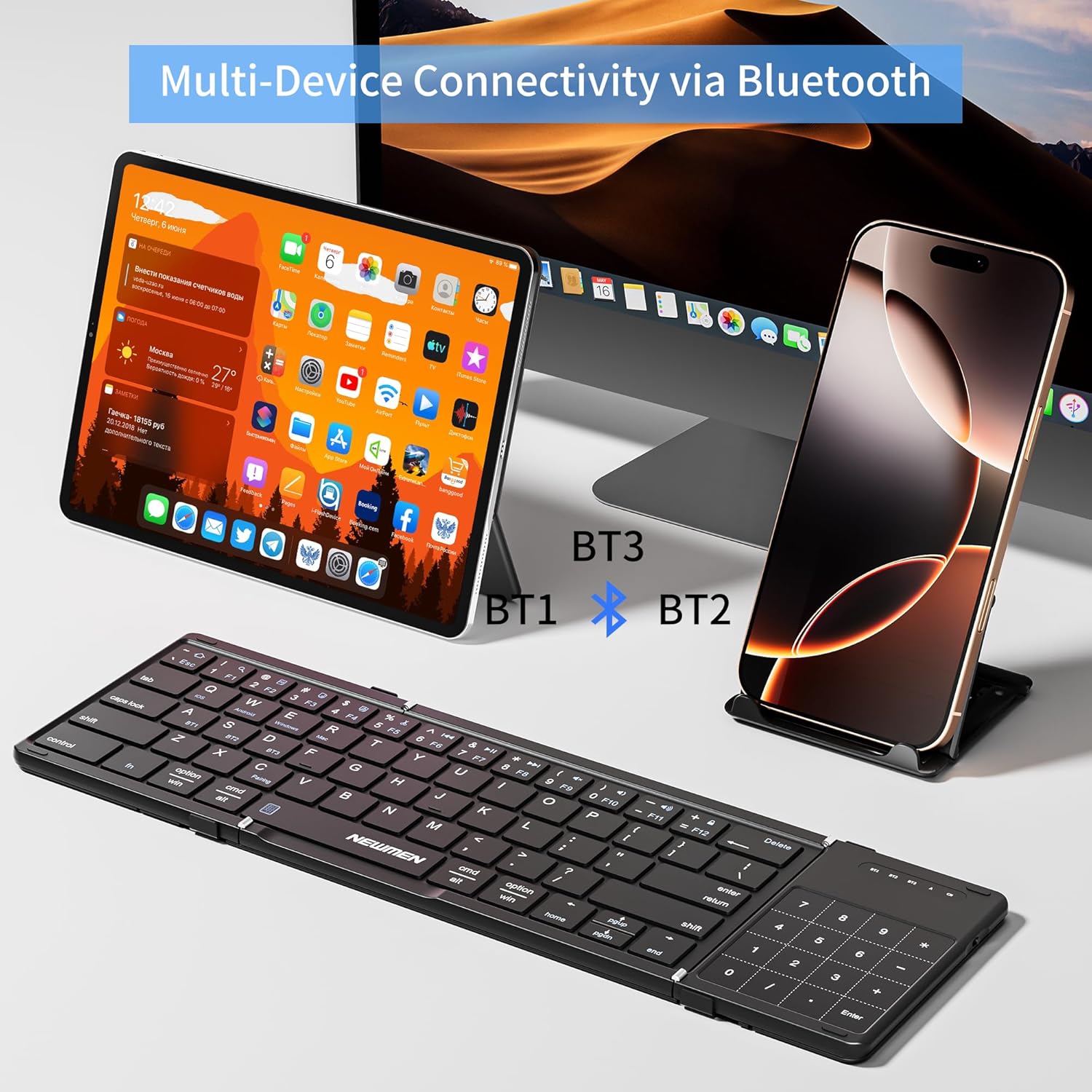
Image: The Newmen BK66 keyboard positioned in front of a tablet and a smartphone, illustrating its multi-device Bluetooth connectivity capabilities (BT1, BT2, BT3).

Image: A close-up of the Newmen BK66 keyboard highlighting the 'Fn' key and the 'A', 'S', 'D' keys, which are used in combination to switch between three paired Bluetooth devices (BT1, BT2, BT3).
3.4 Selezione del sistema operativo
The keyboard is compatible with various operating systems. To optimize key functions for your specific OS, use the following combinations:
- Fn+Q: iOS
- Fn+W: Android
- Fn + Mi: Finestre
- Fn + R: Mac

Image: The Newmen BK66 keyboard surrounded by icons representing iOS, Android, Windows, and Mac operating systems, indicating its broad compatibility.
4. Istruzioni per l'uso
4.1 Passaggio tra dispositivi accoppiati
Per passare da un dispositivo all'altro, premere semplicemente il tasto Fn key along with the corresponding Bluetooth channel key:
- Fn + LA: Switch to Device 1 (BT1)
- Fn+S: Switch to Device 2 (BT2)
- Fn + Re: Switch to Device 3 (BT3)
4.2 Funzioni del touchpad
The integrated touchpad supports various gestures for navigation and control:
- Singolo tocco: Clic sinistro del mouse.
- Tocco con due dita: Fare clic con il tasto destro del mouse.
- Two-Finger Slide (Vertical): Scorri verso l'alto/verso il basso.
- Two-Finger Slide (Horizontal): Scroll left/right.
- Pizzica dentro/fuori: Zoom avanti/indietro.
- Three-Finger Tap: Search function (may vary by OS).

Image: The Newmen BK66 keyboard with its touchpad being used, demonstrating its 2-in-1 keyboard and mouse functionality alongside a tablet and a smartphone.

Image: A visual guide illustrating various touchpad gestures for the Newmen BK66 keyboard, including single tap, two-finger vertical/horizontal slides, three-finger tap, and two-finger pinch for zoom.
4.3 Piegare e aprire
The keyboard features a three-fold design. To unfold, gently extend the two side panels outwards until they lock into place, forming a full-size keyboard. To fold, gently collapse the side panels inwards until the keyboard is compact for storage.

Image: A diagram showing the unfolded dimensions of the Newmen BK66 keyboard (13.39in x 4.13in x 0.31in) and its compact folded dimensions (7.09in x 4.13in x 0.39in).
5. Manutenzione
To ensure the longevity and optimal performance of your Newmen BK66 keyboard, follow these maintenance guidelines:
- Pulizia: Utilizzare un panno morbido, asciutto e privo di lanugine per pulire la superficie della tastiera. Per lo sporco ostinato, pulire leggermenteampPulire il panno con acqua o una soluzione detergente delicata. Evitare l'eccessiva umidità.
- Magazzinaggio: When not in use, fold the keyboard and place it in the provided storage bag. The included PU cover also offers protection against daily wear and scratches. Store in a cool, dry place away from direct sunlight and extreme temperatures.
- Evitare i liquidi: Non esporre la tastiera a liquidi. In caso di versamenti accidentali, spegnere immediatamente la tastiera e lasciarla asciugare completamente prima di riutilizzarla.
- Maneggiare con cura: Evitare di far cadere la tastiera o di sottoporla a forti urti.
6. Risoluzione Dei Problemi
If you encounter issues with your Newmen BK66 keyboard, please refer to the following common solutions:
- La tastiera non si accende:
- Assicurarsi che la tastiera sia completamente carica.
- Verificare che l'interruttore di alimentazione sia in posizione "ON".
- Impossibile effettuare l'associazione tramite Bluetooth:
- Ensure the keyboard is in pairing mode (indicator light flashing after pressing Fn + A/S/D).
- Verifica che il Bluetooth sia abilitato sul tuo dispositivo.
- Avvicina la tastiera al tuo dispositivo.
- Forget the device from your device's Bluetooth list and attempt to re-pair.
- Ensure the correct operating system mode is selected (Fn + Q/W/E/R).
- La tastiera si disconnette frequentemente:
- Assicurarsi che la tastiera si trovi entro il raggio d'azione effettivo del Bluetooth (in genere 10 metri).
- Verificare la presenza di interferenze da altri dispositivi wireless.
- Assicurarsi che la batteria della tastiera abbia una carica sufficiente.
- Touchpad or numeric keypad not responding:
- Assicurarsi che la tastiera sia completamente aperta e bloccata in posizione.
- Verify that the touchpad is not accidentally disabled (if such a function exists, refer to the quick start guide for specific key combinations).
- Keys are not typing correctly or are unresponsive:
- Ensure the correct operating system mode is selected (Fn + Q/W/E/R).
- Riassocia la tastiera al tuo dispositivo.
- Pulisci eventuali detriti attorno ai tasti.
Se questi passaggi non risolvono il problema, contattare l'assistenza clienti per ulteriore assistenza.
7. Specifiche
| Marca | Nuovi uomini |
| Modello | BK66 |
| Tecnologia di connettività | Bluetooth |
| Descrizione della tastiera | Membrana (interruttore a forbice) |
| Dispositivi compatibili | Laptop, PC, Smartphone, Tablet (iOS, Android, Windows, Mac) |
| Caratteristiche speciali | Foldable, Portable, Rechargeable, Silent, Touchpad, Numeric Keypad |
| Fonte di alimentazione | Battery Powered (Built-in 150mAh Rechargeable Lithium Battery) |
| Materiale | Plastica |
| Peso dell'articolo | 14 once (circa 397 grammi) |
| Dimensioni del pacco | 12.36 x 4.72 x 1.02 pollici |
8. Garanzia e supporto
For warranty information and customer support, please refer to the documentation included with your purchase or contact the seller directly. Newmen typically provides support for their products, and details can often be found on their official websito o tramite il rivenditore presso il quale è stato acquistato il prodotto.


