1. Introduzione
This manual provides instructions for the installation, operation, and maintenance of your TOPBULL 60A MPPT Solar Charge Controller. This intelligent regulator is designed to efficiently manage power flow from solar panels to various battery types, ensuring optimal charging and system protection. Please read this manual thoroughly before installation and use.
2. Caratteristiche principali
- Tecnologia MPPT avanzata: Achieves up to 99% tracking efficiency and 98% peak conversion efficiency for maximum power harvest from solar panels.
- Volume automaticotage Riconoscimento: Rileva automaticamente il volume del sistema a 12 V o 24 V CCtage.
- Ampia compatibilità della batteria: Supports various deep cycle battery types including Sealed, Gel, Flooded (FLD), Lithium Iron Phosphate (LiFePO4), and AGM batteries. Includes 0V Li-ion battery charging (activation) support.
- Comprehensive Electronic Protections: Built-in safeguards against reverse polarity, battery overcharge, battery overdischarge, overload, short-circuit, TVS lightning, overpower, over-temperature, and reverse current.
- Display LCD intuitivo: Provides real-time solar charging and battery operation information, customizable parameters, and error codes.
- Doppia porta USB: Conveniently charge electronic devices (5V, 2.4A total).
- Dissipazione efficiente del calore: Presenta un resistente metallo casing and dual high-speed intelligent fans for optimal thermal management, enhancing longevity and performance.
- Compensazione della temperatura: Automatically adjusts charging and discharging parameters based on ambient temperature to prolong battery life.
3. Prodotto finitoview
Familiarize yourself with the components and display of the solar charge controller.

Figura 3.1: Davanti view of the TOPBULL 60A MPPT Solar Charge Controller, showing the LCD display and control buttons.
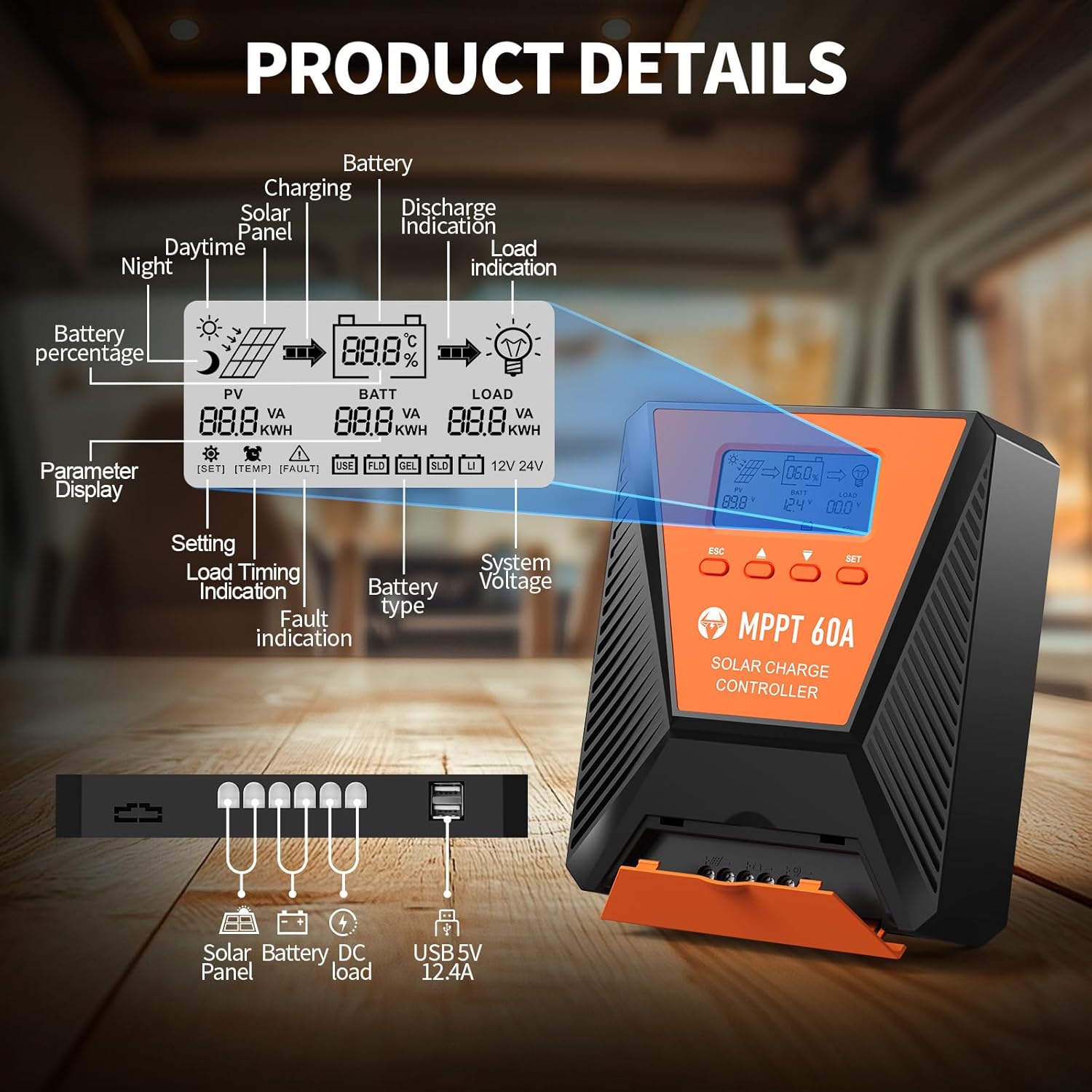
Figura 3.2: Detailed diagram illustrating the LCD display elements and the connection ports at the bottom of the controller. The display shows PV voltage, volume della batteriatage, load status, battery percentage, and various indicators. The ports include connections for solar panel, battery, DC load, and dual USB 5V 2.4A outputs.
3.1. Indicatori del display LCD
- PV (Photovoltaic): Visualizza il volume del pannello solaretage e potenza.
- BATT (Batteria): Mostra il volume della batteriatage, charge status, and type.
- CARICO: Indicates load status and power consumption.
- Percentuale batteriatage: Rappresentazione visiva del livello di carica della batteria.
- Volume di sistematage: Displays 12V or 24V system recognition.
- Visualizzazione dei parametri: Mostra le impostazioni e i valori correnti.
- Indicazione di guasto: Avvisi per errori di sistema.
3.2. Pulsanti di controllo
- ESC: Used to switch load (manual switch) and exit setup menus.
- Freccia su (▲): Navigates up through main interface pages to view parameters; increases values in setup mode.
- Freccia giù (▼): Navigates down through main interface pages to view parameters; decreases values in setup mode.
- IMPOSTATO: Enters setting mode, confirms selections, and saves changes. If no key operation for 10 seconds, it exits setting mode automatically.
4. Installazione e configurazione
4.1. Precauzioni di sicurezza
- Prima di applicare l'alimentazione, assicurarsi che tutti i collegamenti siano corretti e sicuri.
- Collegare sempre prima la batteria, poi il pannello solare e infine il carico. Scollegare in ordine inverso.
- Installare il controller in un'area ben ventilata, lontano da materiali infiammabili e dalla luce solare diretta.
- Utilizzare cavi di sezione adeguata per tutti i collegamenti per evitare il surriscaldamento.
4.2. Montaggio del controller
Mount the controller vertically on a flat, non-flammable surface using the provided mounting screws. Ensure adequate clearance around the unit for proper airflow and heat dissipation, especially for the cooling fans located on the top.

Figura 4.1: Image showing the dimensions of the controller (approximately 9.0 inches long, 7.3 inches wide, 2.8 inches high) and the included mounting screws and user manual.
4.3. Collegamenti elettrici
Seguire attentamente l'ordine di collegamento per evitare danni al controller o ad altri componenti.
- Collegare la batteria: Connect the positive and negative terminals of your battery bank to the corresponding battery terminals on the controller. The controller will automatically detect the system voltage (12V o 24V).
- Collegare il pannello solare: Connect the positive and negative leads from your solar panel array to the solar panel terminals on the controller. Ensure the maximum PV input voltage does not exceed 100VDC. For a 12V system, maximum solar input power is 720W; for a 24V system, it is 1440W.
- Collegare il carico CC (facoltativo): Connect your DC loads to the load terminals on the controller. This allows the controller to manage load discharge and provide protection.

Figura 4.2: Wiring diagram illustrating the correct connection sequence: Battery first, then Solar Panel, then DC Load. An optional inverter for AC loads is also shown connected to the battery bank.
4.4. Selezione del tipo di batteria
The controller is compatible with various battery types. It is crucial to select the correct battery type for optimal charging and battery longevity. Refer to the display and settings section to adjust this parameter if needed. The controller supports FLD (Flooded), LiFePO4 (Lithium Iron Phosphate), SLD (Sealed Lead-Acid), GEL, and AGM batteries.

Figura 4.3: Illustration showing the controller connected to a battery, with icons representing compatible battery types: LI (Lithium), FLD (Flooded), GEL, SLD (Sealed), and AGM. The controller automatically identifies battery voltage and supports custom parameters, including lithium battery 0V charging.
5. Funzionamento
5.1. Monitoraggio del display
The LCD display provides real-time information about your solar system. Use the Up (▲) and Down (▼) buttons to cycle through different display screens, showing parameters such as PV voltage, volume della batteriatage, charging current, load current, and battery state of charge.
5.2. Impostazioni dei parametri
To enter the parameter setting stage:
- Press the "SET" button to enter the setting mode. The value to be adjusted will flash.
- Use the Up (▲) or Down (▼) buttons to adjust the value.
- Press the "SET" button again to confirm and save the new value.
If no button is pressed for 10 seconds in setting mode, the controller will automatically exit without saving changes.
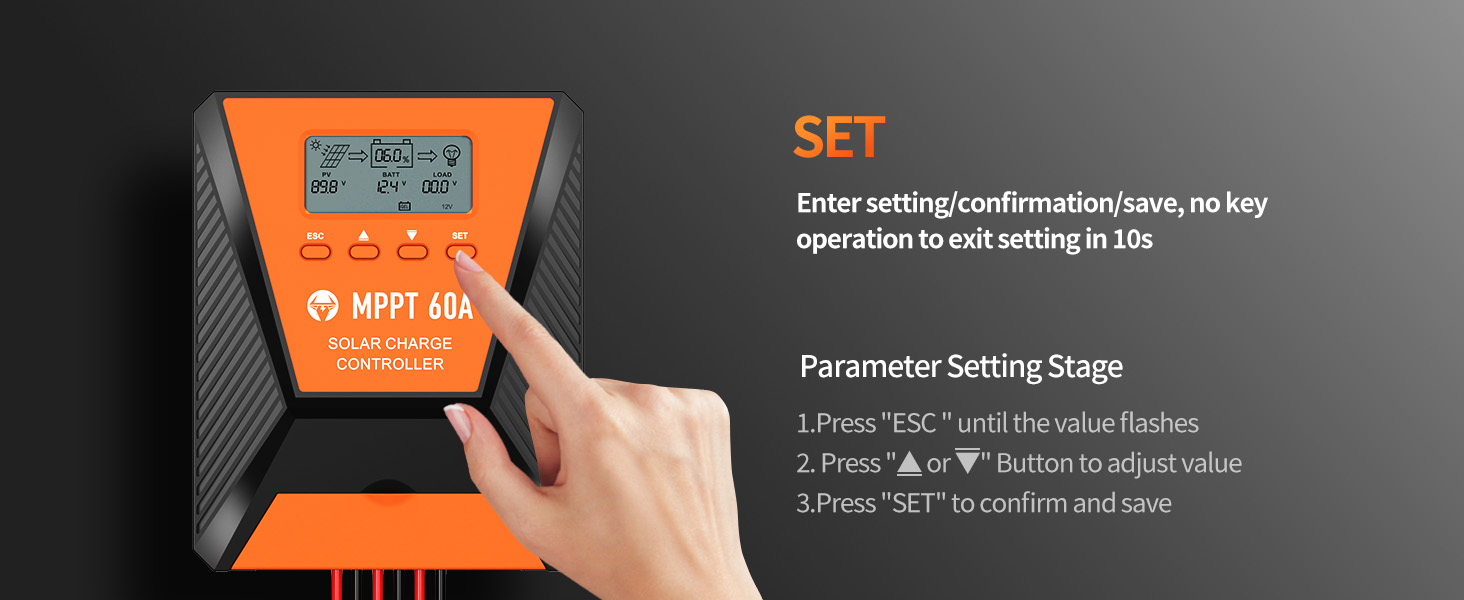
Figura 5.1: Visual guide for using the SET button to enter, adjust, and confirm parameter settings on the controller's LCD display.
5.3. Modalità di lavoro del carico
The controller supports three distinct load working modes:
- Lighting Time Control Mode (1H-23H): The load automatically turns on or off based on the intensity of sunlight and a set timer.
- Normal OFF Mode (0H): The load remains off. This mode is useful for specific loads or during debugging.
- Normal ON Mode (24H): The load remains continuously on. This mode is suitable for loads requiring a 24-hour power supply.

Figura 5.2: Diagram explaining the three load working modes: Lighting time control (1H-23H), Normal OFF (0H), and Normal ON (24H).
6. Manutenzione
Una manutenzione regolare garantisce la longevità e le prestazioni ottimali del regolatore di carica solare.
- Ispezionare le connessioni: Controllare periodicamente tutti i collegamenti elettrici per verificarne la tenuta e la corrosione. Collegamenti allentati possono causare resistenza e accumulo di calore.
- Pulisci il controller: Keep the controller clean and free from dust and debris. Ensure the cooling fan vents are unobstructed. Use a dry cloth for cleaning.
- Prestazioni del monitor: Regularly check the LCD display for normal operation and any error codes. Compare actual performance with expected values.
- Ispezione della batteria: Inspect battery terminals for corrosion and ensure proper ventilation around the batteries.
7. Risoluzione Dei Problemi
Questa sezione affronta i problemi più comuni che potresti riscontrare con il tuo regolatore di carica solare.
| Problema | Possibile causa | Soluzione |
|---|---|---|
| Nessun display/Controller non acceso | Batteria non collegata o bassa tensionetage; reverse polarity; loose wiring. | Controllare i collegamenti della batteria e il voltage. Ensure correct polarity. Tighten all wiring. |
| Batteria non in carica | Solar panel not connected; insufficient sunlight; solar panel fault; incorrect battery type setting. | Verify solar panel connections. Ensure adequate sunlight. Check solar panel output. Confirm correct battery type setting. |
| Il carico non funziona | Load disconnected; overload protection activated; incorrect load working mode. | Check load connections. Reduce load to within controller limits. Adjust load working mode settings. |
| Codice di errore visualizzato | Specific system fault (e.g., over-temperature, short-circuit). | Refer to the controller's display for the specific error code and consult the full user manual for detailed explanations and solutions. Address the underlying issue (e.g., reduce temperature, clear short-circuit). |
8. Specifiche
| Parametro | Valore |
|---|---|
| Modello | 60A |
| Volume di sistematage | Riconoscimento automatico 12V / 24V |
| massimo Ingresso FV Voltage | 100 V CC |
| Potenza massima di ingresso solare (sistema a 12 V) | 720W |
| Potenza massima di ingresso solare (sistema a 24 V) | 1440W |
| Efficienza di tracciamento | ≥99% |
| Efficienza di conversione di picco | Fino al 98% |
| Tipi di batteria supportati | FLD, LiFePO4, SLD, GEL, AGM |
| Uscita USB | Dual 5V, 2.4A (Total) |
| Dimensioni (circa) | 10.71 x 8.62 x 4.33 pollici (confezione) |
| Peso dell'articolo | 3.36 libbre |
| Materiale | Metallo |
| Tipo di visualizzazione | LCD |
9. Garanzia e supporto
TOPBULL products are designed for reliability and performance. For warranty information or technical assistance, please contact TOPBULL customer support through the retailer where the product was purchased or visit the official TOPBULL websito. Quando contatti l'assistenza, tieni a portata di mano il numero di modello del prodotto e la data di acquisto.
Per ulteriori informazioni, è possibile visitare il sito TOPBULL Store on Amazon.


