Introduzione
This manual provides instructions for the safe and effective use of your LEXIBOOK Sonic The Hedgehog Nightlight with Speaker, Model NS01SN. This device combines a soft LED nightlight with an integrated speaker, designed to create a comforting environment. Please read this manual thoroughly before use and retain it for future reference.
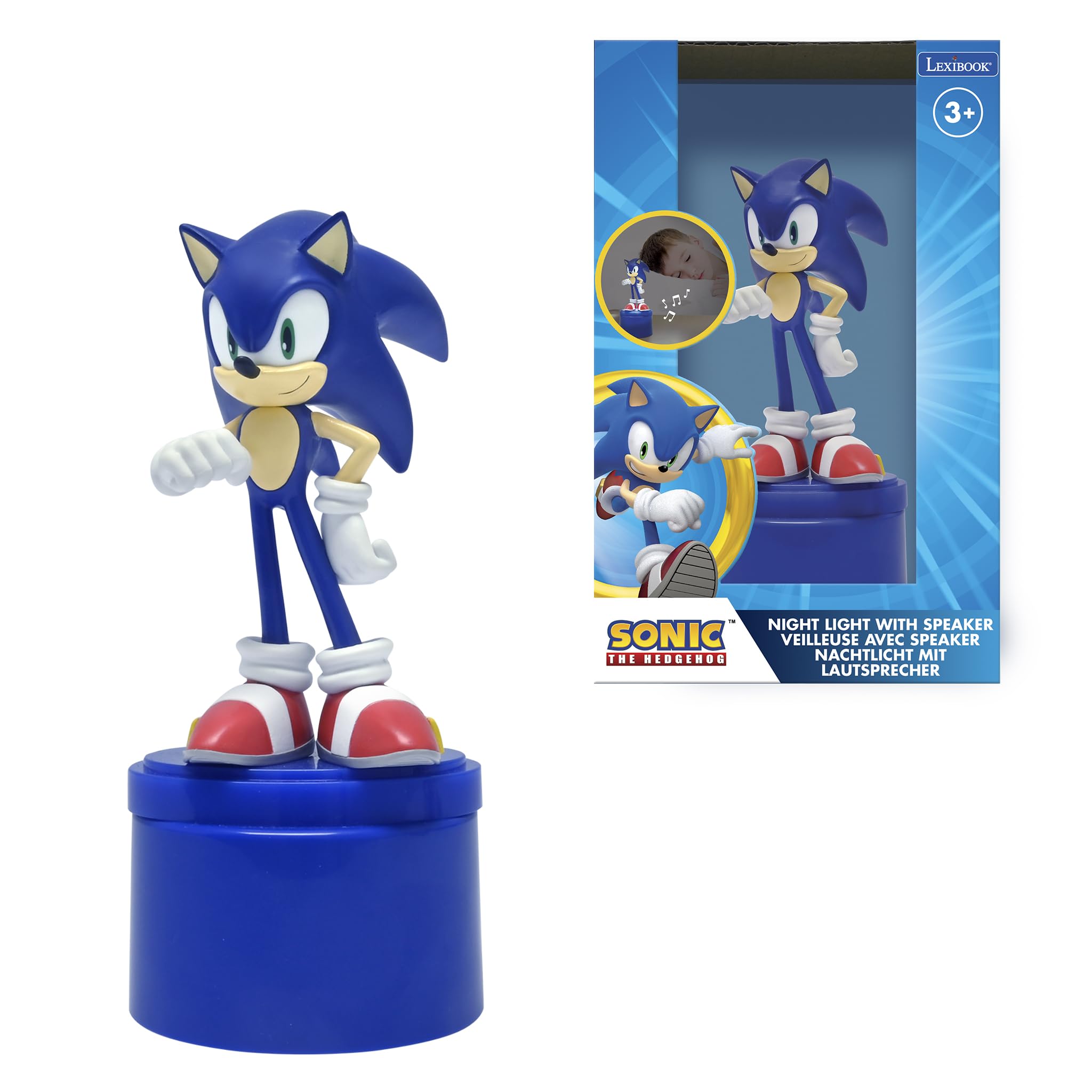
Image: The Sonic The Hedgehog Nightlight with Speaker, featuring a Sonic figurine on a blue base.
Informazioni sulla sicurezza
AVVERTENZE:
- Not suitable for children under the age of 3. Risk of suffocation due to small parts.
- This toy produces flashes that may trigger epilepsy in sensitive persons.
- Sorvegliare sempre i bambini quando si utilizza questo prodotto.
- Non mischiare batterie vecchie e nuove. Non mischiare batterie alcaline, standard (zinco-carbone) o ricaricabili (nichel-cadmio).
- Rimuovere le batterie se il prodotto non viene utilizzato per un periodo prolungato.
Contenuto della confezione
- 1 x Sonic The Hedgehog Nightlight with Speaker
- 1 x Manuale utente (questo documento)
- 1 x Auxiliary Audio Cable (double-headed)

Image: The product packaging, showing the nightlight and its features.
Impostare
1. Installazione della batteria
- Locate the battery compartment on the bottom of the nightlight base.
- Utilizzando un piccolo cacciavite, aprire il coperchio del vano batteria.
- Inserire 3 batterie AAA, assicurandosi che la polarità sia corretta (+/-) come indicato all'interno del vano.
- Riposizionare il coperchio del vano batteria e fissarlo con la vite.
Nota: le batterie non sono incluse e devono essere acquistate separatamente.

Immagine: Posteriore view of the nightlight base, showing the speaker grille and auxiliary input port. The battery compartment is located on the underside.
Istruzioni per l'uso
1. Turning On/Off the Nightlight
- Press the power button (typically located on the base) to turn on the soft LED light.
- The nightlight will automatically switch off after approximately 15 minutes to conserve battery life.
- To turn off manually before the timer, press the power button again.

Image: The Sonic nightlight illuminated, casting a soft glow and showing decorative musical notes.
2. Using the Built-in Speaker
- Locate the auxiliary input port on the nightlight base.
- Connect one end of the included auxiliary audio cable to the nightlight's auxiliary input port.
- Connect the other end of the auxiliary audio cable to the headphone jack or audio output of your external audio device (e.g., smartphone, tablet, MP3 player).
- Play audio from your external device. The sound will be routed through the nightlight's speaker.
- Adjust the volume directly on your external audio device. The nightlight does not have its own volume controls.

Image: The Sonic nightlight with a smartphone connected via an auxiliary cable, demonstrating the speaker function.
Manutenzione
Pulizia
- Ensure the nightlight is turned off and disconnected from any audio devices before cleaning.
- Wipe the surface of the nightlight with a soft, dry, or slightly damp stoffa.
- Non utilizzare detergenti abrasivi, solventi o sostanze chimiche aggressive, poiché potrebbero danneggiare la finitura del prodotto.
- Avoid getting moisture into the battery compartment or speaker grille.
Magazzinaggio
- Se si conserva il prodotto per un periodo prolungato, rimuovere le batterie per evitare perdite.
- Conservare in un luogo fresco e asciutto, lontano dalla luce solare diretta e dalle temperature estreme.
Risoluzione dei problemi
| Problema | Possibile causa | Soluzione |
|---|---|---|
| La luce notturna non si accende. | Le batterie sono scariche o installate in modo errato. | Controllare la polarità delle batterie. Sostituirle con batterie AAA nuove. |
| Speaker produces no sound. | Auxiliary cable not connected properly; external device volume too low; external device not playing audio. | Ensure auxiliary cable is fully inserted into both devices. Increase volume on the external audio device. Verify audio is playing on the external device. |
| La qualità del suono è scadente. | Auxiliary cable connection is loose or damaged; external device audio quality is low. | Check auxiliary cable connection. Try a different auxiliary cable. Test with a different audio source. |
| Nightlight turns off too quickly. | Questo è il normale funzionamento. | The nightlight has an automatic 15-minute shut-off feature. To reactivate, press the power button again. |
Specifiche
| Caratteristica | Dettaglio |
|---|---|
| Nome del modello | NS01SN |
| Marca | LexiBook |
| Tipo di sorgente luminosa | GUIDATO |
| Fonte di alimentazione | Battery Powered (3 x AAA batteries required) |
| Spegnimento automatico | Sì, dopo 15 minuti |
| Oratore | Integrated, with auxiliary input |
| Materiale | Plastica |
| Colore | Blu |
| Dimensioni del prodotto | 4.29 x 2.76 x 6.69 pollici (10.9 x 7 x 17 cm) |
| Peso dell'articolo | 5.2 once (0.15 chilogrammi) |
| Età consigliata | 3 anni e oltre |
Garanzia e supporto
Per informazioni sulla garanzia e sull'assistenza clienti, fare riferimento al sito ufficiale LEXiBOOK websul sito o contattare direttamente il servizio clienti. I dettagli sono solitamente riportati sulla confezione del prodotto o sulle risorse online ufficiali del produttore.
You can visit the LEXiBOOK store on Amazon for more information: LEXiBOOK Store


