1. Prodotto finitoview
The Transcend DrivePro Body 40 is a robust body camera designed for professionals requiring reliable video and audio recording in various environments. It features advanced imaging technology, durable construction, and comprehensive data management capabilities.

Image: Transcend DrivePro Body 40 Body Camera on a police vest, highlighting its use for capturing moments with precision.
Caratteristiche principali:
- Sony STARVIS 2 Image Sensor: Provides 2K QHD 1440P resolution at 60fps for high-quality images and enhanced low-light performance.
- Infrared LEDs for Night Vision: Four infrared LEDs activate automatically in low-light conditions, ensuring clear recording in complete darkness.
- Design robusto e durevole: IP68 rated for water and dust resistance, and compliant with U.S. military drop-test standards for shock resistance.
- Durata prolungata della batteria: Built-in high-capacity lithium battery offers up to 11 hours of continuous recording on a single charge.
- Built-in GPS/GLONASS Receiver: Tags videos and photos with geolocation data for precise tracking of routes and event locations.
- Stabilizzazione elettronica dell'immagine (EIS): Minimizes the effects of vibration and shaking for stable and precise images.
- Connettività Wi-Fi e Bluetooth: Allows for basic setup, mode switching, and live streaming to iOS and Android mobile devices via the DrivePro Body App.
2. Guida all'installazione
2.1 Disimballaggio e ispezione iniziale
Carefully unpack your DrivePro Body 40 camera and verify that all components are present:
- Corpo macchina fotografica
- Cavo USB da tipo C a tipo C
- Cavo da USB tipo C a tipo A
- 360° rotatable clip
- Supporto in velcro
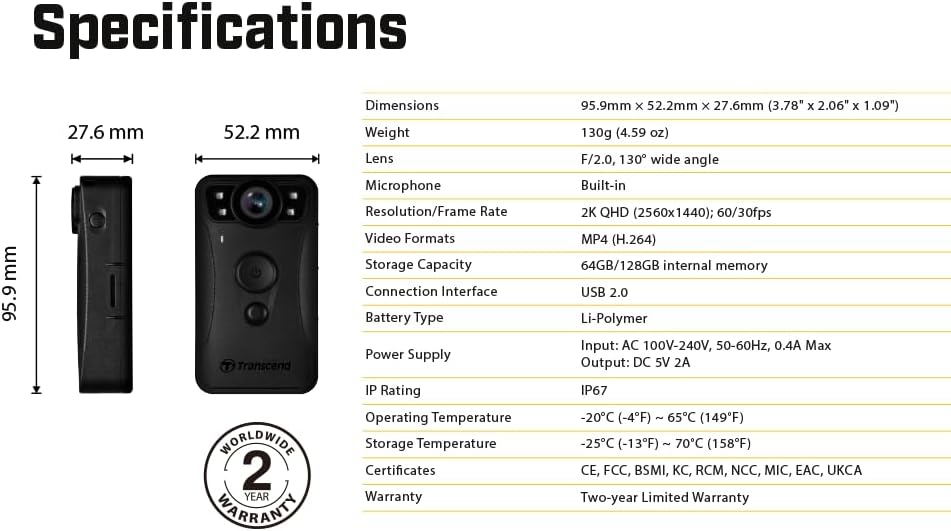
Image: The DrivePro Body 40 camera shown with its standard accessories, including various cables and mounting options.
2.2 Ricarica del dispositivo
Before first use, fully charge the camera. Connect the camera to a power source using the provided USB Type-C cable. The charging indicator light will show the charging status.
2.3 Fissaggio della clip
Attach the 360° rotatable clip or Velcro holder to the back of the camera. Ensure it is securely fastened before attaching the camera to your uniform or gear.
2.4 Accensione/Spegnimento
Per accendere, tenere premuto il pulsante di accensione finché la spia non si illumina. Per spegnere, tenere premuto il pulsante di accensione finché la spia non si spegne.
3. Istruzioni per l'uso
3.1 Registrazione video
To start recording, press the record button. The camera will begin recording in 2K QHD 1440P at 60 frames per second. Press the button again to stop recording. Ensure the camera is positioned correctly to capture the desired field of view.
Video: Official product video demonstrating the Transcend DrivePro Body 40 Body Camera in action, showcasing its recording capabilities.
3.2 Visione notturna
The DrivePro Body 40 is equipped with four infrared LEDs that automatically activate in low-light conditions. This feature enhances night vision capabilities, significantly improving recording quality in complete darkness. FootagLa registrazione con LED a infrarossi sarà in scala di grigi.

Immagine: Un dettaglio view of the camera's infrared LEDs, which enable clear recording in low-light conditions.

Image: A side-by-side comparison illustrating the effectiveness of enabled infrared LEDs for night vision versus disabled, showing improved visibility in darkness.
3.3 Stabilizzazione elettronica dell'immagine (EIS)
The camera features Electronic Image Stabilization (EIS) to minimize the effects of vibration and shaking. This ensures stable and precise images, even during dynamic movements.

Image: The DrivePro Body 40 camera highlighting its Electronic Image Stabilization feature for smoother video capture.
3.4 GPS/GLONASS Tracking
The built-in GPS/GLONASS receiver automatically tags videos and photos with geolocation data. This allows for precise tracking of routes and event locations, which can be viewed on a map display during video playback using the DrivePro Body Toolbox software.

Image: The camera shown with a map overlay, demonstrating its GPS/GLONASS tracking capabilities for geotagging recordings.
3.5 Connettività Wi-Fi e Bluetooth
The DrivePro Body 40 supports both Bluetooth for basic setup and mode switching, and Wi-Fi for live streaming videos to iOS and Android mobile devices. These functions are accessible through the free DrivePro Body App.

Image: A user interacting with the DrivePro Body App on a smartphone, demonstrating quick and easy wireless connectivity with the camera.
3.6 Storage and Battery Life
The camera features 128GB of internal storage for high-quality videos and a high-capacity Li-Polymer battery providing up to 11 hours of continuous recording. A battery power indicator helps monitor the current battery level.

Image: The camera displaying its long battery life and battery level indicators.
4. Manutenzione
4.1 Pulizia della fotocamera
To maintain optimal performance, regularly clean the camera lens and body. Use a soft, lint-free cloth. For stubborn dirt, slightly dampLavare il panno con acqua. Evitare detergenti abrasivi o solventi.
4.2 Resistenza all'acqua e alla polvere (IP68)
The DrivePro Body 40 is IP68 rated, providing full protection against dust and water. This makes it suitable for outdoor recording in harsh environmental conditions. After exposure to water or dust, ensure the product is clean and dry before use. Liquid damage is not covered under warranty if proper care is not taken.
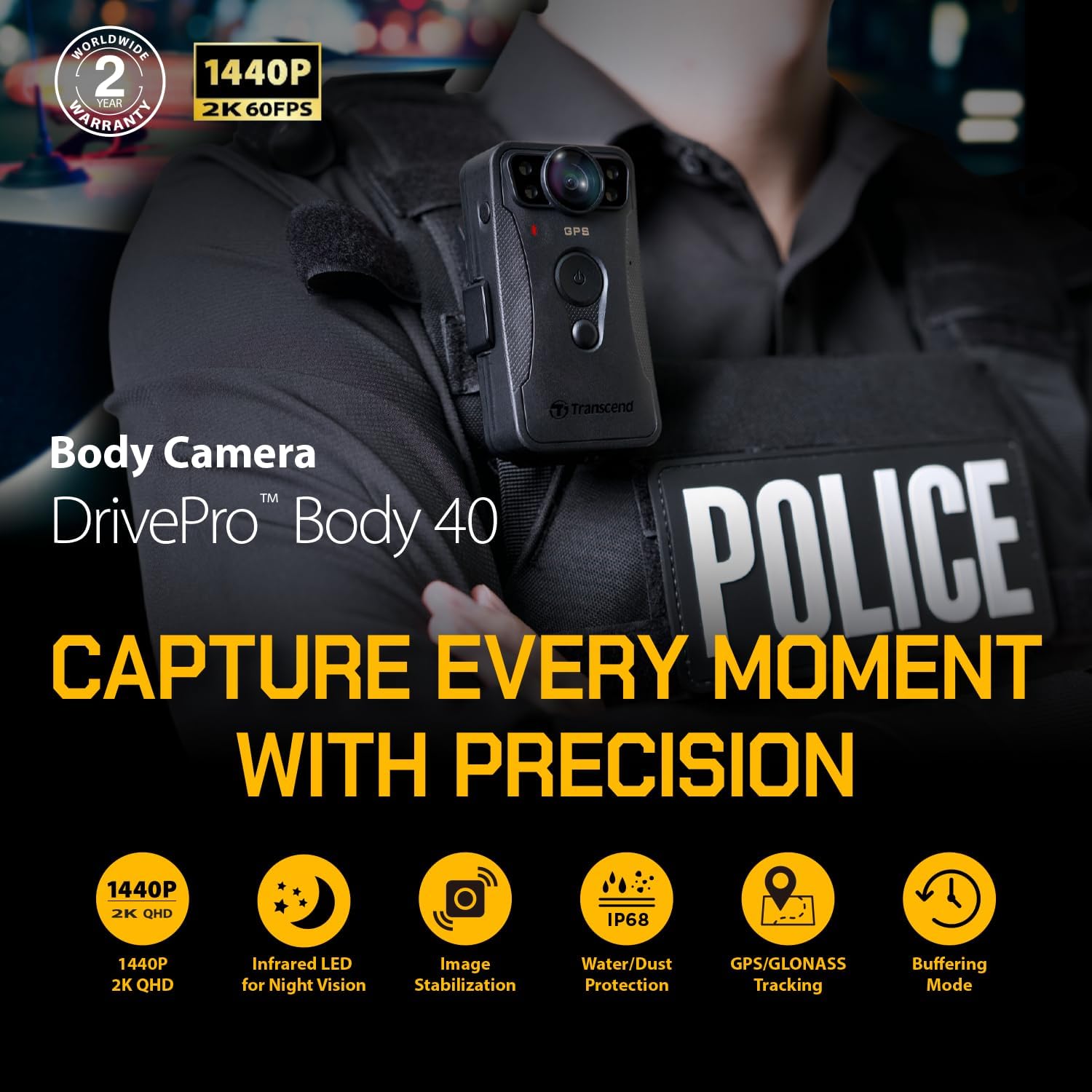
Image: The camera demonstrating its IP68 water and dust resistance, suitable for challenging environments.
4.3 Optional Docking Station (DPD6C)
An optional DPD6C docking station is available for the DrivePro Body 40. This station provides 6 ports for camera charging, device management, and data transfer, streamlining the workflow for multiple cameras.

Image: The DrivePro Body 40 camera being inserted into the DPD6C docking station, an optional accessory for charging and data management.
4.4 Firmware Updates and Software
Transcend provides the DrivePro Body App for mobile devices and the DrivePro Body Toolbox for Windows PCs. These tools allow users to manage recorded videos, adjust settings, format internal storage, and upgrade the camera's firmware. Regularly check for firmware updates to ensure optimal performance and access to new features.

Image: Visual representation of the DrivePro Body App and Toolbox, essential software for managing the camera.
5. Risoluzione Dei Problemi
5.1 Problemi comuni e soluzioni
- La fotocamera non si accende: Assicurarsi che la batteria sia carica. Collegare la fotocamera a una fonte di alimentazione e lasciarla caricare per almeno 30 minuti prima di riprovare ad accenderla.
- La batteria non mantiene la carica: If the battery life significantly decreases over time, it may indicate battery degradation. Ensure you are using the provided charging cables and a compatible power adapter. If issues persist, contact customer support.
- Poor video quality in low light: Verify that the infrared LEDs are enabled. In extremely dark conditions, the camera's performance may still be limited. Ensure the lens is clean.
- Unstable video footage: Ensure Electronic Image Stabilization (EIS) is enabled in the camera settings via the app or toolbox. Avoid excessive shaking or sudden movements where possible.
- Problemi di connettività Wi-Fi/Bluetooth: Ensure the camera's Wi-Fi/Bluetooth is enabled. Check that your mobile device is within range and that the DrivePro Body App is updated to the latest version. Restart both the camera and your mobile device.
- I dati GPS non vengono registrati: Assicurarsi che la fotocamera abbia una visuale chiara view of the sky for GPS signal acquisition. Avoid using the camera indoors or in areas with heavy obstruction.
- La fotocamera non è riconosciuta dal computer: Try a different USB port or cable. Ensure the camera is powered on and in the correct mode for data transfer. Update your computer's USB drivers if necessary.
6. Specifiche tecniche
| Caratteristica | Specificazione |
|---|---|
| Nome del modello | Corpo DrivePro 40 |
| Numero modello articolo | TS128GDPB40A |
| Dimensioni (L x P x A) | 1.09 x 2.06 x 3.78 pollici (27.6 x 52.2 x 95.9 mm) |
| Peso dell'articolo | 4.8 once (135 grammi) |
| Risoluzione di acquisizione video | 1440p (2K QHD) |
| Risoluzione video efficace | 2.21 MP |
| Formato di acquisizione video | MP4 |
| Tecnologia del sensore fotografico | CMOS (Sony STARVIS 2) |
| Massimo WebRisoluzione dell'immagine della camma | 4 MP |
| Viewangolo di ing | 130 gradi |
| Tipo di memoria flash | Micro SDXC (128GB internal) |
| Fonte di alimentazione | Battery Powered (Li-Polymer) |
| Batterie richieste | No (1 CR5 batteries included) |
| Tecnologia di comunicazione wireless | Wifi bluetooth |
| Tecnologia di connettività | Bluetooth, USB, Wi-Fi |
| Livello di resistenza all'acqua | Resistente all'acqua (IP68) |
| Colore | Nero |
| Uso interno/esterno | All'aperto |
| Usi consigliati | Law enforcement personnel, Security guards |
7. Garanzia e supporto
7.1 Informazioni sulla garanzia
The Transcend DrivePro Body 40 Body Camera comes with a Two-year Limited Warranty. This warranty covers defects in materials and workmanship under normal use. Please retain your proof of purchase for warranty claims. For specific terms and conditions, refer to the warranty card included with your product or visit the official Transcend websito.
7.2 Assistenza clienti
For technical assistance, troubleshooting, or warranty inquiries, please contact Transcend customer support. You can find contact information on the official Transcend website. Additionally, the DrivePro Body App and DrivePro Body Toolbox software provide resources for device management and firmware updates.
Risorse online:
- Trascendere ufficiale Websito: www.transcend-info.com
- DrivePro Body App (available on App Store/Google Play)
- DrivePro Body Toolbox (available for download from Transcend websito)


