1. Introduzione
The Ebitcam Indoor Camera is a versatile home security device designed to provide comprehensive monitoring with its 360° pan/tilt capabilities, 1080P HD video, and advanced features like color night vision and two-way audio. This camera is ideal for monitoring pets, babies, or for general home security. It operates on 2.4GHz WiFi networks.

Figure 1.1: Ebitcam Indoor Camera and its mobile application interface.
2. Cosa c'è nella scatola
Si prega di controllare il contenuto della confezione per assicurarsi che siano presenti tutti gli articoli:
- 1x Ebitcam Smart Security Camera
- 1x adattatore USB
- 1x cavo
- 1x Guida rapida all'installazione
- 1 accessori di montaggio
3. Guida all'installazione
- Accendere la fotocamera: Connect the camera to a power source using the provided USB adapter and cable. The camera will power on automatically.

Figure 3.1: Connect the camera to power.
- Download the EbitCam App: Scan the QR code in the Quick Installation Guide or search for "EbitCam" in your mobile app store (iOS or Android) to download and install the application.

Figure 3.2: Download the EbitCam mobile application.
- Aggiungi dispositivo nell'app: Open the EbitCam app, create an account if you don't have one, and log in. Tap the "+" icon to add a new device. Follow the on-screen instructions to connect the camera to your 2.4GHz Wi-Fi network. Ensure your phone is connected to the same 2.4GHz Wi-Fi network during setup.

Figure 3.3: Steps to add the camera in the EbitCam app.
- View Alimentazione dal vivo: Una volta effettuata la connessione con successo, è possibile view the live video feed from your camera through the EbitCam app.

Figura 3.4: In diretta view of the camera feed on a smartphone.
4. Istruzioni per l'uso
4.1. Controllo panoramica e inclinazione
The Ebitcam Indoor Camera offers a 355° horizontal and 115° vertical rotation range, allowing you to monitor a wide area. Control the camera's movement directly from the EbitCam app by swiping on the live video feed.
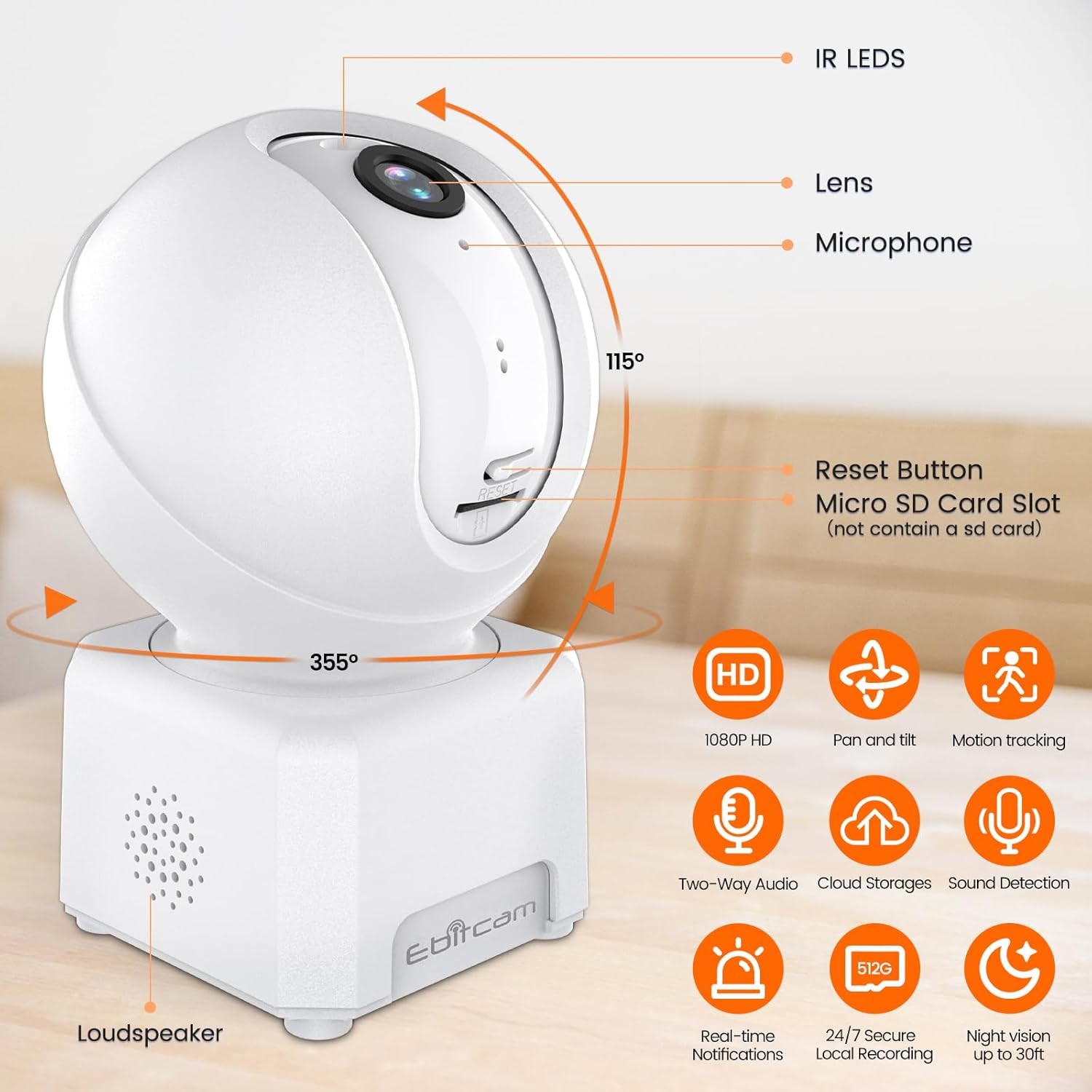
Figura 4.1: Capacità di panoramica e inclinazione della telecamera.
4.2. 1080P HD Color Night Vision
The camera provides sharp 1080P HD resolution and features advanced color night vision technology with a dual-source lighting system. Equipped with 1 PIR LED, it offers clear visibility up to 20 feet in low-light conditions. You can select between vivid full-color night vision or traditional infrared night vision modes within the app.

Figure 4.2: Clear day and night vision capabilities.
4.3. AI Human/Sound/Motion Detection
The camera is equipped with advanced motion sensors and intuitive analytics. It can detect human movement and unusual sounds, sending timely notifications to your EbitCam app. This feature helps minimize unnecessary alerts while ensuring important events are captured.

Figure 4.3: Motion detection and tracking in action.
4.4. Two-Way Audio & Alexa Integration
With a built-in microphone and speaker, the camera supports two-way audio communication, allowing you to speak with and listen to your baby, pet, or family members remotely. The camera also works with Alexa; simply ask Alexa to display the camera's view sui dispositivi compatibili.
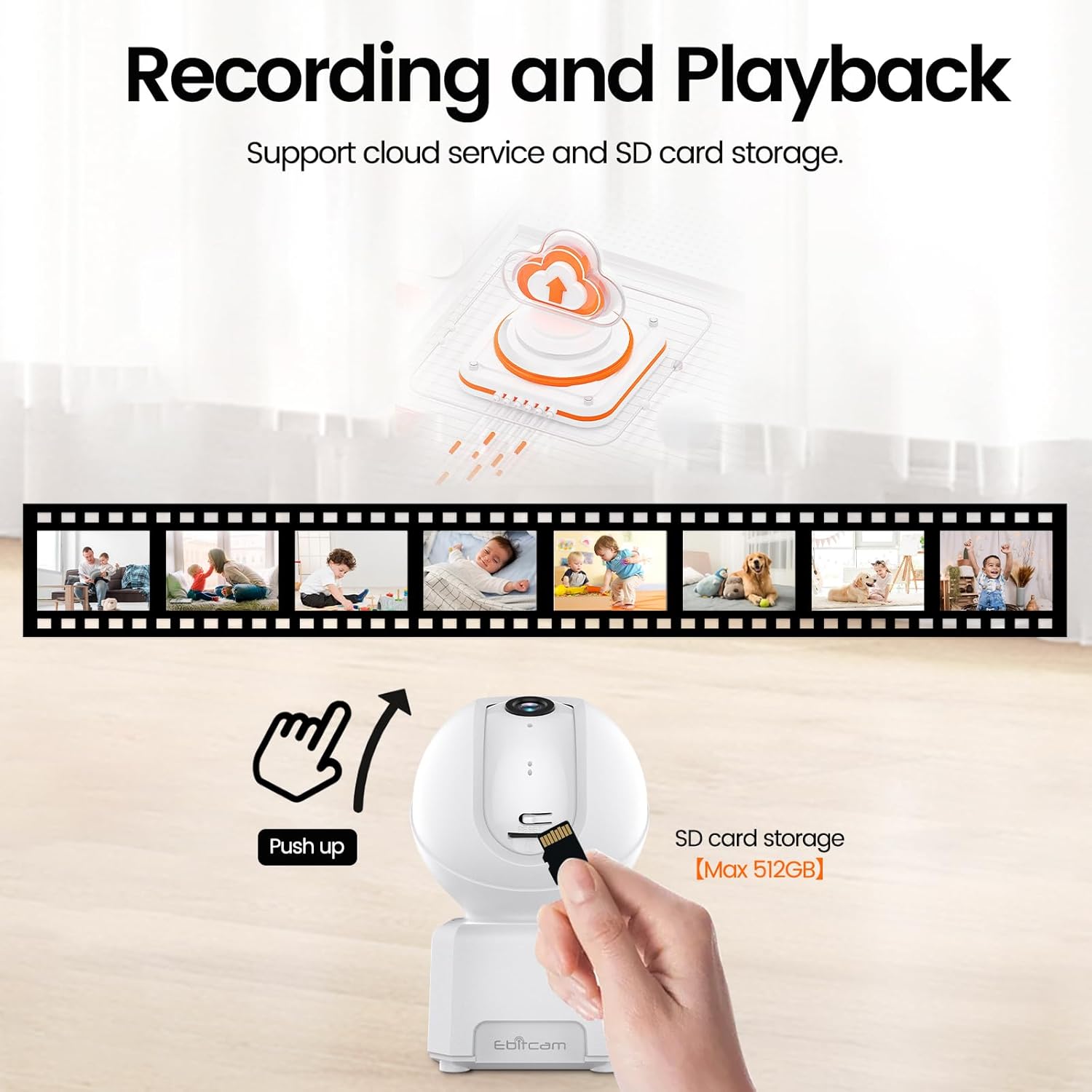
Figure 4.4: Camera integration with Alexa for voice control.
4.5. Supporto multiutente
The EbitCam mobile application allows multiple users to control and view the camera simultaneously on both iOS and Android devices. You can easily share access to the camera with friends and family members.

Figure 4.5: Multiple users can access the camera feed.
4.6. Registrazione e archiviazione
The camera supports two storage options for continuous 24/7 recording:
- Archiviazione cloud: Financial encryption video storage technology allows private recording in the EbitCam cloud storage (sold separately). A 30-day free cloud trial is available for first-time users.
- Archiviazione locale sulla scheda SD: The camera supports a Micro SD card up to 512GB (not included) for local storage, providing continuous recording without a subscription fee. To access the Micro SD card slot, gently push the camera head upwards.

Figure 4.6: Cloud and local SD card storage options.
5. Manutenzione
To ensure optimal performance and longevity of your Ebitcam Indoor Camera, follow these maintenance guidelines:
- Pulizia: Use a soft, dry cloth to clean the camera's exterior. For the lens, use a microfiber cloth specifically designed for optics. Avoid using harsh chemicals or abrasive cleaners.
- Posizionamento: Posizionare la fotocamera in un luogo stabile, lontano dalla luce solare diretta, da fonti di calore e da umidità eccessiva. Assicurarsi che vi sia una ventilazione adeguata attorno al dispositivo.
- Aggiornamenti del firmware: Regularly check the EbitCam app for available firmware updates to ensure your camera has the latest features and security enhancements.
6. Risoluzione Dei Problemi
If you encounter issues with your Ebitcam Indoor Camera, refer to the following common problems and solutions:
| Problema | Possibile causa | Soluzione |
|---|---|---|
| La fotocamera non si accende | Problema con l'adattatore o il cavo di alimentazione; problema con la presa di corrente. | Assicurati che l'adattatore di alimentazione sia collegato saldamente alla fotocamera e a una presa di corrente funzionante. Prova una presa diversa. |
| Impossibile connettersi al Wi-Fi | Password Wi-Fi errata; rete Wi-Fi a 5 GHz; telecamera troppo lontana dal router. | Verify Wi-Fi password. Ensure you are connecting to a 2.4GHz Wi-Fi network. Move the camera closer to the router. |
| Scarsa qualità video | Segnale Wi-Fi debole; lente sporca. | Check your Wi-Fi signal strength in the app. Clean the camera lens with a soft cloth. |
| Il rilevamento del movimento non funziona | Detection settings disabled or sensitivity too low. | Check the motion detection settings in the EbitCam app and adjust sensitivity as needed. |
| La scheda SD non registra | SD card not inserted correctly; card full or corrupted; incorrect format. | Ensure the SD card is inserted correctly. Check card capacity and format (FAT32 recommended). Try reformatting the card via the app or replacing it. |
7. Specifiche tecniche
| Caratteristica | Specificazione |
|---|---|
| Modello | B0DHX2WK2T |
| Risoluzione di acquisizione video | Formato: 1080p |
| Viewangolo di ing | 360 Degrees (355° horizontal, 115° vertical) |
| Tecnologia di connettività | Wi-Fi (2.4 GHz) |
| Gamma di visione notturna | 6 metri (circa 20 piedi) |
| Magazzinaggio | Micro SD (fino a 512 GB), archiviazione cloud |
| Audio bidirezionale | SÌ |
| Rilevamento del movimento | AI Human/Sound/Motion Detection |
| Dispositivi compatibili | Amazon Alexa, Android, Apple HomeKit (via app) |
| Fonte di alimentazione | Elettrico con cavo (5 Volt CC, 5 Watt) |
| Dimensioni (L x P x A) | 3.15 x 4.21 x 2.83 pollici |
| Peso dell'articolo | 9.9 once |
| Materiale | Acrilonitrile Butadiene Stirene (ABS) |
8. Garanzia e supporto
Ebitcam is committed to customer satisfaction. Your Ebitcam Indoor Camera comes with a garanzia di un anno from the date of purchase. Additionally, Ebitcam offers supporto tecnico a vita per il prodotto.
If you encounter any problems or have questions regarding your camera, please contact Ebitcam customer service. They aim to reply within 24 hours for assistance with returns, refunds, or technical queries.
For support, please refer to the contact information provided in your Quick Installation Guide or visit the official Ebitcam websito.


