Introduzione
This manual provides detailed instructions for the Fantech Tamago WHG01 Wireless Headphones. It covers product features, setup, operation, maintenance, and troubleshooting to ensure optimal performance and user experience. The WHG01 offers tri-mode connectivity (StrikeSpeed 2.4GHz wireless, Bluetooth 5.2, and wired Type-C) and a detachable microphone, designed for versatile audio needs.
Cosa c'è nella scatola
Verifica che tutti gli articoli elencati di seguito siano inclusi nel tuo pacchetto:
- Fantech Tamago WHG01 Headset
- USB Receiver (for StrikeSpeed 2.4GHz wireless)
- Cavo di ricarica di tipo C.
- Microfono omnidirezionale staccabile
- Manuale d'uso

Prodotto finitoview
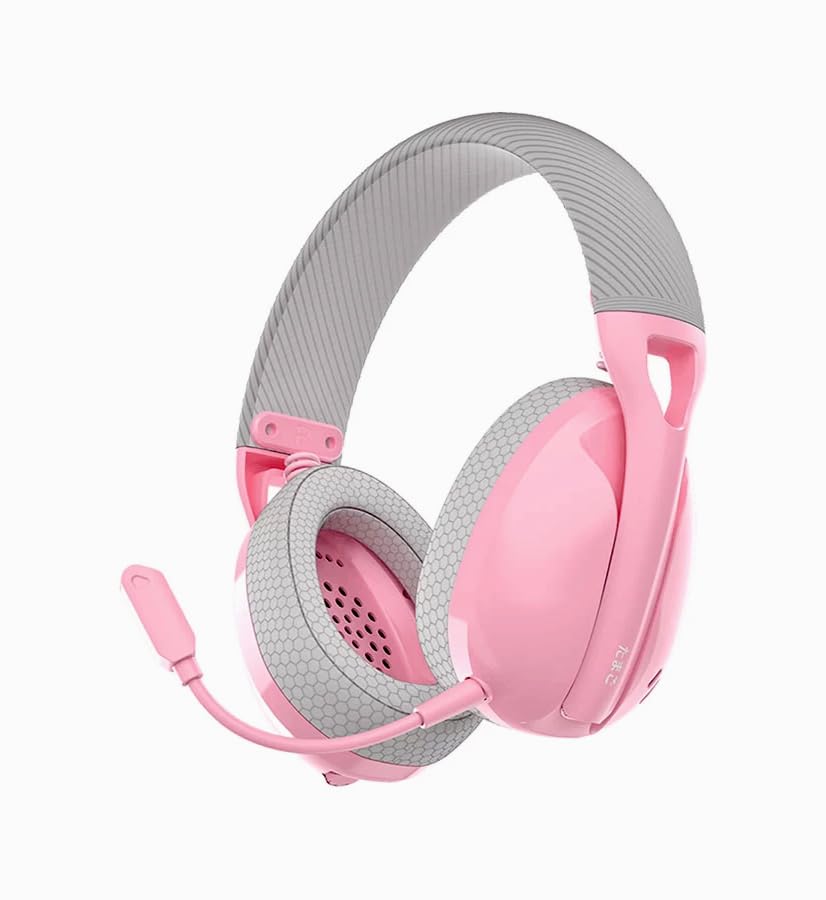
The Fantech Tamago WHG01 headphones are designed for comfort and versatility. Key features include:
- Design ultraleggero: Weighing approximately 168g (172g with microphone), ensuring comfort during extended use.
- Breathable Ear Cushions: Fabric-covered ear cushions for enhanced comfort and airflow.
- Microfono staccabile: A flexible omnidirectional microphone for clear communication, which can be removed when not needed.
- Controlli sopra l'orecchio: Integrated buttons for power, volume adjustment, and microphone mute.

Impostare
1. Caricare l'auricolare
Before first use, fully charge the headset. A built-in 400mAh battery provides up to 18 hours of playtime.
- Collegare il cavo di ricarica Type-C in dotazione alla porta di ricarica sull'auricolare.
- Collegare l'altra estremità del cavo a una fonte di alimentazione USB (ad esempio, una porta USB del computer, un adattatore USB da parete).
- The LED indicator on the headset will show charging status (refer to LED indicator section for details).
- Una volta caricata completamente, scollegare il cavo di ricarica.

2. Collegamento del microfono
The WHG01 features a detachable omnidirectional microphone.
- Locate the microphone port on the left ear cup.
- Allineare il connettore del microfono con la porta e spingerlo delicatamente finché non scatta in posizione.
- To detach, gently pull the microphone out of the port.
3. Modalità di connettività
The headset supports three connectivity modes: StrikeSpeed 2.4GHz Wireless, Bluetooth 5.2, and Wired Type-C.

StrikeSpeed 2.4GHz Wireless Connection
This mode provides low-latency wireless audio, ideal for gaming.
- Insert the USB receiver into an available USB port on your device (PC, laptop, compatible console).
- Power on the headset. The headset will automatically attempt to connect to the USB receiver.
- The LED indicator will confirm successful connection (refer to LED indicator section).
- Ensure the headset is selected as the audio output/input device in your system settings.
Connessione Bluetooth 5.2
For wireless connection to Bluetooth-enabled devices like smartphones, tablets, or laptops.
- Accendi l'auricolare.
- Press and hold the mode button (or power button, depending on model specifics - refer to physical controls diagram if available) to enter Bluetooth pairing mode. The LED indicator will flash, indicating it's discoverable.
- On your device, go to Bluetooth settings and search for "Fantech Tamago WHG01" (or similar).
- Select the headset to pair. The LED indicator will change to a solid light upon successful pairing.
Connessione cablata di tipo C
For a direct, stable connection and simultaneous charging.
- Connect the Type-C charging cable to the headset's Type-C port.
- Connect the other end of the cable to a compatible Type-C port on your device.
- L'auricolare funzionerà come un dispositivo audio cablato.
Istruzioni per l'uso
Accensione/spegnimento
- Per accendere: Press and hold the Power button (usually located on the ear cup) for approximately 3 seconds until the LED indicator lights up.
- Per spegnere: Tenere premuto il pulsante di accensione per circa 5 secondi finché l'indicatore LED non si spegne.
Controllo del volume
- Aumenta volume: Press the '+' button on the ear cup.
- Diminuisci volume: Press the '-' button on the ear cup.
Disattiva/Riattiva microfono
- Microfono disattivato: Press the dedicated microphone mute button (or a specific combination, refer to product diagram) on the ear cup.
- Disattiva microfono: Press the microphone mute button again.
Cambiare modalità di connettività
The headset allows seamless switching between its tri-modes.
- Press the Mode button (if available) to cycle through StrikeSpeed Wireless, Bluetooth, and Wired modes.
- The LED indicator will change to reflect the active mode.
Manutenzione
Pulizia
- Utilizzare un panno morbido e asciutto per pulire le superfici delle cuffie.
- Per i cuscinetti auricolari, strofinare delicatamente con un panno leggermente damp panno e lasciare asciugare completamente all'aria.
- Non utilizzare prodotti chimici aggressivi, solventi o detergenti abrasivi.
Magazzinaggio
- Conservare le cuffie in un luogo fresco e asciutto, lontano dalla luce solare diretta e da temperature estreme.
- Evitare di posizionare oggetti pesanti sul visore.
- Se si prevede di non utilizzarla per un periodo prolungato, assicurarsi che la batteria sia parzialmente carica (circa il 50%) per prolungarne la durata.
Risoluzione dei problemi
- Nessun potere: Ensure the headset is charged. Connect the Type-C cable and check if the charging indicator lights up.
- No Sound (Wireless):
- Check if the headset is powered on and connected to the correct device.
- For StrikeSpeed, ensure the USB receiver is properly inserted and recognized by your device.
- For Bluetooth, ensure the headset is paired and selected as the audio output in your device's settings.
- Aumentare il volume sia dell'auricolare che del dispositivo connesso.
- Microfono non funzionante:
- Assicurarsi che il microfono sia fissato saldamente all'auricolare.
- Check if the microphone is muted using the headset's controls.
- Verify that the correct microphone input device is selected in your computer's or device's sound settings.
- Problemi di connessione:
- Prova a riavviare sia l'auricolare che il dispositivo connesso.
- Per il Bluetooth, prova a disaccoppiare e riassociare l'auricolare.
- Ensure there are no significant obstructions or interference sources between the headset and the wireless receiver/device.
Specifiche
| Modello | WHG01 |
| Connettività | Tri-mode (StrikeSpeed 2.4GHz Wireless, Bluetooth 5.2, Wired Type-C) |
| Peso | 168g (172g with microphone) |
| Driver dell'altoparlante | 40mm |
| Sensibilità dell'altoparlante | 106 dB±3 dB |
| Tipo di microfono | Detachable Omnidirectional |
| Dimensione microfono | ø6 mm*2.7 mm |
| Sensibilità del microfono | -42±3dB |
| Capacità della batteria | 400mAh |
| Tempo di gioco | Fino a 18 ore |
| Porta di ricarica | USB di tipo C |
| Core Construction | addominali |
| Dispositivi compatibili | PC, Laptop, Mobile devices |
Garanzia e supporto
Per informazioni sulla garanzia e supporto tecnico, fare riferimento al sito ufficiale Fantech webo contattare il distributore locale. Conservare la prova d'acquisto per eventuali reclami in garanzia.
Produttore: Fantech
Importatore/Imballatore: MRJ Electronics Ahmedabad Gujarat. electronicsmrj@gmail.com. Contact: 9023265213
Data prima disponibilità: 25 settembre 2024


