1. Prodotto finitoview
The BOYA BY-V30 is a compact and lightweight wireless lavalier microphone system designed for high-quality audio recording with USB-C compatible devices, including iPhone 15/16 series, Android phones, PCs, and laptops. It features advanced 2.4GHz wireless technology, dual-mode noise cancellation, and an extended battery life, making it ideal for content creation, live streaming, vlogging, and interviews.

Image: The BOYA V30 wireless microphone system, showing two transmitters, a charging case, and a USB-C receiver.
2. Cosa c'è nella scatola
- BY-V30 Transmitter x 2
- BY-V30 RXU Receiver x 1
- Custodia di ricarica x 1
- Parabrezza in schiuma x 2
- Cavo di ricarica da USB-A a USB-C x 1
3. Caratteristiche principali
3.1 Compact and Lightweight Design
The Boya BY-V30 wireless microphone delivers high-quality recording in a compact design. Weighing only 10.5g per transmitter, this mini microphone ensures exceptional comfort and portability, making it ideal for various recording scenarios.

Image: A hand holding the lightweight BOYA V30 transmitter, highlighting its portability.
3.2 Dual-mode Noise Cancellation
Engineered for clarity, this clip-on microphone provides one-click noise cancellation and a dense windproof foam cover, effectively reducing wind and background interference. With high-resolution 48kHz/16bit audio, an 80dB signal-to-noise ratio, and a 120dB maximum sound pressure level, it delivers precise, clear audio—even in high-noise settings. Ideal for capturing professional-grade sound anywhere.

Image: Illustration of the one-click noise reduction feature on the BOYA V30 transmitter.
3.3 Upgraded 328FT Wireless Transmission
This portable microphone uses advanced 2.4GHz wireless technology, providing reliable, cable-free audio transmission up to 328 feet (100 meters). This allows for convenient, hands-free recording in various settings.

Image: A smartphone with the BOYA V30 receiver attached, demonstrating stable wireless transmission up to 100 meters.
3.4 Extended 36-Hour Battery Life
The wireless lavalier microphone transmitter is equipped with a 95mAh rechargeable battery and energy-efficient chip, delivering up to 9 hours of use on a single charge. With the included charging case, the mobile version provides an impressive 36-hour total battery life—perfect for long shoots and extended recording sessions. Additionally, the receiver features a USB-C charging port to keep your device powered and your recording uninterrupted.

Image: The BOYA V30 charging case illustrating the 36-hour total battery life provided by the case and transmitters.
3.5 Plug and Play, Truly Wireless
This wireless microphone system features a direct plug-in receiver for a hassle-free, fully wireless experience. No adapters, Bluetooth, or apps required—simply plug the receiver (Type-C port) into your device, clip on the microphone, and start recording instantly. The USB-C version is compatible with Android phones, iPhone 15/16 series, and laptops, delivering clear, crisp sound across multiple devices.

Image: A step-by-step diagram demonstrating the plug-and-play setup process for the BOYA V30.
3.6 Playback without Unplugging
With exclusive audio technology, this lapel microphone lets you enjoy seamless playback directly from your phone’s built-in speaker—no need to unplug the receiver. This allows for convenient review delle tue registrazioni.

Image: A user listening to audio directly from their phone's speaker without unplugging the BOYA V30 receiver.
3.7 360° Rotating Clip
The microphone features a 360° rotatable clip, allowing for flexible and secure attachment to clothing or other surfaces. This ensures optimal sound pickup and a stable fit in any position.
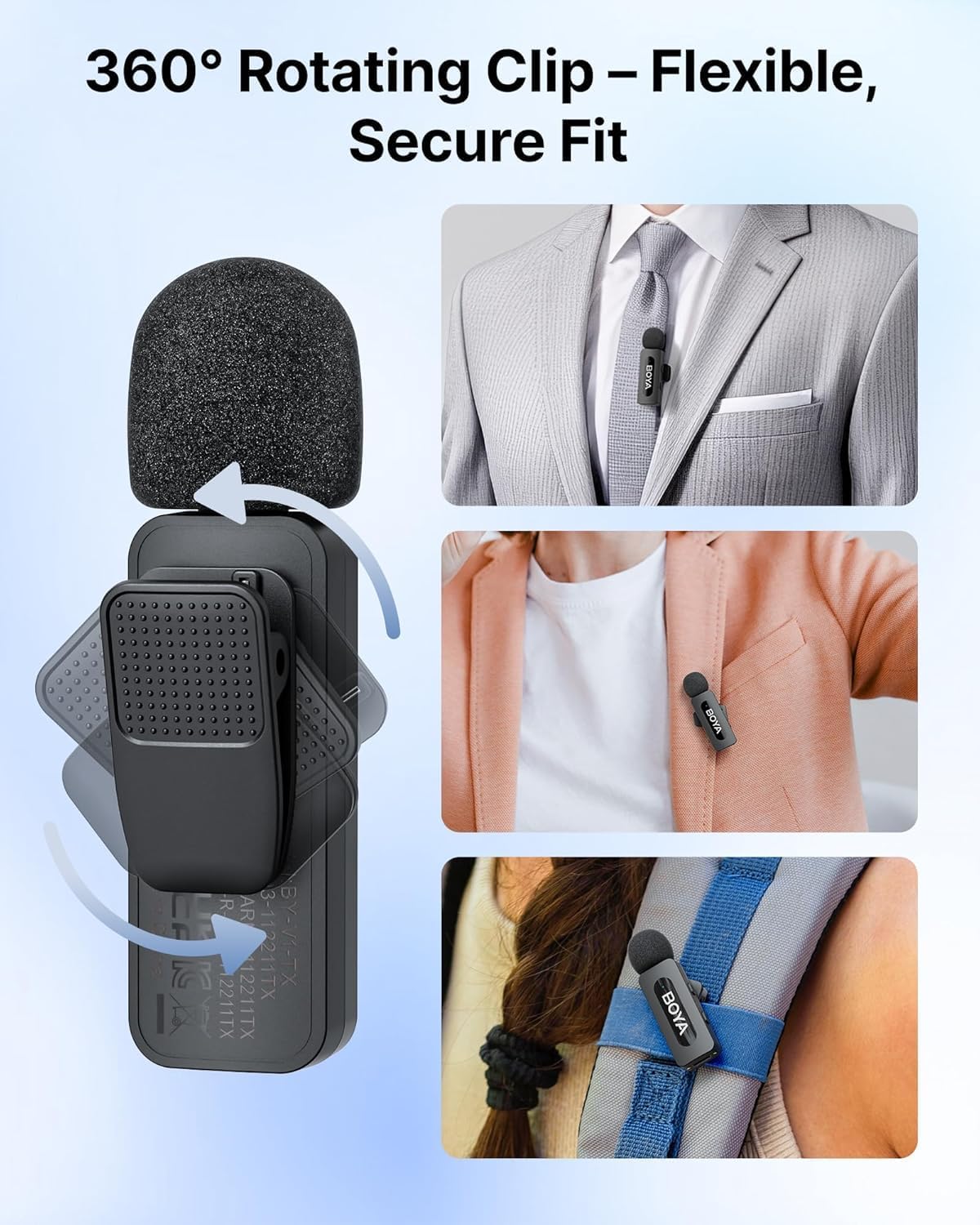
Immagine: dettagliata view of the BOYA V30's 360° rotating clip, showing its versatility for attachment.
3.8 Compatibilità universale
The USB-C version of the BOYA V30 is widely compatible, supporting 99% of Type-C smartphone devices, including Android phones, iPhone 15/16 series, iPads, and laptops, delivering clear, crisp sound across multiple devices.

Immagine: Un'illustrazione mostraasing the wide compatibility of the BOYA V30 with various USB-C devices.
4. Guida all'installazione
- Carica il sistema: Before first use, ensure both transmitters and the charging case are fully charged using the provided USB-A to USB-C charging cable. The charging case has indicator lights to show its battery level.
- Inserire il ricevitore: Plug the BY-V30 RXU receiver directly into the USB-C port of your recording device (smartphone, tablet, or laptop).
- Accensione dei trasmettitori: Take the BY-V30 transmitters out of the charging case. They will automatically power on and attempt to pair with the receiver.
- Conferma dell'associazione: Once successfully paired, the indicator lights on both the receiver (RX) and transmitters (TX) will turn solid blue.
- Collegare i microfoni: Clip the transmitters onto your clothing, ensuring the microphone head is facing towards your mouth for optimal sound capture. Utilize the 360° rotating clip to adjust the angle as needed.
- Avvia la registrazione: Open your preferred audio or video recording application on your device and begin recording. Note: Some phones may default to the built-in mic; please switch to the BY-V external mic in your device's settings if necessary.
5. Istruzioni per l'uso
- Accensione/spegnimento: The transmitters automatically power on when removed from the charging case and power off when placed back inside.
- Cancellazione del rumore: Each transmitter features a dedicated button for one-click noise cancellation. Press the 'NR' button to toggle noise reduction on or off, indicated by a change in the LED light.
- Monitoraggio della connessione: The indicator lights on both the receiver and transmitters provide visual confirmation of their connection status. A solid blue light indicates a successful connection.
- Riproduzione audio: The system supports direct audio playback through your device's built-in speaker without needing to unplug the receiver. This allows for convenient review delle tue registrazioni.
6. Manutenzione
- Pulizia: Utilizzare un panno morbido e asciutto per pulire i trasmettitori del microfono, il ricevitore e la custodia di ricarica. Evitare l'uso di prodotti chimici aggressivi o materiali abrasivi.
- Magazzinaggio: When not in use, store the microphones and receiver in their charging case to protect them and keep them charged. Store in a cool, dry place away from direct sunlight and extreme temperatures.
- Cura della batteria: For optimal battery longevity, avoid fully discharging the devices frequently. Recharge them regularly, especially if they will be stored for extended periods.
7. Risoluzione Dei Problemi
- Nessun suono/scarsa qualità del suono:
- Assicurarsi che sia i trasmettitori che il ricevitore siano completamente carichi e accesi.
- Verify that the receiver is securely plugged into your device's USB-C port.
- Controlla le impostazioni di ingresso audio del tuo dispositivo per assicurarti che sia selezionato il microfono esterno.
- Confirm that the transmitters are properly clipped and angled towards the sound source.
- If noise cancellation is active, try disabling it to see if sound quality improves in quiet environments.
- Microfono non connesso:
- Ensure all components are charged.
- Remove and re-insert the receiver into your device.
- Power cycle the transmitters by placing them back in the charging case and then taking them out again.
- Ensure no other 2.4GHz wireless devices are causing interference nearby.
- Durata breve della batteria:
- Ensure the charging case itself is fully charged to provide multiple recharges to the transmitters.
- Avoid operating the microphones in extremely cold or hot conditions, which can affect battery performance.
8. Specifiche
| Caratteristica | Dettaglio |
|---|---|
| Nome del modello | BOYA V30 |
| Fattore di forma del microfono | Lavalier |
| Tecnologia di connettività | Wireless 2.4GHz |
| Tipo di connettore | USB di tipo C |
| Modello polare | Omnidirezionale |
| Gamma di frequenza | Da 20 Hz a 16 kHz |
| Signal-to-Noise Ratio | 80 dB |
| Livello massimo di pressione sonora (SPL) | 120 dB |
| Item Weight (Single Transmitter) | 10.5 grammi |
| Peso della custodia di ricarica | 86.5 grammi |
| Durata della batteria del trasmettitore | Fino a 9 ore (carica singola) |
| Durata totale della batteria (con custodia) | Fino a 36 ore |
| Distanza di trasmissione wireless | Fino a 328 piedi (100 metri) |
| Dispositivi compatibili | Laptop, Personal Computer, Smartphone, Tablet (USB-C) |
9. Garanzia e supporto
BOYA products typically come with a manufacturer's warranty. Please refer to the warranty information provided with your product packaging for specific terms and conditions. For technical support, product inquiries, or warranty claims, please visit the official BOYA websito o contattare direttamente il servizio clienti.
Puoi anche visitare il Negozio BOYA su Amazon per maggiori informazioni e supporto.
Questo prodotto è idoneo a una politica di reso/sostituzione di 30 giorni dalla data di acquisto.


