1. Importanti istruzioni di sicurezza
Leggere attentamente le presenti istruzioni di sicurezza prima di utilizzare l'unità. Conservare il manuale per riferimento futuro.
- Non esporre questo apparecchio a pioggia o umidità.
- Non ostruire le aperture di ventilazione. Installare secondo le istruzioni del produttore.
- Non installare vicino a fonti di calore come radiatori, bocchette di riscaldamento, stufe o altri apparecchi (inclusi amplificatori) che producono calore.
- Proteggere il cavo di alimentazione dall'essere calpestato o schiacciato, in particolare in corrispondenza di spine, prese di corrente e nel punto in cui escono dall'apparecchio.
- Utilizzare solo accessori/componenti specificati dal produttore.
- Scollegare l'apparecchio durante i temporali o quando non viene utilizzato per lunghi periodi di tempo.
- Affidare tutte le operazioni di manutenzione a personale di assistenza qualificato. L'assistenza è necessaria quando l'apparecchio è stato danneggiato in qualsiasi modo.
- Do not use batteries (8 x LR20/D) if they show signs of leakage or corrosion.
2. Contenuto della confezione
Verificare che tutti gli articoli siano presenti al momento del disimballaggio:
- Soundmaster SCD8300SW Boombox
- Cavo di alimentazione CA.
- Manuale d'uso
3. Prodotto finitoview
Familiarize yourself with the components of your Soundmaster SCD8300SW.
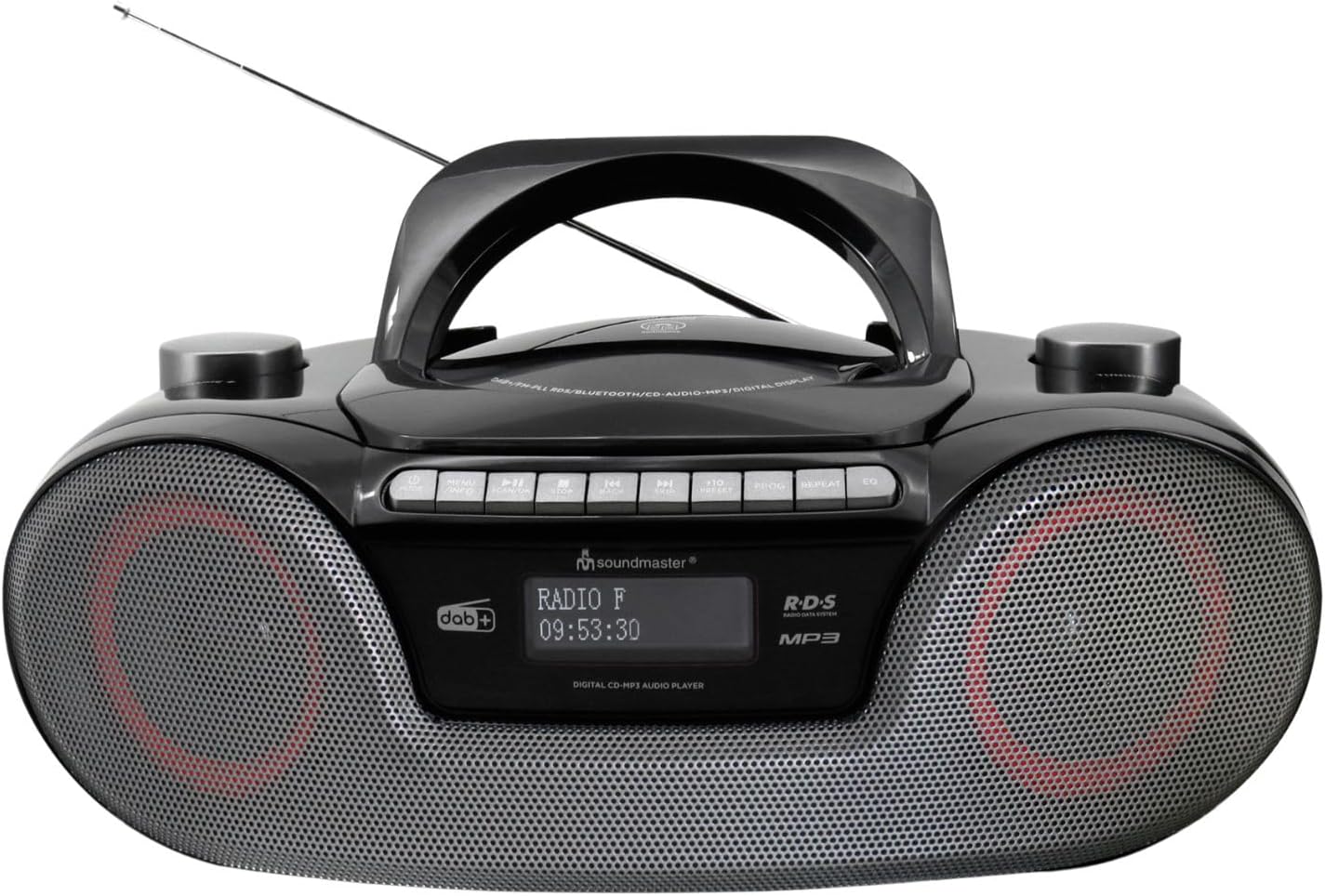
Immagine: Davanti view of the Soundmaster SCD8300SW Boombox. It features a central handle, an extendable antenna, a display screen, control buttons on top, and two speaker grilles on the front. The display shows 'RADIO F' and '09:53:30'.
Comandi e caratteristiche del pannello frontale:
- Schermo di visualizzazione: Shows current mode, station information, time, and other relevant data.
- Griglie degli altoparlanti: Altoparlanti stereo per l'uscita audio.
- Pulsanti di controllo (pannello superiore): Includes Power, Mode, Play/Pause, Stop, Skip/Tune, Volume, EQ, Info, and Alarm functions.
- Scomparto CD: Located on the top, for inserting CDs.
- Porta USB: Per collegare dispositivi di archiviazione USB.
- Slot per scheda SD: Per inserire schede di memoria SD.
- Jack per cuffie: Per l'ascolto privato.
- Ingresso AUX: Per collegare dispositivi audio esterni.
- Antenna telescopica: Per una migliore ricezione radio.
4. Impostazione
4.1 Alimentazione
Il tuo boombox può essere alimentato tramite rete elettrica CA o batterie.
Funzionamento con alimentazione CA:
- Assicurarsi che l'unità sia spenta.
- Connect the supplied AC power cable to the AC IN socket on the rear of the unit.
- Collegare l'altra estremità del cavo di alimentazione CA a una presa a muro standard.
Funzionamento a batteria:
For portable use, the unit requires 8 x LR20/D size batteries (not included).
- Aprire il coperchio del vano batterie nella parte inferiore dell'unità.
- Insert 8 x LR20/D batteries, ensuring correct polarity (+/-) as indicated inside the compartment.
- Chiudere saldamente il coperchio del vano batterie.
4.2 Configurazione dell'antenna
For optimal DAB+ and FM radio reception, fully extend the telescopic antenna. Adjust its position for the best signal.
5. Istruzioni per l'uso
5.1 Funzionamento generale
- Accensione/spegnimento: Premere il tasto ENERGIA pulsante per accendere o spegnere l'unità.
- Selezione della modalità: Premere il tasto MODALITÀ button repeatedly to cycle through available modes: DAB+, FM, CD, Bluetooth, USB, SD, AUX.
- Controllo del volume: Utilizzare il VOLUME +/- pulsanti per regolare il livello del suono.
Radio DAB+ 5.2
- Passare alla modalità DAB+ utilizzando il MODALITÀ pulsante.
- The unit will automatically scan for available DAB+ stations on first use.
- Utilizzare il SALTA/SINTONIZZA pulsanti per navigare nell'elenco delle stazioni.
- Premere ENTRARE or RIPRODUCI/PAUSA per selezionare una stazione.
- Per salvare una stazione, tenere premuto il tasto PRESET pulsante, quindi utilizzare SALTA/SINTONIZZA per selezionare un numero preimpostato (1-40) e premere ENTRARE per confermare.
5.3 Radio FM
- Passare alla modalità FM utilizzando il MODALITÀ pulsante.
- Premere e tenere premuto il tasto SALTA/SINTONIZZA buttons to automatically scan for the next available station. Press briefly to manually tune.
- To save an FM station, follow the same procedure as for DAB+ stations (up to 40 presets).
5.4 Lettore CD
- Passare alla modalità CD utilizzando il MODALITÀ pulsante.
- Open the CD compartment cover and insert a CD (CD, CD-R/RW, or MP3 CD) with the label side facing up. Close the cover.
- The CD will begin playing automatically.
- Utilizzo RIPRODUCI/PAUSA per mettere in pausa/riprendere la riproduzione.
- Utilizzo FERMARE per interrompere la riproduzione.
- Utilizzo SALTA/SINTONIZZA pulsanti per saltare le tracce.
5.5 Riproduzione Bluetooth
- Passare alla modalità Bluetooth utilizzando il MODALITÀ button. The display will show 'BT' or 'PAIRING'.
- Abilita il Bluetooth sul tuo smartphone, tablet o altro dispositivo compatibile.
- Cercare 'SCD8300SW' in your device's Bluetooth list and select it to pair.
- Una volta effettuato l'abbinamento, puoi riprodurre l'audio dal tuo dispositivo tramite lo stereo portatile.
- Usa il boombox RIPRODUCI/PAUSA E SALTA/SINTONIZZA buttons to control playback, or control directly from your paired device.
5.6 Riproduzione USB/SD
- Inserire una chiavetta USB nella porta USB o una scheda SD nello slot per schede SD.
- Passare alla modalità USB o SD utilizzando MODALITÀ pulsante.
- L'unità rileverà automaticamente e inizierà a riprodurre MP3 files dal dispositivo di archiviazione.
- Utilizzo RIPRODUCI/PAUSA, FERMARE, E SALTA/SINTONIZZA pulsanti per controllare la riproduzione.
5.7 Audio Book Mode
The Audio Book mode is designed for optimized playback of audio books, often resuming from the last played position.
- When playing audio from CD, USB, or SD, activate the Audio Book mode (refer to specific button or menu option if available, typically labeled 'Audio Book' or similar).
- This mode may offer features like bookmarking or faster navigation suitable for spoken word content.
5.8 Funzione sveglia
The unit features two alarms with a weekend function.
- Premere il tasto ALLARME pulsante per accedere alla configurazione dell'allarme.
- Utilizzo SALTA/SINTONIZZA per selezionare Sveglia 1 o Sveglia 2, quindi premere ENTRARE.
- Set the alarm time, source (Buzzer, Radio, CD, USB/SD), and volume using SALTA/SINTONIZZA E ENTRARE.
- Activate or deactivate the weekend function as desired.
- Premere ALLARME again to exit setup.
5.9 Preimpostazioni dell'equalizzatore
Premere il tasto EQ button repeatedly to cycle through various equalizer presets (e.g., Pop, Rock, Jazz, Classic, Flat) to adjust the sound profile.
5.10 Headphone and AUX Connection
- Jack per cuffie: Plug 3.5mm headphones into the headphone jack for private listening. The speakers will be muted automatically.
- Ingresso AUX: Connect an external audio device (e.g., MP3 player) to the AUX IN jack using a 3.5mm audio cable. Switch the boombox to AUX mode to play audio from the connected device.
6. Manutenzione
Proper maintenance ensures the longevity of your device.
- Pulizia: Utilizzare un panno morbido e asciutto per pulire l'esterno dell'unità. Non utilizzare detergenti abrasivi o solventi.
- Pulizia delle lenti del CD: Use a specialized CD lens cleaner disc periodically to maintain optimal CD playback.
- Magazzinaggio: If storing the unit for an extended period, remove the batteries to prevent leakage. Store in a cool, dry place.
- Antenna: Ritrarre l'antenna telescopica quando non la si utilizza per evitare danni.
7. Risoluzione Dei Problemi
Per i problemi più comuni e le relative soluzioni, fare riferimento a questa tabella.
| Problema | Possibile causa | Soluzione |
|---|---|---|
| Nessun potere | Cavo di alimentazione non collegato; batterie scariche o inserite in modo errato. | Controllare il collegamento dell'alimentazione CA; sostituire le batterie o verificare la corretta polarità. |
| Scarsa ricezione radio | Antenna non estesa o posizionata male; area con segnale debole. | Estendere completamente e regolare l'antenna telescopica; provare a spostare l'unità in una posizione diversa. |
| Il CD non viene riprodotto | CD inserted incorrectly; CD is dirty or scratched; Incorrect mode selected. | Ensure CD is inserted label-side up; Clean or replace CD; Select CD mode. |
| Associazione Bluetooth non riuscita | Bluetooth non abilitato sul dispositivo; Unità non in modalità di associazione; Dispositivo troppo lontano. | Ensure Bluetooth is active on your device; Switch boombox to Bluetooth mode; Keep devices within range (approx. 10m). |
| USB/SD non in riproduzione | Non corretto file format; USB/SD card not inserted correctly; Incorrect mode selected. | Garantire files are MP3 format; Reinsert USB/SD card; Select USB or SD mode. |
8. Specifiche
Technical specifications for the Soundmaster SCD8300SW.
| Caratteristica | Specificazione |
|---|---|
| Numero di modello | SCD8300SW |
| Marca | Maestro del suono |
| Colore | Nero |
| Tecnologia di connettività | Bluetooth V5.3, Auxiliary |
| Dispositivi compatibili | Lettore MP3, Smartphone, Tablet |
| Tipo di altoparlante | Stereo |
| Dimensioni (L x P x A) | Dimensioni: 38 x 22 x 14 cm |
| Fonte di alimentazione | AC Power Cable (included), 8 x LR20/D Batteries (not included) |
| Peso dell'articolo | 2 chilogrammi |
| Standard supportati | CD, CD-R/RW, CD-MP3, USB/SD-MP3 |
| Sintonizzatore radio | DAB+, FM |
| Display | Dimmable Dot Matrix LCD |
| Preimpostazioni | Up to 40 DAB+ and 40 FM stations |
9. Garanzia e supporto
This product comes with a standard manufacturer's warranty. For detailed warranty information, please refer to the documentation included with your purchase or contact Soundmaster customer support.
For technical assistance or service inquiries, please visit the official Soundmaster websito o contattare il loro servizio clienti.


