1. Introduzione
Benvenuti al manuale utente del vostro Blackview BV4800 Pro 4G Rugged Smartphone. This guide provides essential information to help you set up, operate, maintain, and troubleshoot your device. Please read this manual carefully to ensure optimal performance and longevity of your smartphone.

Il Neroview BV4800 Pro smartphone, showcasing its robust design and key features on the display.
2. Prodotto finitoview
Il Neroview BV4800 Pro is a rugged smartphone designed for durability and performance. It features a powerful processor, ample memory, a high-capacity battery, and advanced camera capabilities, all within a robust, protective casing.
Caratteristiche principali:
- Prestazione: Experience enhanced speed and performance with the T606 chipset. The Blackview BV4800 Pro Android phone features 4GB fixed RAM and 128GB ROM. Through RAM expansion technology, an additional 8GB of virtual RAM can be accessed via settings, totaling up to 12GB of RAM.
- Durata: The BV4800 Pro outdoor smartphone offers 360° total protection and IP68 waterproofing, inspired by a sophisticated space capsule structure. Its 27 integrated construction upgrades enhance resistance to water immersion, drops, and shocks. This military-grade mobile phone withstands extreme temperatures from -22°F (-30°C) to 122°F (50°C).
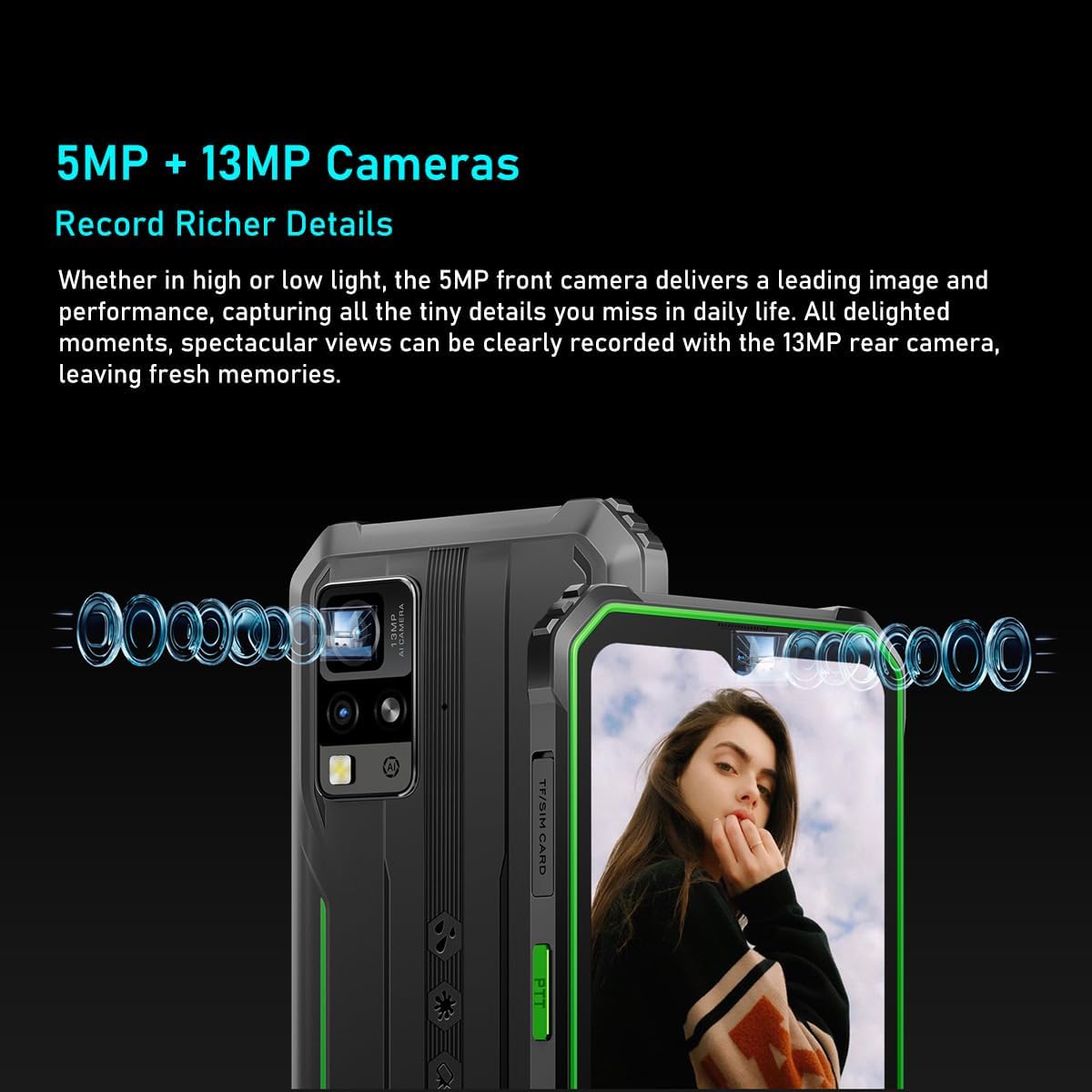
- Sistema di telecamere: Il Neroview BV4800 Pro features a 16MP rear camera for capturing moments and an 8MP front camera for quick face unlock and selfies. Utilize the latest facial recognition features for faster and more secure phone unlocking.
- Durata della batteria: The BV4800 Pro rugged outdoor mobile phone boasts a 5180mAh long-lasting battery, providing extended usage for work or study without frequent recharging.
- Connettività: Il Neroview BV4800 Pro unlocked mobile phone supports dual 4G global networks and is compatible with most GSM, WCDMA, and LTE carriers. It includes GPS, NFC, and comes with a 24-month warranty.

The BV4800 Pro features 4GB of physical RAM, expandable with an additional 8GB of virtual RAM, providing a total of 12GB for smooth multitasking and faster application performance.

Equipped with a 16MP rear camera and an 8MP front camera, the BV4800 Pro allows for clear photo capture and video calls.
3. Impostazione
3.1. Installazione della scheda SIM e della scheda TF
- Locate the SIM/TF card slot on the side of your Blackview BV4800 Pro.
- Aprire con cautela la copertura protettiva del vassoio SIM.
- Insert your Nano-SIM card(s) and/or TF (microSD) card into the designated slots on the tray. Ensure the cards are correctly oriented.
- Gently push the tray back into the slot until it is fully seated and close the protective cover securely to maintain water and dust resistance.

La parte posteriore view of the BV4800 Pro, indicating the location of the SIM/TF card slot for installation.
3.2. Accensione iniziale
- Press and hold the Power button (usually on the right side of the device) until the Blackview appare il logo.
- Seguire le istruzioni sullo schermo per completare la configurazione iniziale, inclusa la selezione della lingua, la connessione Wi-Fi e la configurazione dell'account Google.
4. Istruzioni per l'uso
4.1. Navigazione di base
Il tuo neroview BV4800 Pro runs on Android 14. Navigate using gestures or the traditional three-button navigation bar (configurable in Settings).
- Schermata iniziale: Scorri verso sinistra o verso destra per accedere alle diverse schermate iniziali.
- Cassetto delle applicazioni: Scorri verso l'alto dalla parte inferiore dello schermo per view tutte le applicazioni installate.
- Notifiche e impostazioni rapide: Scorri verso il basso dalla parte superiore dello schermo per accedere alle notifiche e ai pulsanti delle impostazioni rapide.
4.2. Utilizzo della fotocamera
To open the camera, tap the Camera icon on your home screen or app drawer. The BV4800 Pro features a 16MP rear camera and an 8MP front camera.
- Cambia telecamera: Tocca l'icona di commutazione della fotocamera per passare dalla fotocamera anteriore a quella posteriore e viceversa.
- Cattura foto: Tap the Shutter button to take a picture.
- Registra video: Switch to video mode and tap the Record button to start/stop recording.
- Sblocco facciale: Configure face unlock in Security settings for quick and secure access.
4.3. Caratteristiche dello schermo
The 6.56-inch HD+ IPS display offers clear visuals.
- Luminosità: Adjust screen brightness in Quick Settings or Display settings.
- Frequenza di aggiornamento: Il display funziona con una frequenza di aggiornamento di 60 Hz per immagini fluide.
- Tocca S.amptasso di ling: Un tocco da 120Hzampling rate ensures responsive touch input.

The device features a 6.56-inch HD+ IPS display protected by Corning Gorilla Glass 5, offering a 60Hz refresh rate and a responsive 120Hz touch sampling rate for clear visuals and smooth interaction.
4.4. Gestione della batteria
La batteria da 5180 mAh garantisce un utilizzo prolungato. Per ottimizzare la durata della batteria:
- Ridurre la luminosità dello schermo.
- Chiudi le app inutilizzate in esecuzione in background.
- Attivare la modalità Risparmio batteria quando necessario.
- Evitare temperature estreme.

The BV4800 Pro's 5180mAh battery provides extended usage, offering up to 7.5 hours of gaming, 8 hours of video playback, 11 hours of web browsing, 28.5 hours of calls, 30 hours of music, and 924 hours of standby time.
4.5. Caratteristiche speciali
- NFC: Use Near Field Communication for contactless payments and quick data transfer. Enable NFC in Settings > Connected devices.
- Posizione GPS: Il GPS integrato fornisce servizi di localizzazione precisi per app di navigazione e basate sulla posizione.
- OTG: USB On-The-Go allows you to connect USB devices like flash drives or keyboards directly to your phone.
- FM Radio: Enjoy FM radio broadcasts using wired headphones as an antenna.
- Altoparlante Smart-K BOX: Experience enhanced audio quality from the device's speaker.
The Smart-K BOX speaker system on the BV4800 Pro delivers powerful audio, enhancing your listening experience.
5. Manutenzione
5.1. Durata e protezione
Il Neroview BV4800 Pro is built to be rugged, featuring IP68 water and dust resistance and MIL-STD-810H military standard compliance for shock protection.
- Resistenza all'acqua: Ensure all port covers (USB-C, SIM tray) are securely closed to maintain water resistance. Avoid prolonged submersion or exposure to high-pressure water.
- Resistenza alla temperatura: The device is designed to operate in extreme temperatures from -22°F (-30°C) to 122°F (50°C).
- Protezione dalle cadute: While rugged, avoid unnecessary drops. The device is tested to survive drops from up to 1.5 meters.

The BV4800 Pro is designed to withstand harsh conditions, including water immersion, dirt exposure, and impacts, as illustrated by these durability tests.

Built to MIL-STD-810H military standards, the BV4800 Pro is engineered for extreme environments, capable of surviving drops from up to 1.5 meters.
5.2. Pulizia
Per pulire il dispositivo, utilizzare un panno morbido eamp panno. Evitare prodotti chimici aggressivi o materiali abrasivi che potrebbero danneggiare lo schermo o casing.
6. Risoluzione Dei Problemi
Se riscontri problemi con il tuo Blackview BV4800 Pro, try the following steps:
- Il dispositivo non risponde: Per forzare il riavvio, tenere premuto il pulsante di accensione per circa 10-15 secondi.
- La batteria si scarica rapidamente: Check for background apps, reduce screen brightness, and ensure Wi-Fi/Bluetooth are off when not in use.
- Problemi di rete: Ensure your SIM card is correctly inserted. Try restarting the device or toggling Airplane Mode on/off.
- App che si bloccano: Cancella la cache dell'app problematica (Impostazioni > App > [Nome app] > Archiviazione > Cancella cache). Se il problema persiste, prova a reinstallare l'app.
- Prestazioni lente: Chiudere le app in background non necessarie, svuotare la cache o, come ultima risorsa, valutare un ripristino delle impostazioni di fabbrica (eseguire prima il backup dei dati).
Per problemi più complessi, contattare Blackview assistenza clienti.
7. Specifiche
| Caratteristica | Specificazione |
|---|---|
| Marca | Neroview |
| Nome del modello | Neroview BV4800 PRO |
| Colore | Nero |
| Tipo di prodotto | Bar Telefono |
| Sistema operativo | Androide 14 |
| Dimensioni dello schermo | 6.56 pollici |
| Risoluzione dello schermo | 1080x2340 |
| Frequenza di aggiornamento | Frequenza 60 Hz |
| Processore | T606 Chipset |
| Dimensione RAM installata | 12 GB (4 GB fisici + 8 GB virtuali) |
| Capacità di archiviazione della memoria | 128 GB (espandibile fino a 1 TB tramite scheda TF) |
| Risoluzione della telecamera posteriore | 16 MP |
| Risoluzione della fotocamera frontale | 8 MP |
| Capacità della batteria | 5180 mAh |
| Composizione della batteria | Agli ioni di litio |
| Connessioni | Bluetooth |
| Porta di ricarica | USB tipo C |
| Caratteristiche speciali | Rugged Body, Dual SIM, Expandable Memory, Water Resistant, USB OTG Support, NFC, GPS, FM |
| Operatore di telefonia mobile | Sbloccato |
| Data prima disponibilità | 23 ottobre 2024 |
8. Garanzia e supporto
8.1. Garanzia del produttore
Il Neroview BV4800 Pro è dotato di un Garanzia del produttore di 2 annoSi prega di conservare la prova d'acquisto per eventuali reclami in garanzia.
8.2. Assistenza clienti
For technical assistance, warranty inquiries, or any other questions regarding your Blackview BV4800 Pro, please visit the official Blackview websito o contattare direttamente il servizio clienti.
Spare parts availability and guaranteed software updates information are currently unavailable.


