1. Introduzione
Thank you for choosing the HETP Portable Charger. This device is designed to provide convenient and fast charging for a wide range of electronic devices, including smartphones, tablets, and smartwatches. Featuring built-in charging cables and an integrated iWatch charger, it offers a versatile and compact power solution for your daily needs and travels.
Si prega di leggere attentamente questo manuale prima di utilizzare il prodotto per garantire prestazioni sicure e ottimali. Conservare il manuale per riferimento futuro.
2. Caratteristiche del prodotto
- Alta capacità: Batteria da 10800 mAh per ricariche multiple.
- Ricarica rapida: QC4.0+PD 25W technology for rapid device charging.
- Cavi integrati: Built-in Type-C, iOS, and Micro USB cables for universal compatibility without extra cords.
- iWatch Charger: Dedicated magnetic wireless charging pad for Apple Watch.
- Uscite multiple: 6 outputs (3 built-in cables, 1 wireless iWatch charger, 1 USB-C port, 1 USB-A port) to charge up to 6 devices simultaneously.
- Doppi ingressi: Recharge the power bank via Type-C cable or Type-C port.
- Schermo LCD: Il display digitale chiaro mostra la percentuale di batteria rimanentetage.
- Compatto e portatile: Slim and lightweight design (6.02x2.8x0.59 inches, 280g) ideal for travel.
- Sicurezza superiore: Multi-protection smart microchip protects against short circuit, overheating, overcharging, over voltage, e sovracorrente.

Image: The HETP Portable Charger, highlighting its compact form factor and integrated LCD display.

Immagine: dettagliata view of the power bank's multiple output and input options, including the built-in cables and ports.
3. Impostazione
- Disimballare: Carefully remove the portable charger and all accessories from the packaging.
- Carica iniziale: Before first use, fully charge the power bank. Connect the power bank to a USB wall charger (not included) using its built-in Type-C cable or a separate Type-C cable via the Type-C input port. The LCD display will show the charging progress.
- Controlla il livello della batteria: Una volta caricata completamente, il display mostrerà il 100%.
4. Istruzioni per l'uso
4.1 Ricarica dei dispositivi
The power bank can charge up to 6 devices simultaneously using its various outputs:
- Utilizzo di cavi integrati: Extend the appropriate built-in cable (Type-C, iOS, or Micro USB) and connect it directly to your device.
- Utilizzo delle porte USB: Collega il cavo di ricarica del tuo dispositivo alla porta di uscita USB-C o alla porta di uscita USB-A del power bank.
- Ricarica dell'Apple Watch: Posiziona l'Apple Watch sul tappetino magnetico di ricarica wireless del power bank. Assicurati che sia allineato correttamente affinché la ricarica abbia inizio.
The power bank will automatically detect the connected device and begin charging. The LCD display will show the remaining battery percentage del power bank.

Image: The power bank charging an iPhone, Android phone, tablet, and Apple Watch concurrently, demonstrating its multi-device charging capability.
4.2 Controllo del livello della batteria
Premere una volta il pulsante di accensione per attivare il display LCD, che mostrerà la percentuale attuale della batteriatage of the power bank. The display will turn off automatically after a few seconds to conserve power.
5. Compatibilità
This portable charger is widely compatible with a broad range of devices, including but not limited to:
- iPhone: iPhone 16/15/14/13/12/11/XS/XR/SE Pro/Pro Max series.
- Dispositivi Android: Samsung S24/S23 Series, Google Pixel, LG, Moto, and other Android smartphones and tablets.
- Orologio Apple: Apple Watch 10/9/8/7/6/5/4/3/2/1/SE 1/SE2/Ultra/Ultra 2.
- Altri dispositivi: AirPods, and other USB-C or Micro USB compatible devices.
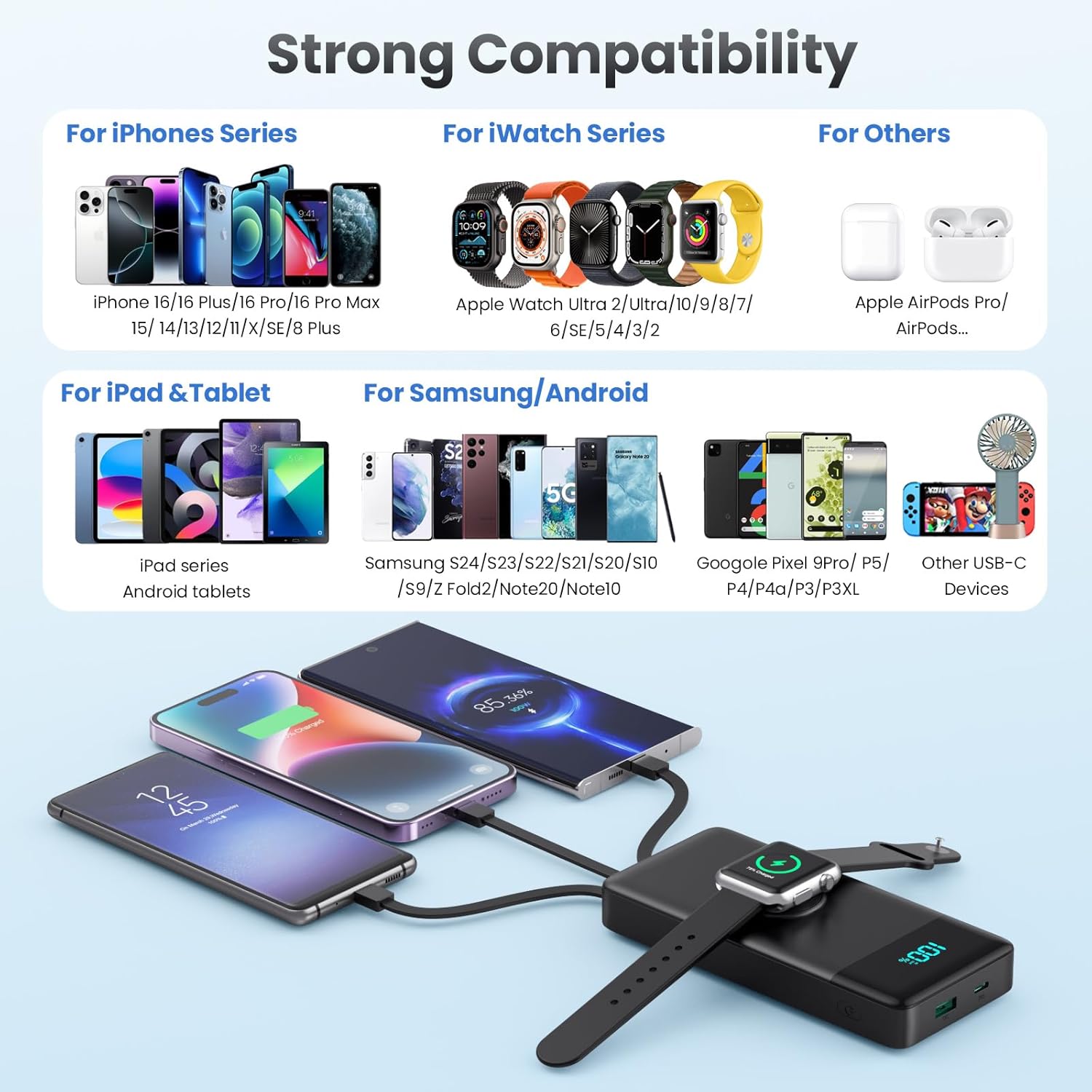
Image: Visual representation of the power bank's extensive compatibility with various device types.
6. Ricarica del Power Bank
To recharge your HETP Portable Charger, you have two convenient options:
- Using Built-in Type-C Cable: Extend the built-in Type-C cable and plug it into a compatible USB wall charger or power adapter.
- Using Type-C Input Port: Connect a separate Type-C to Type-C or Type-C to USB-A cable to the power bank's Type-C input port and plug the other end into a compatible charger.
The power bank supports 25W fast recharging. The LCD display will show the charging percentage mentre si ricarica.

Image: Two methods for recharging the power bank, demonstrating the flexibility of using either the dedicated input port or the integrated Type-C cable.
7. Informazioni sulla sicurezza
The HETP Portable Charger is equipped with a multi-protection smart microchip to ensure safe operation. This includes protection against:
- Sovraccarico
- Sovraccarico
- Over-volumetage
- Sovracorrente
- Cortocircuito
- Overheating (Temperature Protection)
- Sopraffare
- Protezione di recupero
To ensure your safety and prolong the product's lifespan, please adhere to the following:
- Non esporre il power bank a temperature estreme (caldo o freddo), alla luce solare diretta o ad ambienti umidi.
- Non smontare, modificare o tentare di riparare autonomamente il dispositivo.
- Tenere lontano da acqua e altri liquidi.
- Evitare di far cadere o sottoporre il power bank a forti impatti.
- Use only certified charging adapters and cables.
- Tenere fuori dalla portata dei bambini.

Immagine: Oltreview of the comprehensive safety features built into the power bank to protect both the device and connected electronics.
8. Manutenzione
- Pulisci il power bank con un panno morbido e asciutto. Non utilizzare prodotti chimici aggressivi o materiali abrasivi.
- Conservare il power bank in un luogo fresco e asciutto quando non viene utilizzato.
- Se si intende conservare il power bank per un periodo prolungato, caricarlo a circa il 50-70% ogni tre mesi per preservare le condizioni della batteria.
9. Risoluzione Dei Problemi
| Problema | Possibile causa | Soluzione |
|---|---|---|
| Il power bank non carica i dispositivi. | Low battery on power bank; cable not connected properly; device not compatible; power bank in standby mode. | Recharge power bank; ensure cables are securely connected; verify device compatibility; press power button to activate. |
| Il power bank non si ricarica. | Charging cable or adapter faulty; input port damaged; power bank battery issue. | Try a different charging cable and adapter; ensure connection is secure; contact support if issue persists. |
| Ricarica lenta. | Cavo che non supporta la ricarica rapida; dispositivo che non supporta la ricarica rapida; più dispositivi che si ricaricano contemporaneamente. | Use a fast-charging compatible cable; ensure device supports fast charging; charge fewer devices at once for faster individual charging. |
| Il display LCD non funziona. | Il power bank è spento; malfunzionamento del display. | Press the power button; if still unresponsive, contact customer support. |
| Apple Watch non si carica. | Watch not positioned correctly; watch battery too low; power bank in standby mode. | Adjust watch position on the magnetic pad; ensure power bank has sufficient charge; press power button. |
10. Specifiche
| Caratteristica | Dettaglio |
|---|---|
| Numero di modello | HX100N9 |
| Capacità della batteria | 10800mAh |
| Dimensioni del prodotto | 6.02 x 2.8 x 0.59 pollici (circa 15.29 x 7.11 x 1.5 cm) |
| Peso dell'articolo | 12.3 once (circa 348.7 grammi) |
| Tecnologia di ricarica rapida | QC4.0+PD 25W |
| Risultati | Built-in Type-C, Built-in iOS, Built-in Micro USB, Wireless iWatch Charger, USB-C Port, USB-A Port |
| Ingressi | Built-in Type-C Cable, USB-C Port |
| Display | Display digitale a LED |
| Colore | Nero |
| Produttore | Dongguan Yuanhaoxun Technology Co., LTD |
| Paese di origine | Cina |
11. Garanzia e supporto
Il tuo caricabatterie portatile HETP è dotato di un Garanzia di 24 mesi from the date of purchase, covering manufacturing defects. Additionally, we provide supporto tecnico a vita for our product.
If you encounter any issues or have questions regarding your portable charger, please do not hesitate to contact our customer support team. Please have your purchase information and model number ready when contacting support.
Per assistenza, fare riferimento alle informazioni di contatto fornite sulla confezione del prodotto o sul sito del rivenditore websito dove hai acquistato il prodotto.


