1. Introduzione
This user manual provides comprehensive instructions for the setup, operation, maintenance, and troubleshooting of your Thomson 27-inch QHD Gaming Monitor (Model: M27QG5Y14). This monitor is designed to deliver a superior visual experience with its QHD resolution, 180Hz refresh rate, and IPS panel technology, making it ideal for gaming and multimedia applications.

Immagine 1.1: anteriore view of the Thomson 27-inch QHD Gaming Monitor, showcasinil suo design elegante e l'area di visualizzazione.
2. Informazioni sulla sicurezza
Leggere attentamente tutte le istruzioni di sicurezza prima di utilizzare il monitor. Conservare il presente manuale per riferimento futuro.
- Fonte di energia: Utilizzare solo l'adattatore di alimentazione fornito con il monitor. Assicurarsi che la presa di corrente sia correttamente messa a terra.
- Ventilazione: Non ostruire le aperture di ventilazione. Lasciare spazio sufficiente attorno al monitor per garantire un flusso d'aria adeguato ed evitare il surriscaldamento.
- Liquido e umidità: Tenere il monitor lontano da acqua, pioggia o umidità eccessiva. Non posizionare oggetti contenenti liquidi sul monitor.
- Pulizia: Disconnect the power cable before cleaning. Use a soft, dry cloth. Do not use liquid cleaners or aerosol cleaners.
- Posizionamento: Posizionare il monitor su una superficie stabile e piana. Evitare di esporlo alla luce diretta del sole o vicino a fonti di calore.
- Gestione: Maneggiare il monitor con cura. Evitare di farlo cadere o di sottoporlo a forti urti.
- Manutenzione: Non tentare di riparare il monitor da soli. Per qualsiasi intervento di assistenza, rivolgersi a personale qualificato.
3. Contenuto della confezione
Verificare che tutti gli articoli siano presenti nella confezione. Se alcuni articoli risultano mancanti o danneggiati, contattare il rivenditore.
- Thomson 27-inch QHD Gaming Monitor
- Supporto per monitor (base e collo)
- Adattatore di alimentazione e cavo di alimentazione
- Cavo HDMI
- DisplayPort (DP) Cable (may vary by region)
- USB-B to USB-A Cable (for USB hub functionality)
- Manuale dell'utente (questo documento)
- Viti per il montaggio del supporto
4. Impostazione
4.1. Assemblaggio del supporto del monitor
- Estrarre con cautela il monitor dalla confezione e posizionarlo con lo schermo rivolto verso il basso su una superficie morbida e pulita per evitare graffi.
- Fissare il collo del supporto al pannello del monitor utilizzando le viti fornite.
- Attach the stand base to the stand neck and secure it with the designated screw.
- Once assembled, carefully lift the monitor and place it on a stable desk or table.

Image 4.1: Monitor dimensions and stand assembly overview. The monitor measures approximately 61 cm wide, 54 cm high (with stand), and 24 cm deep (with stand).
4.2. Collegamento del monitor
Connect the necessary cables to the monitor's input ports. Refer to the image below for port locations.
- Collegamento elettrico: Connect the power adapter to the "DC IN" port on the monitor, then plug the power cable into a power outlet.
- Ingresso video:
- Connect an HDMI cable from your computer's graphics card to an "HDMI 2.1" port on the monitor.
- Alternatively, connect a DisplayPort (DP) cable from your computer's graphics card to a "DP 1.2" port on the monitor.
- Hub USB: To enable the monitor's USB 3.0 ports, connect a USB-B cable from the "USB 3.0 B" port on the monitor to a USB-A port on your computer.
- Uscita audio: Connect headphones or external speakers to the "Earphone Plug" (3.5mm audio jack) for audio output.

Image 4.2: Rear panel of the monitor displaying the various input and output ports for connectivity.
4.3. Regolazioni ergonomiche
Il supporto del monitor consente varie regolazioni per ottimizzare il tuo viewcomfort:
- Inclinazione: Adjust the screen's vertical angle (up or down).
- Girevole: Rotate the screen horizontally (left or right).
- Perno: Ruota lo schermo di 90 gradi per la modalità verticale viewing.
- Regolazione dell'altezza: Sollevare o abbassare il monitor all'altezza preferita degli occhi.
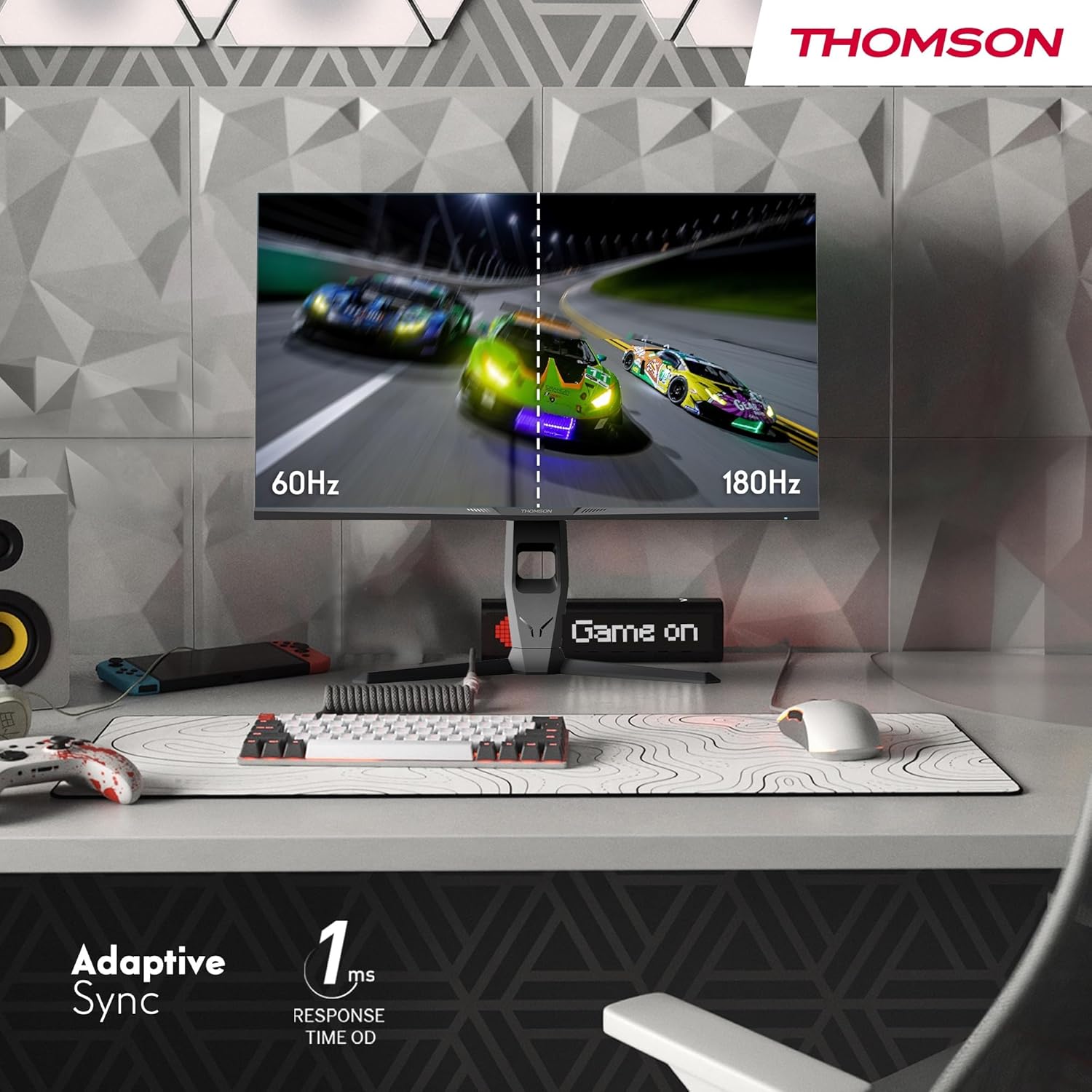
Image 4.3: Demonstrations of the monitor's ergonomic capabilities, including tilt, swivel, and pivot for optimal viewangoli di inclinazione.
4.4. Montaggio VESA
The monitor is compatible with VESA 100x100mm mounting standards. To mount the monitor on a wall or an alternative stand, remove the original stand and attach the VESA-compatible mount (sold separately) using appropriate screws.
5. Istruzioni per l'uso
5.1. Accensione/spegnimento
Premere il pulsante di accensione, solitamente situato sul retro o sulla parte inferiore del monitor, per accenderlo o spegnerlo. La spia di accensione si accende quando il monitor è acceso.
5.2. Menu OSD (On-Screen Display).
The OSD menu allows you to adjust various monitor settings. Use the joystick or buttons (location may vary) on the monitor to navigate the menu.
- Impostazioni immagine: Regola luminosità, contrasto, nitidezza, temperatura colore e gamma.
- Impostazioni colore: Fine-tune RGB levels, saturation, and hue.
- Selezione input: Passa manualmente tra gli ingressi HDMI e DisplayPort.
- Audio: Regola il volume degli altoparlanti integrati o dell'uscita cuffie.
- Impostazioni OSD: Modifica la lingua OSD, la trasparenza e il timeout.
- Impostazioni di gioco: Access features like Adaptive Sync, response time (OD), and crosshair overlays.
5.3. Caratteristiche di gioco
- Frequenza di aggiornamento 180Hz: Provides smoother motion and reduced input lag, especially beneficial for fast-paced games. Ensure your graphics card and cable support this refresh rate.
- Tempo di risposta (OD) di 1 ms: Minimizes motion blur and ghosting for clear, crisp images during rapid movements.
- Sincronizzazione adattiva: Synchronizes the monitor's refresh rate with your graphics card's frame rate, eliminating screen tearing and stuttering. Enable this feature in the OSD menu and your graphics card control panel.

Image 5.1: Visual comparison illustrating the difference between 60Hz and 180Hz refresh rates, highlighting the smoother motion provided by the higher refresh rate, alongside the Adaptive Sync feature.
5.4. Caratteristiche della cura degli occhi
- Tecnologia anti-sfarfallio: Reduces screen flickering, which can cause eye strain during prolonged use.
- Modalità luce blu bassa: Filters out harmful blue light emissions to protect your eyes and reduce fatigue. This mode can be activated through the OSD menu.
- Schermo antiriflesso: The matte screen surface minimizes reflections from ambient light, providing clear visuals without distraction.

Image 5.2: Depiction of the monitor's eye comfort features, including an anti-glare screen and technologies like Anti-Flicker and Low Blue Light for reduced eye strain.
5.5. Illuminazione ambientale RGB
The monitor features integrated RGB ambient lighting on the rear. This lighting can be customized via the OSD menu to enhance your gaming environment or match your setup's aesthetics.
6. Manutenzione
6.1. Pulizia del monitor
- Schermo: Pulire delicatamente lo schermo con un panno morbido e privo di lanugine. Per i segni ostinati, strofinare leggermenteampen the cloth with water or a specialized screen cleaner (ensure it's safe for LCD/IPS panels) and wipe gently. Never spray liquid directly onto the screen.
- Casing: Utilizzare un panno morbido e asciutto per pulire il monitor casing. Evitare l'uso di detergenti abrasivi o solventi.
- Scollegare sempre il cavo di alimentazione prima della pulizia.
6.2. Conservazione
Se si conserva il monitor per un periodo prolungato, scollegare tutti i cavi, imballarlo nella confezione originale (se disponibile) e conservarlo in un luogo fresco e asciutto, lontano dalla luce solare diretta e da temperature estreme.
7. Risoluzione Dei Problemi
Questa sezione affronta i problemi più comuni che potresti riscontrare. Se il problema persiste, contatta l'assistenza clienti.
| Problema | Possibile causa | Soluzione |
|---|---|---|
| Nessun potere | Cavo di alimentazione non collegato; Presa di corrente difettosa; Monitor spento. | Ensure power cable is securely connected. Test the power outlet. Press the monitor's power button. |
| Nessun segnale / Schermo vuoto | Video cable not connected; Incorrect input selected; Computer not outputting signal. | Check HDMI/DP cable connections. Select the correct input source via OSD. Ensure computer is on and outputting video. |
| Distorted image / Flickering | Incorrect resolution/refresh rate; Faulty cable; Graphics driver issue. | Set display resolution to 2560x1440 and refresh rate to 180Hz. Try a different video cable. Update graphics drivers. |
| Nessun audio dagli altoparlanti/cuffie | Volume troppo basso; Cavo audio non collegato; Uscita audio selezionata sul PC non corretta. | Increase monitor volume via OSD. Ensure headphones/speakers are connected. Select monitor as audio output device in PC settings. |
8. Specifiche
Detailed technical specifications for the Thomson M27QG5Y14 monitor.
| Caratteristica | Specificazione |
|---|---|
| Marca | Tommaso |
| Modello | M27QG5Y14 |
| Dimensioni dello schermo | 27 pollici |
| Tipo di pannello | Informazione pubblica |
| Risoluzione | Risoluzione 2560 x 1440 (QHD) |
| Frequenza di aggiornamento | Frequenza 180 Hz |
| Tempo di risposta | 1 Millisecond (OD) / 5 Milliseconds (GtG) |
| Luminosità | 350 nit |
| Rapporto di contrasto | 1200:1 |
| Viewangolo di ing | 178 gradi (orizzontale/verticale) |
| Gamma di colori | 120% sRGB |
| Supporto HDR | HDR10 (10-bit) |
| Sincronizzazione adattiva | SÌ |
| Connettività | 2x HDMI 2.1, 1x DisplayPort 1.2, 1x USB 3.0 Type-B (upstream), 3x USB 3.0 Type-A (downstream), 1x Earphone Plug (3.5mm) |
| Altoparlanti incorporati | Yes (2x2W) |
| Compatibilità montaggio VESA | 100x100mm |
| Dimensioni del prodotto (con supporto) | 61 x 54 x 24 cm (L x A x P) |
| Peso (con supporto) | 7.3 kg |
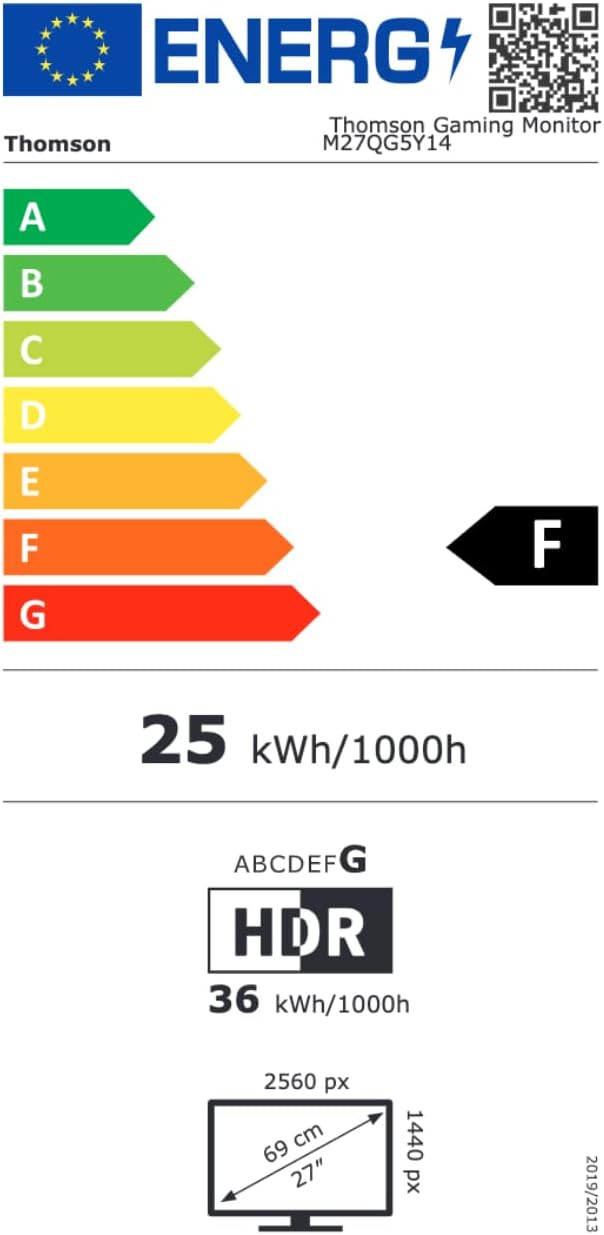
Image 8.1: EU Energy Label for the Thomson M27QG5Y14 monitor. For more details, visit the Banca dati EPREL.
9. Garanzia e supporto
Thomson products are designed for reliability and performance. This monitor typically comes with a Garanzia di 3 anno dalla data di acquisto, a copertura dei difetti di fabbricazione. Si prega di conservare la prova d'acquisto per eventuali reclami in garanzia.
For technical assistance, troubleshooting beyond this manual, or warranty inquiries, please contact Thomson customer support or your local retailer. Refer to the official Thomson websito o sulla confezione del prodotto per informazioni di contatto specifiche.
You can also visit the official Thomson store on Amazon for more information: Thomson Store.


