1. Introduzione
This manual provides detailed instructions for the proper use and maintenance of your Casio G-Shock GA-2100 Series Analog-Digital Watch. The GA-2100 series inherits the robust toughness and innovative design of the original G-SHOCK DW5000C models, featuring a slim profile and an iconic octagonal bezel. Constructed with a highly rigid fine resin reinforced with carbon fiber, this watch offers exceptional durability while maintaining a lightweight and comfortable fit. Please read this manual thoroughly to ensure optimal performance and longevity of your timepiece.

Figura 1: Fronte view of the G-Shock GA-2100 watch.
2. Caratteristiche del prodotto
- Struttura di protezione del nucleo in carbonio: A new carbon core guard structure protects the module by enclosing it in a carbon case, ensuring superior shock resistance.
- Resistenza all'acqua fino a 200 metri: Designed for robust use, including swimming and diving.
- Display analogico-digitale: Combina le tradizionali lancette analogiche con un display digitale per una misurazione versatile del tempo e una presentazione dei dati.
- Sottile Profile: At 11.8 mm, it is one of the slimmest G-SHOCK models, offering a comfortable fit.
- Ora mondiale: Displays the current time in 48 cities (31 time zones) around the world.
- Cronometro: 1/100-second stopwatch with measuring capacity up to 24 hours.
- Conto alla rovescia: Measuring unit of 1 second, countdown range of 24 hours.
- 5 sveglie giornaliere: Includes one snooze alarm.
- Doppia luce LED: Separate LED light for the face (Super Illuminator) and the digital display, with afterglow.
- Hand Shift Feature: Hands move out of the way to provide an unobstructed view of digital display contents.
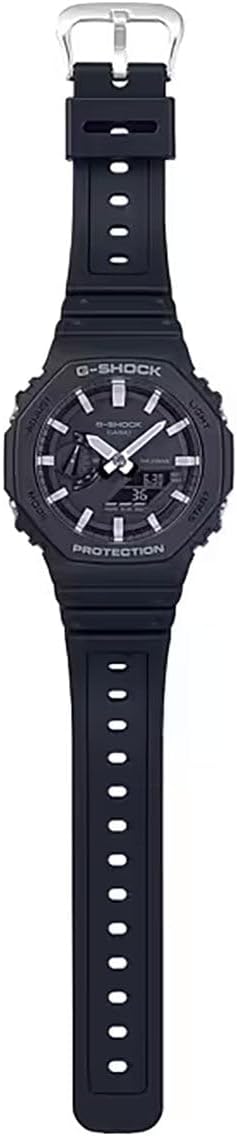
Figura 2: Completo view of the G-Shock GA-2100 watch, highlighting its strap and overall design.
3. Impostazione
3.1 Impostazione iniziale dell'ora
- Nella modalità di indicazione dell'ora, tenere premuto REGOLARE (in alto a sinistra) per circa due secondi, finché il codice della città non inizia a lampeggiare sul display digitale. Questo indica la modalità di impostazione.
- Premere il tasto MODALITÀ button (bottom left) to cycle through the settings: City Code → DST (Daylight Saving Time) → 12/24-hour format → Seconds → Hour → Minute → Year → Month → Day.
- Utilizzare il LEGGERO button (top right) to increase the flashing value and the INIZIO button (bottom right) to decrease it. For city code, use these buttons to select your desired home city.
- Una volta configurate tutte le impostazioni, premere il tasto REGOLARE button to exit the setting mode. The watch will automatically adjust the analog hands to match the digital time.
3.2 Correzione della posizione iniziale della mano
If the analog hands do not align with the digital time, you can correct their home positions:
- In modalità cronometraggio, tenere premuto il tasto REGOLARE button for about five seconds until "0.00" appears and starts flashing, indicating the hand home position adjustment mode.
- Utilizzare il LEGGERO pulsante (in alto a destra) e INIZIO button (bottom right) to move the hour and minute hands until they point to 12 o'clock.
- Premere il tasto REGOLARE button to confirm the setting and return to Timekeeping Mode.
4. Istruzioni per l'uso
The GA-2100 features four buttons: REGOLARE (in alto a sinistra), LEGGERO (top right), MODALITÀ (bottom left), and INIZIO (in basso a destra).
Modalità di navigazione 4.1
Premere il tasto MODALITÀ pulsante (in basso a sinistra) per scorrere le diverse modalità:
- Timekeeping Mode (TME)
- Modalità ora mondiale (WT)
- Stopwatch Mode (STW)
- Countdown Timer Mode (TMR)
- Alarm Mode (ALM)
4.2 Timekeeping Mode (TME)
This is the default mode, displaying the current time and date. Refer to Section 3.1 for setting the time and date.
4.3 World Time Mode (WT)
Ti consente di view l'ora corrente in varie città del mondo.
- Entrare nella modalità Ora mondiale premendo il tasto MODALITÀ pulsante.
- Utilizzare il LEGGERO button (top right) or INIZIO button (bottom right) to scroll through different city codes.
4.4 Stopwatch Mode (STW)
Misura il tempo trascorso.
- Entrare in modalità cronometro premendo il tasto MODALITÀ pulsante.
- Premere il tasto INIZIO button (bottom right) to start the stopwatch.
- Premere il tasto INIZIO di nuovo il pulsante per interrompere.
- Premere il tasto REGOLARE pulsante (in alto a sinistra) per azzerare il cronometro.
4.5 Countdown Timer Mode (TMR)
Conto alla rovescia a partire da un tempo preimpostato.
- Enter Countdown Timer Mode by pressing the MODALITÀ pulsante.
- Tieni premuto il tasto REGOLARE button (top left) until the current countdown time starts to flash.
- Utilizzare il MODALITÀ button to move the flashing between hours and minutes.
- Utilizzare il LEGGERO pulsante (in alto a destra) e INIZIO button (bottom right) to set the desired countdown time.
- Premere il tasto REGOLARE pulsante per uscire dalla modalità di impostazione.
- Premere il tasto INIZIO button to begin the countdown. Press again to pause/resume.
- Quando il conto alla rovescia raggiunge lo zero, suonerà un allarme. Premere un pulsante qualsiasi per interrompere l'allarme.
4.6 Alarm Mode (ALM)
Imposta fino a cinque sveglie giornaliere indipendenti.
- Entrare in modalità Allarme premendo il tasto MODALITÀ pulsante.
- Utilizzare il LEGGERO button (top right) to cycle through alarms (AL1, AL2, AL3, AL4, AL5, SIG - Hourly Segnale orario).
- Per impostare una sveglia, tenere premuto il tasto REGOLARE (in alto a sinistra) finché l'ora della sveglia non inizia a lampeggiare.
- Utilizzare il MODALITÀ button to move between hour and minute settings.
- Utilizzare il LEGGERO pulsante e INIZIO pulsante per impostare l'orario desiderato per la sveglia.
- Premere il tasto REGOLARE pulsante per uscire dalla modalità di impostazione.
- To turn an alarm ON/OFF, select the alarm and press the INIZIO button. "ON" or "OFF" will appear.
4.7 Illuminazione (Luce)
Premere il tasto LEGGERO button (top right) to illuminate the watch face and digital display. The illumination duration can be set in Timekeeping Mode settings.

Figure 3: G-Shock GA-2100 watch worn on a wrist.
5. Manutenzione
5.1 Pulizia dell'orologio
Pulire l'orologio con un panno morbido e asciutto per rimuovere sporco e umidità. Per lo sporco ostinato, utilizzare un panno morbido.ampLavare con acqua e un detergente neutro delicato, quindi asciugare. Evitare l'uso di agenti volatili come diluenti o benzina, poiché potrebbero danneggiare i componenti in resina.
5.2 Precauzioni per la resistenza all'acqua
Your GA-2100 watch is water resistant to 200 meters. To maintain water resistance:
- Non azionare i pulsanti quando l'orologio è bagnato o immerso in acqua.
- Avoid exposing the watch to extreme temperatures (hot water, saunas).
- If the watch is exposed to saltwater, rinse it thoroughly with fresh water and wipe it dry.
- Have the gaskets checked periodically (every 2-3 years) by an authorized service center to ensure water resistance.
5.3 Sostituzione della batteria
The watch uses a CR2016 lithium battery. When the display becomes dim or the light function weakens, it's time to replace the battery. Battery replacement should be performed by an authorized Casio service center to ensure proper sealing and water resistance.
6. Risoluzione Dei Problemi
- Le lancette analogiche non corrispondono all'ora digitale: Perform the Hand Home Position Correction as described in Section 3.2.
- Il display digitale è vuoto o poco luminoso: La batteria potrebbe essere scarica. Sostituiscila presso un centro di assistenza autorizzato.
- Watch Not Responding to Button Presses: The watch may be in a frozen state. Try holding down all four buttons simultaneously for a few seconds to perform a soft reset. If the issue persists, the battery might be completely drained.
- Incorrect Time After Travel: Ensure your Home City setting and DST (Daylight Saving Time) setting are correct in Timekeeping Mode.

Figure 4: G-Shock GA-2100 watch as part of a casual outfit.
7. Specifiche
| Caratteristica | Dettaglio |
|---|---|
| Numero di modello | GA2100-1A |
| Dimensioni della cassa (L× P× A) | Dimensioni: 48.5 × 45.4 × 11.8 mm |
| Peso | 51 grammi |
| Materiale della cassa e della lunetta | Carbon / Resin |
| Materiale della fascia | Resin Band |
| Resistenza all'acqua | Resistenza all'acqua fino a 200 metri |
| Alimentazione elettrica | Circa 3 anni su CR2016 |
| Bicchiere | Vetro minerale |
| Tipo di chiusura | Fibbia |
8. Garanzia e supporto
Your Casio G-Shock GA-2100 watch is covered by a manufacturer's warranty against defects in materials and workmanship. Please refer to the warranty card included with your purchase for specific terms and conditions, including the warranty period.
For technical support, service, or warranty claims, please contact Casio customer service or visit their official websito. Conservare la prova d'acquisto per la convalida della garanzia.
Casio Ufficiale Websito: www.casio.com


