1. Introduzione
Thank you for choosing the scopepick Blackhead Removal Tweezer with 1080p Camera. This precision-engineered tool is designed to provide ultimate accuracy and control for delicate tasks such as blackhead removal, ingrown hair extraction, and eyebrow shaping. Featuring a built-in 1080p camera, it offers a magnified, up-close view of the target area, ensuring meticulous grooming and extraction. This manual provides detailed instructions for setup, operation, maintenance, and troubleshooting to help you get the most out of your device.

Figure 1.1: The scopepick Blackhead Removal Tweezer with its accompanying smartphone application displaying a magnified view of the skin.
Caratteristiche principali:
- Telecamera HD 1080p: Fornisce un'immagine chiara e ad alta definizione view dell'area bersaglio.
- Ingrandimento 10x: Offers enhanced visibility for precise work.
- Wireless Phone Connection: Connects seamlessly to iOS and Android devices for real-time viewing.
- Replaceable Tweezers: Allows for easy replacement and interchangeability with different tip types.
- Illuminated Tips: Features adjustable LED lights for optimal visibility in various lighting conditions.
- UV Sterilization Lamp: Automatically activates for 30 seconds after shutdown to help sanitize the tips.
- Lente impermeabile: The camera lens is designed to be waterproof for easy cleaning.
- Gyroscope Inside: Ensures precise control and image stabilization, adjusting the image according to tweezer movement.
- Design portatile: Compact and lightweight, suitable for travel and on-the-go use.

Figura 1.2: Oltreview of the key features of the scopepick Visual Blackhead Magnifying Tweezers.
2. Guida all'installazione
2.1 Contenuto della confezione
Prima di iniziare, assicurati che tutti i componenti siano presenti nel pacchetto:
- scopepick Blackhead Removal Tweezer with 1080p Camera
- Cavo di ricarica USB di tipo C.
- Manuale dell'utente (questo documento)
2.2 Ricarica del dispositivo
Before first use, fully charge the device. Connect the provided USB Type-C cable to the charging port on the tweezer and plug the other end into a compatible USB power adapter (not included). The indicator light will show charging status and turn off when fully charged.
2.3 Installazione e connessione dell'app
The scopepick tweezer requires a companion application for operation. Follow these steps to install and connect:
- Installa l'app: Download and install the "MUBY" app from your device's app store (App Store for iOS, Google Play Store for Android).
- Accendere il dispositivo: Press and hold the power button on the tweezer for 2 seconds to turn on the device. The indicator light will illuminate.
- Connettiti al Wi-Fi: On your smartphone or tablet, go to your Wi-Fi settings. Locate and connect to the Wi-Fi network named "Muby-XXXXX" (where XXXXX is a unique identifier for your device). No password is required.
- Avvia l'app: Open the "MUBY" app. The app should automatically detect and connect to the tweezer, displaying the live camera feed.

Figure 2.1: The device offers portable wireless phone connection for convenient use anywhere.
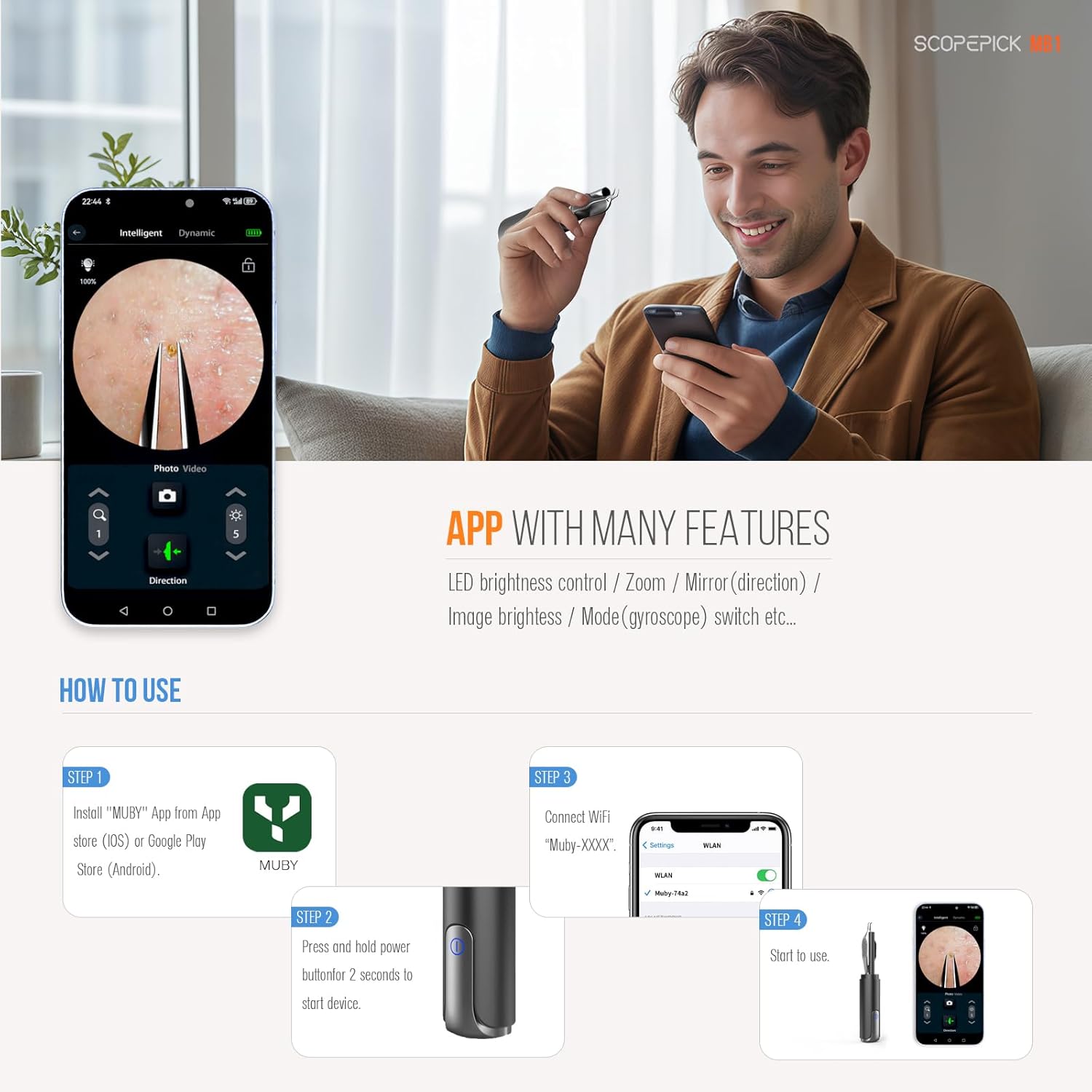
Figure 2.2: Step-by-step guide for app installation and device connection.
3. Istruzioni per l'uso
3.1 Tenere il dispositivo
For optimal control and precision, it is strongly recommended to hold the tweezers like a pen. An improper grip may lead to accidental touches on the power switch, causing unintended shutdown during use.
3.2 Utilizzo delle funzionalità dell'app
The MUBY app provides various controls to enhance your experience:
- Controllo della luminosità del LED: Adjust the intensity of the integrated LED lights for clear illumination of the target area.
- Funzione zoom: Utilize the digital zoom feature to get an even closer look at details.
- Mirror/Direction: Adjust the image orientation to match your natural hand movements, ensuring intuitive control.
- Luminosità dell'immagine: Fine-tune the overall brightness of the camera feed.
- Mode (Gyroscope) Switch: The built-in gyroscope analyzes the movement of the tweezers and adjusts the image accordingly in the app, providing stable and precise control.
- Acquisizione di foto/video: Capture still images or record videos of the magnified view direttamente dall'app.
3.3 Detachable Lens Hood
The device features an eye-friendly detachable lens hood. This accessory helps to avoid direct light exposure to the eyes, enhancing comfort during use, especially when working near sensitive areas.
4. Manutenzione e cura
4.1 Cleaning the Tweezers and Lens
Regular cleaning is essential for hygiene and optimal performance:
- Detachable Tweezers: The tweezers are designed to be easily detachable from the main unit. This allows for thorough cleaning and sanitization.
- Metodo di pulizia: After each use, detach the tweezers and clean them with an alcohol wipe or a suitable sterilizing solution. Ensure they are completely dry before reattaching.
- Lente impermeabile: The camera lens tip is waterproof. You can gently wipe the lens with a soft, damp panno. Non immergere l'intero dispositivo in acqua.
- Sterilizzazione UV: The device automatically activates a UV sterilization lamp for 30 seconds after shutdown. This feature aids in sanitizing the tweezer tips.

Figure 4.1: The tweezers are removable for easy cleaning and replacement.
4.2 Conservazione
Store the device in a clean, dry place away from direct sunlight and extreme temperatures. Keep it out of reach of children.
5. Risoluzione Dei Problemi
If you encounter issues with your scopepick Blackhead Removal Tweezer, refer to the following common problems and solutions:
| Problema | Possibile causa | Soluzione |
|---|---|---|
| Il dispositivo non si accende. | Batteria scarica; malfunzionamento del dispositivo. | Caricare completamente il dispositivo. Se il problema persiste, contattare l'assistenza clienti. |
| Cannot connect to the app / No live feed. | Wi-Fi not connected; App issue; iOS compatibility. | Ensure you are connected to the device's Wi-Fi network ("Muby-XXXXX"). Restart the app and/or your phone. For iPhone users, ensure iOS is updated to the latest version and try restarting your phone. |
| L'immagine è sfocata o poco chiara. | Dirty lens; Incorrect focus/zoom. | Clean the camera lens gently. Adjust zoom and brightness settings within the app. |
| La batteria si scarica rapidamente. | Normal wear and tear; Continuous use. | Ensure the device is fully charged before use. Avoid using while charging as it may heat up. |
| Device heats up during use/charging. | Normal operation; Overcharging. | A slight warmth is normal. If it becomes excessively hot, discontinue use and contact support. Do not use while charging. |

Figure 5.1: Specific troubleshooting advice for iPhone users experiencing connection issues.
6. Specifiche
| Caratteristica | Dettaglio |
|---|---|
| Nome del modello | Blackhead Removal Tweezer With Camera |
| Numero modello articolo | MB1, MB2, MT1, MT2, MS1, MS2 |
| Marca | scopepick |
| Materiale | Metal (High-quality martensitic stainless steel for tweezers) |
| Colore | Nero |
| Risoluzione della fotocamera | Formato: 1080p |
| Ingrandimento | Up to 10x (Up to 20x with app) |
| Connettività | Wireless (Wi-Fi) to iOS/Android devices |
| Orario di lavoro | Circa 110 minuti |
| Tempo di carica | Circa 100 minuti |
| Porta di ricarica | Tipo C |
| Dimensioni del pacco | 6.61 x 3.19 x 1.42 pollici |
| Peso dell'articolo | 1.6 once |
| Produttore | Muby Technology Co., LTD |
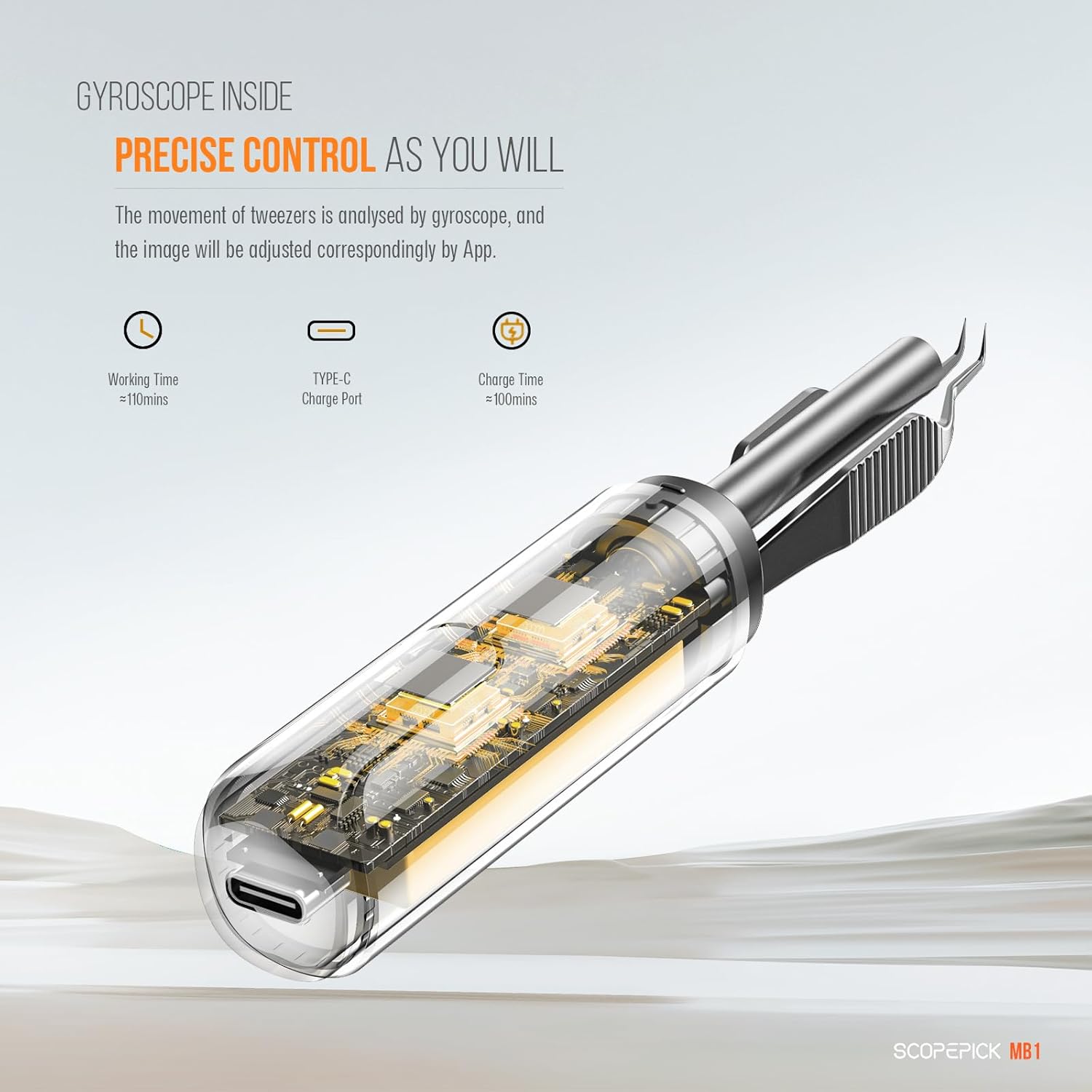
Figure 6.1: Internal components and power specifications of the device.
7. Informazioni sulla garanzia
This product is covered by a standard return policy, allowing for refund or replacement within 30 days of purchase. For specific warranty details and terms, please refer to the documentation provided with your purchase or contact the seller directly.
8. Assistenza clienti
For further assistance, technical support, or inquiries regarding your scopepick Blackhead Removal Tweezer, please contact the manufacturer or seller through the platform where the product was purchased. Ensure you have your model number (MB1, MB2, MT1, MT2, MS1, MS2) and purchase details ready when contacting support.