Introduzione
The MakeOn AMORE PACIFIC Skin Light Therapy 3 is an advanced beauty device designed to enhance skin health and appearance. This device utilizes innovative light therapy and galvanic current technology to provide comprehensive skincare benefits. It includes 5 distinct modes, with a dedicated Retinol mode, and supports frequent firmware updates via the COSME+ app.

Image: The MakeOn Skin Light Therapy 3 device, highlighting its name and purpose as a beauty device.
Informazioni sulla sicurezza
Warning: Do not subject the device to impact. Handle with care to prevent damage and ensure safe operation.
Impostare
1. Carica del dispositivo
Before first use, fully charge the device. The Skin Light Therapy 3 uses a Type-C charger. Connect the provided Type-C cable to the charging port on the device and plug the other end into a compatible USB power adapter.
2. Downloading the COSME+ App
For full functionality and access to all modes, including the new Retinol mode, download the official COSME+ APP. The app is available on both the Android Store and App Store. Cercare "COSME+ APP" and follow the installation instructions.
- Utenti Android: Cercare "COSME+ APP" in the Google Play Store.
- Utenti iOS: Cercare "COSME+ APP" in the Apple App Store.
Regularly check the app for firmware updates to ensure optimal performance and access to the latest features.
Istruzioni per l'uso
Funzionamento generale
To power on the device, press and hold the main button until the indicator light illuminates. Press the button briefly to cycle through the available modes. The device features 5 distinct modes, including a newly added Retinol mode, each designed for specific skin concerns.
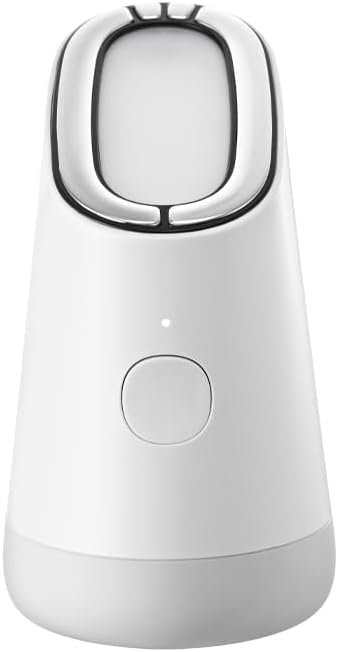
Image: The main unit of the MakeOn Skin Light Therapy 3, illustrating its compact design and primary controls.
Using the Retinol Mode (Mode #5)
The Retinol mode is specifically designed to assist in the absorption of skincare products containing retinol. This mode utilizes galvanic current and microcurrents to enhance product efficacy. The LED light does not illuminate in this mode, allowing for use with light-sensitive skincare ingredients like retinol.

Image: Detailed instructions for activating and using the Retinol mode, including the requirement to touch the metal part for galvanic effect.
- To activate Retinol mode, power on the device and press the button 5 times. The indicator light will turn lime green.
- While the LED does not light up in this mode, the galvanic current and microcurrents are active, and a faint vibration may be felt.
- For optimal galvanic effect, ensure your finger is always touching the metal part on the back of the device during use.
- Other usage methods are similar to conventional modes.
Skin Improvement Results
Regular use of the Skin Light Therapy 3 can lead to significant improvements in skin condition. Based on clinical trials, users experienced:
- Contenuto di umidità: Up to 734% increase in the outermost layer of the stratum corneum.
- Dead Skin Cells: Up to 53% reduction.
- Visible Pores: Up to 40% reduction in the appearance of pores.
- Skin Elasticity: Up to 10% improvement in inner and outer elasticity.
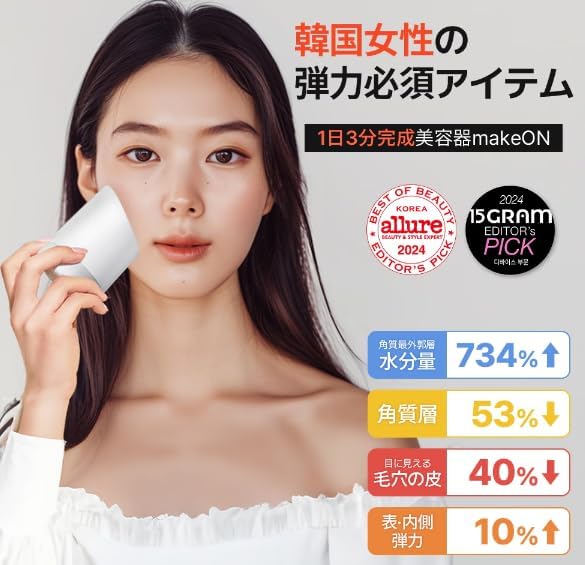
Image: A user demonstrating the device, accompanied by charts illustrating the significant improvements in skin moisture, reduction in dead skin cells and visible pores, and enhanced elasticity.
Manutenzione
Pulizia del dispositivo
Dopo ogni utilizzo, pulire delicatamente la testina del dispositivo con un panno morbido e asciutto.amp panno. Non utilizzare detergenti abrasivi né immergere il dispositivo in acqua. Assicurarsi che il dispositivo sia completamente asciutto prima di riporlo o ricaricarlo.
Magazzinaggio
Store the Skin Light Therapy 3 in a cool, dry place away from direct sunlight and extreme temperatures. Keep it out of reach of children.
Risoluzione dei problemi
| Problema | Possibile causa | Soluzione |
|---|---|---|
| Il dispositivo non si accende. | Batteria scarica o non carica. | Ensure the device is fully charged using the Type-C charger. |
| No vibration in Retinol mode. | Finger not touching the metal part on the back. | Ensure continuous contact with the metal part for galvanic effect. |
| Problemi di connessione all'app. | Bluetooth not enabled or app outdated. | Ensure Bluetooth is enabled on your smartphone. Update the COSME+ APP to the latest version. |
Specifiche
- Modello: Skin Light Therapy 3
- Marca: MakeOn
- Colore: Bianco
- Dimensioni della confezione: Dimensioni: 27.8 x 17.2 x 11.4 cm
- Peso: 430 grammi
- Batteria: 1 batteria agli ioni di litio (inclusa)
- Porta di ricarica: Tipo C
- Caratteristiche del prodotto: Moisture improvement, 5 modes including Retinol mode, Galvanic current, Microcurrent
- ASIN: B0DM94GL5J
Garanzia e supporto
Informazioni sulla garanzia
Questo prodotto è coperto dalla garanzia standard del produttore. Per termini e condizioni specifici, inclusi i dettagli sul periodo di garanzia e sulla copertura, fare riferimento alla scheda di garanzia inclusa nella confezione del prodotto.
Assistenza clienti
For technical assistance, troubleshooting, or any inquiries regarding your MakeOn Skin Light Therapy 3 device, please contact MakeOn customer support. Contact details can typically be found on the official MakeOn websito o nella confezione del prodotto.
You may also find helpful resources and FAQs within the COSME+ APP.