1. Prodotto finitoview
The VENTION Laptop Power Bank (Model: FHV) is a high-capacity portable charger designed for fast and efficient power delivery to a wide range of devices, including laptops, smartphones, and tablets. Featuring advanced PD 3.1 technology and a 27000mAh (99.9Wh) capacity, it offers multiple charging ports and a smart TFT digital display for comprehensive monitoring.

Image: The VENTION Laptop Power Bank, a sleek gray aluminum device, shown with its included USB-C charging cables. The power bank features a digital display on one end.
2. Caratteristiche principali
- 140 W di ricarica rapida: Utilizes PD 3.1 technology for rapid charging, capable of charging a MacBook Pro 16” to 56% in approximately 30 minutes.
- Display digitale intelligente: Provides real-time information including charging status, output power, battery temperature, remaining power, estimated charging time, battery cycle count, total output power, and total input power.
- Design in lega di alluminio: Durable and lightweight casing with excellent thermal conductivity for efficient heat dissipation.
- 27000mAh (99.9Wh) Capacity: High capacity suitable for multiple charges of various devices, and is airline approved.
- Compatibilità universale: Supports multiple charging protocols for compatibility with a wide range of devices including laptops, smartphones, and game consoles.
- Ricarica simultanea: Equipped with three charging ports (140W USB-C input/output, PD 20W USB-C, and 18W USB-A) for charging multiple devices concurrently.
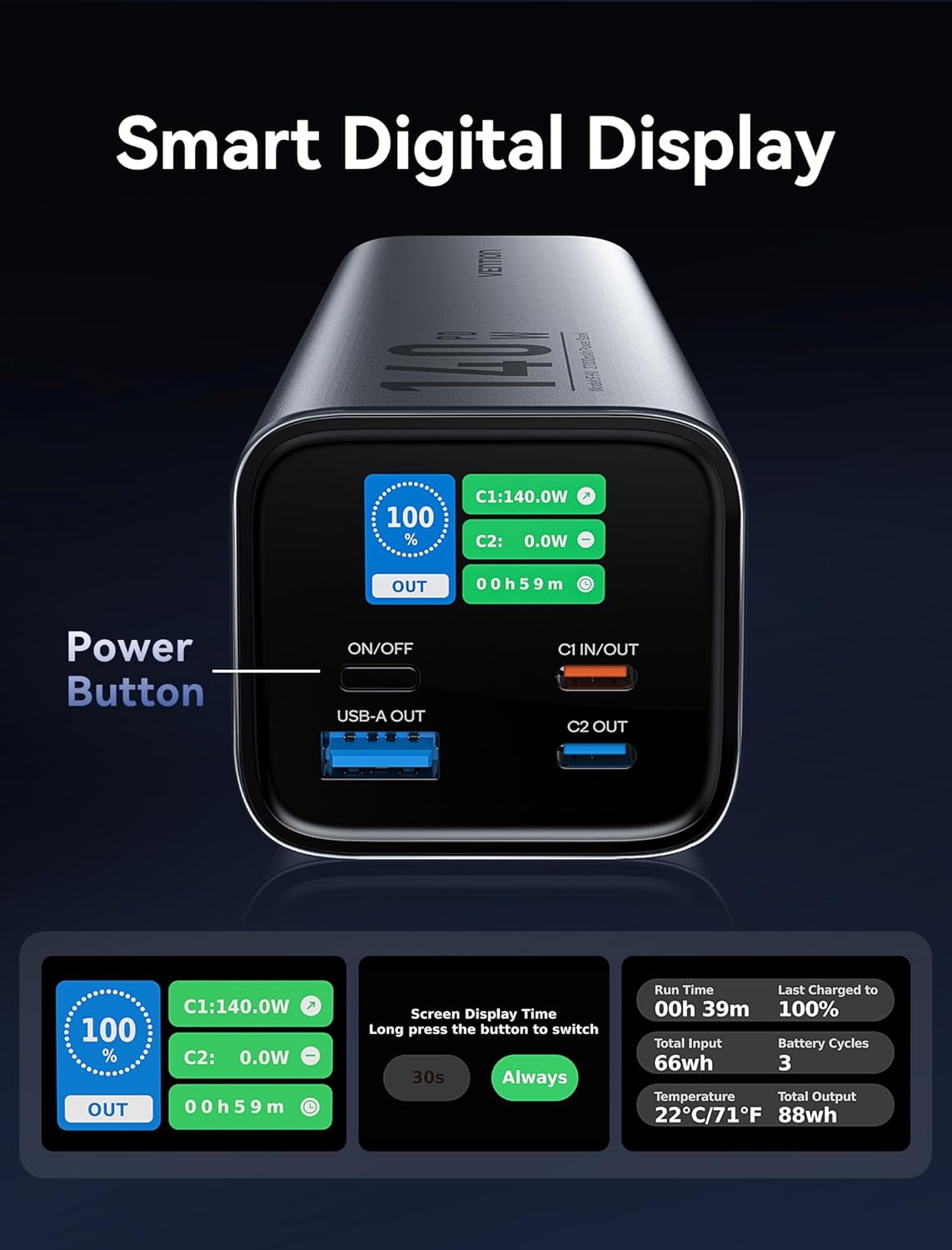
Immagine: Un dettaglio view of the power bank's smart digital display, highlighting the power button and various data points such as percentage, power output, and estimated time.
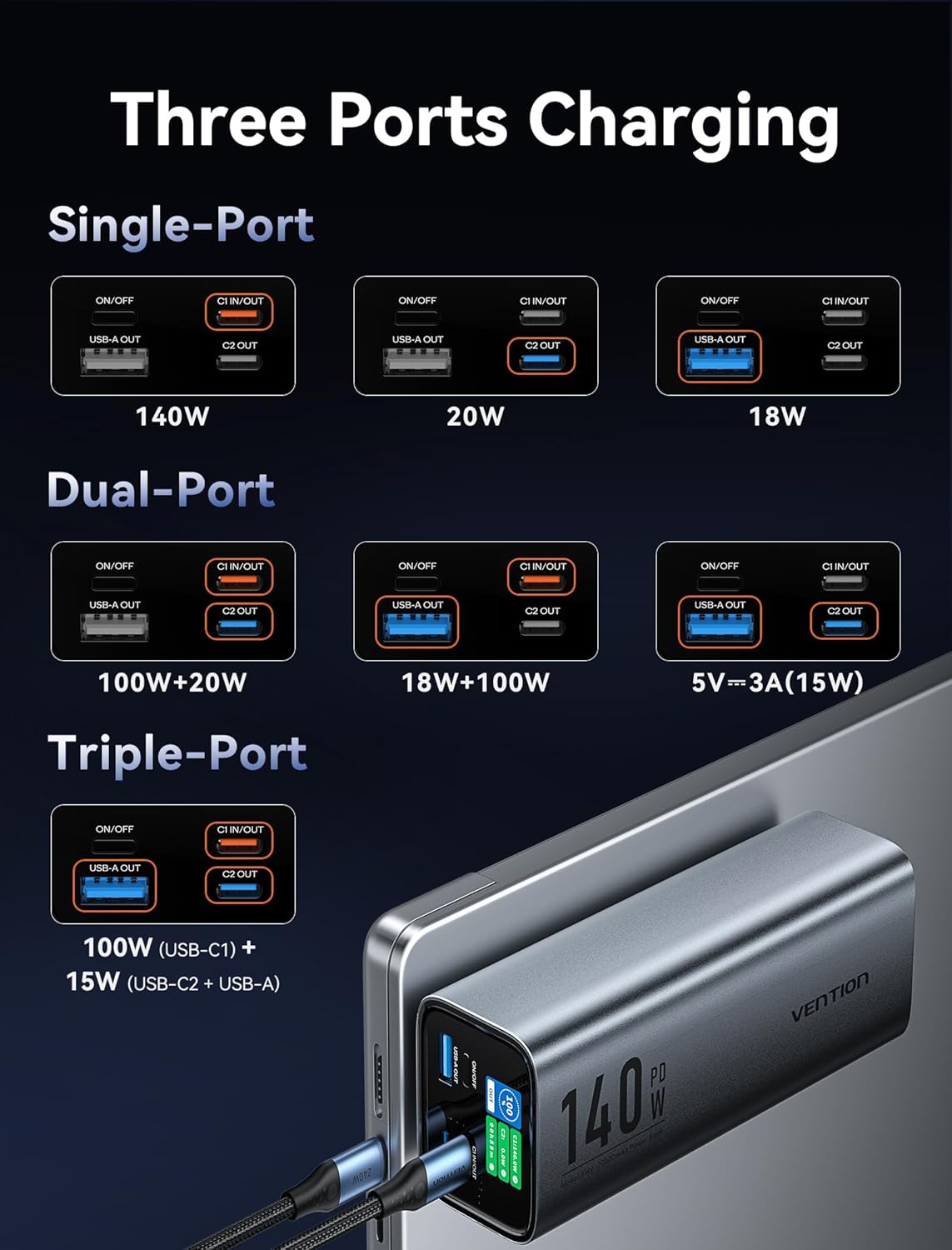
Image: A visual guide demonstrating the power bank's single-port, dual-port, and triple-port charging capabilities with corresponding wattage outputs for each configuration.
3. Configurazione e utilizzo iniziale
3.1 Disimballaggio e ispezione
Upon receiving your VENTION Laptop Power Bank, carefully unbox all components. Verify that the package contains the power bank unit and the included 240W 5A fast charging cable. Inspect the device for any visible damage.
3.2 Ricarica iniziale del Power Bank
Before first use, it is recommended to fully charge the power bank. Connect the included USB-C to USB-C cable to the C1 IN/OUT port on the power bank and connect the other end to a compatible 140W PD wall charger (not included). The smart digital display will show the charging status and estimated time to full charge. A full charge typically takes approximately 90 minutes with a 140W charger.
Video: This video demonstrates the VENTION 140W Laptop Power Bank, showcasing its design, the smart digital display in action, and its ability to charge multiple devices simultaneously. It also highlights the efficient self-charging process.
4. Istruzioni per l'uso
4.1 Ricarica dei dispositivi
To charge a device, connect it to one of the power bank's output ports using an appropriate charging cable. The power bank features:
- C1 IN/OUT Port: Supports up to 140W Power Delivery (PD 3.1) for both input and output. Ideal for laptops and other high-power devices.
- C2 OUT Port: Supports up to 20W PD for fast charging smartphones and tablets.
- USB-A OUT Port: Supports up to 18W for standard USB-A charging.
The power bank will automatically detect the connected device and begin charging. For optimal performance, use high-quality charging cables.
4.2 Understanding the Smart Digital Display
The TFT smart digital display provides critical information at a glance:
- Percentuale batteriatage: Shows the remaining charge.
- Potenza in uscita (W): Visualizza l'ora correntetage being delivered by each active port (C1, C2, USB-A).
- Tempo di ricarica stimato: Indicates how long until the power bank is fully charged (when charging the power bank) or how long it can continue to output power (when discharging).
- Temperatura della batteria: Monitors the internal temperature for safety.
- Battery Cycle Count: Tracks the number of charge/discharge cycles.
- Total Input/Output Power (Wh): Shows cumulative energy transferred.
Press the power button briefly to cycle through display information or to activate the display. Long press the power button to adjust the screen display time (30s or Always On).
5. Manutenzione
Una corretta manutenzione garantisce la longevità e le prestazioni ottimali del tuo power bank.
5.1 Pulizia
Wipe the exterior of the power bank with a soft, dry cloth. Do not use liquid cleaners or abrasive materials, as they may damage the surface or internal components.
5.2 Conservazione
Store the power bank in a cool, dry place away from direct sunlight, extreme temperatures, and high humidity. If storing for extended periods, charge the power bank to approximately 50-70% capacity every three months to preserve battery health.
5.3 Cura della batteria
Avoid fully discharging the power bank frequently, as this can reduce battery lifespan. While the device has over-charge and over-discharge protection, maintaining a charge above 20% and below 80% when possible can extend its overall battery life.
6. Risoluzione Dei Problemi
If you encounter issues with your VENTION Laptop Power Bank, refer to the following common problems and solutions:
| Problema | Possibile causa | Soluzione |
|---|---|---|
| Il power bank non carica i dispositivi. | Low battery; incorrect cable; device not compatible; power bank in standby. | Ensure power bank is charged. Use the correct cable for your device. Press the power button to activate output. Verify device compatibility. |
| Power bank not charging itself. | Faulty charging cable/adapter; port issue. | Try a different USB-C cable and a known working PD wall adapter. Ensure the cable is fully inserted into the C1 IN/OUT port. |
| Ricarica lenta. | Cavo che non supporta watt elevatitage; device not supporting fast charge; multiple devices connected. | Use the included 240W cable or another high-quality PD compatible cable. Ensure your device supports fast charging. Disconnect other devices for maximum single-port output. |
| Il display digitale non funziona. | Power bank off; display timeout. | Press the power button briefly to activate the display. Check if the display timeout setting is set to "Always On" if you prefer it to stay on. |
| Il power bank risulta caldo durante l'uso. | Normal operation during high-power charging/discharging. | This is normal, especially during 140W operation. The aluminum casing aids in heat dissipation. If it becomes excessively hot or emits smoke/odor, discontinue use immediately and contact support. |
7. Specifiche
| Attributo | Dettaglio |
|---|---|
| Numero di modello | VAPORE ALTO |
| Capacità della batteria | 27000 mAh (99.9 Wh) |
| Dimensioni del prodotto | 6.5 x 2.2 x 2 pollici |
| Peso dell'articolo | 1.56 libbre |
| Tipi di connettori | USB Type C (x2), USB Type A (x1) |
| Potenza massima in uscita | 140 W (USB-C1) |
| Caratteristiche speciali | Digital Display, Over Charging Protection, Fast Charging, Pocket Size, Scratch Resistant |
| Colore | Grigio scuro |
| Produttore | VENZIONE |
| Paese di origine | Cina |
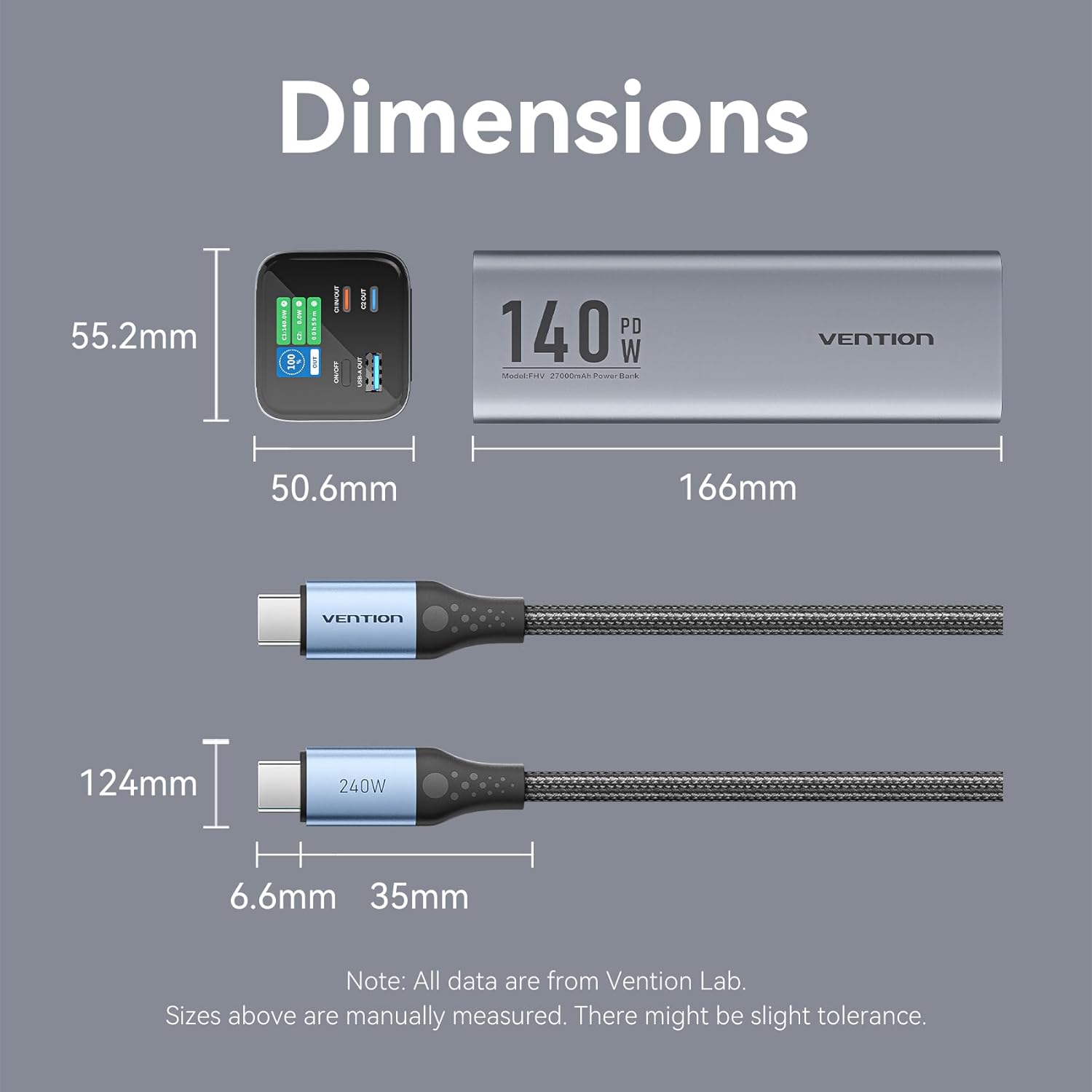
Image: A technical diagram detailing the precise dimensions of the VENTION power bank (166mm length, 50.6mm width, 55.2mm height) and the included 240W cable.
8. Garanzia e supporto
For warranty information and customer support, please refer to the documentation included with your purchase or visit the official VENTION websito. Puoi anche trovare maggiori informazioni e dettagli di contatto sul VENTION Official Store on Amazon.
Si prega di conservare la prova d'acquisto per eventuali reclami in garanzia.


