KOOSMILE Mini PC KT-M9 User Manual
Model: KT-M9
1. Introduzione
Thank you for choosing the KOOSMILE Mini PC KT-M9. This compact yet powerful desktop computer is designed for a wide range of applications, from demanding professional tasks to immersive home entertainment. Equipped with an Intel Core i9-12900HK processor, ampGrazie alla memoria interna e all'archiviazione ad alta velocità, offre prestazioni eccezionali in un formato compatto. Questo manuale fornisce informazioni essenziali per la configurazione, il funzionamento, la manutenzione e la risoluzione dei problemi del Mini PC.
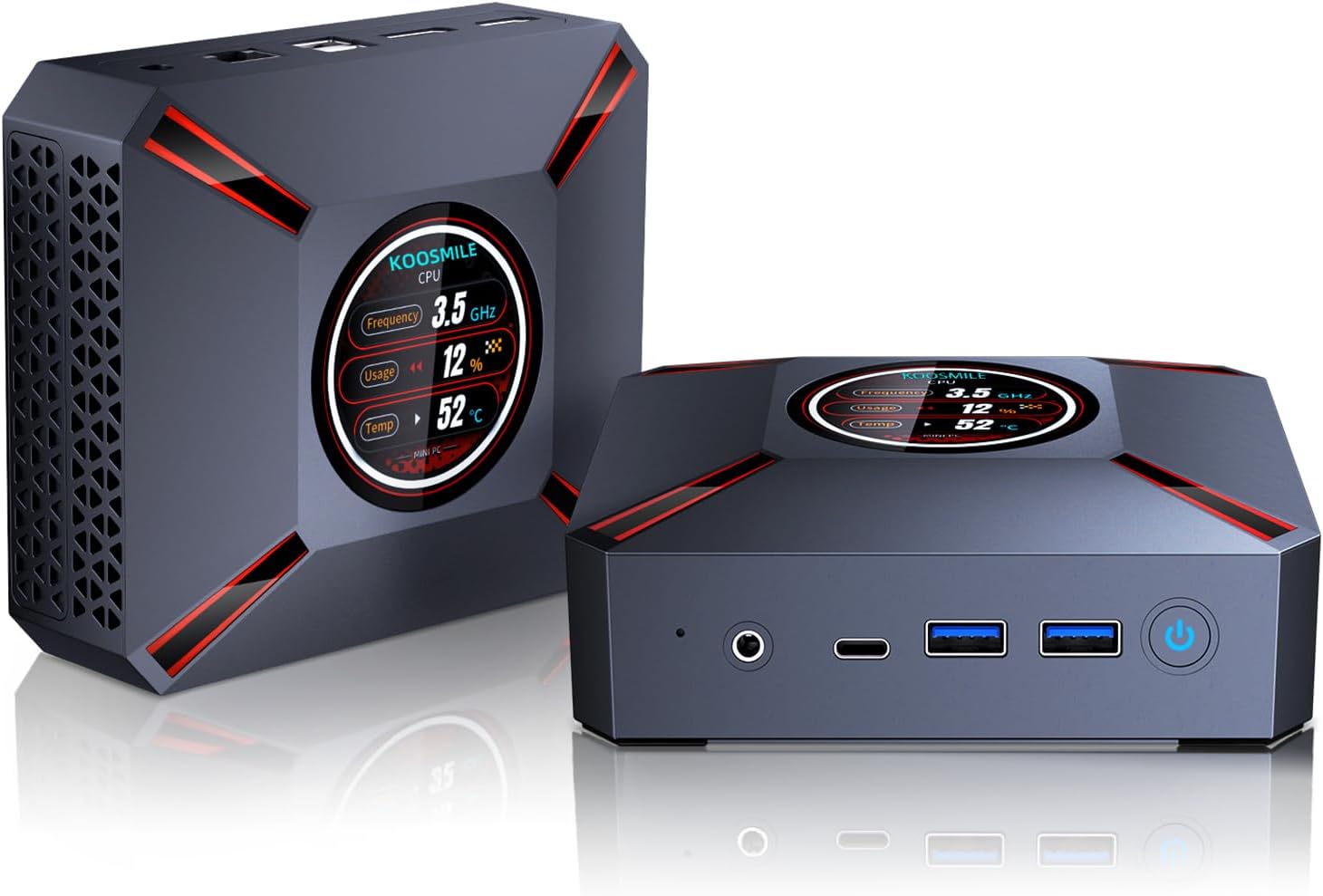
Figure 1.1: The KOOSMILE Mini PC KT-M9, showcasing its compact design and smart display.

Figura 1.2: Oltreview of the Mini PC's core features, including its powerful processor, memory, storage, and connectivity options.
2. Contenuto della confezione
Si prega di verificare che tutti gli articoli siano presenti e in buone condizioni all'apertura del pacco. Se alcuni articoli risultano mancanti o danneggiati, si prega di contattare l'assistenza clienti.
- 1 x KOOSMILE Mini PC KT-M9
- 1 cavo HDMI
- 1 x adattatore di alimentazione
- 1 cavo DisplayPort (DP)
- 1 hub USB
- 1 x Metal Sheet Bracket (for mounting)
- 1 x Manuale utente (questo documento)
3. Prodotto finitoview
The KOOSMILE Mini PC KT-M9 is designed for efficiency and versatility. Its compact chassis houses high-performance components and a variety of ports for extensive connectivity.
3.1. Dimensioni fisiche
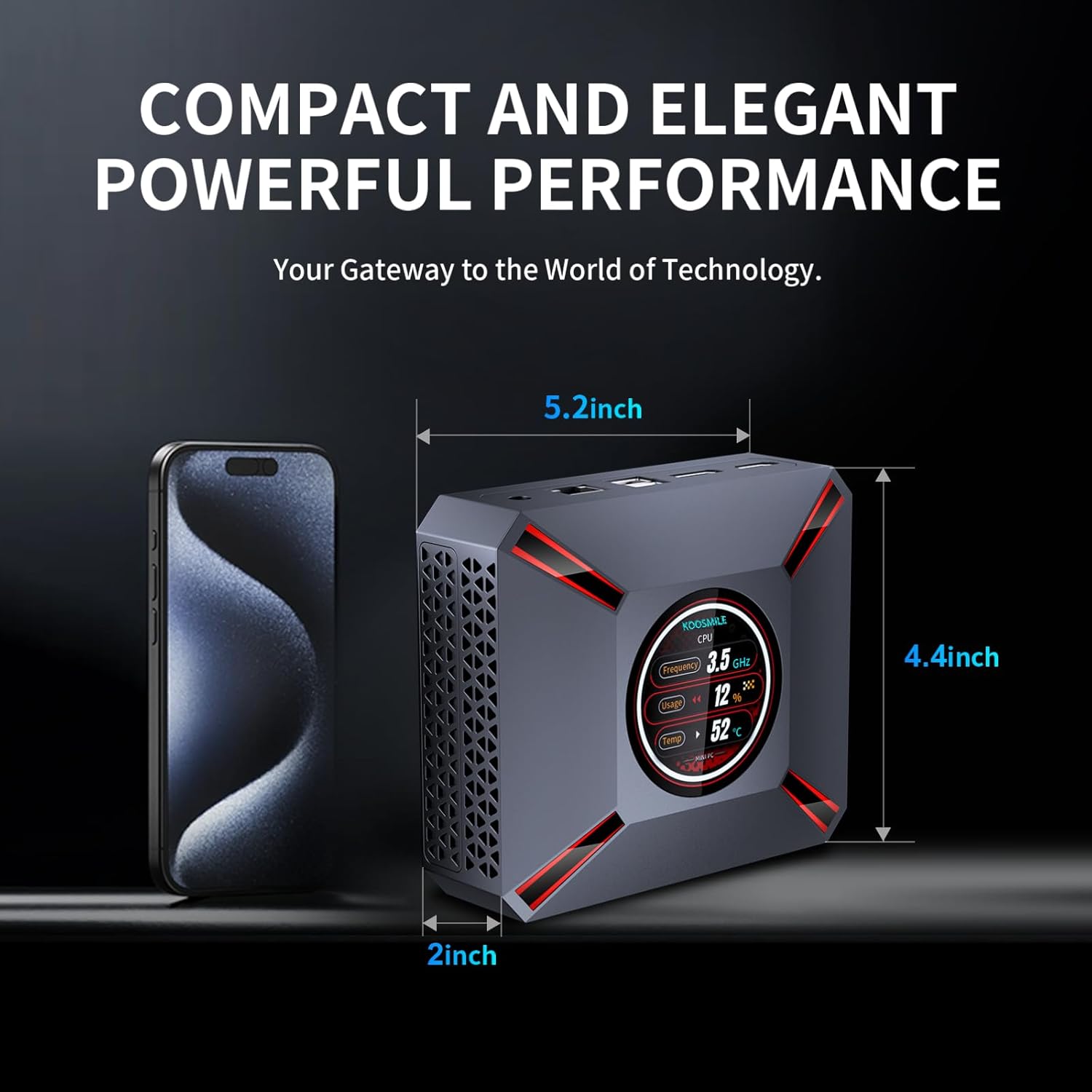
Figure 3.1: The compact size of the Mini PC, approximately 5.2 inches in length, 4.4 inches in width, and 2 inches in height, shown next to a smartphone for scale.
3.2. Porte e connettori
Familiarize yourself with the various input/output ports on your Mini PC:

Figure 3.2: Detailed diagram of the Mini PC's front and rear ports, including power, video outputs, USB, and audio connections.
- Pannello frontale:
- Jack audio/microfono da 3.5 mm
- USB Type-C Port (Full-feature)
- 2 porte USB 3.0
- Pulsante di accensione
- CMOS Reset Pinhole
- Pannello posteriore:
- Jack DC-IN (ingresso alimentazione)
- Porta Ethernet (RJ-45)
- 2 porte USB 2.0
- DisplayPort (DP 1.4a)
- Uscita HDMI 2.1
3.3. Smart Display Monitoring
The Mini PC features a built-in smart display on the lid that provides real-time system information. This display allows you to quickly monitor key performance metrics without needing additional software.

Figure 3.3: The smart display interface, showing real-time data such as CPU frequency, usage, temperature, network upload/download speeds, and disk usage.
Le informazioni visualizzate includono:
- Frequenza della CPU
- CPU Usage Percentage
- CPU Temperature (°C)
- Velocità di caricamento/download della rete
- Utilizzo della memoria
4. Guida all'installazione
Follow these steps to set up your KOOSMILE Mini PC for the first time.
4.1. Connessione hardware iniziale
- Connetti le periferiche: Plug in your USB keyboard and mouse to the available USB ports (USB 3.0 ports are recommended for faster response).
- Collega display: Connect your monitor(s) to the Mini PC using the provided HDMI cable, DisplayPort cable, or a USB-C to display cable. Important: Ensure the display device is connected before turning on the computer. Use the included HDMI cable and avoid other adapter cables for the HDMI interface to prevent compatibility issues.
- Connetti alimentazione: Insert the power adapter cable into the DC-IN jack on the rear panel of the Mini PC, then plug the power adapter into a wall outlet.
- Connessione di rete (facoltativa): For a wired connection, connect an Ethernet cable from your router or modem to the RJ-45 port on the Mini PC. For wireless connection, Wi-Fi 6 is enabled by default.
4.2. Primo avvio e installazione di Windows 11 Pro
- Accensione: Press the Power Button on the front panel of the Mini PC. The smart display will illuminate, and the system will begin to boot.
- Installazione di Windows 11 Pro: The Mini PC comes pre-installed with Windows 11 Pro. On the first boot, you will be guided through the Windows Out-Of-Box Experience (OOBE) to configure language, region, network, and user accounts. Follow the on-screen prompts to complete the setup.
- Installazione del driver: All necessary drivers are pre-installed. Please avoid installing third-party drivers unless specifically instructed by KOOSMILE support to prevent compatibility issues.
4.3. Configurazione a triplo display
The Mini PC supports up to three displays simultaneously via HDMI 2.1, DisplayPort 1.4a, and the full-feature USB Type-C port. This allows for an extended workspace or multi-monitor setups for productivity or entertainment.
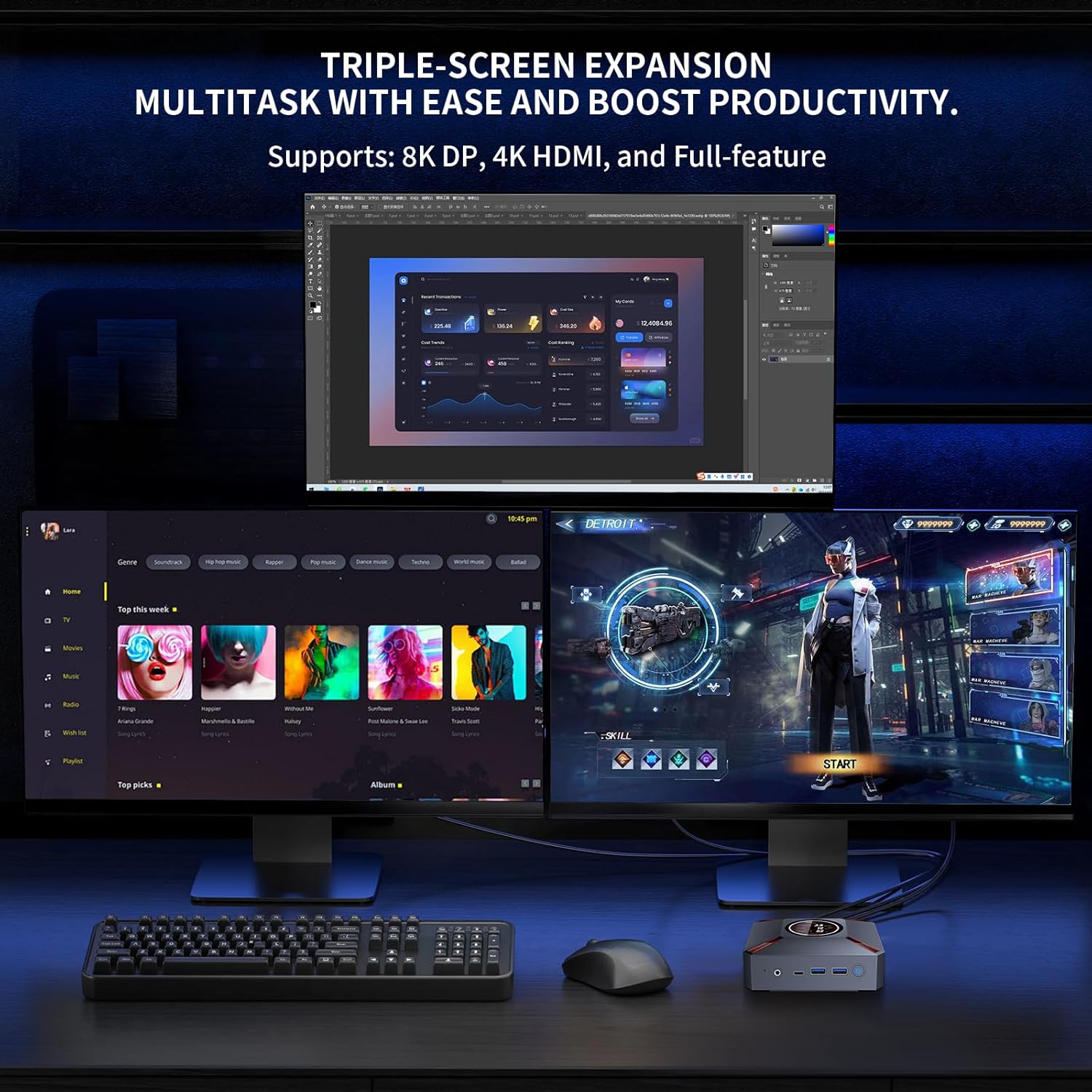
Figura 4.1: Esample of a triple-monitor setup connected to the Mini PC, demonstrating its multi-display capability.
Per configurare più display in Windows 11:
- Ensure all monitors are physically connected to the Mini PC and powered on.
- Right-click on an empty area of your desktop and select "Display settings."
- In the Display settings window, Windows should detect all connected displays. You can arrange them by dragging and dropping the display icons.
- Under "Multiple displays," choose how you want to use your displays (e.g., "Extend these displays," "Duplicate these displays").
- Adjust resolution, orientation, and scaling for each display as needed.
5. Istruzioni per l'uso
This section covers basic operation and utilization of your Mini PC.
5.1. Accensione/spegnimento e riavvio
- Accensione: Premere il pulsante di accensione sulla parte anteriore del Mini PC.
- Fermare: Fare clic sul pulsante Start in Windows, quindi selezionare Arresta il sistema > Arresta il sistema.
- Ricomincia: Fare clic sul pulsante Start in Windows, quindi selezionare Arresta > Riavvia.
- Sonno: Fare clic sul pulsante Start in Windows, quindi selezionare Alimentazione > Sospensione.
5.2. Utilizzo dello Smart Display
The smart display on the lid provides real-time system metrics. It operates automatically and requires no user input. Monitor these values to understand your system's current load and health.
5.3. Connettività di rete
- Wi-Fi 6: To connect to a wireless network, click the Wi-Fi icon in the Windows taskbar, select your desired network, enter the password, and click Connect.
- Collegamento Ethernet: Se è collegato un cavo Ethernet, il Mini PC stabilirà automaticamente una connessione di rete cablata.
5.4. Gestione dell'archiviazione
Your Mini PC comes with a 1TB NVMe SSD. You can manage disk partitions through Windows Disk Management. If you wish to adjust the hard disk partition structure, please refer to online resources or contact KOOSMILE customer support for guidance.
6. Manutenzione
Una corretta manutenzione garantisce la longevità e le prestazioni ottimali del tuo Mini PC.
6.1. Pulizia
- Esterno: Use a soft, dry, lint-free cloth to wipe the exterior of the Mini PC. For stubborn marks, slightly dampLavare il panno con acqua. Evitare prodotti chimici aggressivi o detergenti abrasivi.
- Vents: Periodically use compressed air to clear dust from the ventilation grilles to ensure proper airflow.
6.2. Sistema di raffreddamento
The Mini PC features an advanced copper cooling fan and multiple vents for efficient heat dissipation. This system is designed to keep your PC running smoothly even under intense tasks.

Figura 6.1: Interno view highlighting the efficient cooling system with its copper fan, designed to maintain optimal operating temperatures.
Ensure the Mini PC is placed in a well-ventilated area and that the vents are not obstructed. A slight heating of the metal housing during operation is normal and indicates effective heat dissipation.
6.3. Aggiornamenti software
Controlla regolarmente e installa gli aggiornamenti di Windows per garantire stabilità, sicurezza e prestazioni del sistema. Vai a Impostazioni > Windows Update per verificare la presenza di aggiornamenti.
7. Risoluzione Dei Problemi
Questa sezione affronta i problemi più comuni che potresti riscontrare con il tuo Mini PC.
7.1. Nessuna uscita di visualizzazione
- Ensure the monitor is powered on and correctly connected to the Mini PC's HDMI, DisplayPort, or USB-C video output.
- Verificare che sul monitor sia selezionata la sorgente di input corretta.
- Importante: Always connect the display device before powering on the Mini PC.
- Try using a different video cable or monitor to rule out faulty peripherals.
7.2. Il sistema non si accende
- Check that the power adapter is securely connected to both the Mini PC and a working power outlet.
- Assicurati che la presa di corrente sia funzionante testandola con un altro dispositivo.
7.3. Buzzing Sound
- A slight buzzing sound might occur. Try restarting the computer. If the sound persists or is unusually loud, contact customer support.
7.4. Problemi di connettività (Wi-Fi/Bluetooth)
- Wifi: Ensure Wi-Fi is enabled in Windows settings. Restart your router/modem. Check for interference from other devices.
- Bluetooth: Ensure Bluetooth is enabled in Windows settings. Try re-pairing your Bluetooth device.
7.5. Problemi generali di prestazioni
- Chiudere le applicazioni non necessarie in esecuzione in background.
- Assicurarsi che Windows e i driver siano aggiornati.
- Check the smart display for high CPU usage or temperature, which might indicate a heavy workload or cooling issue.
8. Specifiche
Detailed technical specifications for the KOOSMILE Mini PC KT-M9.

Figure 8.1: Key specifications of the Intel Core i9-12900HK processor, highlighting its core count, threads, cache, and maximum turbo frequency.

Figure 8.2: Information on the high-speed DDR4 memory and PCIe 3.0 SSD, crucial for fast data processing and quick loading times.

Figure 8.3: Comparison of wireless and wired connectivity speeds, highlighting the advantages of Wi-Fi 6 and USB 3.0.
| Componente | Specificazione |
|---|---|
| Processore | Intel Core i9-12900HK (14 Cores, 20 Threads, up to 5.0GHz, 24MB Cache) |
| Sistema operativo | Windows 11 Pro |
| Memoria RAM | 32 GB DDR4 3200 MHz |
| Magazzinaggio | SSD PCIe 3.0 NVMe da 1 TB |
| Grafica | Grafica Intel Iris Xe (integrata) |
| Uscita video | HDMI 2.1 (4K @ 60Hz), DisplayPort 1.4a (8K @ 60Hz), USB Type-C (Full-feature) |
| Connettività wireless | Wi-Fi 6 (802.11ax), Bluetooth 5.2 |
| Connettività cablata | 1000M RJ45 Ethernet |
| Porte USB | 2 x USB 3.0, 2 x USB 2.0, 1 x USB Type-C (Full-feature) |
| Audio | Jack audio/microfono da 3.5 mm |
| Sistema di raffreddamento | Advanced Copper Cooling Fan with Multiple Vents |
| Schermo intelligente | Real-time CPU Frequency, Usage, Temperature, Network, Memory |
| Dimensioni | Circa. 5.2 x 4.4 x 2 pollici (13.2 x 11.2 x 5.1 cm) |
| Peso | Circa. 2.57 libbre (1.17 kg) |
9. Garanzia e supporto
KOOSMILE is committed to providing high-quality products and excellent customer service.
9.1. Informazioni sulla garanzia
Your KOOSMILE Mini PC KT-M9 comes with a 1 anni di garanzia gratuita from the date of purchase. This warranty covers manufacturing defects and hardware malfunctions under normal use. It does not cover damage caused by misuse, accidents, unauthorized modifications, or natural disasters.
9.2. Supporto tecnico
For any technical assistance, troubleshooting, or warranty claims, please contact our customer service team via email. Provide your product model (KT-M9), purchase date, and a detailed description of the issue to receive prompt support.
E-mail: [Insert Customer Support Email Here - e.g., support@koosmile.com]
Our team is dedicated to helping you resolve any issues and ensure your satisfaction with your KOOSMILE Mini PC.


