1. Introduzione
This manual provides detailed instructions for the safe installation, operation, and maintenance of your Fafeicy 2.2KW Single Phase Solar Inverter PV Pump Speed Controller. Please read this manual thoroughly before using the product to ensure proper function and to prevent damage or injury. Keep this manual for future reference.
2. Informazioni sulla sicurezza
AVVERTIMENTO: Electrical shock hazard. Always disconnect power before servicing.
- Read the user's manual completely before attempting installation or operation.
- Do not open the inverter cover while the power supply is connected. Wait at least 10 minutes after disconnecting the power supply before opening the cover to allow internal capacitors to discharge.
- Ensure all wiring terminals are fully enclosed and secure to prevent electric shocks.
- The inverter is constructed with flame-retardant PC plastic and aluminum for heat and aging resistance. However, ensure adequate ventilation to prevent overheating.
- Solo personale qualificato dovrebbe eseguire l'installazione e la manutenzione.
- Verificare il volume immessotage and current specifications match your solar panel array to avoid damage.
3. Prodotto finitoview
The Fafeicy 2.2KW Single Phase Solar Inverter PV Pump Speed Controller is designed for efficient and convenient operation of solar-powered pumps. It converts DC power from solar panels into AC power to drive single-phase motors.
Caratteristiche principali:
- Conversione di potenza efficiente: Ingresso voltage range of 200-400VDC, output voltage of 0-220VAC, with a rated power of 2.2KW.
- Regolatore MPPT integrato: Features Maximum Power Point Tracking to detect and utilize the maximum power available from solar panels in real-time.
- Robust and Safe Design: Constructed with fireproof PC plastic and aluminum, featuring fully enclosed wiring terminals for enhanced safety and durability.
- Prestazioni stabili: Utilizes a double-layer board layout and protective paint PCB board for reliability and a low failure rate.
- Display digitale chiaro: A bright red digital tube display provides clear and intuitive operational feedback.
- Efficace dissipazione del calore: Equipped with a 24V DC cooling fan and an external aluminum cooling base to prevent overheating.
- Ampio volumetage Input Support: Automatically manages input voltage, triggering low voltage alarms or suppressing overvoltage to protect the system.
- Unattended Automatic Operation: Automatically starts and stops the load based on solar illumination intensity, eliminating the need for manual control.
Identificazione dei componenti:
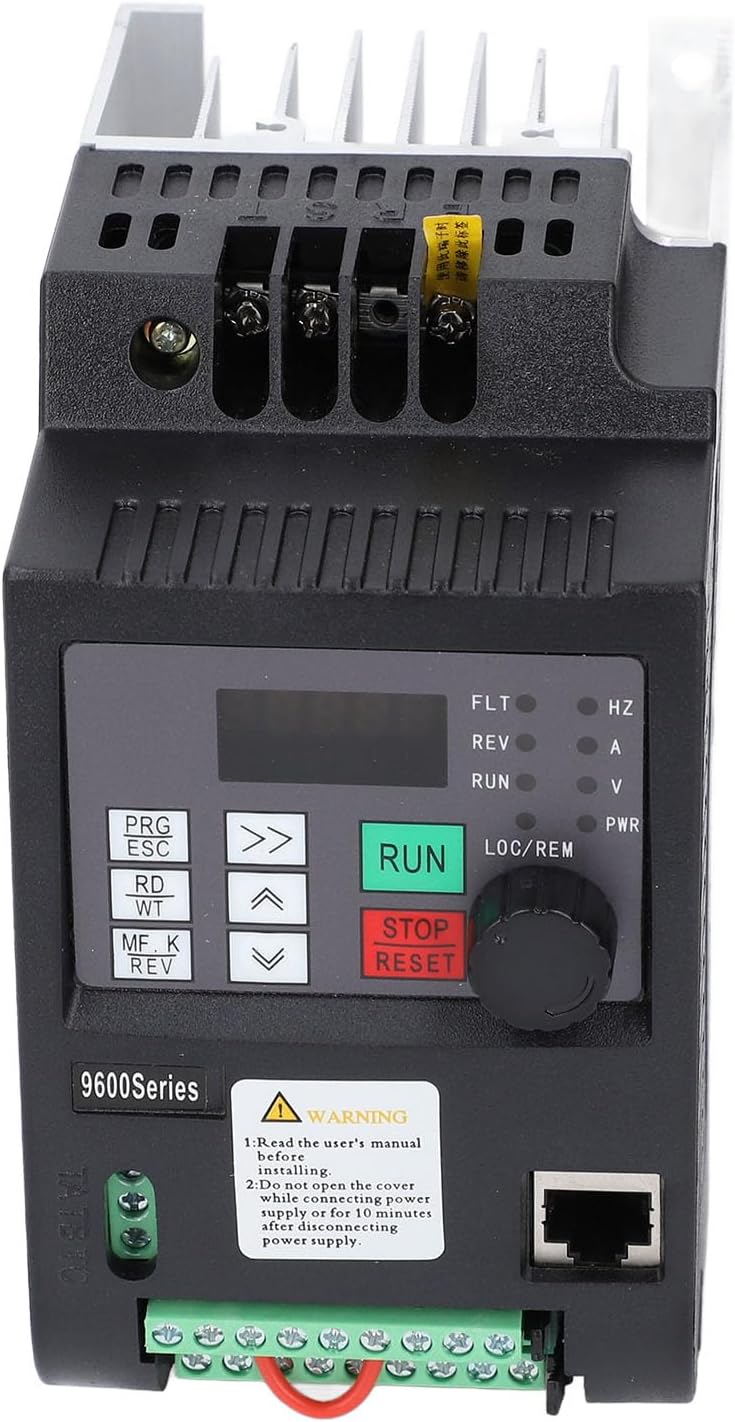
Figura 1: Fronte View of the Inverter. This image displays the front panel of the Fafeicy solar inverter, highlighting the digital display, control buttons (PRG/ESC, RD/WT, MF/K REV, RUN, STOP/RESET), and the LOC/REM knob. A warning label is visible below the control panel, and an Ethernet port is on the right side. The bottom section shows green terminal blocks for control wiring.

Figure 2: Terminal Connections. This detailed front view shows the various terminal blocks on the inverter. At the bottom, there are green terminal blocks labeled X1-X4, DO1, DCOM, AI1, AI2, ACOM, 24V, AM, A, B, 10V for control and analog inputs/outputs. Below these, larger terminals are visible for power connections (U, V, W, PN, DC+). A cooling fan is also visible at the very bottom.
- Display digitale: Mostra lo stato operativo, i parametri e i codici di errore.
- Pulsanti di controllo: Used for programming, setting parameters, and manual control (PRG/ESC, RD/WT, MF/K REV, RUN, STOP/RESET).
- LOC/REM Knob: For local or remote control selection.
- Morsettiere: For connecting DC input from solar panels, AC output to the pump, and various control signals.
- Cooling Fan & Heatsink: Located at the bottom and sides for thermal management.
4. Specifiche
| Parametro | Valore |
|---|---|
| Tipo di articolo | Inverter Solare Monofase |
| Materiale | Flame Retardant PC, Aluminum |
| Ingresso volumetage | 200-400 V CC |
| Volume di uscitatage | 0-220 V CA 0-600 Hz |
| Potenza nominale | 2.2 kW |
| Corrente nominale | 10A |
| Dimensioni (circa) | 130 x 80 x 155mm / 5.1 x 3.1 x 6.1in |
| Controllore integrato | MPPT (inseguimento del punto di massima potenza) |
| Ingresso digitale programmabile | 4 Ingressi |
| Ingresso analogico programmabile | AI1: 0-10V, AI2: 0-5V or panel potentiometer |
| Uscita Open Collector | uscita 1 |
| Uscita relè | uscita 1 |
| Uscita analogica | 1 Output (Optional 4-20mA or 0-10V) |
| Metodo di controllo | No PG vector, V/F control |
| Capacità di sovraccarico | 150% rated current for 60s; 180% rated current for 10s |
| Starting Torsion (No PG Vector) | 0.5Hz/150% (SVC) |

Figura 3: In basso View con specifiche. This image shows the bottom of the inverter, featuring a label with detailed specifications including the model number (9600D-1T-00220D), input/output voltage, frequency, power (2.2KW), and current (10A). The aluminum heatsink is prominently visible, indicating efficient thermal management.
5. Configurazione e installazione
Proper installation is crucial for the safe and efficient operation of the solar inverter. Refer to Figure 2 for terminal identification.
Montaggio:
- Montare l'inverter verticalmente su una superficie stabile e non infiammabile.
- Ensure sufficient clearance around the inverter for proper airflow, especially around the cooling fan and heatsink.
- Evitare il montaggio alla luce diretta del sole, in ambienti con elevata umidità o polverosi.
Collegamenti elettrici:
ATTENZIONE: Ensure all power sources are disconnected before making any wiring connections.
- DC Input (Solar Panels): Connect the positive (+) and negative (-) terminals of your solar panel array to the corresponding DC+ and DC- terminals on the inverter. Ensure the total voltage of your solar array is within the 200-400VDC input range.
- AC Output (Pump Motor): Connect the U, V, W terminals to your single-phase pump motor.
- Messa a terra: Collegare l'inverter a una messa a terra affidabile.
- Cablaggio di controllo: If using external control signals (e.g., remote start/stop, analog input for speed control), connect them to the programmable digital and analog input terminals (X1-X4, AI1, AI2, etc.) as required by your application.

Figure 4: Top Power Terminals. This close-up shows the top section of the inverter, specifically the main power input terminals. These terminals are designed for robust and secure connections, ensuring reliable power flow to the unit.
6. Istruzioni per l'uso
The Fafeicy solar inverter is designed for unattended automatic operation, but manual control and parameter adjustments are also possible.
Funzionamento automatico:
- In the morning, when solar illumination reaches a sufficient level (input voltage around 400V for 220V converter, or 200V for 220V converter), the inverter will automatically start and drive the connected pump.
- In the evening, as illumination decreases and the input voltage drops (to about 400V for 220V converter, or 200V for 220V converter), the inverter will automatically stop the pump.
Manual Control and Parameter Setting:
Use the control buttons and digital display on the front panel (refer to Figure 1).
- Pulsante RUN: Initiates operation manually.
- Pulsante STOP/RESET: Stops operation or clears error states.
- PRG/ESC Button: Enters or exits programming mode, or cancels an operation.
- RD/WT Button: Reads or writes parameter values.
- Pulsanti freccia (su/giù/sinistra/destra): Navigare nei menu e regolare i valori dei parametri.
- LOC/REM Knob: Switches between local (panel) and remote control modes.
Consult the detailed programming guide (if provided separately) for specific parameter settings and advanced functions.
7. Manutenzione
Una manutenzione regolare garantisce la longevità e le prestazioni ottimali del vostro inverter.
- Pulizia: Periodically clean the exterior of the inverter with a soft, dry cloth. Ensure the cooling fan and heatsink fins are free from dust and debris to maintain efficient heat dissipation.
- Verifiche della connessione: Regularly inspect all wiring connections for tightness and signs of corrosion or damage. Loose connections can lead to poor performance or safety hazards.
- Condizioni ambientali: Assicurarsi che l'ambiente operativo rimanga entro gli intervalli di temperatura e umidità specificati.
- Aggiornamenti del firmware: Controllare il produttore websito per eventuali aggiornamenti firmware disponibili, se applicabili.
AVVERTIMENTO: Always disconnect all power sources before performing any maintenance or cleaning inside the inverter.
8. Risoluzione Dei Problemi
Questa sezione fornisce soluzioni ai problemi più comuni che potresti riscontrare. Per problemi non elencati qui, contatta l'assistenza clienti.
| Problema | Possibile causa | Soluzione |
|---|---|---|
| Inverter does not start automatically | Insufficient solar illumination; Input voltage troppo basso | Check solar panel connections and ensure adequate sunlight. For 220V converter, input voltage must be above 200V. For 380V converter, input voltage deve essere superiore a 400V. |
| Basso volumetage allarme/spegnimento | Pannello solare voltage dropped below threshold | Verify solar panel output. The inverter will automatically restart when voltage recupera. |
| Sovravoltage allarme/spegnimento | Ingresso voltage exceeded safe limits | The inverter has automatic suppression for overvoltage (e.g., 400V for 220V converter, 700V for 380V converter). If persistent, check solar panel configuration. |
| No output to pump | Incorrect wiring; Inverter in STOP mode; Fault condition | Check AC output wiring. Press RUN button. Check display for error codes and refer to the manual for specific fault resolution. |
| Surriscaldamento | Blocked ventilation; Excessive ambient temperature; Overload | Ensure cooling fan and heatsink are clear. Reduce ambient temperature. Check pump load. |
9. Garanzia e supporto
Warranty information for this product is not explicitly detailed in the provided product data. Please refer to the retailer or manufacturer's official websito per termini e condizioni di garanzia specifici.
For technical support, troubleshooting assistance, or spare parts, please contact Fafeicy customer service through their official channels or the retailer from whom you purchased the product.