1. Introduzione
This manual provides comprehensive instructions for the installation, operation, maintenance, and troubleshooting of your Fanvil 8-Port 2-Wire PoE Switch (Model PN8). Please read this manual thoroughly before using the device to ensure proper functionality and to prevent damage.
2. Prodotto finitoview
The Fanvil PN8 is an 8-port 2-wire Power over Ethernet (PoE) switch designed to transmit both power and data over existing 2-wire cables. This unique capability simplifies installation, especially in environments where traditional Ethernet cabling is not feasible or cost-effective. It supports up to 8 PoE-enabled devices and can transmit data and power over distances up to 300 meters.
2.1 Caratteristiche principali
- 8 PoE ports for data and power transmission.
- Supports power and data over 2-wire connections.
- Long transmission distance of up to 300 meters.
- User-friendly setup with no complex configuration required.
2.2 Disposizione del dispositivo
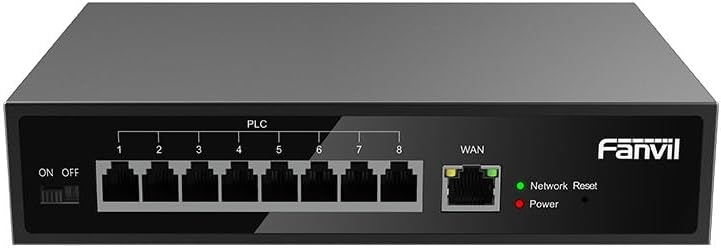
Figura 1: Davanti view of the Fanvil PN8 switch, showing 8 PLC ports, a WAN port, ON/OFF switch, and LED indicators for Network Reset and Power.

Figura 2: Angolato view of the Fanvil PN8 switch, highlighting the side ventilation and port layout.
2.3 Indicatori LED
- Network Reset (Green LED): Indicates network activity or status. A steady light typically means a stable connection, while blinking indicates data transmission.
- Power (Red LED): Illuminates when the device is powered on and receiving electrical current.
3. Istruzioni per l'installazione
3.1 Contenuto della confezione
Prima dell'installazione, verificare che tutti gli elementi siano presenti nella confezione:
- Fanvil 8-Port 2-Wire PoE Switch (PN8)
- Adattatore di alimentazione
- Manuale dell'utente (questo documento)
- Accessori di montaggio (se inclusi)
3.2 Collegamento dello switch
- Collegamento elettrico: Connect the provided power adapter to the power input port on the switch and then plug it into a standard electrical outlet (100-240V AC). Ensure the ON/OFF switch is in the OFF position before connecting power.
- Connessione WAN: Connect your main network router or modem to the WAN port on the Fanvil PN8 switch using a standard Ethernet cable.
- Connessione del dispositivo PoE: Connect your 2-wire PoE-enabled devices (e.g., IP phones, cameras) to any of the 8 PLC ports on the switch. The switch will automatically detect and provide power and data to these devices.
- Accensione: Flip the ON/OFF switch to the ON position. The Power LED should illuminate, indicating the switch is operational.
4. Funzionamento dell'interruttore
Once connected, the Fanvil PN8 switch operates automatically. It provides power and data to connected PoE devices without requiring additional configuration. The LED indicators provide visual feedback on the device's status.
4.1 Accensione/Spegnimento
- To power on the switch, ensure the power adapter is connected and flip the ON/OFF switch to the 'ON' position. The red Power LED will light up.
- To power off the switch, flip the ON/OFF switch to the 'OFF' position. The red Power LED will turn off.
5. Manutenzione
To ensure optimal performance and longevity of your Fanvil PN8 switch, follow these maintenance guidelines:
- Pulizia: Utilizzare un panno morbido e asciutto per pulire l'esterno dell'interruttore. Non utilizzare detergenti liquidi o spray. Assicurarsi che il dispositivo sia spento prima di pulirlo.
- Ventilazione: Ensure the switch is placed in a well-ventilated area. Do not block the ventilation openings on the sides of the device.
- Ambiente: Avoid exposing the switch to extreme temperatures, high humidity, or direct sunlight.
6. Risoluzione Dei Problemi
If you encounter issues with your Fanvil PN8 switch, refer to the following table for common problems and solutions:
| Problema | Possibile causa | Soluzione |
|---|---|---|
| Nessuna alimentazione (LED di alimentazione spento) | Power adapter not connected or faulty; ON/OFF switch is off. | Check power adapter connection and outlet. Ensure ON/OFF switch is in the 'ON' position. |
| Nessuna connettività di rete | WAN cable disconnected; faulty cable; upstream network issue. | Verify WAN cable connection. Test with a different cable. Check your router/modem. |
| PoE device not receiving power/data | Device not PoE-compatible; faulty 2-wire cable; device drawing too much power. | Ensure device is PoE-compatible. Test with a different 2-wire cable. Check device power requirements. |
| Velocità di rete lenta | Qualità del cavo; congestione della rete; limitazioni del dispositivo. | Ensure high-quality 2-wire cables are used. Reduce network traffic if possible. |
7. Specifiche tecniche
| Specificazione | Valore |
|---|---|
| Numero di modello | Codice PN8 |
| Tipo di prodotto | 2-Wire PoE Switch |
| Porti | 8 |
| Ingresso volumetage | 100~240 V CA |
| Volume di eserciziotage | 28 Volt |
| Lunga distanza di trasmissione | 300 metri |
| Dimensioni del prodotto | 5.91 x 78.74 x 5.91 pollici |
| Peso dell'articolo | 2.49 libbre |
| Batterie richieste | 1 AAAA batteries (included) |
| ASIN | B0DP5HXVQJ |
| Codice UPC | 6937295605105 |
| Data prima disponibilità | 27 novembre 2024 |
8. Garanzia e supporto
Per informazioni sulla garanzia e supporto tecnico, fare riferimento alla documentazione fornita con l'acquisto o visitare il sito ufficiale Fanvil website. Contact their customer service for assistance with product issues, repairs, or further inquiries.


