1. Prodotto finitoview
The FIFINE K688CT+H8 is a complete podcasting and recording solution, featuring a high-quality dynamic microphone, a robust boom arm, and comfortable studio monitoring headphones. This kit is designed to provide clear, professional-grade audio for various applications, including podcasting, streaming, voice-overs, and music recording.

Image 1.1: Complete FIFINE K688CT+H8 Podcast Microphone Kit, including the dynamic microphone, boom arm, and studio headphones.
Caratteristiche principali:
- Authentic Sound Integrity: The dynamic microphone delivers natural sound reproduction with a high SPL of 130dB, ensuring original and consistent recordings without distortion.
- Diagramma polare cardioide: Effectively reduces ambient noise, focusing on the sound source directly in front of the microphone for clear vocal capture.
- Comandi intuitivi: Features a tap-to-mute button for instant muting and a gain knob for precise audio level adjustments.
- Monitoraggio delle cuffie: Integrated headphone jack and volume knob allow for real-time audio monitoring, optimizing recording effectiveness.
- Comfortable Studio Headphones: The included H8 headphones feature a supportive adjustable headband and soft padded ear cushions, weighing 265g for extended comfortable wear during long sessions.
- Robust Boom Arm: Crafted from durable metal, the boom arm ensures secure and stable microphone placement, minimizing collisions and vibrations for smooth audio quality.
- Connettività versatile: Supports both XLR and USB connections for compatibility with various setups, including PCs, mixers, and gaming consoles (PS4/PS5).
2. Istruzioni di sicurezza
Please read and understand these safety instructions before using the product to prevent damage or injury.
- Do not expose the microphone or headphones to water or excessive moisture.
- Avoid dropping or subjecting the equipment to strong impacts.
- Non tentare di smontare o modificare il prodotto. Le riparazioni devono essere eseguite solo da personale qualificato.
- Tenere il prodotto lontano da fonti di calore e dalla luce solare diretta.
- Ensure all cables are connected securely to prevent accidental disconnections or short circuits.
- When adjusting the boom arm, ensure it is securely clamped to a stable surface to prevent tipping.
- Avoid listening at excessively high volumes with the headphones for prolonged periods to prevent hearing damage.
3. Contenuto della confezione
Verifica che tutti gli articoli elencati di seguito siano presenti nel tuo pacco:
- FIFINE K688 Dynamic Microphone
- Studio Monitoring Headphones (H8)
- Adjustable Boom Arm with Desk Clamp
- Cavo da USB-C a USB-A
- XLR Cable (Note: XLR cable may not be included in all bundles. Please check product packaging.)
- 3.5mm Audio Cable for Headphones
- 6.35mm (1/4 inch) Adapter for Headphones
- Manuale dell'utente (questo documento)
4. Guida all'installazione
Follow these steps to set up your FIFINE Podcast Microphone Kit:
4.1. Boom Arm Assembly and Mounting
- Fissare la scrivania clamp to a sturdy surface, such as a desk or table edge. Tighten the clamp in modo sicuro.
- Inserire la base del braccio nel foro sulla scrivaniaampAssicurarsi che sia completamente inserito e stabile.
- Adjust the boom arm's position and angle as needed. The arm offers 180° vertical and 135° horizontal adjustability for optimal microphone placement.
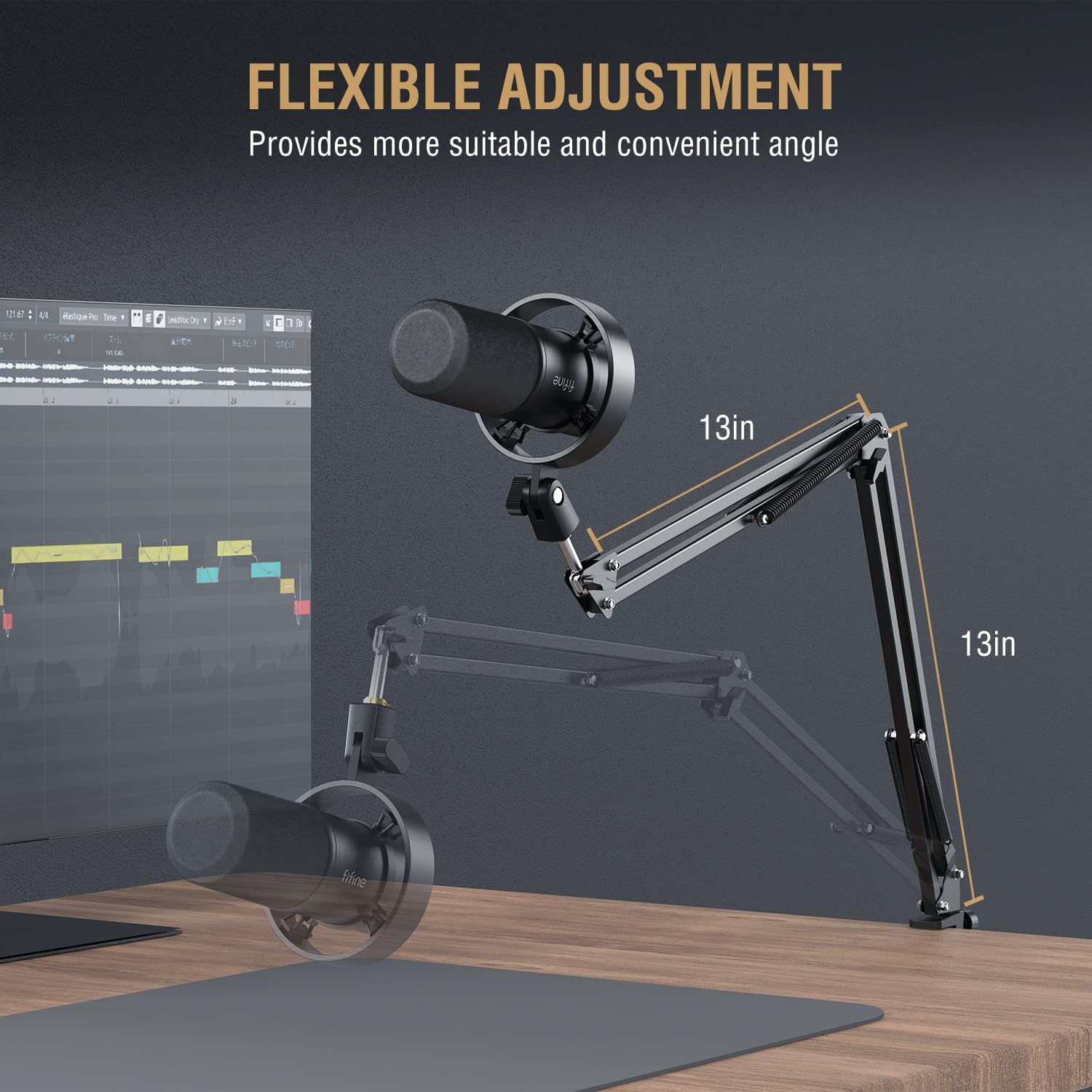
Image 4.1: The boom arm offers flexible adjustment, extending up to 13 inches vertically and horizontally from its pivot points.
4.2. Attacco per microfono
- Screw the FIFINE K688 microphone onto the threaded end of the boom arm. Ensure it is firmly attached but do not overtighten.
- Position the microphone so that the front (where the FIFINE logo is visible) faces the sound source.
4.3. Collegamento delle cuffie
- Connect the 3.5mm audio cable to the headphone jack on the FIFINE K688 microphone.
- If your mixer or audio interface requires a 6.35mm (1/4 inch) connection, use the provided adapter.
- Plug the other end of the headphone cable into the H8 studio headphones.

Image 4.2: The H8 headphones feature a closed-back circumaural design for immersive monitoring and sound isolation.
4.4. Connecting to Your Device (PC/Mixer)
The K688 microphone offers both USB and XLR connectivity.
USB Connection (Plug and Play):
- Connect the USB-C end of the provided USB cable to the USB port on the K688 microphone.
- Connect the USB-A end of the cable to an available USB port on your computer (desktop or laptop) or gaming console (PS4/PS5).
- The device should be automatically recognized by your operating system. Select "FIFINE K688" as your input device in your system's sound settings and recording software.
XLR Connection (Requires Audio Interface/Mixer):
- Connect a standard XLR cable (not always included) to the XLR port on the K688 microphone.
- Connect the other end of the XLR cable to an XLR input on your audio interface or mixer.
- Ensure your audio interface/mixer is properly connected to your computer and configured.


Image 4.3: The K688 microphone features both XLR and USB interfaces for versatile connectivity.
5. Funzionamento
Understanding the controls on your FIFINE K688 microphone and H8 headphones is essential for optimal performance.
5.1. Microphone Controls (K688)

Immagine 5.1: Dettagliata view of the microphone's gain and monitoring volume controls.
- Pulsante Tocca per disattivare l'audio: Located on the top of the microphone. A single tap will instantly mute or unmute the microphone. The LED indicator will change color to show mute status (e.g., green for active, red for muted).
- Manopola del guadagno del microfono: Adjusts the input sensitivity of the microphone. Turn clockwise to increase gain (make your voice louder), and counter-clockwise to decrease it. Adjust this to achieve a strong signal without clipping.
- Monitoring Volume Control: Adjusts the volume of the audio output to your connected headphones. This does not affect the microphone's input level.

Image 5.2: User-friendly functions like tap-to-mute and headphone monitoring are easily accessible.
5.2. Headphone Usage (H8)
The H8 headphones are designed for comfortable and accurate audio monitoring.
- Logorante: Adjust the headband to fit comfortably over your head. The earcups should fully enclose your ears for optimal sound isolation and comfort.
- Volume: Control the headphone volume using the monitoring volume knob on the K688 microphone or your connected audio device.

Image 5.3: The H8 headphones feature a lightweight design (265g) with soft filler headband and padded earmuffs for comfort during long sessions.
6. Manutenzione
Proper maintenance ensures the longevity and optimal performance of your FIFINE kit.
- Pulizia: Use a soft, dry cloth to wipe down the microphone, headphones, and boom arm. Do not use liquid cleaners or abrasive materials.
- Magazzinaggio: When not in use, store the kit in a clean, dry place away from extreme temperatures and humidity.
- Cura del cavo: Avoid sharp bends or kinks in the cables. Store them neatly to prevent tangling and damage.
- Griglia del microfono: Periodically check the microphone grille for dust or debris. Use a soft brush if necessary to gently clean it.
7. Risoluzione Dei Problemi
If you encounter issues with your FIFINE Podcast Microphone Kit, refer to the following common problems and solutions:
| Problema | Possibile causa | Soluzione |
|---|---|---|
| Nessun suono dal microfono | Microphone muted; Incorrect input device selected; Loose cable connection; Gain too low. | Tap the mute button to unmute; Check system sound settings and recording software to ensure K688 is selected as input; Reconnect USB/XLR cable; Increase Mic Gain knob. |
| Nessun suono dalle cuffie | Headphones not connected; Monitoring volume too low; Incorrect output device selected. | Ensure headphones are fully plugged into the K688; Increase Monitoring Volume knob; Check system sound settings to ensure K688 (or connected interface) is selected as output. |
| Audio distorto | Mic Gain too high (clipping); Microphone too close to sound source. | Decrease Mic Gain knob; Move microphone slightly further away from the sound source. |
| Background noise/hum | Environmental noise; Ground loop (XLR); USB port interference. | Ensure recording environment is quiet; Try a different USB port; If using XLR, ensure proper grounding or use a ground loop isolator. |
| Boom arm unstable | Scrivania clamp not tightened; Arm joints loose. | Retighten the desk clamp; Check and tighten any adjustable joints on the boom arm. |
8. Specifiche
Technical specifications for the FIFINE K688CT+H8 Podcast Microphone Kit:
| Componente | Specificazione |
|---|---|
| Tipo di microfono | Dinamico |
| Modello polare | cardioide |
| Risposta in frequenza | 50 Hz - 16 kHz |
| Sensibilità | -58dB (±3dB) |
| Livello massimo di pressione sonora | 130 dB |
| Rapporto segnale / rumore (SNR) | >80 dB |
| Connessione di uscita | USB-C, XLR |
| Dimensioni del driver delle cuffie | Driver dinamico da 50 mm |
| Impedenza delle cuffie | 32 ohm |
| Peso della cuffia | 265 g (9.4 once) |
| Boom Arm Material | Metallo durevole |
| ASIN | B0DPFYH9LQ |
| Data prima disponibilità | 2 dicembre 2024 |

Image 8.1: The K688 microphone features a cardioid polar pattern and a Signal-to-Noise Ratio (SNR) greater than 80dB.

Image 8.2: The H8 headphones are equipped with 50mm dynamic drivers for balanced sound quality and an impedance of 32 ohms, ideal for monitoring.
9. Garanzia e supporto
FIFINE products are designed for reliability and performance. For information regarding warranty coverage, technical support, or service, please refer to the warranty card included with your product or visit the official FIFINE websito. Conservare la ricevuta d'acquisto come prova d'acquisto per eventuali reclami in garanzia.


