1. Introduzione
This manual provides detailed instructions for the installation, operation, and maintenance of your Xigmatek Aqua V AIR Arctic Mid-Tower PC Case. Please read this manual thoroughly before beginning any installation to ensure proper setup and safe operation. Retain this manual for future reference.
2. Informazioni sulla sicurezza
Durante l'installazione e il funzionamento, osservare le seguenti precauzioni di sicurezza:
- Scollegare sempre l'alimentatore dalla presa a muro prima di installare o rimuovere qualsiasi componente.
- Indossare un braccialetto antistatico per evitare danni causati dalle scariche elettrostatiche (ESD) ai componenti sensibili.
- Maneggiare i componenti con cura. Evitare di toccare direttamente i pin o le schede dei circuiti.
- Assicurare una corretta ventilazione attorno al case del PC per evitare il surriscaldamento.
- Tenere le parti piccole e gli strumenti lontano dalla portata dei bambini.
- Non tentare di modificare la custodia o i suoi componenti, poiché ciò potrebbe invalidare la garanzia e comportare rischi per la sicurezza.
3. Contenuto della confezione
Verificare che tutti gli articoli siano presenti nel pacco:
- Xigmatek Aqua V AIR Arctic Mid-Tower PC Case
- Accessory kit (screws, standoffs, cable ties)
- Manuale dell'utente (questo documento)
If any items are missing or damaged, contact your retailer or Xigmatek support.
4. Prodotto finitoview
The Xigmatek Aqua V AIR Arctic is a mid-tower PC case designed for high-performance gaming configurations. It features tempered glass panels for component visibility and optimized airflow with pre-installed ARGB fans.

Figura 4.1: Anteriore sinistro view of the Xigmatek Aqua V AIR Arctic PC case, showcasing the tempered glass front and side panels, and the pre-installed ARGB fans.

Figura 4.2: Posteriore view of the PC case, showing the I/O shield cutout, expansion slots, and rear fan mount.
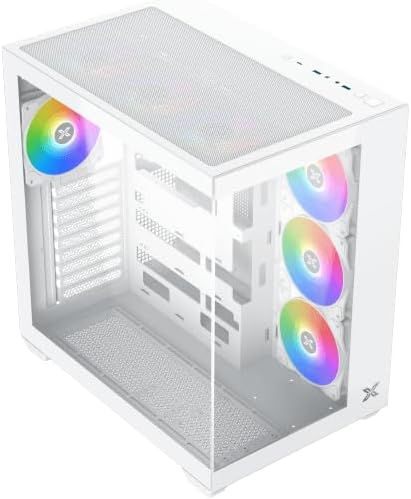
Figura 4.3: Angolo dall'alto verso il basso view, highlighting the top mesh panel for additional cooling and the internal layout.
5. Configurazione e installazione
Follow these steps to install your PC components into the Xigmatek Aqua V AIR Arctic case.
5.1. Preparazione del caso
- Posizionare la custodia su una superficie piana e stabile.
- Remove the tempered glass side panel by unscrewing the thumb screws at the rear and carefully sliding it off. Place it on a soft, non-abrasive surface to prevent scratches.
- Remove the opposite steel side panel by unscrewing the thumb screws and sliding it off.
5.2. Installazione della scheda madre
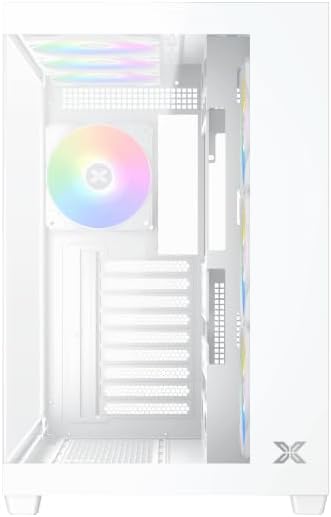
Figura 5.1: Interno view of the case, illustrating the motherboard mounting area and cable routing cutouts.
- Installare la schermatura I/O nel ritaglio sul retro del case.
- Align your motherboard with the pre-installed standoffs. Ensure the standoffs match your motherboard's form factor (ATX, Micro ATX).
- Secure the motherboard using the provided screws from the accessory kit. Do not overtighten.
5.3. Installazione dell'unità di alimentazione (PSU)
- Locate the PSU mounting bracket at the bottom rear of the case.
- Slide your PSU into the designated compartment from the rear of the case.
- Fissare l'alimentatore al case utilizzando le viti fornite con l'alimentatore.
5.4. Installazione dell'unità di archiviazione
Il case supporta più unità di archiviazione:
- SSD da 2.5": Mount directly to the SSD trays located behind the motherboard tray. Secure with screws.
- HDD da 3.5": Install into the drive cage located beneath the PSU shroud. Slide the drive into the tray and secure with screws.
5.5. Installazione della scheda grafica (GPU) e della scheda di espansione
- Rimuovere le coperture degli slot di espansione necessari nella parte posteriore del case.
- Inserire la scheda grafica o altre schede di espansione negli slot PCIe appropriati sulla scheda madre.
- Secure the cards with the provided screws.
5.6. Gestione dei cavi
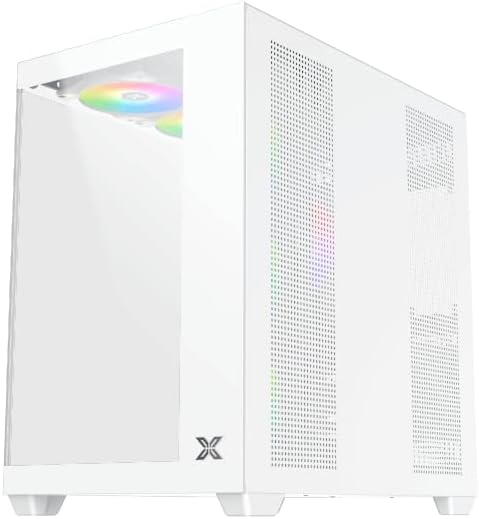
Figura 5.2: View behind the motherboard tray, illustrating the ample space and tie-down points for effective cable management.
Utilizzare i fori per il passaggio dei cavi e i punti di fissaggio dietro il vassoio della scheda madre per organizzare i cavi. Questo migliora il flusso d'aria e l'estetica.
- Collegare tutti i cavi di alimentazione necessari dall'alimentatore alla scheda madre, alla GPU e alle unità di archiviazione.
- Connect front panel cables (USB, audio, power/reset switches, LED indicators) to the corresponding headers on your motherboard. Refer to your motherboard manual for specific header locations.
- Connect the ARGB fan cables to the integrated fan controller or directly to your motherboard's ARGB headers if available.
5.7. Supporto per ventole e radiatori
The Xigmatek Aqua V AIR Arctic comes with 7 pre-installed 120mm ARGB fans. Additional cooling options are available:
- Davanti: Supports up to 3 x 120mm or 2 x 140mm fans / 240mm, 280mm, 360mm radiators.
- Superiore: Supports up to 3 x 120mm or 2 x 140mm fans / 240mm, 280mm, 360mm radiators.
- Posteriore: Supporta 1 ventola da 120 mm.
- Metter il fondo a: Supports up to 3 x 120mm fans.
Ensure proper fan orientation for optimal airflow (intake at front/bottom, exhaust at rear/top).
6. Operativo
Once all components are installed and cables are connected, replace the side panels. Connect your monitor, keyboard, mouse, and power cable. Press the power button on the front panel to start your system.
The pre-installed ARGB fans can be controlled via the integrated controller (if present) or through compatible motherboard software, allowing customization of lighting effects and fan speeds.
7. Manutenzione
Una manutenzione regolare aiuta a garantire prestazioni ottimali e longevità dei componenti del PC.
- Pulizia della polvere: Periodically clean dust filters (top, front, bottom) to maintain good airflow. Use compressed air to remove dust from inside the case and components.
- Pulizia esterna: Pulire le superfici esterne con un panno morbido, damp panno. Evitare detergenti abrasivi o solventi.
- Controllo della gestione dei cavi: Occasionally check cable routing to ensure no cables are obstructing fans or airflow.
8. Risoluzione Dei Problemi
In caso di problemi, fare riferimento ai seguenti passaggi comuni per la risoluzione dei problemi:
- Il sistema non si accende:
- Assicurarsi che l'alimentatore sia acceso e correttamente collegato alla presa a muro.
- Verify all power cables (24-pin ATX, 8-pin CPU, PCIe, SATA) are securely connected.
- Controllare i collegamenti dell'interruttore di alimentazione del pannello frontale alla scheda madre.
- Nessuna uscita di visualizzazione:
- Ensure the monitor cable is connected to the graphics card (not the motherboard I/O if using a dedicated GPU).
- Reinstallare la scheda grafica e i moduli RAM.
- Fans not spinning or ARGB not working:
- Controllare i collegamenti di alimentazione della ventola alla scheda madre o al controller della ventola.
- Verify ARGB connections to the controller or motherboard headers.
- Ensure any fan control software or BIOS settings are correctly configured.
For more complex issues, consult your component manuals or contact Xigmatek technical support.
9. Specifiche
| Caratteristica | Dettaglio |
|---|---|
| Nome del modello | Aqua V AIR Arctic |
| Numero di modello | EN45837 |
| Tipo di caso | Torre media |
| Compatibilità della scheda madre | ATX, Micro-ATX |
| Materiale | Steel Alloy, Tempered Glass |
| Colore | Bianco |
| Ventole preinstallate | 7 ventole ARGB da 120 mm |
| Lunghezza massima della GPU | 410 millimetri |
| Porte USB | 3 |
| Peso | 8.8 chilogrammi |
10. Garanzia e supporto
Xigmatek products are manufactured to high quality standards. For warranty information, please refer to the warranty card included with your product or visit the official Xigmatek website. For technical support or inquiries, please contact Xigmatek customer service through their official channels.
Ufficiale Websito: www.xigmatek.com