Introduzione
Thank you for choosing the Porodo Lifestyle 4K Digital Camera. This camera is designed to capture your world in stunning detail, offering 4K video recording and high-resolution 50MP images. With features like 16x digital zoom, a flip flash, and a 180° rotating screen, it is ideal for vlogging, photography, and various content creation needs. This manual provides essential information on setting up, operating, and maintaining your camera to ensure optimal performance and longevity.
Informazioni sulla sicurezza
- Non esporre la fotocamera a temperature estreme, alla luce solare diretta o a elevata umidità.
- Evitare di far cadere la fotocamera o di sottoporla a forti urti.
- Keep the camera away from water and liquids unless specifically designed for underwater use (this model is not).
- Non tentare di smontare o modificare la fotocamera. Ciò invaliderà la garanzia.
- Utilizzare solo il tipo di batteria e il metodo di ricarica specificati.
- Tenere fuori dalla portata dei bambini.
Contenuto della confezione
Si prega di selezionare la casella per i seguenti elementi:
- Porodo Lifestyle 4K Digital Camera
- Batteria ricaricabile (650 mAh)
- Cavo di ricarica di tipo C.
- Manuale dell'utente (questo documento)
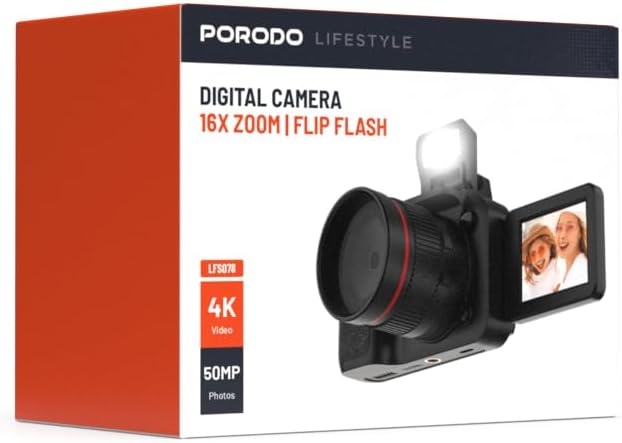
Immagine: Frontale view of the Porodo Lifestyle 4K Digital Camera retail box, showing the camera and key features.

Immagine: Indietro view of the Porodo Lifestyle 4K Digital Camera retail box, displaying product specifications and features.
Prodotto finitoview
Familiarize yourself with the various parts of your Porodo Lifestyle 4K Digital Camera.

Image: The Porodo Lifestyle 4K Digital Camera shown with its 180° rotating screen flipped open and the integrated flash extended upwards.
- Lente: Componente ottico principale per l'acquisizione di immagini e video.
- Flip Flash: Fornisce ulteriore illuminazione in condizioni di scarsa illuminazione.
- 180° Rotating Screen (2.2'' Display): Consente flessibilità viewing angles, ideal for vlogging and selfies.
- Pulsante di accensione: Accende/spegne la fotocamera.
- Pulsante dell'otturatore: Scatta foto o avvia/interrompe la registrazione video.
- Controlli dello zoom: Adjusts the 16x digital zoom.
- Pulsanti di navigazione: Per la navigazione del menu e la regolazione delle impostazioni.
- Porta di tipo C: Per la ricarica e il trasferimento dei dati.
- Slot per scheda di memoria: Per inserire una scheda SD (non inclusa).
Impostare
1. Installazione e ricarica della batteria
- Individuare il coperchio del vano batteria nella parte inferiore della fotocamera.
- Far scorrere il fermo per aprire il coperchio.
- Insert the provided 650mAh battery, ensuring the contacts align correctly.
- Chiudere il coperchio del vano batteria finché non scatta in posizione.
- Connect the camera to a power source using the Type-C charging cable. The charging indicator will illuminate.
- A full charge takes approximately 2.5 hours. The indicator will change or turn off when charging is complete.
2. Installazione della scheda di memoria
Per memorizzare foto e video è necessaria una scheda di memoria (scheda SD, non inclusa).
- Individuare lo slot per la scheda di memoria, solitamente sul lato o nella parte inferiore della fotocamera.
- Insert the SD card with the metal contacts facing the correct direction (refer to the diagram near the slot if available) until it clicks into place.
- Per rimuoverla, spingere delicatamente la scheda finché non scatta fuori.
3. Accensione iniziale
- Tenere premuto il pulsante di accensione per alcuni secondi finché lo schermo non si illumina.
- Upon first use, you may be prompted to set the date and time. Use the navigation buttons to adjust and confirm.
Istruzioni per l'uso
Basic Photo Mode (50MP)
- Accendi la fotocamera. Solitamente è impostata sulla modalità foto.
- Frame your shot using the 2.2'' display.
- Press the Shutter button halfway down to focus (if applicable).
- Press the Shutter button fully to capture a 50MP image.

Image: A person holding the Porodo Lifestyle 4K Digital Camera, demonstrating a typical usage scenario for capturing photos.

Immagine: Un altro view of a person holding the Porodo Lifestyle 4K Digital Camera, illustrating the camera's ergonomic design during use.
Basic Video Mode (4K)
- Switch the camera to video mode (usually via a dedicated button or menu option).
- Press the Shutter button once to start 4K video recording. A recording indicator (e.g., red dot, timer) will appear on the screen.
- Premi nuovamente il pulsante Otturatore per interrompere la registrazione.

Image: The Porodo Lifestyle 4K Digital Camera highlighting its 4K video resolution capability.
Using the 16X Digital Zoom
- While in photo or video mode, use the zoom controls (often marked with 'W' for Wide and 'T' for Telephoto) to adjust the 16x digital zoom.
- Premi 'T' per ingrandire e 'W' per rimpicciolire.
Using the Flip Flash
- To activate the flash, manually flip it up from its resting position.
- The camera will automatically use the flash when needed in low-light conditions, depending on your flash settings (e.g., Auto, Fill-in, Red-eye reduction).
- To turn off the flash, gently push it back down until it locks into place.
Using the 180° Rotating Screen
- The 2.2'' display can be rotated 180 degrees.
- Flip the screen out from the side of the camera and rotate it to face forward for selfies or vlogging, or to various angles for creative shots.
- Ensure the screen is securely positioned before shooting.

Image: The Porodo Lifestyle 4K Digital Camera illustrating its 2.2-inch display and 180-degree flip screen functionality.
Playback and Deleting Files
- Enter Playback mode (usually via a dedicated button or menu option).
- Use the navigation buttons to scroll through your photos and videos.
- Per eliminare un file, select it and press the Delete button (often marked with a trash can icon). Confirm deletion when prompted.
Connessione a un computer
- Spegnere la telecamera.
- Connect the camera to your computer using the provided Type-C cable.
- Accendi la fotocamera. Dovrebbe apparire come un'unità disco rimovibile sul tuo computer.
- Ora puoi trasferire foto e video sul tuo computer.
Manutenzione
Pulizia della fotocamera
- Per pulire il corpo della fotocamera, utilizzare un panno morbido e privo di lanugine.
- Per la lente e lo schermo, utilizzare un panno e una soluzione specifici per la pulizia delle lenti. Non utilizzare materiali abrasivi.
- Avoid spraying cleaning solutions directly onto the camera. Apply to the cloth first.
Cura della batteria
- Ricaricare completamente la batteria prima del primo utilizzo.
- Evitare di scaricare completamente la batteria frequentemente per prolungarne la durata.
- Se si conserva la fotocamera per un periodo prolungato, caricare la batteria a circa il 50% e rimuoverla dalla fotocamera.
Magazzinaggio
- Conservare la fotocamera in un luogo fresco e asciutto, lontano dalla luce solare diretta e da temperature estreme.
- Utilizza una custodia o una borsa per proteggere la macchina fotografica da polvere e graffi.
Risoluzione dei problemi
| Problema | Possibile causa | Soluzione |
|---|---|---|
| La fotocamera non si accende. | La batteria è scarica o non è installata correttamente. | Caricare la batteria. Assicurarsi che la batteria sia inserita con la polarità corretta. |
| Non è possibile scattare foto/registrare video. | La scheda di memoria è piena, non inserita o danneggiata. | Inserire una scheda di memoria. Eliminare le schede non necessarie files. Format the card (this will erase all data). |
| Le immagini/i video sono sfocati. | Obiettivo sporco. Luce insufficiente. Fotocamera mossa. | Clean the lens. Use the flash or shoot in brighter conditions. Hold the camera steady. |
| Il flash non funziona. | Flash is not flipped up. Flash setting is off. | Ensure the flash is manually flipped up. Check flash settings in the menu. |
| La telecamera si blocca. | Problema software. | Rimuovere e reinserire la batteria per resettare la fotocamera. |
Specifiche
Detailed technical specifications for the Porodo Lifestyle 4K Digital Camera:

Image: Visual representation of the camera's core capabilities: 4K video, 50MP photos, and 16x digital zoom.

Image: A detailed table outlining the technical specifications of the Porodo Lifestyle 4K Digital Camera.
- Nome modello: Porodo Lifestyle 4K Digital Camera – 50MP, 16x Zoom, Flip Flash, 180° Rotating Screen
- Numero modello articolo: 6849108448116
- Marca: Porodo
- Massimo WebRisoluzione immagine camma: 50 MP
- Risoluzione video: 4K (3840x2160)
- Zoom digitale: 16X
- Zoom ottico: 1.0
- Display: 2.2'' (180° Rotating Screen)
- Capacità della batteria: 650 mAh (1 batteria P76 inclusa)
- Orario di lavoro: Fino a 3 ore
- Tempo di ricarica: Circa 2.5 ore
- Porta di ricarica: Tipo C
- Tecnologia del sensore fotografico: CMOS
- Supportato File Formati: JPG (images), AVI (videos)
- Stabilizzazione dell'immagine: Digitale
- Proporzioni: 16:9, 4:3
- Descrizione della misurazione: Macchiare
- Dimensioni del prodotto: 6 x 13 x 9 cm; 310 g
- Paese di origine: Cina
Garanzia e supporto
Porodo products are designed with quality and reliability in mind. For warranty information and technical support, please refer to the official Porodo websito o contattare il distributore locale.
Supporto online: Visitare il Porodo Store on Amazon per informazioni e aggiornamenti sui prodotti.
Opzioni di garanzia estesa: Additional warranty plans may be available through authorized retailers. Please check with your point of purchase for details.


