1. Prodotto finitoview
The FLIR ONE Gen 3 is a professional thermal imaging camera designed for iOS smartphones (iPhone 15 and newer with USB-C). It transforms your smartphone into a powerful thermal imager, enabling you to visualize heat energy that is invisible to the naked eye. This device is ideal for various applications including home inspection, HVAC system analysis, automotive diagnostics, and industrial machine maintenance.
It features high-resolution IR images with 1440x1080 visual resolution and 80x60 thermal resolution, enhanced by FLIR's patented MSX technology for clearer details. The FLIR ONE Gen 3 is built to be jobsite tough, rated to withstand drops from 1.5 meters.

Figure 1: The FLIR ONE Gen 3 thermal imaging camera, showing its compact design and USB-C connector.
2. Impostazione
- Carica il dispositivo: Ensure your FLIR ONE Gen 3 is fully charged before first use. Use the provided USB-C cable to connect it to a power source.
- Download the FLIR ONE App: Cercare "FLIR ONE" in the Apple App Store on your iOS device (iPhone 15 or newer). Download and install the official FLIR ONE application.
- Connect to your Smartphone: Plug the FLIR ONE Gen 3 directly into your iPhone's USB-C charging port. The adjustable USB-C connector can extend up to 4 mm to accommodate many protective cases.
- Avvia l'app: Open the FLIR ONE app. Follow any on-screen prompts for initial setup or calibration.
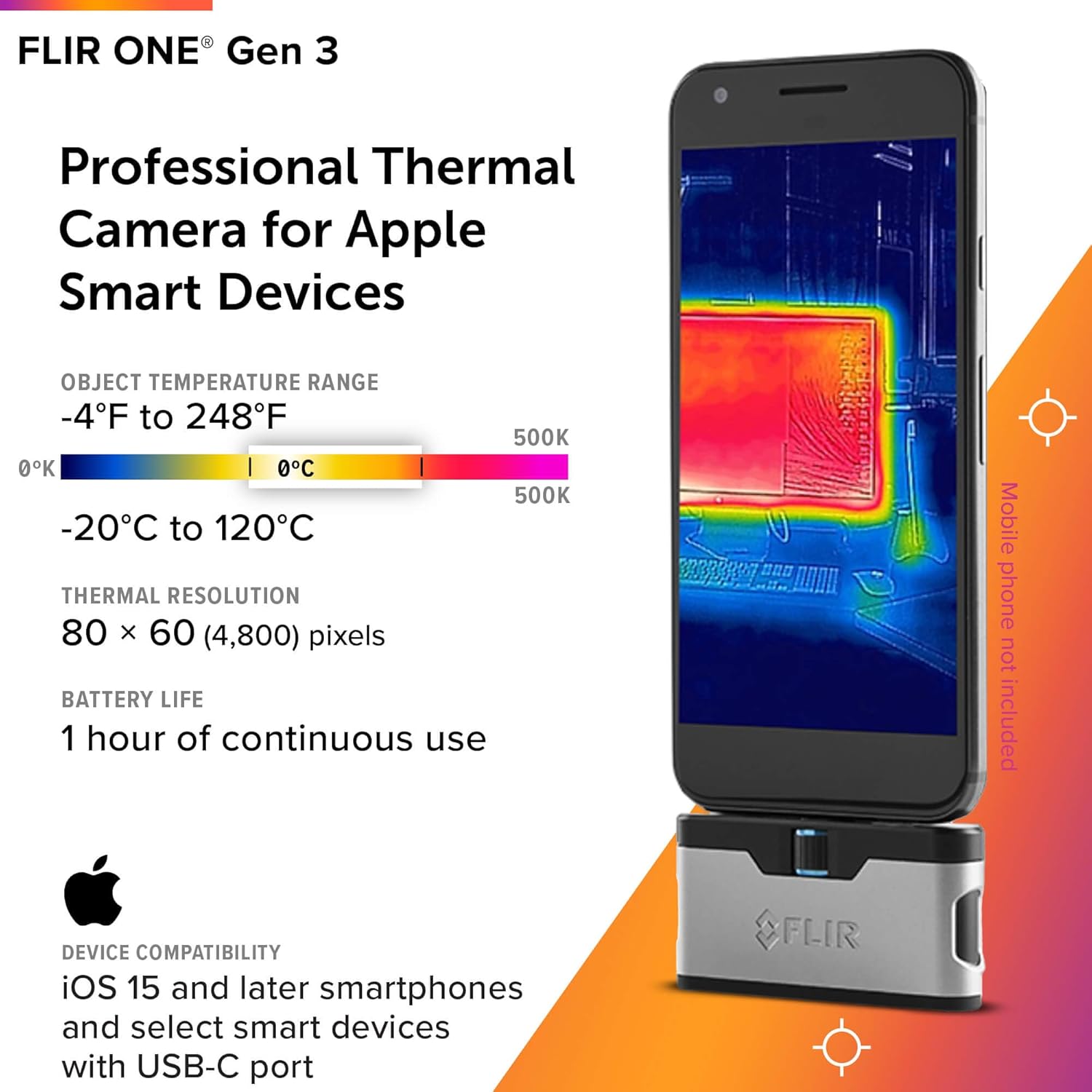
Figure 2: The FLIR ONE Gen 3 connected to an iOS smartphone, illustrating its compact form factor and key specifications like temperature range and thermal resolution.

Figura 3: primo piano view of the FLIR ONE Gen 3, highlighting the adjustable USB-C connector and its rugged design, capable of withstanding a 1.5-meter drop.
3. Funzionamento
3.1 Capturing Thermal Images
Once connected and the app is open, the FLIR ONE Gen 3 will display a live thermal feed on your smartphone screen. You can switch between thermal, visible, and MSX modes within the app. To capture an image, simply tap the capture button on the screen.
3.2 MSX Technology
FLIR's Multi-Spectral Dynamic Imaging (MSX) technology enhances thermal images by embossing visual details from the integrated visible light camera onto the thermal image. This provides greater clarity and makes it easier to identify objects and features in the thermal scene.

Figure 4: Comparison of thermal images with and without MSX technology, demonstrating how MSX enhances lines and edge details for improved clarity.
3.3 FLIR ONE App Features
The FLIR ONE app provides a comprehensive interface for controlling the camera and managing your thermal data. Key features include:
- Misura della temperatura: Display temperature readings for specific points or areas.
- Acquisizione di immagini e video: Save thermal images and videos directly to your phone's gallery.
- Thermal Inspection Guides: Access step-by-step guides within the app to help identify common issues like air leaks or moisture buildup.
- FLIR Ignite Cloud Integration: Seamlessly upload, edit, organize, and share images and videos via FLIR Ignite cloud storage.
- Impostazioni: Adjust emissivity, temperature units, color palettes, and other camera settings.

Figure 5: Screenshot of the FLIR ONE App interface, showing options for settings, image capture, and access to help articles.

Figura 6: Esamples of the FLIR Thermal Inspection Guides available within the app, assisting users in identifying and documenting common thermal faults.

Figure 7: Illustration of FLIR Ignite cloud storage and reporting software, showing how images can be accessed and managed across mobile and desktop devices.
4. Manutenzione
To ensure the longevity and optimal performance of your FLIR ONE Gen 3, follow these maintenance guidelines:
- Pulizia: Gently wipe the lens and device body with a soft, lint-free cloth. Do not use abrasive cleaners or solvents.
- Magazzinaggio: Conservare il dispositivo in un luogo fresco e asciutto quando non in uso. Evitare temperature estreme.
- Cura della batteria: In caso di conservazione a lungo termine, assicurarsi che la batteria sia carica a circa il 50%. Ricaricarla periodicamente se conservata per periodi prolungati.
- Protezione fisica: While the device is jobsite tough and rated for drops up to 1.5 meters, avoid unnecessary impacts or rough handling.
5. Risoluzione Dei Problemi
If you encounter issues with your FLIR ONE Gen 3, consider the following common troubleshooting steps:
- Dispositivo non rilevato:
- Ensure the FLIR ONE Gen 3 is securely plugged into the USB-C port.
- Verify your smartphone is compatible (iPhone 15 and newer with USB-C).
- Restart the FLIR ONE app and/or your smartphone.
- Check if the device battery is charged.
- Problemi di qualità dell'immagine:
- Clean the thermal and visual camera lenses with a soft cloth.
- Ensure proper focus if applicable (though FLIR ONE Gen 3 is fixed focus).
- Adjust emissivity settings in the app for more accurate temperature readings on different surfaces.
- Arresto anomalo/blocco dell'app:
- Chiudere e riaprire l'app.
- Assicurati che la tua app sia aggiornata all'ultima versione.
- Free up storage space on your smartphone if it's low.
For persistent issues, refer to the FLIR support websito o contattare il servizio clienti.
6. Specifiche
| Caratteristica | Dettaglio |
|---|---|
| Numero di modello | Numero di telefono: 435-0010-03 |
| Compatibilità | iOS Smartphones (iPhone 15 and Newer w/USB-C) |
| Risoluzione termica | 80 x 60 pixel |
| Risoluzione visiva | 1440 x 1080 pixel |
| Precisione della temperatura | ±3°C or ±5% (within 15°C – 35°C, scene 5°C – 120°C) |
| Intervallo di temperatura dell'oggetto | -20°C a 120°C (-4°F a 248°F) |
| Valutazione di caduta | 1.5 metri (4.9 piedi) |
| Dimensioni del prodotto | 2.6 x 1.3 x 0.6 pollici (67 x 34 x 14 mm) |
| Peso dell'articolo | 1.28 once |
| Durata della batteria | Up to 1 hour continuous use (internal rechargeable battery) |
| Modalità di scatto | Thermal, Visible, MSX |
7. Garanzia e supporto
For information regarding product warranty, technical support, or service, please visit the official FLIR website or contact FLIR customer support directly. Details on protection plans may also be available through your point of purchase.
Risorse online:


