1. Introduzione
Thank you for choosing the OMAIC Rechargeable Voice Remote Control. This manual provides detailed instructions for the setup, operation, and maintenance of your new remote controls (models BN59-01432A and BN59-01312A). These remotes are designed to be compatible with a wide range of Samsung Smart TVs, offering convenient control and voice functionality.

Image: The OMAIC BN59-01432A and BN59-01312A remote controls.
2. Contenuto della confezione
Il tuo pacco dovrebbe contenere i seguenti articoli:
- 1 x OMAIC BN59-01432A Rechargeable Voice Remote Control
- 1 x OMAIC BN59-01312A Voice Remote Control
- 1 x Manuale utente (questo documento)
3. Specifiche
| Caratteristica | Descrizione |
|---|---|
| Marca | OMAICO |
| Numeri di modello | BN59-01432A, BN59-01312A |
| Caratteristica speciale | Ricerca vocale |
| Colore | Nero |
| Dispositivi supportati massimi | 2 (per telecomando) |
| Dispositivi compatibili | Samsung Televisions, Samsung Smart TVs |
| Connettività | Senza fili |
| Rechargeable (BN59-01432A) | Porta USB di tipo C |
| Distanza operativa | Fino a 45 piedi (circa 13.7 metri) |
| Tempo di risposta | 0.1 secondi |

Image: Key features and specifications of the OMAIC remote controls.
4. Configurazione e associazione
Before first use, please ensure the BN59-01432A rechargeable remote is fully charged. Charging typically takes 1-2 hours via its USB Type-C port.
4.1. Associazione del telecomando
Both BN59-01432A and BN59-01312A remotes use the same pairing method:
- Assicurati che la tua Smart TV Samsung sia accesa.
- Punta il telecomando verso il televisore.
- Premere e tenere premuto il tasto Indietro (
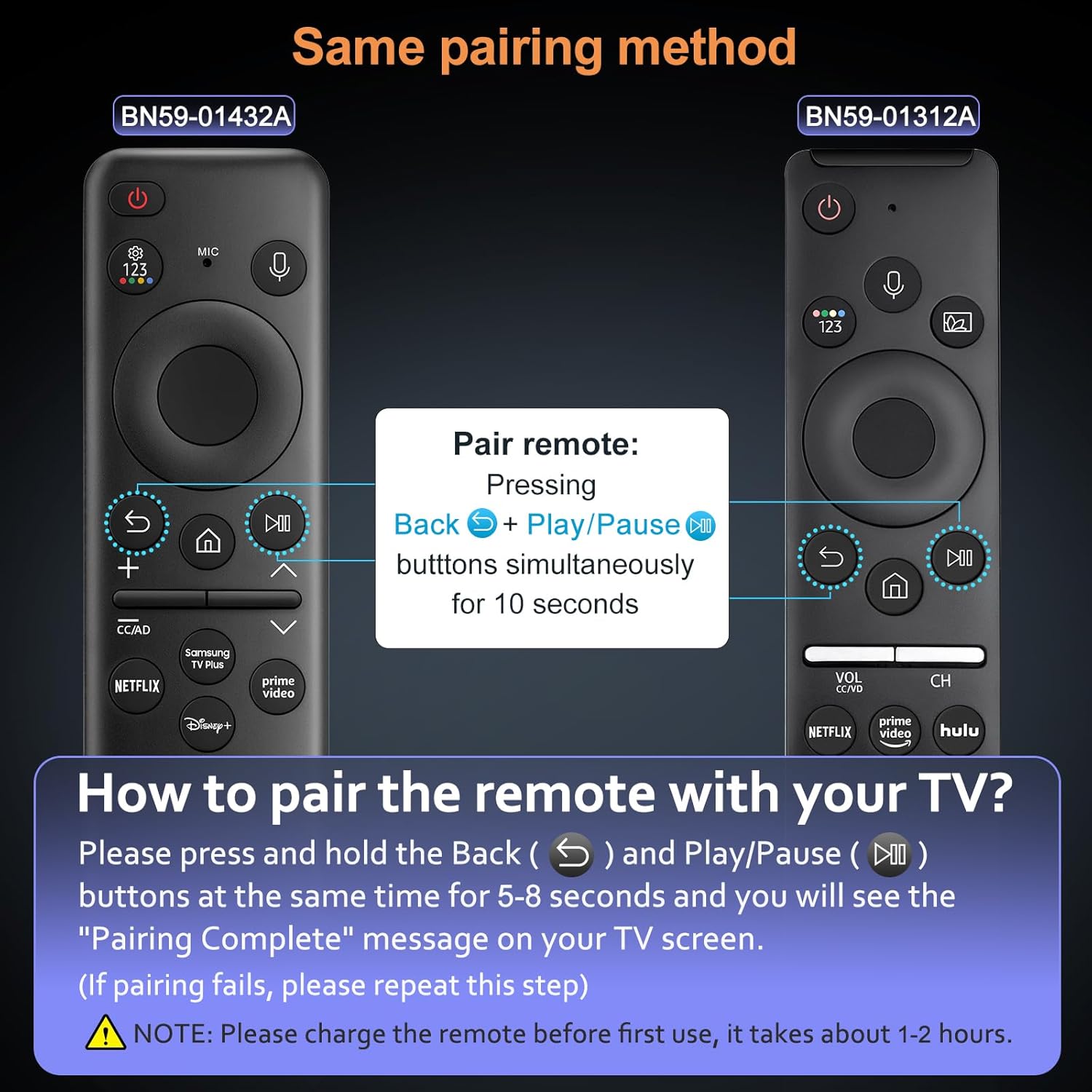 ) E Riproduci/Pausa () buttons simultaneously for 5-8 seconds.
 - A "Pairing Complete" message should appear on your TV screen, indicating successful pairing.
Nota:
- If pairing fails, please repeat the steps.
- The voice function requires your TV to support this feature. Please check your TV settings if the voice function does not work after pairing.
Image: Visual guide for pairing the OMAIC remote control with a Samsung TV.
5. Istruzioni per l'uso
5.1. Funzione vocale
The voice function allows you to control your TV using voice commands. To use this feature:
- Premere e tenere premuto il tasto Microfono pulsante (
 ) sul telecomando.
 - Speak your command clearly into the remote. For example, "Turn the volume up to 20" or "Open Netflix."
- Release the Microphone button when you are finished speaking.
Assicurati che l'assistente vocale della tua TV sia abilitato e configurato per prestazioni ottimali.
Image: User demonstrating the voice control feature of the remote.
5.2. Pulsanti di scelta rapida
Both remote models feature dedicated shortcut buttons for quick access to popular streaming services:
- Netflix: Apre direttamente l'applicazione Netflix.
- Video Prime: Directly opens the Amazon Prime Video application.
- Hulu: Directly opens the Hulu application.
- Samsung TV Plus / Disney+: Depending on the remote model, one of these buttons will directly open the respective application.

Image: Shortcut buttons for popular streaming services on the OMAIC remote controls.
6. Charging (BN59-01432A Only)
The BN59-01432A remote control is rechargeable via a USB Type-C port, eliminating the need for frequent battery replacements.
6.1. Procedura di ricarica
- Locate the USB Type-C port on the bottom edge of the BN59-01432A remote control.
- Connect a standard USB Type-C charging cable (not included) to the remote's port.
- Collegare l'altra estremità del cavo a una fonte di alimentazione USB (ad esempio, un adattatore da parete, una porta USB del computer).
- The remote's indicator light (if present) may show charging status.
- Una ricarica completa richiede in genere 1-2 ore.
It is recommended to fully charge the remote before its first use to ensure optimal battery life.

Image: The USB Type-C charging port on the BN59-01432A remote control.
7. Compatibilità
These OMAIC remote controls are compatible with a wide range of Samsung Smart TVs. The voice function specifically requires your TV to support voice commands.
7.1. Compatible Samsung TV Models (Partial List)
- QE1C, QN990C, LST9C, S90C, Q80C, Q80CD, CU8000D, Q70CD, QN85CD, QN90CD, Q60C, QN800C, QN900C, CU8000, QN850C, Q70C, QN85C, QN90C, S95C
- Q80D, Q70D, Q60D, DU8000, QN90D, QN85D, S90D, S95D, QN800D, QN900D, LS03D, LS03B, LS03C
- M70C, S9, M80C, M50C, LSP3B, G85SB, G7, G70B, G65B, M70B, M8
- And other Samsung Smart TV models that support BN59-01330A, BN59-01312B, BN59-01312D, BN59-01312E, BN59-01312F, BN59-01330B, BN59-01330C, BN59-01330N, BN59-01330Q, BN59-01329A, BN59-01329C, BN59-01329F, BN59-01455A, BP59-00149A, BN59-01456A, BN59-01385A, BN59-01391A, BN59-01330H, BN59-01363A, BN59-01357A remotes.
Please verify your TV's model number and voice function support for full compatibility.

Image: OMAIC remotes compatible with various Samsung Smart TV models.
8. Risoluzione Dei Problemi
| Problema | Possibile causa | Soluzione |
|---|---|---|
| Il telecomando non si associa | Incorrect pairing procedure, low battery (BN59-01432A) | Ensure BN59-01432A is charged. Repeat pairing steps (hold Back and Play/Pause for 5-8 seconds). Ensure TV is on. |
| La funzione vocale non funziona | TV does not support voice function, remote not paired correctly, microphone blocked | Verify your TV model supports voice control. Re-pair the remote. Ensure nothing is obstructing the microphone on the remote. |
| Il telecomando non risponde | Low battery (BN59-01432A), remote out of range, interference | Charge BN59-01432A. Move closer to the TV (within 45 feet). Remove any obstructions between the remote and TV. |
| Shortcut buttons not working | App not installed on TV, TV not connected to internet | Ensure the respective app (Netflix, Prime Video, Hulu, etc.) is installed and updated on your Samsung TV. Verify your TV has an active internet connection. |
9. Manutenzione
- Pulizia: Per pulire il telecomando, utilizzare un panno morbido e asciutto. Non utilizzare detergenti liquidi o materiali abrasivi.
- Magazzinaggio: Conservare il telecomando in un luogo fresco e asciutto, lontano dalla luce solare diretta e da temperature estreme.
- Battery Care (BN59-01432A): For optimal battery life, avoid fully discharging the remote frequently. Charge it when the battery indicator is low.
- Evitare gocce: Proteggere il telecomando da cadute e urti, che potrebbero danneggiare i componenti interni.
10. Garanzia e supporto
L'OMAIC fornisce un Servizio post-vendita di 90 giorni for this product. If you encounter any issues or have questions regarding your remote controls, please contact our customer support team.
We are committed to responding within 12 hours and will endeavor to resolve any problems as quickly as possible.
For support, please refer to the contact information provided with your purchase or visit the OMAIC brand store on Amazon.


