1. Introduzione
This manual provides comprehensive instructions for the installation, operation, maintenance, and troubleshooting of your Xigmatek Bano EN44250 computer case. Please read this manual thoroughly before beginning assembly to ensure proper setup and optimal performance.
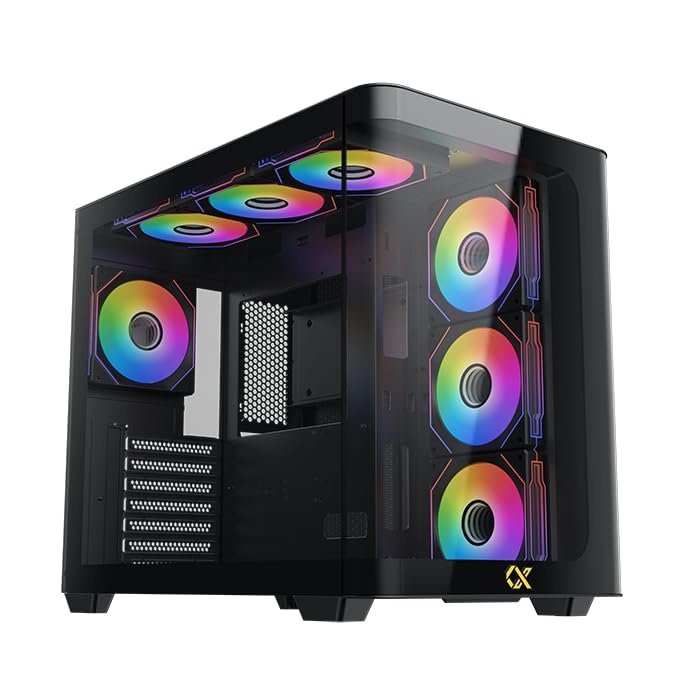
Figure 1: Xigmatek Bano EN44250 Computer Case (Exterior View)
2 Caratteristiche
- Materiale: Constructed from high-quality steel alloy for durability and long-term use.
- Supporto per schede madri: Compatible with E-ATX, ATX, Micro ATX, and Mini ITX motherboards.
- Sistema di raffreddamento: Supports both air and liquid cooling solutions, with multiple fan and radiator mounting options.
- Baie di guida: Features five internal drive bays compatible with both 2.5-inch and 3.5-inch hard drives/SSDs.
- Pannello I/O: Equipped with one USB 3.0 port, two USB 2.0 ports, and HD audio jacks for seamless connectivity.
- Progetto: Stylish black finish with a curved tempered glass panel for showcasing internal components and superior airflow.
- Slot di espansione: Includes 7 expansion slots.
- PSU Mounting: Supports rear-mounted power supplies.

Figure 2: Internal Layout of the Case
3. Istruzioni per l'installazione
3.1 Preparazione del caso
- Disimballare la valigia e rimuovere tutto il materiale di imballaggio.
- Carefully remove the tempered glass side panel by unscrewing the thumb screws. Place it on a soft, flat surface to prevent scratches.
- Identify the accessory box inside the case, which contains screws, standoffs, and cable ties.
3.2 Installazione della scheda madre
- Install the I/O shield (if not pre-installed) into the rear opening of the case.
- Align your motherboard with the pre-installed standoffs. If your motherboard form factor (E-ATX, ATX, Micro ATX, Mini ITX) requires additional standoffs, install them in the appropriate holes.
- Carefully place the motherboard onto the standoffs and secure it with the provided screws.
3.3 Installazione dell'unità di alimentazione (PSU).
- Mount the PSU into the designated rear compartment of the case.
- Fissare l'alimentatore con le viti dalla parte posteriore del case.
- Route the necessary power cables through the cable management cutouts to the motherboard and other components.
3.4 Storage Drive Installation (2.5"/3.5" HDDs/SSDs)
- Locate the internal drive bays. The case supports five drive bays compatible with 2.5-inch and 3.5-inch drives.
- For 3.5-inch drives, slide the drive into the tool-less tray (if applicable) or secure it with screws.
- For 2.5-inch drives, secure them to the designated mounting points or adapters.
- Connect SATA data and power cables to each installed drive.
3.5 Installazione del sistema di raffreddamento (ventole/radiatori)
The Xigmatek Bano EN44250 supports various fan and radiator configurations for optimal airflow. Refer to the diagrams below for compatible sizes and locations.

Figure 3: Fan and Radiator Mounting Options (Side View)

Figure 4: Fan and Radiator Mounting Options (Top View)
- Install case fans or liquid cooling radiators into the desired mounting positions using the appropriate screws.
- Connect fan power cables to the motherboard fan headers or a fan controller.
3.6 Collegamenti del pannello I/O frontale
Connect the front I/O panel cables to the corresponding headers on your motherboard. These include:
- Intestazione USB 3.0
- Intestazioni USB 2.0
- HD Audio header
- Power switch, reset switch, HDD LED, and power LED headers

Figure 5: Front I/O Panel
4. Linee guida operative
Once all components are installed and connected, replace the side panel. Ensure all cables are neatly managed to avoid obstructing airflow. Power on your system using the front panel power button. Monitor temperatures and fan speeds to ensure optimal cooling performance.
5. Manutenzione
Regular maintenance helps prolong the life of your computer components and ensures efficient cooling.
- Pulizia della polvere: Pulire periodicamente i filtri antipolvere (se presenti) e i componenti interni utilizzando aria compressa. Assicurarsi che il sistema sia spento e scollegato prima di procedere alla pulizia.
- Gestione dei cavi: Review cable routing periodically to ensure no cables are obstructing fan blades or airflow paths.
- Pulizia esterna: Pulire le superfici esterne con un panno morbido, damp panno. Evitare detergenti abrasivi o solventi.
6. Risoluzione Dei Problemi
Se riscontri problemi durante o dopo il montaggio, prendi in considerazione i seguenti passaggi comuni per la risoluzione dei problemi:
- Il sistema non si accende:
- Controllare tutti i collegamenti di alimentazione, tra cui l'alimentatore alla presa a muro, l'alimentatore alla scheda madre (24 pin e CPU 8 pin) e il connettore dell'interruttore di alimentazione sul pannello frontale.
- Assicurarsi che l'interruttore dell'alimentatore sia in posizione "ON".
- Nessuna uscita di visualizzazione:
- Verify that your monitor is connected to the graphics card (not the motherboard I/O if using a dedicated GPU).
- Reinstallare la scheda grafica e i moduli RAM.
- Problemi di surriscaldamento:
- Ensure all case fans are spinning and correctly oriented for optimal airflow (intake/exhaust).
- Check CPU cooler installation and thermal paste application.
- Pulisci eventuali accumuli di polvere da ventole e radiatori.
- Pannello frontale USB/Audio non funzionante:
- Verificare che i connettori USB e audio del pannello frontale siano collegati correttamente alla scheda madre.
7. Specifiche
| Caratteristica | Dettaglio |
|---|---|
| Produttore | Società anonima XIGMATEK Co., Ltd. |
| Numero di modello | EN44250 |
| Dimensioni del prodotto (L x P x A) | Dimensioni: 45 x 53.3 x 25.8 cm |
| Peso | 9.44 kg |
| Compatibilità della scheda madre | E-ATX, ATX, Micro ATX, Mini ITX |
| Tipo di caso | Torre |
| Colore | Nero |
| Materiale | Lega di acciaio |
| Montaggio dell'alimentatore | Montaggio posteriore |
| Metodo di raffreddamento | Aria, Acqua |
| Spazio del dispositivo di raffreddamento della CPU | Fino a 16 cm |
| Supporto lunghezza scheda VGA | Fino a 41 cm |
| Supporto lunghezza PSU | Fino a 22 cm |
| Slot di espansione | 7 |
| Alloggiamenti per unità interne | 5 (compatible with 2.5" and 3.5" drives) |
| Porte I / O anteriori | 1x USB 3.0, 2x USB 2.0, audio HD |
8. Garanzia e supporto
For warranty information and technical support, please refer to the official Xigmatek webo contattare il rivenditore locale. Conservare la prova d'acquisto per eventuali reclami in garanzia.
Risorse online: www.xigmatek.com


