Introduzione
The Kipcush K8 White Noise Machine is designed to create a calming environment for improved sleep and relaxation. It features a variety of soothing sounds, a soft night light, and customizable settings to suit individual preferences. This manual provides detailed instructions for the safe and effective use of your device.
Informazioni sulla sicurezza
- Do not use near water to prevent electric shock.
- Evitare livelli di volume elevati per proteggere l'udito.
- Non destinato all'uso da parte di bambini senza la supervisione di un adulto.
- Use only with a compatible 5V power adapter and the provided USB-A to coaxial connector cable.
Contenuto della confezione
Si prega di controllare la confezione per verificare la presenza dei seguenti elementi:
- Kipcush K8 White Noise Machine
- USB-A to Coaxial Connector Cable
- Manuale d'uso
Nota: A power adapter is not included and must be supplied by the user (5V recommended).
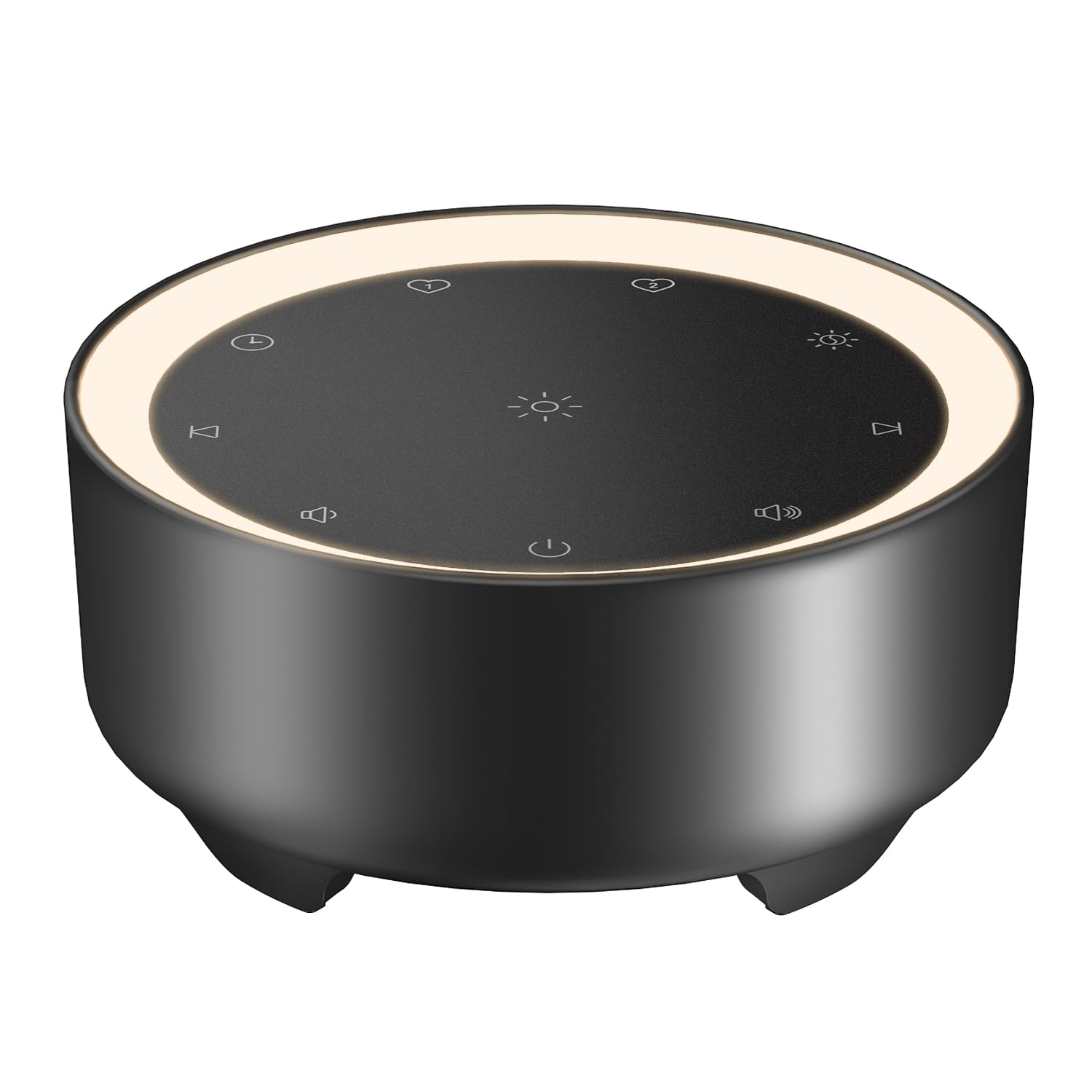
Image: Kipcush K8 White Noise Machine with its USB cable, illustrating the compact design and power connection.
Caratteristiche del prodotto
- 20 suoni rilassanti: Includes white noise, fan sounds, nature recordings, and lullabies.
- 2 Customizable Shortcuts: Save your favorite sounds for instant playback.
- Luce notturna soffusa: Three adjustable brightness levels for a calm environment.
- Opzioni timer multiple: 15, 30, 60, 90, 120 minutes, or continuous 8-hour playback.
- Funzione di memoria: Automatically saves last sound, volume, and light settings.
- Alimentato tramite USB: Flexible use with power banks, laptops, wall chargers, or car USB ports.
- Compatto e portatile: Small size for easy travel and placement.

Image: A visual representation of the 20 distinct sound options, including various white noises, fan sounds, nature sounds like rain and ocean, and lullabies.

Image: The device highlighting its timer functions, offering various durations from 15 minutes to 8 hours for automatic shut-off.
Impostare
- Collegamento elettrico: Connect the provided USB-A to coaxial connector cable to the device. Plug the USB-A end into a compatible 5V power adapter (not included), power bank, laptop, or car USB port.
- Posizionamento: Place the device on a stable, flat surface away from water or excessive heat.
Video: An official Kipcush video demonstrating the white noise sound machine in various usage scenarios, including setup and operation.
Istruzioni per l'uso

Immagine: dettagliata view of the touch-sensitive control panel with labels for each function.
- Accensione/spegnimento: Tocca il Pulsante di accensione (cerchio con linea verticale) per accendere o spegnere il dispositivo.
- Selezione del suono: Tocca il Traccia successiva (right arrow) or Traccia precedente (left arrow) buttons to cycle through the 20 available sounds.
- Regolazione del volume: Tocca il Volume + (speaker with plus) or Volume - (speaker with minus) buttons to adjust the sound level.
- Controllo della luce notturna: Tocca il Luce notturna (sun icon) button to turn the light on/off and cycle through three brightness levels.
- Impostazione del timer: Tocca il Timer (clock icon) button to select a desired duration (15, 30, 60, 90, 120 minutes, or 8 hours continuous play). The device will automatically turn off after the selected time.
- Customizable Shortcuts (Favorite Sounds):
- To save a favorite sound: While a sound is playing, long-press either Preferito 1 (heart icon 1) or Preferito 2 (heart icon 2) button until you hear a confirmation tone.
- To play a favorite sound: Tap the corresponding Preferito 1 or Preferito 2 button for instant playback.
- Funzione di memoria: The device automatically remembers your last sound, volume, and light settings when powered off and will resume these settings upon restart.

Image: The device showcasing the unique Favorite Button feature for quick sound recall.
Manutenzione
- Pulizia: Pulire il dispositivo con un panno morbido e asciutto. Non utilizzare detergenti liquidi o materiali abrasivi.
- Magazzinaggio: Conservare il dispositivo in un luogo fresco e asciutto quando non viene utilizzato.
- Cura del cavo: Avoid bending or twisting the power cable excessively to prevent damage.
Risoluzione dei problemi
| Problema | Possibile causa | Soluzione |
|---|---|---|
| Il dispositivo non si accende. | Nessuna alimentazione o connessione allentata. | Ensure the USB cable is securely connected to both the device and a working 5V power source. Try a different power adapter or USB port. |
| Nessun suono. | Volume troppo basso o disattivato. | Increase the volume using the Volume + button. Ensure a sound is selected. |
| La luce notturna non funziona. | Light is off or at lowest setting. | Tap the Night Light button to cycle through brightness levels or turn it on. |
| Il dispositivo si spegne inaspettatamente. | Timer attivato. | Check the timer setting. If continuous play is desired, ensure the 8-hour option is selected or no timer is set. |
Specifiche
- Nome modello: K8
- Marca: Kipcus
- Fonte di energia: Corded Electric (USB-powered, 5V)
- Materiale: Plastica
- Colore: Nero (come da variante del prodotto)
- Dimensioni della confezione: 4.37 x 4.29 x 2.99 pollici
- Peso dell'articolo: 9.14 once
- Opzioni audio: 20 (Rumore bianco, Ventilatore, Natura, Ninne nanne)
- Opzioni timer: 15, 30, 60, 90, 120 minutes, 8 hours continuous
- Luce notturna: 3 livelli di luminosità regolabili
Garanzia e supporto
The Kipcush K8 White Noise Machine comes with a Garanzia di 24 mesi from the date of purchase. This warranty covers manufacturing defects and ensures long-term reliability.
For professional customer support, please contact Kipcush directly through their official channels. Refer to the product packaging or the Kipcush websito per le informazioni di contatto.


