1. Prodotto finitoview
The Lafocuse 10-inch Digital Wall and Desk Clock (Model ZH0152A) is a versatile device designed to display time, date, day of the week, temperature, and humidity. It features a large LCD screen for clear readability and can be used as both a wall-mounted or desktop clock. This clock is battery-operated, ensuring portability and freedom from power outlets.

Figura 1: Davanti view of the Lafocuse 10-inch Digital Clock, displaying time, date, day, temperature, and humidity.
Caratteristiche principali:
- 10-inch LCD screen with large digits.
- Displays time (seconds included), date, day of the week, temperature, and humidity.
- Dual functionality: suitable for wall mounting or desktop placement.
- Battery-operated (3 x AAA batteries, not included) for cordless use.
- Day of the week display in 7 languages (English, Danish, Spanish, Dutch, French, Italian, German).
- Alarm function with a 5-minute snooze feature.
- 12/24-hour time format selection.

Figura 2: Visual representation of the clock's dimensions and primary functions.
2. Contenuto della confezione
Please ensure all items are present upon opening the package:
- Lafocuse 10-inch Digital Wall and Desk Clock (Model ZH0152A)
- Manuale di istruzioni (questo documento)
Nota: Per il funzionamento sono necessarie 3 batterie AAA, non incluse nella confezione.
3. Identificazione dei componenti
Familiarize yourself with the clock's components and control buttons.
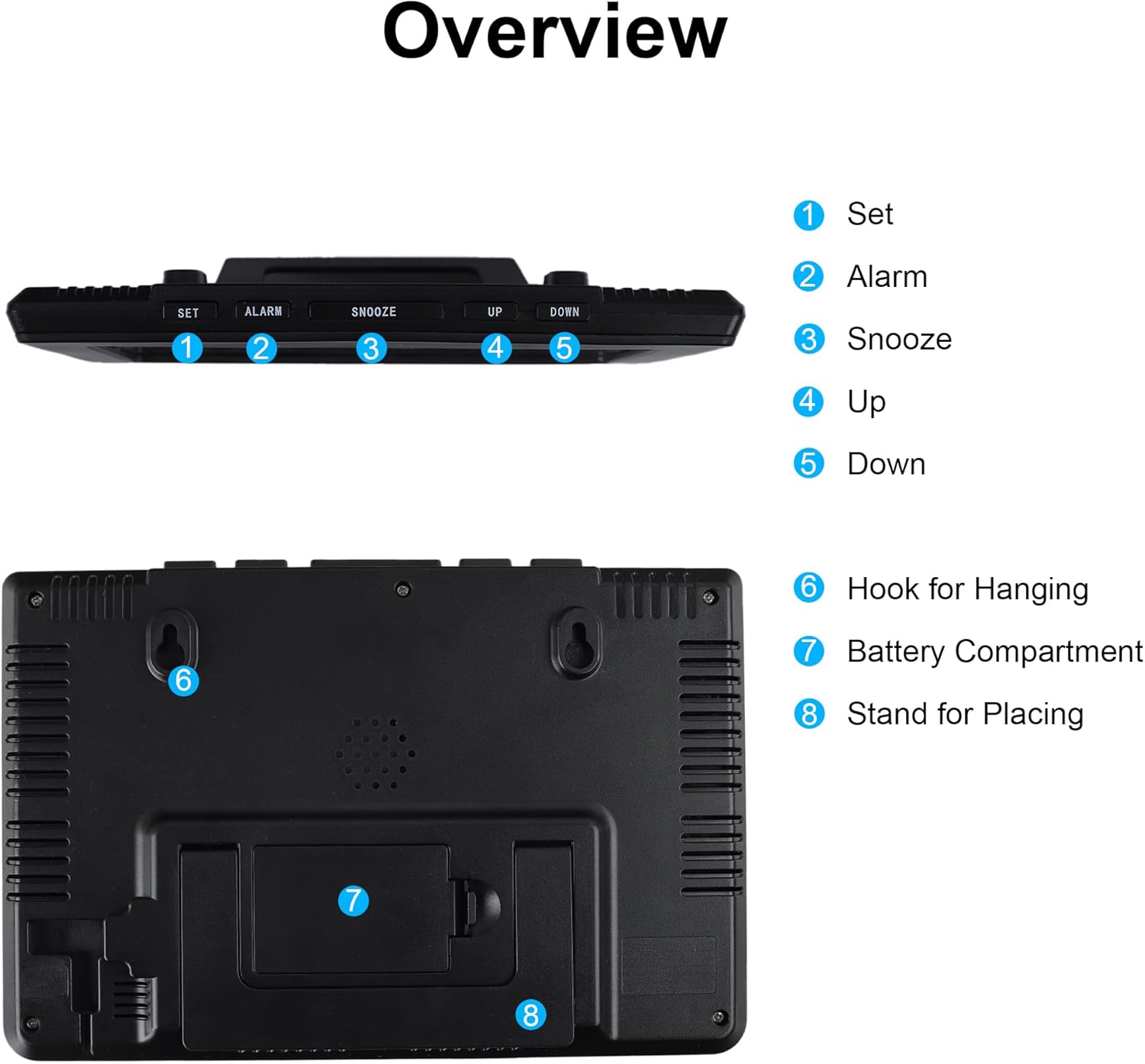
Figura 3: Superiore e posteriore view of the clock, showing control buttons, hanging hooks, battery compartment, and stand.
- Pulsante IMPOSTA: Utilizzato per immettere e confermare le impostazioni.
- Pulsante ALLARME: Used to set and activate/deactivate the alarm.
- Pulsante SNOOZE: Activates the snooze function during an alarm.
- Pulsante SU: Utilizzato per aumentare i valori durante le impostazioni.
- Pulsante GI: Utilizzato per diminuire i valori durante le impostazioni.
- Hooks for Hanging: Two durable hooks for wall mounting.
- Vano batteria: Contiene 3 batterie AAA.
- Stand for Placing: Supporto integrato per l'uso sulla scrivania.
4. Configurazione e installazione
4.1 Installazione della batteria
The clock requires 3 AAA batteries (not included) for operation.
- Locate the battery compartment (7) on the back of the clock.
- Aprire il coperchio del vano batterie.
- Inserire 3 batterie AAA nuove, assicurandosi della corretta polarità (+ e -).
- Chiudere saldamente il coperchio del vano batterie.

Figura 4: Posteriore view showing the battery compartment for 3 AAA batteries.
4.2 Opzioni di posizionamento
L'orologio offre opzioni di posizionamento flessibili:
- Posizionamento sul desktop: Use the integrated stand (8) to place the clock on any flat surface, such as a desk, table, or shelf.
- Montaggio a parete: Utilize the two hooks (6) on the back of the clock to hang it securely on a wall. Ensure appropriate wall anchors or screws are used for stability.

Figura 5: Examples of the clock being wall-mounted and placed on a desk.
5. Istruzioni per l'uso
5.1 Impostazione di ora, data e giorno
To adjust the time, date, and day settings:
- Premere e tenere premuto il tasto IMPOSTATO button (1) for approximately 2 seconds to enter setting mode. The first adjustable item will begin to flash.
- Utilizzare il UP (4) o GIÙ (5) buttons to adjust the value.
- Premere il tasto IMPOSTATO button (1) briefly to confirm the current setting and move to the next adjustable item.
- Repeat steps 2 and 3 for all settings (e.g., 12/24H format, hour, minute, year, month, day, day language).
- Una volta completate tutte le impostazioni, premere IMPOSTATO again or wait a few seconds for the clock to exit setting mode automatically.
5.2 Formato 12/24 ore
During the time setting process, you will have the option to select either a 12-hour or 24-hour time display format. Use the UP or GIÙ buttons to toggle between these options.
5.3 Setting the Alarm and Snooze Function
Per impostare la sveglia:
- Premere e tenere premuto il tasto ALLARME button (2) for approximately 2 seconds to enter alarm setting mode. The alarm hour will begin to flash.
- Utilizzare il UP (4) o GIÙ (5) pulsanti per regolare l'ora della sveglia.
- Premere il tasto ALLARME button (2) briefly to confirm the hour and move to the alarm minute setting.
- Utilizzare il UP (4) o GIÙ (5) buttons to adjust the alarm minute.
- Premere il tasto ALLARME button (2) briefly to confirm and exit alarm setting mode.
Per attivare/disattivare l'allarme, premere brevemente il tasto ALLARME button (2) outside of setting mode. An alarm icon will appear/disappear on the display.
When the alarm sounds, you can activate the POSTICIPARE funzione:
- Premi il grande POSTICIPARE button (3) on the top of the clock. The alarm will pause for 5 minutes and then sound again.
- To stop the alarm completely, press any other button on the top of the clock (SET, ALARM, UP, DOWN).

Figura 6: Demonstrating the use of the large snooze button.
5.4 Day of the Week Language Setting
During the initial setup or when adjusting the date, you can select the display language for the day of the week. The available languages are English, Danish, Spanish, Dutch, French, Italian, and German. Use the UP or GIÙ buttons to cycle through the options.

Figura 7: The clock's display showing various information and examples of day abbreviations in different languages.
5.5 Visualizzazione della temperatura e dell'umidità
The clock continuously displays the current temperature and humidity. No specific action is required to view these readings. The temperature can be displayed in Celsius or Fahrenheit, which can be selected during the initial setup process.
6. Manutenzione
6.1 Pulizia
To clean the clock, gently wipe the surface with a soft, dry cloth. Avoid using abrasive cleaners, solvents, or chemical sprays, as these can damage the display or casing.
6.2 Sostituzione della batteria
When the display becomes dim or the clock functions irregularly, it is time to replace the batteries. Follow the steps in Section 4.1 for battery installation. Always replace all three AAA batteries at the same time with new ones to ensure optimal performance.
7. Risoluzione Dei Problemi
| Problema | Possibile causa | Soluzione |
|---|---|---|
| Il display è vuoto o poco luminoso. | Le batterie sono scariche o installate in modo errato. | Sostituire con nuove batterie AAA, assicurandosi della corretta polarità. |
| L'ora/data non è corretta. | Settings were not saved or incorrectly set. | Per reimpostare l'ora e la data, fare riferimento alla Sezione 5.1. |
| L'allarme non suona. | La sveglia non è attivata oppure l'orario della sveglia non è corretto. | Ensure the alarm icon is visible on the display. Refer to Section 5.3 to set and activate the alarm. |
| La lettura dell'umidità sembra imprecisa. | Fattori ambientali o calibrazione del sensore. | Allow the clock to stabilize in its environment for at least 30 minutes. While the temperature sensor is generally accurate, minor variations in humidity readings compared to other devices may occur due to sensor type and placement. This is generally within expected tolerances for a consumer device. |
8. Specifiche
| Caratteristica | Dettaglio |
|---|---|
| Marca | lafocuse |
| Numero di modello | ZH0152A |
| Tipo di visualizzazione | LCD digitale |
| Colore | Nero |
| Materiale | Plastica |
| Dimensioni del prodotto (L x P x A) | 20.8 x 3.81 x 14 cm (8.3 x 1.5 x 5.5 pollici) |
| Peso dell'articolo | 310 grammi |
| Fonte di alimentazione | 3 x batterie AAA (non incluse) |
| Caratteristiche speciali | Large LCD, Wall/Desk Clock, Multifunction Display (Time, Date, Day, Temp, Humidity, Alarm, Snooze) |
9. Garanzia e supporto
Specific warranty details are not provided in the product information. For any product inquiries, technical support, or warranty claims, please contact the seller or refer to the official Lafocuse brand store for assistance.
You can visit the Lafocuse brand store at: Lafocuse Store
