1. Introduzione
This manual provides detailed instructions for the installation, operation, and maintenance of your SINOTIMER DC/AC 24V Digital Programmable Timer Switch, Model 24VDC. This device is designed for precise, programmable control of electrical circuits, offering up to 28 ON/OFF events per day across a 7-day cycle. Please read this manual thoroughly before use to ensure proper function and safety.

Image 1.1: The SINOTIMER 7 Day Digital Programmable Timer Switch.
2. Informazioni sulla sicurezza
- Rischio elettrico: Installation and wiring should only be performed by qualified personnel. Ensure power is disconnected before any installation or maintenance.
- Voltage Compatibilità: This device operates on DC/AC 24V. Connecting to an incorrect voltage supply may damage the unit and pose a safety risk.
- Capacità di carico: Do not exceed the maximum load rating of 10A at 250VAC (2000 watts). For higher loads, use an external contactor or relay.
- Ambiente: Install the timer in a dry, protected environment. While the unit has some dustproof features, direct exposure to water or extreme temperatures should be avoided.
- Batteria: The internal battery is for memory backup only. Do not attempt to charge or replace it unless specified in the maintenance section.
3. Contenuto della confezione
Verificare che tutti gli articoli siano presenti nel pacco:
- 1x SINOTIMER Digital Programmable Timer Switch (Model: 24VDC)
- 1x staffa di montaggio
- 1x copertura antipolvere
- 1x CR2032 Battery (pre-installed or separate)
- 1x Disassembly Tool (small screwdriver)
- 2x viti di montaggio
- 5x Spade Connecting Wires
- 1x Manuale utente (questo documento)
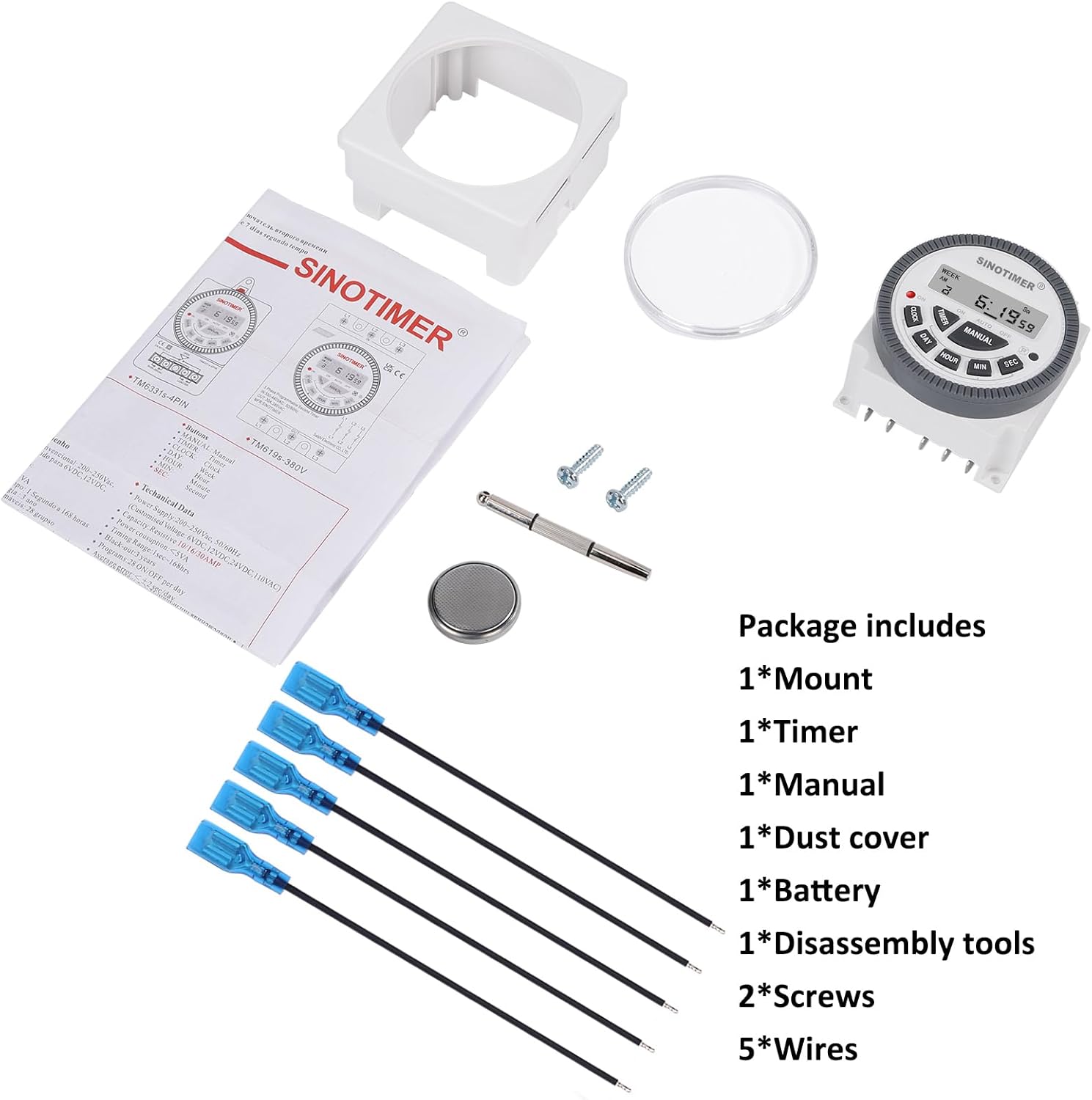
Image 3.1: Visual representation of the package contents, including the timer, mount, manual, dust cover, battery, disassembly tool, screws, and wires.
4. Prodotto finitoview & Caratteristiche
The SINOTIMER DC/AC 24V Digital Programmable Timer Switch is a versatile device designed for automating various electrical applications. Its compact design and digital display ensure ease of use and integration into control panels.
Caratteristiche principali:
- Programmabilità di 7 giorni: Allows for up to 28 ON/OFF events per day, with flexible programming blocks for daily, weekly, or custom schedules.
- Display digitale: Clear LCD for time, day, and program status.
- Internal Battery Backup: Mantiene le impostazioni del programma durante lo spegnimentotages.
- SPDT Output: Single Pole Double Throw relay output (1 Normally Open + 1 Normally Closed contact).
- Elevata capacità di carico: Rated for up to 10A at 250VAC, 2000 watts.
- Formato 12/24 ore: User-selectable time display format.
- Design antipolvere: Maggiore durata per vari ambienti.

Immagine 4.1: Passoview of the timer's key features, including its robust design and advanced functionality.
5. Specifiche
| Caratteristica | Specificazione |
|---|---|
| Modello | 24VDC (TM-619) |
| Ingresso volumetage | CC/CA 24V |
| Tipo di uscita | SPDT (1NO+1NC) |
| Max. Corrente di carico | 10A @ 250VAC, 2000W |
| Eventi programmabili | Up to 28 ON/OFF per day |
| Formato ora | Selezionabile 12 ore / 24 ore |
| Batteria di backup | Internal CR2032 (for program memory) |
| Dimensioni (P x L x A) | 1.77" x 2.83" x 2.83" (45 mm x 72 mm x 72 mm) |
| Peso | 5.3 once (circa 150 g) |
| Materiale | Metallo, Plastica |

Image 5.1: Dimensional drawing and terminal layout of the timer switch.
6. Installazione e cablaggio
AVVERTIMENTO: Disconnect all power before installation to prevent electric shock or equipment damage.
6.1 Montaggio
- Select a suitable location for mounting, ensuring it is protected from moisture and excessive heat.
- Attach the mounting bracket to a flat surface using the provided screws.
- Slide the timer switch into the mounting bracket until it clicks securely into place.
- Optionally, install the clear dust cover over the timer face for added protection.
6.2 Istruzioni per il cablaggio
The timer switch features 5 spade connecting terminals. Refer to the wiring diagram below and the labels on the back of the unit for correct connections.
- Terminal 1 e 2: Power Input (DC/AC 24V). Connect your 24V power supply here.
- Terminale 3: Common (COM) for the relay output.
- Terminale 4: Normally Open (NO) contact for the relay output. The circuit connected here will be ON when the timer is active.
- Terminale 5: Normally Closed (NC) contact for the relay output. The circuit connected here will be OFF when the timer is active.

Image 6.1: Simplified wiring diagram for the timer switch.

Immagine 6.2: Es.ample of spade connectors attached to the timer terminals.
7. Istruzioni per l'uso
After successful installation and power connection, the timer display should illuminate. If not, ensure power is supplied correctly and the internal battery is properly seated.
7.1 Configurazione iniziale (primo utilizzo)
- Reset: Press the 'R' (Reset) button with a pointed object (e.g., the provided disassembly tool) to clear all previous settings. The display will show '0:00'.
- Imposta ora corrente:
- Premere il tasto OROLOGIO pulsante.
- Premere GIORNO to select the current day of the week (Mo, Tu, We, Th, Fr, Sa, Su).
- Premere ORA per impostare l'ora corrente.
- Premere MINIMO per impostare il minuto corrente.
- Premere SEC to set the current second (optional, for precise synchronization).
- Per passare dal formato 12 ore (AM/PM) a quello 24 ore, premere OROLOGIO E GIORNO simultaneamente.
7.2 Programming ON/OFF Events
Il timer supporta fino a 28 programmi di accensione/spegnimento. Ogni programma è composto da un orario di accensione e uno di spegnimento.
- Premere il tasto TIMER button. The display will show '1 ON'. This is the first ON program.
- Premere GIORNO to select the day(s) for this program. You can choose a single day, weekdays, weekends, or various combinations. Keep pressing GIORNO per scorrere le opzioni.
- Premere ORA per impostare l'ora di accensione desiderata.
- Premere MINIMO per impostare il minuto di accensione desiderato.
- Premere TIMER again. The display will show '1 OFF'. This is the first OFF program.
- Ripetere i passaggi da 2 a 4 per impostare il/i giorno/i di spegnimento, l'ora e il minuto desiderati per questo programma.
- Continua a premere TIMER to cycle through '2 ON', '2 OFF', up to '28 ON', '28 OFF', setting each program as needed.
- Dopo aver impostato tutti i programmi desiderati, premere il tasto OROLOGIO button to return to the current time display. The programs are now saved.
7.3 Override manuale
IL MANUALE button allows you to override the programmed schedule temporarily or permanently.
- Premere MANUALE per scorrere le seguenti modalità:
- SOPRA: L'uscita è sempre attiva, ignorando i programmi.
- AUTO ACCESO: Output is currently ON, following programs.
- SPEGNIMENTO AUTOMATICO: Output is currently OFF, following programs.
- OFF: L'uscita è sempre disattivata, ignorando i programmi.
- Selezionare ACCENSIONE AUTOMATICA or SPEGNIMENTO AUTOMATICO to resume programmed operation.
8. Manutenzione
8.1 Pulizia
Pulire l'unità con un panno morbido e asciutto. Non utilizzare detergenti abrasivi o solventi.
8.2 Sostituzione della batteria
The internal CR2032 battery provides backup for program memory. If the display becomes dim or programs are lost during power outages, the battery may need replacement.
- AVVERTIMENTO: Disconnect main power to the timer before replacing the battery.
- Individuare il vano batterie sul retro dell'unità.
- Aprire con cautela il coperchio del vano.
- Rimuovere la vecchia batteria CR2032 e inserirne una nuova, assicurandosi che la polarità sia corretta (lato + rivolto verso l'alto).
- Chiudere il coperchio del vano batterie.
- After replacement, perform an initial setup (Section 7.1) to reset and set the current time.

Image 8.1: Location of the replaceable CR2032 battery.
9. Risoluzione Dei Problemi
| Problema | Possibile causa | Soluzione |
|---|---|---|
| Il display è vuoto o scuro | No power supply; Incorrect wiring; Dead internal battery. | Check 24V power input (Terminals 1 & 2). Verify wiring. Replace CR2032 battery. |
| Programs are not running | Timer is in Manual ON/OFF mode; Incorrect program settings; Incorrect current time. | Premere MANUALE until 'AUTO ON' or 'AUTO OFF' is displayed. Review program settings (Section 7.2). Set current time correctly (Section 7.1). |
| Output does not switch ON/OFF | Incorrect output wiring; Load exceeds capacity; Faulty relay. | Verify output wiring (Terminals 3, 4, 5) to your load. Ensure load does not exceed 10A/2000W. If issues persist, contact support. |
| Il tempo è impreciso | Internal clock drift; Battery low. | Reset and set time again. Consider replacing the internal battery if drift is significant. |
10. Garanzia e supporto
For warranty information and technical support, please refer to the documentation provided with your purchase or contact SINOTIMER customer service through the retailer where the product was purchased. Please have your product model (24VDC) and purchase date available when contacting support.
Risorse online: Per ulteriori informazioni, FAQ o per view other SINOTIMER products, visit the official SINOTIMER store or websito.


